|
Brand Name |
Grasshopper |
|
Product Type |
Virtual phone system / VoIP for small business |
|
Founded |
2003 |
|
Parent Company |
GoTo (formerly LogMeIn, acquired Grasshopper in 2018) |
|
Headquarters |
333 Summer St, Boston, Massachusetts 02210, United States |
|
Website |
grasshopper.com |
|
Login Portal |
my.grasshopper.com |
|
Support Portal |
support.grasshopper.com |
|
Customer Service Phone |
1-800-820-8210 (toll free), 1-805-617-7098 (direct) |
|
Support Email |
|
|
Mobile Apps |
iOS and Android |
|
Desktop Apps |
Windows and Mac |
|
Service Coverage |
United States and Canada only |
|
Starting Price |
$14 per month (billed annually), $18 per month (billed monthly) |
|
Top Plan Price |
$55 to $80 per month (Small Business, billed annually) |
|
Free Trial |
7 days, no credit card surprises, all features unlocked |
|
Number of Customers |
Over 400,000 reported by GoTo |
|
Best For |
Solopreneurs, freelancers, home based businesses |
|
Not Ideal For |
Growing teams, healthcare (no HIPAA), international callers |
|
ICON POLLS Rating |
2.2 / 5 |
What Is Grasshopper Visual Phone System?
In plain English, Grasshopper is a cloud based virtual phone service that slaps a business phone number on top of the personal cell phone or computer you already use. You do not buy hardware. You do not run any wires. You do not sign a carrier contract. You just pick a local, toll free, or vanity number, install their app, and start taking calls and texts that look perfectly professional from the outside while ringing through to whatever device you want them to ring through to.
That pitch is simple, and honestly, for a one person operation it still makes sense on paper. The issue is that the platform has not really evolved in any serious way since GoTo bought it back in 2018, and newer competitors have steadily eaten its lunch on features, integrations, and design. And that is pretty much where our rating comes from.
Grasshopper Login Experience
Logging in is meant to be the easy part. You head to my.grasshopper.com, type in the email and password you set up at signup, and you are in. Those same credentials work for the desktop app and both mobile apps, so there is no separate account creation for each device. No fuss.
In practice though, this is where the first round of complaints tends to show up. A pattern that keeps repeating on G2 and Trustpilot is that the app forgets credentials on mobile, which forces password resets every few weeks, especially for users who only open it occasionally. Shared accounts are another sticking point. More than a few reviewers have pointed out that you can not easily give a team member access to an extension without handing over full admin login details. That is a real privacy issue for small businesses that want to keep billing stuff and account settings out of employee hands.
If you do lose access, recovery runs through the usual email reset flow, and Grasshopper support can help you out via the 1-800-820-8210 number. Just brace yourself for a wait. PissedConsumer logs an average hold time of around five minutes and an average call of about nine minutes for customer service contacts, which is not the worst in the industry but not great either.
Grasshopper App: Mobile and Desktop
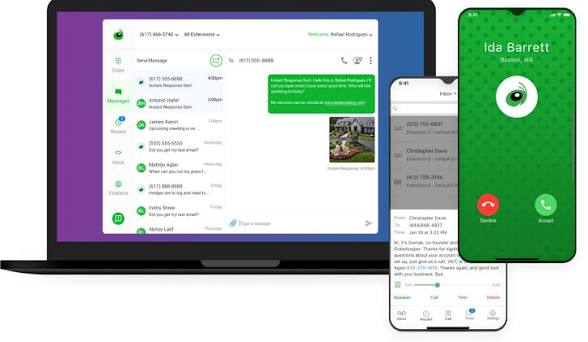
Grasshopper puts out mobile apps for iOS and Android, plus desktop apps for Windows and Mac. All four look pretty similar: a combined inbox for calls, texts, and voicemails, a dialer, a contacts screen, and a settings area for extensions, greetings, and call forwarding rules.
On the plus side, the app looks and behaves a lot like the stock phone app on your device, so the learning curve is basically nothing. You can make calls over WiFi or cellular data, text business contacts without burning your personal number, and read voicemail transcriptions right next to the actual audio. Virtual fax is thrown in too, which still matters for healthcare adjacent businesses, legal folks, and trade service clients who, for some reason, still fax things in 2026.
On the minus side, the app feels old. That word keeps coming up in reviews from 2025 and 2026. People mention the stale icon, the cluttered menu layout after the most recent update that merged calls, texts, and faxes into one single feed, and flat out reliability issues. Freezes during calls, dropped calls with no notification, push notifications that just silently fail, required updates that never actually install, these are all common threads in recent G2 and Capterra reviews. A surprising number of users also say caller ID does not show the saved contact name on incoming calls, which is a genuinely strange miss for a 2026 product.
What works in the app
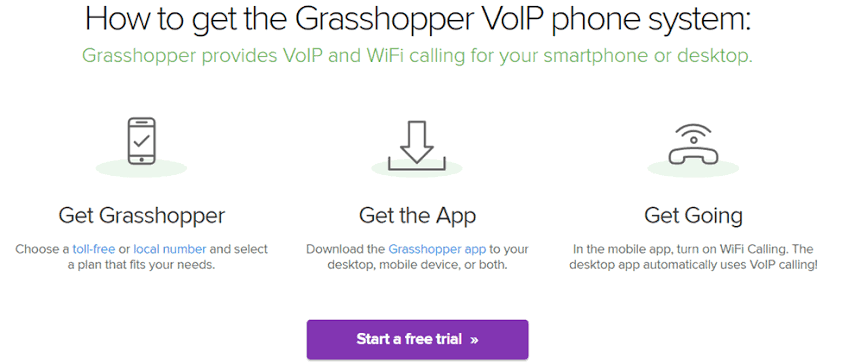
Clean dialer and texting interface that feels familiar from day one
Voicemail transcription delivered to the inbox and to email
WiFi calling fallback when your cell signal is rough
Inbound virtual fax included, no extra charge
Same greetings, routing, and extension controls on mobile and desktop
What frustrates users
Frequent app glitches, freezes, and unexplained crashes in recent reviews
App forgets login on infrequent use, triggering repeat password resets
No contact name display on incoming calls for a lot of users
Push notifications can be late or just silently fail
Recent update that merged calls, texts, and faxes into one feed called overwhelming by longtime users
Grasshopper Pricing in 2026
Grasshopper uses a per account pricing model instead of per user, which is its clearest selling point. You pay for the plan, for the phone numbers, and for the extensions, not for each person on your team. So a five person shop on the right plan can end up cheaper than a lot of per user competitors. That math still works in their favor.
There are three core plans. The prices below are the current 2026 rates straight from grasshopper.com.
|
Plan |
Annual Price |
Monthly Price |
Includes |
|---|---|---|---|
|
True Solo |
$14/month |
$18/month |
1 user, 1 number, 1 extension |
|
Solo Plus |
$25/month |
$32/month |
Unlimited users, 1 number, 3 extensions |
|
Small Business |
$55 to $80/month |
$70 to $92/month |
Unlimited users, 4 to 5 numbers, unlimited extensions |
On paper, that looks like a deal. In practice, the add on fees are where your bill starts climbing quietly in the background. You are looking at about $9 per month for each additional phone number, $3 per month for each extra extension on Solo Plus, another $9 per month for call blasting, a one time $75 for a professionally recorded greeting, a one time $19 registration plus around $1.50 per month in compliance fees to actually send business texts, and a pretty hefty $500 deposit if you need international calling. A few independent pricing breakdowns have flagged that a $25 Solo Plus account can realistically land anywhere from $60 to $100 per month once you tack on the common stuff.
Grasshopper also does not discount annual billing as aggressively as a lot of newer competitors do, and the most expensive plan still caps you at five phone numbers. If you run a small agency, a real estate team, or any kind of service business that wants its own line per department, you will hit that ceiling faster than you think.
Grasshopper Free Trial: Is It Actually Free?
Grasshopper offers a 7 day free trial. You get one phone number, up to three extensions, 50 minutes of voice calls, and 100 text messages during that week. And importantly, nothing is locked behind a paywall during the trial, so you actually get to try the thing you might pay for.
Two quick things to watch. First, if you want to send texts with your trial number, you still have to get through The Campaign Registry verification, which takes paperwork and, in a lot of cases, longer than the trial itself. A decent number of reviewers have said their trial ended before texting was even approved. Second, the trial does require a payment method, and cancellation is definitely not a one click web thing. You have to submit a reason online, get a case number, and then call in to close the account. Several reviewers have described that process as deliberately slow, and honestly, it is hard to disagree.
Our take: the free trial is real, but treat seven days like five, and put the cancellation deadline in your calendar on day one. Future you will thank present you.
Grasshopper Customer Service and Support
Grasshopper advertises 24/7/365 support across phone, email, and an online help center. The toll free support line is 1-800-820-8210 and the direct line is 1-805-617-7098. Billing and security questions route through [email protected] under the GoTo parent brand. Press or media inquiries go to [email protected].
Feedback on support is pretty much split down the middle, which is reflected in our score. On one hand, individual agents like Joselin Yadira, who was actually named in a recent Trustpilot review, get consistent praise for being patient and genuinely knowledgeable. When you get the right rep, your problem gets sorted quickly. On the other hand, the recurring complaints center on three specific things: you can not cancel through the website or the app, refund requests get denied even when a user was billed for a service already ported away, and SMS registration failures that support can not always unblock. PissedConsumer tracks a customer service rating of one out of five based on its own user panel, which is harsher than the wider G2 average but worth knowing about.
If you need fast help, phone support during US business hours is usually your best shot. The beta chatbot on the help center can handle password resets and basic setup questions, but anything account related pretty much always ends up on a phone call anyway.
Grasshopper User Experience in 2026
User experience is really where Grasshopper picks up the bulk of its mixed reviews. The good stuff is genuinely good. Setup takes a few minutes. You pick a number, choose a plan, install the app, and you are making calls. No equipment to buy, no PBX to configure, no IT specialist to hire. For a freelance consultant who just wants to stop putting their personal cell number on a public website, Grasshopper nails that one specific job for as little as $14 a month.
The bad stuff is where the rating starts dropping. The interface looks and feels like software from a decade ago. Grasshopper does not integrate with Zapier, Make, HubSpot, Salesforce, or any other modern CRM, which means no automatic call logging, no follow up text triggers, no contact sync. It is also not HIPAA compliant, so that rules it out for healthcare businesses right away. No video conferencing. No team messaging. Analytics are basic, just call counts, missed calls, and duration, and reports only go back 90 days. International calling needs that $500 deposit, and the service itself really only covers the US and Canada natively.
Call quality is also inconsistent enough that it keeps showing up in reviews. GoTo advertises 99.99 percent uptime, and fine, that might be technically true, but users keep reporting echoes, lag, and dropped calls that would not show up in an uptime chart anyway. Whether this actually hits you depends on your network, your call volume, and honestly some luck. Users with heavy volume or mission critical client communication tend to migrate within a year.
The overall impression is of a product that was excellent in 2015, decent in 2020, and just outdated in 2026. For the right micro business at the right price point, it still works. For pretty much anyone else, the value has slipped.
ICON POLLS Verdict: 2.2 / 5
We are rating Grasshopper Visual Phone System 2.2 out of 5 in 2026. The product does what it says on the tin for solo users on a tight budget, and it is genuinely easy to set up. That counts for something. But the growing list of issues, including the dated interface, missing integrations, no HIPAA, no video, the frequent app glitches, the hidden add on fees, the awkward cancellation flow, the inconsistent call quality, and the support experience that seems to rely heavily on which agent you reach, all of that pulls the overall score well below the industry average.
If you are a solopreneur, a side hustler, or a one person service provider who needs a professional number today and nothing more, Grasshopper can still be a fine pick. If you are a growing team, a healthcare provider, a business that needs CRM integration, or anyone planning to scale past five people, we would honestly push you to trial Quo, OpenPhone, Dialpad, Nextiva, or RingCentral before committing.
Pros and Cons Summary
Pros
Very low entry price of $14 per month on annual billing
Per account billing, not per user, so small teams can share a flat rate
Fast setup, no hardware, works on the phones you already own
Unlimited business calls and texts within the US and Canada
7 day free trial with every feature unlocked
Virtual fax included at every tier
24/7 support by phone
Cons
Dated interface that has barely moved since the GoTo acquisition in 2018
No integrations with Zapier, Make, or any major CRM
Not HIPAA compliant
No video conferencing and no team chat
Hidden add on fees that can double the advertised price
Cancellation is not possible online, requires a phone call
Recent app update criticized for merging calls, texts, and faxes into one confusing feed
Call quality complaints, including echoes, drops, and missed notifications
Service limited to US and Canada unless you pay that $500 international deposit
Frequently Asked Questions About Grasshopper in 2026
1. Is Grasshopper still worth it in 2026?
For a solopreneur or freelancer who just needs a professional business number and basic texting, yeah, Grasshopper is still a reasonable low cost option. For growing teams, healthcare, or anyone who needs CRM integration or video conferencing, it has pretty clearly fallen behind modern alternatives like Quo, OpenPhone, and Dialpad. That is the main reason our rating is sitting at 2.2 out of 5.
2. How do I log in to my Grasshopper account?
Head to my.grasshopper.com and enter the email and password you set during signup. The same credentials work for the iOS app, Android app, and the Windows and Mac desktop apps. If you get locked out, use the forgot password link, or call 1-800-820-8210 for account recovery.
3. How much does Grasshopper cost per month?
There are three plans. True Solo is $14 per month billed annually or $18 billed monthly. Solo Plus is $25 annually or $32 monthly. Small Business runs from $55 to $80 per month annually, or $70 to $92 monthly. Add ons like extra numbers at $9 per month, extra extensions at $3 per month, and call blasting at $9 per month can raise your real bill significantly.
4. Does Grasshopper have a free trial and is it really free?
Yes, Grasshopper offers a 7 day free trial that unlocks every feature. You get one number, up to three extensions, 50 voice minutes, and 100 texts. You do have to provide a payment method, and cancellation is done by phone, so set a calendar reminder before day seven if you decide not to continue.
5. How do I cancel my Grasshopper subscription?
You can not cancel on the website or in the app. You have to submit a cancellation reason online to generate a case number, then call 1-800-820-8210 to actually finalize it. A lot of users have reported hold times of five minutes or more, and most get pitched retention discounts before the account is actually closed. Plan for 15 to 30 minutes start to finish.
6. Is Grasshopper HIPAA compliant?
No. Grasshopper is not HIPAA compliant in 2026. Healthcare providers, therapists, and medical practices that need to handle protected health information over the phone should go with a provider that offers a signed Business Associate Agreement, like Nextiva, RingCentral, or Dialpad.
7. Does Grasshopper integrate with CRMs like HubSpot or Salesforce?
No, and this is a big one. Grasshopper does not offer native integrations with CRMs, and it does not connect with Zapier or Make for workarounds either. The only supported integration is call forwarding from Google Voice. Sales and service teams that depend on automatic call logging are going to find this really limiting.
8. What is the Grasshopper customer service number and are they responsive?
The toll free support number is 1-800-820-8210, and the direct line is 1-805-617-7098. Support is advertised as 24/7. Reviews are mixed. Some users report excellent agents who fix issues in one call, others report long holds, refund denials, and a painful cancellation experience. Phone support is generally faster than email or the chatbot for anything account related.
9. Can I use Grasshopper internationally?
Grasshopper natively supports calling and texting only within the US and Canada. International calling requires a $500 deposit and is not available on all plans. If you regularly call clients outside North America, Grasshopper is probably not your best fit. Competitors like Zoom Phone, Dialpad, or Quo handle international use a lot better.
10. What are the best Grasshopper alternatives in 2026?
The most frequently recommended alternatives right now are Quo (formerly OpenPhone) for modern design and built in automation, Nextiva for scaling up and enterprise features, Dialpad for AI powered calling, Zoom Phone for unified voice and video, RingCentral for full UCaaS, and Google Voice for the simplest near free option if you are already on Google Workspace. Each of these solves at least one of the main pain points reviewers flag about Grasshopper.