|
Google Pomelli at a Glance |
|
|---|---|
|
Product Name |
Google Pomelli |
|
Developer |
Google Labs in partnership with Google DeepMind |
|
Category |
AI marketing and content generation tool for small and medium businesses |
|
Launched |
28 October 2025 (public beta) |
|
Core Feature |
Business DNA, built automatically from your website URL |
|
Key Tools |
Campaign ideas, social assets, Animate (video), Photoshoot (product photography) |
|
AI Models |
Google language models, Veo 3.1 for video, Nano Banana 2 for images |
|
Pricing |
Free during the public beta period |
|
Language |
English |
|
Availability |
Expanded to 170+ countries in 2026 (started in the US, Canada, Australia and New Zealand) |
|
Website |
labs.google.com/pomelli |
|
ICON POLLS Rating |
3.9 out of 5 |
What Is Google Pomelli?
Pomelli is an AI marketing assistant built by Google Labs together with Google DeepMind. It launched as a public beta on 28 October 2025. The idea behind it is simple. You give it your website link, and it studies your pages and images to work out how your brand looks and sounds. Google calls this profile your Business DNA, and it covers your colours, fonts, tone of voice and general visual style.
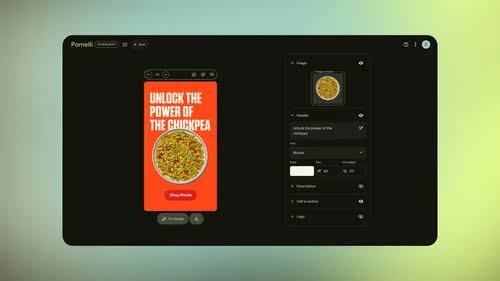
Once that profile exists, Pomelli suggests campaign ideas tied to your business and then builds ready to edit assets such as social posts, ad creatives and email banners. You can also type your own prompt if you have a specific goal in mind. The pitch is that a small team can produce on brand content in minutes instead of spending hours briefing a designer or starting from a blank canvas. In our testing the brand extraction worked best on sites that already had a clean, consistent look. Thin or messy websites produced weaker, more generic results.
Countries and Availability in 2026
When Pomelli first opened up, it was limited to four English speaking markets: the United States, Canada, Australia and New Zealand. That kept a lot of interested users locked out during the early months. Google moved fairly quickly on this. The tool arrived in India in late February 2026, and by March 2026 access had widened to more than 170 countries.
Two points are worth keeping in mind. First, the interface is still English only, so even where Pomelli is available, you work in English. Second, because this is a Labs experiment, availability can shift without much notice, and some regions may see features roll out later than others. If you are outside the original launch markets, it is worth signing in with your Google account and checking directly, since the country list has changed several times already.
Is Google Pomelli Free?
Yes, Pomelli is free to use during its public beta. There is no subscription, no card required and no paywall on the core campaign and asset generation tools as of mid 2026. The image and video features, including Photoshoot and Animate, are also free while the beta runs.
The honest caveat is that Google has not announced what happens after the beta. There is no confirmed pricing for a future paid tier, and the company has not committed to keeping everything free forever. Several reviewers expect some form of usage cap or paid plan eventually, but that is speculation rather than anything Google has stated. Our advice is straightforward. If Pomelli fits your workflow, take advantage of the free window now and keep your own copies of anything you create.
Pomelli Photoshoot
Photoshoot is the feature that pushed Pomelli back into the spotlight. Google added it on 19 February 2026, and it tackles a real pain point for online sellers, which is the cost of professional product photography. Instead of booking a studio, you upload a single photo of your product, even a rough one taken on a phone, and Pomelli generates polished, studio quality versions of it.
It runs on Google DeepMind's Nano Banana image model, with the newer Nano Banana 2 powering later results, and it offers a set of shot templates. The ones we saw included Studio, Floating, Ingredient and In Use, along with lifestyle scenes that place your product in a real setting such as a kitchen or an outdoor space. The In Use option can even generate a model holding or using the product. Everything pulls from your Business DNA, so the styling tends to match the rest of your brand.
In practice the output is impressive for the price, which is zero. Backgrounds, lighting and composition are handled automatically, and you can refine things with plain language edits like asking it to swap the background. It is not flawless. Fine product details can drift, and anyone wanting exact, true to life accuracy for things like jewellery or text on packaging should check each image carefully before publishing.
User Experience
The thing most users praise is speed. You can go from a website link to a stack of finished assets in a few minutes, and the three step flow of analyse, suggest and generate is easy to follow with no learning curve. For a solo founder or a small agency juggling several clients, that pace is the main draw.
The friction shows up in the details. The tone of voice that Pomelli pulls from a site sometimes needs manual correction. The template variety is thin next to a tool like Canva, so a lot of outputs can start to feel similar. There is no direct publishing, which means you download your assets and upload them to each platform yourself. And the tool builds one Business DNA per website, so businesses running multiple sub brands have to use workarounds such as separate landing pages.
A line from one reviewer captured the mood well: Pomelli is an excellent copilot, not an autopilot. It speeds up the production work, but the strategy, the judgement and the final quality check still sit with you. That is exactly how we found it during testing.
Google Pomelli Alternatives
Pomelli is strong at automated, on brand generation, but it is not the only option, and for some jobs it is not the best one. Here are the alternatives we think are worth a look in 2026:
Canva:
The most common comparison. Canva gives you a huge template library, precise drag and drop control and a built in scheduler for publishing. It is template first where Pomelli is automation first. Many teams simply use both.
Adobe Express:
A solid pick if you already live in the Adobe ecosystem and want tighter creative control with brand kits.
Jasper:
Better suited to long form and SEO writing. Some users pair Jasper for copy with Pomelli for visuals.
Typeface:
Aimed more at enterprise branding teams that need governance and scale across larger organisations.
If you need pixel perfect design control or scheduling, Canva or Adobe Express will serve you better. If you want finished, on brand assets generated for you with almost no effort, Pomelli is hard to beat at its current price.
ICON POLLS Verdict
Google Pomelli earns a 3.9 out of 5 from us. It is fast, genuinely free for now, and the Business DNA approach is a clever way to keep content on brand without a long setup. Photoshoot adds real value for product sellers who cannot afford studio shoots. The deductions come from the limited templates, the lack of direct publishing, the English only interface and the uncertainty around future pricing. Treat it as a powerful assistant that handles the heavy lifting while you keep control of the strategy, and you will get strong value out of it.
Frequently Asked Questions
1. Is Google Pomelli free to use in 2026?
Yes. Pomelli is free during its public beta, including the campaign tools, Animate and Photoshoot. Google has not confirmed any pricing for after the beta, so the free access may not last forever.
2. Which countries can use Google Pomelli?
It started in the United States, Canada, Australia and New Zealand. Through early 2026 it expanded, reaching India in late February and then more than 170 countries by March 2026. The interface is English only, and availability can still change.
3. What is the Photoshoot feature in Pomelli?
Photoshoot, launched on 19 February 2026, turns a single ordinary product photo into professional looking studio or lifestyle images. It uses Google's Nano Banana model and offers templates such as Studio, Floating, Ingredient and In Use.
4. Do I need design skills to use Pomelli?
No. The whole point of the tool is that it does the design work for you. You provide a website link, and it builds your brand profile and generates finished assets. You can refine results with plain language instructions rather than design software.
5. How does Pomelli compare to Canva?
Pomelli is automation first and generates complete on brand assets for you, while Canva is template first and gives you far more manual control plus a built in scheduler. Pomelli is free in beta, whereas Canva's paid plans carry an annual cost. Many people use both for different jobs.
6. Can Pomelli publish content directly to social media?
Not at the moment. Pomelli generates and lets you edit assets, but you download them and upload them to each platform yourself. There is no direct publishing or scheduling built in yet.
7. What is Business DNA in Pomelli?
Business DNA is the brand profile Pomelli creates by scanning your website. It captures your tone of voice, colours, fonts and visual style, then applies that profile to everything it generates so your content stays consistent.
8. Is the content from Pomelli safe to use commercially?
Pomelli is built for business marketing, so commercial use is the intended purpose. That said, it is still a beta experiment, so you should review the current terms of service and check generated images for accuracy before using them in paid campaigns.
9. Is Google Pomelli worth using in 2026?
For small and medium businesses that want quick, on brand content without a big budget, yes. It is fast, free for now and easy to use. Just treat it as a helpful assistant rather than a full replacement for human marketing judgement, which is why we rated it 3.9 out of 5.