|
Company |
Brinks Home Security |
|
Founded |
1908 |
|
Headquarters |
United States |
|
Service Type |
Home Security Monitoring |
|
Overall Rating |
3.1 out of 5 Stars |
Overview
You've probably seen Brinks around for ages. They've been in the security game since 1908, which is pretty wild when you think about it. That's over a century of protecting homes, and they clearly know what they're doing. We wanted to see how they stack up in 2026, so we put their service through its paces for ICON POLLS. After diving into everything from their login process to their mobile app and security packages, we've got a pretty clear picture of where they stand.
The short answer? They're solid. Not flashy, but dependable. In this review, we'll walk you through all the stuff that actually matters when you're picking a home security company. We're talking about how easy it is to log in, what kinds of packages they've got, whether their app is any good, and how the whole experience feels when you're actually using it day-to-day. We also threw together some FAQs at the end because those are the questions people keep asking us about Brinks.
Brinks Home Security Login
Logging in is about as straightforward as it gets. You head to their website or fire up the app, punch in your email and password, and boom, you're in. Forget your password? They've got you. Just click the reset link, check your email, and you're good to go. It's honestly one of the simpler parts of their whole system.
What we really liked is that they offer two-factor authentication. That's the extra security step where they send you a code to make sure it's actually you logging in. It's not groundbreaking stuff, but it matters. Keeps the bad guys out, which is kind of the whole point, right? Once you're logged in, the dashboard isn't cluttered or confusing. Everything's laid out pretty logically, so you can find what you need without hunting around.
Security Packages
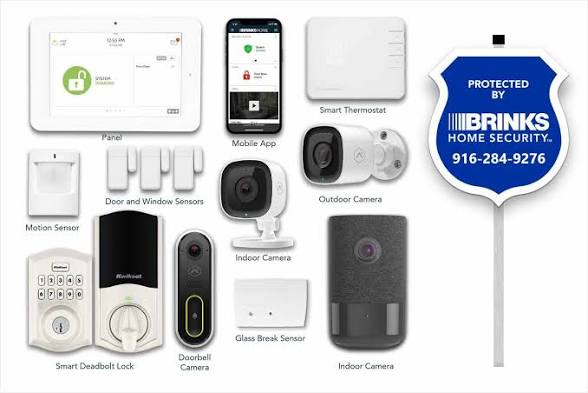
Here's where you get to build what you want. Brinks doesn't try to force you into some bloated package with a bunch of stuff you don't need. Their basic setup comes with door and window sensors plus professional monitoring. If you want to go bigger, you can add motion detectors, glass break sensors, and some smart home stuff. Pick what matters for your house.
The base package won't break the bank, but obviously if you start adding everything under the sun, your bill's going to climb. That's just how it works. The nice part is the flexibility. You're not locked into paying for features you'll never use. And the 24/7 professional monitoring is included no matter which package you pick, which is pretty important. Someone's always watching, even at 3 AM.
About the contracts: Brinks will let you do month-to-month if you want flexibility. Yeah, you'll pay a bit more than if you commit for a year or two, but at least you're not stuck if the service isn't working out. That's honestly pretty cool of them.
Mobile App
The Brinks app is on both iPhone and Android, so most people can use it. Open it up and you can arm or disarm your system, check which sensors are active, and see alerts when something happens. It's quick to load and doesn't make you feel like you need a degree in computer science to figure it out.
But here's the thing: it's functional, not fancy. It does what it needs to do, but it feels a little dated. Some of the newer security apps out there have way more polished interfaces and extra features that make the experience smoother. The notifications come through reliably, which matters when your system detects something weird. That part works great. When you make changes on your phone though, like disarming the system, sometimes there's a tiny lag before it updates. Nothing crazy, just something we noticed.
Security Number and Account Setup
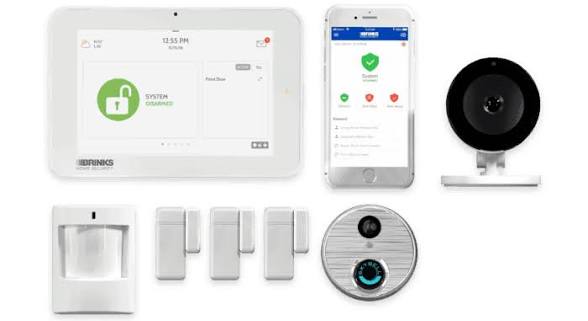
Your security number is basically your PIN code. It's what you punch in to arm and disarm everything. During setup, you get to pick your own, so make it something you remember but other people can't guess. If you've got family members using the system, you can set up separate codes for each person. That way you know who armed it and who didn't.
You can change your PIN anytime you want by hopping into your account. If you somehow draw a complete blank on what it was, customer service can reset it for you. They'll just verify it's actually you before they do it, which is the right way to handle security stuff.
User Experience
Taking everything together, using Brinks feels reliable. You set it up, it works, and you don't have to stress about whether it's doing its job. The technicians who install it are professional and actually take time to explain how everything works. Once you get the hang of it, arming and disarming the system becomes second nature.
If we're being totally honest, the whole platform could use some updating. The website looks like it hasn't had a major refresh in a few years. The app works fine, but it's not going to win any design awards. Customer support is pretty good. Most of the time they get back to you quickly, though if you call during crazy busy hours, you might wait a bit.
The thing is, this works in Brinks' favor if you're not super tech-savvy. There are no confusing bells and whistles. You just arm your system and go. Your grandparents could figure this out. If you're the type who wants to customize everything and integrate a million smart devices, you might feel like Brinks is holding you back a little.
Why We Gave This Rating
We landed on 3.1 out of 5 because Brinks does exactly what it says it will do. You get professional monitoring, your system works, and the company has been around long enough that they know how to handle this stuff. That counts for something. But here's the reality: they're not pushing the envelope. They're comfortable doing the same thing they've always done, and sometimes that's okay. Sometimes it's not what you're looking for.
The platform feels a bit behind the times compared to what some newer companies are doing. If you check out some of the flashier options out there, you'll see stuff Brinks doesn't offer yet. Smart home integration could be way better. The app could be slicker. For a company their size, you'd expect them to be more on the cutting edge. That's why they're not getting a higher score from us at ICON POLLS.
Frequently Asked Questions
1. Does Brinks offer professional installation for their systems?
Yep, they do. Brinks will send someone to your place to get everything set up. The tech will make sure all your sensors are positioned right, your panel's working, and that the whole system is actually talking to their monitoring center. Before they leave, they'll spend time walking you through how to use it. Depending on what package you pick, installation might be free or discounted, so double-check what's included with yours.
2. What happens if my internet goes down? Will Brinks still monitor my system?
This is actually a great question because a lot of people don't think about it. Brinks systems have cellular backup built in, which means if your internet takes a dive, your system switches over to cell service and keeps talking to the monitoring center. So you're still protected even when your Wi-Fi is out. Now, you won't be able to log into the app or make changes remotely without internet, but the monitoring itself keeps running. That's the important part.
3. Can I integrate Brinks with smart home devices like Alexa or Google Home?
They've got some integrations, but it's not as robust as what some other companies offer. You can connect to certain platforms, but you won't get the full ecosystem feel that you might want if you're really into the smart home scene. If controlling everything from Alexa or Google Assistant is super important to you, definitely look into what's actually available in your area before you commit. You might be disappointed.
4. How much does Brinks Home Security cost per month in 2026?
It varies a lot depending on what you're getting. The cheapest plans start around 30 bucks a month, but if you load up on all the sensors and features, you could be looking at 60 or even more. Then there's installation, which varies too. The real answer is: get a quote. Go to their website or call them up and tell them what you want. They'll give you actual numbers instead of you guessing.
5. What should I do if I forgot my Brinks password?
Go to the login page and look for the forgot password link. Click it, type in your email, and they'll send you a reset link. Once you click that link, you can make a new password. Pretty simple stuff. Just remember to check your spam folder if the email doesn't show up in your inbox. If you're still having trouble, hit up their customer support and they'll sort it out.
6. How do I contact Brinks customer support?
You can reach them by phone, email, or through their website. They've got 24/7 support for monitoring stuff, which is good if something weird happens at 2 AM. Phone is usually the fastest way to get someone if it's urgent. During regular business hours, response times are solid. If it's the middle of the night and you need to talk to someone right now, calling is your best bet.
7. Can I cancel my Brinks subscription anytime?
It depends on what you signed up for. If you're on a month-to-month plan, you can bail whenever you want, usually with 30 days notice. If you locked in for a year or longer, pulling out early might cost you some money. Make sure you know what your contract says before you sign anything. It's one of those things worth reading the fine print on.
8. Are there any discounts available for Brinks Home Security in 2026?
All the time. Brinks runs promotions for new customers pretty regularly. Sometimes they waive installation, sometimes they knock money off the equipment, and sometimes they give you the first couple months cheaper. Check their website or just ask when you call for a quote. You might also save some cash if you bundle services or sign up for a longer contract. It's always worth asking what deals they've got going.
Icon Polls Verdict
Look, Brinks gets the job done. They've been around forever, they know security inside and out, and they're not going anywhere. Your system will work, your monitoring will be there when you need it, and the whole thing isn't complicated. That matters. A lot of people just want something that works without drama, and Brinks delivers that.
The catch is that they're not pushing boundaries. If you're into technology and you want the latest features and the smoothest experience, Brinks might feel a little boring. Their app is functional but not beautiful. Their smart home integration is okay but not great. They're basically the reliable friend who's been around for decades versus the cool new person in town. Both have their place.
For families that want straightforward security without having to become a tech expert, Brinks is totally worth it. The pricing is fair, especially if you go with month-to-month. The monitoring is solid. The customer service actually helps. And there's something to be said about going with a company that's been doing this since before your great-grandparents were born.
Our advice? Get quotes from a few different companies and compare. See what fits your situation best. The 3.1 rating reflects our honest take: Brinks is good at what it does, but there are companies pushing further on innovation and design. If you want proven, steady, and no-nonsense, check Brinks out. If you want cutting-edge, keep shopping. Either way, you'll find something that works for you.




Comments (0)