
|
Field |
Details |
|---|---|
|
Product Name |
Claude Dispatch |
|
Developer |
Anthropic |
|
Parent Product |
Claude Cowork (Dispatch is a feature inside it) |
|
Launch Date |
March 17, 2026 (research preview) |
|
Category |
Mobile-to-desktop AI agent / remote task delegation |
|
Platforms |
macOS and Windows x64 (desktop), iOS and Android (mobile) |
|
Pricing Plans |
Pro: $20/month, Max: $100/month, Max Power: $200/month |
|
Subscription Required |
Yes, Pro or Max |
|
Key Feature |
Send tasks from phone, desktop executes them locally |
|
Connected Apps |
38+ connectors including Gmail, Slack, Notion, Drive, GitHub |
|
Setup Method |
QR code pairing between mobile and desktop apps |
|
Best For |
Pro users, founders, journalists, and remote operators |
|
ICON POLLS Rating |
3.5 out of 5 |
Claude Dispatch Review on Reddit
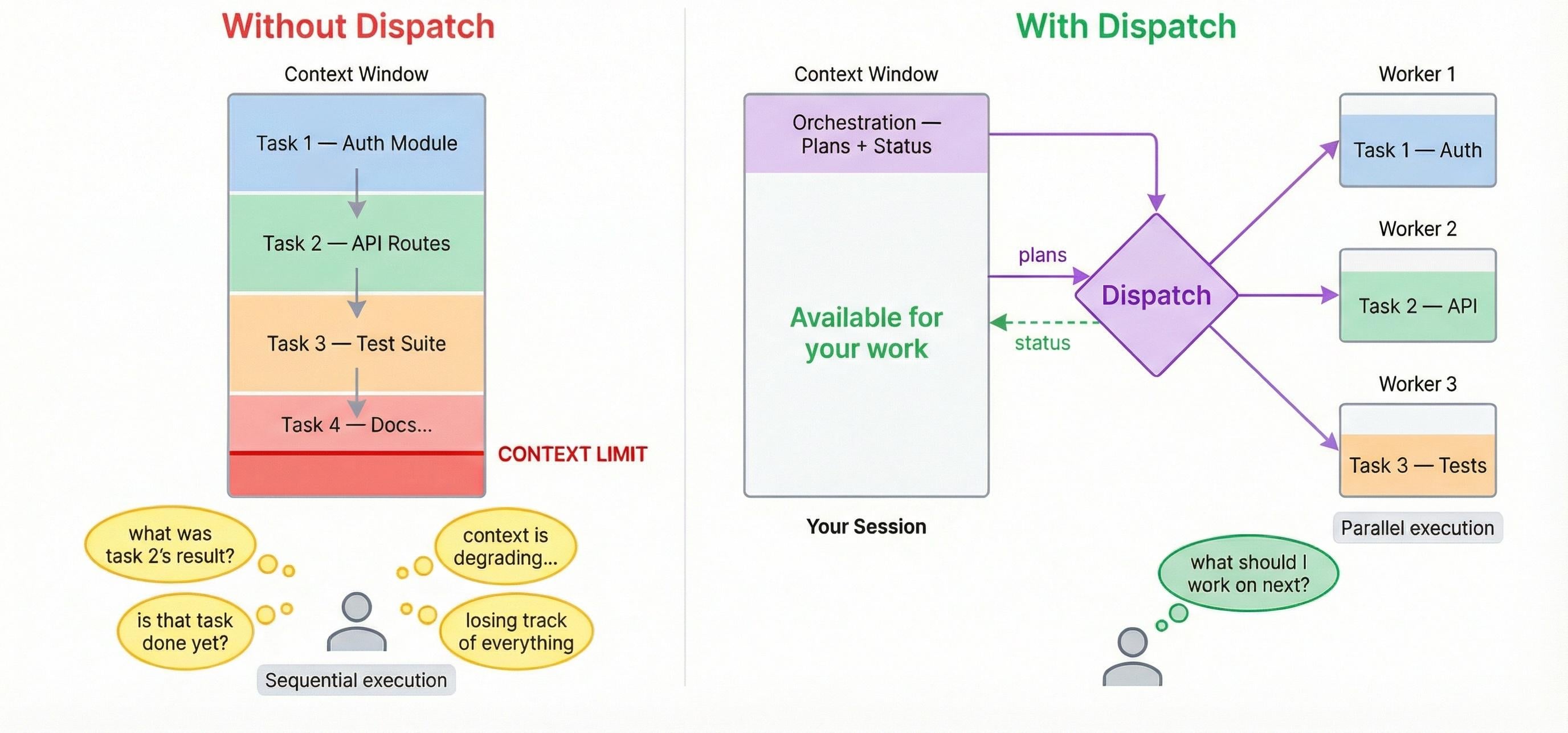
Reactions on Reddit have been mixed, and that is putting it kindly. In threads across r/ClaudeAI, r/singularity, and r/artificial, users seem to land in one of three camps. The first group is genuinely excited, sharing screenshots of morning briefings, file cleanups, and email summaries that ran while they were commuting. The second group is frustrated, mostly because the desktop has to stay awake for Dispatch to work, and many users found their Mac going to sleep mid task.
The third group is skeptical, comparing Dispatch to OpenClaw, the viral open source agent that hit hundreds of thousands of GitHub stars before Anthropic launched its own version. A common Reddit complaint is that Dispatch only supports a single device pairing at a time, which annoys people who work across multiple computers. Power users on Reddit also note that the 50 percent success rate on complex chained tasks is the elephant in the room. Simple jobs work well. Anything that touches three or four apps in sequence is hit or miss.
Claude Dispatch on Windows
This was a sticking point at launch. When Dispatch first shipped on March 17, 2026, it was macOS only, and Windows users were left out. That changed on April 3, 2026, when Anthropic brought Claude's desktop control feature to Windows for Pro and Max subscribers. The Windows expansion came just ten days after the macOS debut, which is one of the fastest platform rollouts the company has done for a preview feature.
Windows users now get Dispatch on both x64 and ARM64 builds of Claude Desktop. There is one small catch. On Windows, you need Git for Windows installed before the Code tab will work properly inside the desktop app, and you have to restart the app after installing it. Beyond that, the Windows experience is broadly similar to macOS, though early reviewers say computer use behaviors like clicking buttons and reading the screen are still slightly more polished on Mac. Linux users are out of luck for now, with Anthropic recommending the CLI instead.
Claude Dispatch Pricing
Dispatch does not have its own price tag. It is bundled into Claude's existing subscription tiers, and access depends on which plan you are on.
Claude Pro at $20 per month, which now includes Dispatch access after the initial rollout.
Claude Max at $100 per month, which is positioned as the sweet spot for daily, longer use of Cowork and Dispatch.
Claude Max Power at $200 per month, aimed at heavy users who hand off many tasks throughout the day.
Max subscribers got Dispatch first, on March 17, 2026. Pro subscribers got access in the days that followed. There is no free tier for Dispatch, which makes sense given that it runs persistent agent sessions and consumes usage limits faster than regular chat. If you already pay for Claude Pro or Max, Dispatch costs you nothing extra. If you do not, the $20 Pro plan is the entry point.
Claude Dispatch and Claude Code
Claude Code and Dispatch live inside the same Claude Desktop app but serve different purposes. Claude Code is the development environment, with its own tab for software work, while Dispatch sits inside the Cowork tab and handles broader agent tasks. Where things get interesting is the overlap. Developers can pair Claude Code Computer Use with Dispatch to run remote desktop automation from their phone.
In practice, this means you can be away from your machine and trigger a coding workflow, kick off a build, or run a script through Claude Code, all from the mobile app. There is one workflow note worth mentioning. In late March 2026, Claude Code's TypeScript source briefly became public through an npm packaging error, which raised some eyebrows in the developer community. Anthropic addressed it quickly, but it is a reminder that this whole ecosystem is moving fast.
Our Experience With Claude Dispatch
After testing Dispatch across a range of everyday tasks, here is the honest summary of what stood out to the ICON POLLS team.
What works well
Quick pulls. Finding a file, summarizing a thread, or pulling numbers from a spreadsheet works reliably.
Daily briefings. Asking Claude to check calendar, unread email, and Slack mentions before your first meeting is a use case that genuinely pays off.
Comparison tasks. Things like comparing three contract PDFs by price, scope, and renewal terms hold up surprisingly well.
Memory between sessions. Dispatch remembers context from earlier tasks, so you do not have to re explain your preferences each time.
What is frustrating
Your desktop has to stay awake. If your laptop sleeps or the app closes, Dispatch stops. Many users end up installing utilities like Amphetamine just to keep the Mac alive.
Complex chained tasks are about 50 percent reliable. Multi step jobs across several apps often stall partway through.
Single device pairing. You cannot easily hop between two computers without disconnecting and reconnecting.
Slow response times. Early adopters described Dispatch as currently slow, especially for tasks that involve opening apps or sending messages.
Across roughly a dozen test runs, we found Dispatch genuinely useful for the ordinary, annoying tasks that pile up during a busy day. The promise is real. The execution still feels like an early product, which is exactly what Anthropic told us it is.
ICON POLLS Verdict
Final Rating: 3.5 out of 5
Claude Dispatch earns a solid 3.5 from us. It is the most polished mobile to desktop agent we have tested this year, the setup is genuinely simple, and the connector ecosystem is impressive. But the desktop must be awake requirement, the inconsistent success rate on complex tasks, and the single device limitation keep it from earning a higher score. If you already pay for Claude Pro or Max, Dispatch is worth turning on today. If you are new to Claude entirely, give it a few more months to mature before basing a workflow on it.
Frequently Asked Questions About Claude Dispatch
1. What is Claude Dispatch and how does it work?
Claude Dispatch is a feature inside Claude Cowork that turns your phone into a remote control for your desktop AI assistant. You send tasks from the Claude mobile app, your desktop runs them locally using your files, connected apps, and browser, and you check back for the results. The two devices are linked through a QR code pairing process that takes about two minutes to set up.
2. Is Claude Dispatch free to use?
No. Dispatch requires either a Claude Pro plan at $20 per month or a Claude Max plan starting at $100 per month. There is no free tier. The good news is that if you already pay for Claude, Dispatch is included at no extra cost beyond your existing subscription.
3. Does Claude Dispatch work on Windows?
Yes. Anthropic added Windows support on April 3, 2026, just over two weeks after the macOS launch. It works on both Windows x64 and ARM64 versions of Claude Desktop. Linux is not currently supported on the desktop app, though Anthropic recommends the Claude CLI as a workaround.
4. Can Claude Dispatch run if my computer is off or asleep?
No. Your desktop must be on, awake, and running the Claude app for Dispatch to work. If your Mac or PC goes to sleep, the connection drops and your task stops. Many users enable a keep awake setting inside Dispatch or use third party utilities to prevent sleep during long tasks.
5. How is Claude Dispatch different from Claude Code?
Claude Code lives inside a separate tab in the Claude Desktop app and is built for software development tasks like reviewing diffs, running builds, and editing code. Dispatch sits inside the Cowork tab and handles broader agent work like file management, email triage, and cross app workflows. They can be used together. Developers often pair Claude Code Computer Use with Dispatch to trigger remote coding workflows from their phone.
6. Is Claude Dispatch safe to use with sensitive files?
Anthropic has been upfront that Dispatch carries real risks because it can trigger any action Cowork has permission to perform, including reading, moving, and editing local files. Prompt injection attacks have already been demonstrated against Cowork. The official guidance is to grant access only to the folders and connectors you are comfortable with Claude acting on autonomously, and to avoid running Dispatch on highly sensitive financial or business data without careful permission scoping.
7. What apps can Claude Dispatch connect to?
Cowork supports more than 38 connectors out of the box, including Gmail, Slack, Google Calendar, Google Drive, Notion, GitHub, Figma, Trello, Asana, and Dropbox. Beyond the built in connectors, Anthropic has launched a plugin system that bundles skills, connectors, and specialized sub agents into single installs, including plugins for brand voice, legal contract review, and finance workflows.
8. How does Claude Dispatch compare to OpenClaw?
OpenClaw is the open source, model agnostic agent that went viral in late 2025 and pushed the entire category forward. It runs locally on your machine, works through messaging apps like iMessage and Telegram, and lets you pick any LLM backend. Dispatch is the polished, managed alternative. You get official connectors, a clean security model, simple QR code pairing, and the support of Anthropic's infrastructure, but you give up the model flexibility and open source control. Most reviewers say the choice comes down to whether you want ease of use or full control.
9. Why does Claude Dispatch only support one paired device at a time?
As of the research preview, Dispatch only supports a single persistent conversation thread between one phone and one desktop. Users with multiple workstations have raised feature requests on GitHub asking for multi device support, and Anthropic has acknowledged the limitation. Multi thread support may come in future updates, but there is no announced timeline.t
10. Is Claude Dispatch worth it in 2026?
Our take at ICON POLLS is that Dispatch is worth turning on if you already pay for Claude Pro or Max, especially for daily briefings, file cleanups, and quick pulls from your inbox or calendar. It is not yet reliable enough to trust with complex multi app workflows, and the keep your computer awake requirement makes it less practical for laptop users on the move. Treat it as a useful assistant for the small annoying tasks, not as a replacement for a full automation stack.
Wut











