|
Attribute |
Details |
|---|---|
|
Product Name |
Codex Security |
|
Parent Company |
OpenAI |
|
Launch Date |
March 6, 2026 (Research Preview) |
|
Former Name |
Aardvark (Private Beta, October 2025) |
|
Category |
AI-Powered Application Security Agent (AppSec) |
|
Primary Function |
Code vulnerability scanning, validation and automated patching |
|
Access Channel |
Codex Web via ChatGPT |
|
Repository Support |
GitHub (currently) |
|
Eligible Plans |
ChatGPT Pro, Enterprise, Business, Edu |
|
Free Trial |
Yes, available during research preview phase |
|
Notable Stat |
Scanned 1.2 million commits, found 792 critical and 10,561 high-severity issues |
|
Open Source Support |
Codex for OSS program (free ChatGPT Pro for maintainers) |
|
Workflow Steps |
Identification, Validation, Remediation |
|
Status |
Research Preview as of May 2026 |
|
ICON POLLS Rating |
2.9 / 5 |
What Is Codex Security?
Codex Security is OpenAI's application security agent. It was launched on March 6, 2026 as a research preview after spending several months in private beta under the name Aardvark. The tool is designed to do something that has been a real pain point for engineering teams for years, which is finding actual security vulnerabilities in source code without burying developers in false positives.
Unlike traditional static analysis tools that rely on pattern matching and rulebooks, Codex Security uses OpenAI's frontier models to read your code the way a security researcher would. It builds a threat model of your repository, explores realistic attack paths, validates findings in an isolated sandbox, and then proposes patches that you can review and push as pull requests. The whole thing is meant to feel less like running a scanner and more like having a junior security engineer on your team.
Codex Security is available to ChatGPT Pro, Enterprise, Business and Edu customers through the Codex Web interface. There is no standalone subscription, which means you have to be on one of those plans to use it. During the preview period OpenAI also offered free access for the first month, and a Codex for OSS program gives open-source maintainers free ChatGPT Pro accounts along with Codex Security access.
Codex Security Plugin and Skill
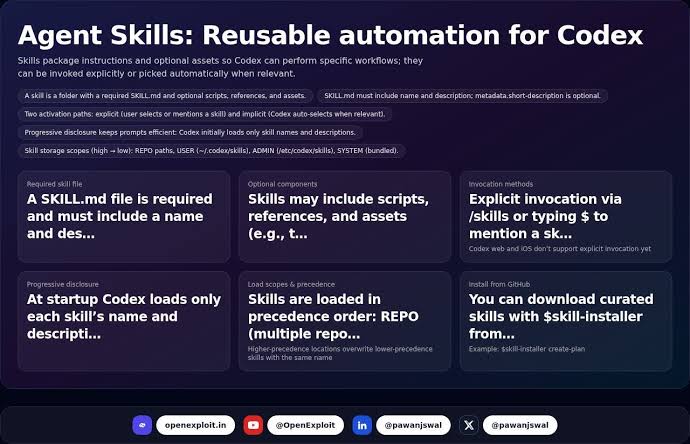
One of the things that got people talking when Codex Security launched was that it shows up inside the Codex app as a plugin that adds skills for scanning your codebase. In practice this means you do not have to install a separate piece of software or wire it into your CI pipeline to start using it. If you are already on a qualifying ChatGPT plan and you have connected your GitHub account to Codex, the security skills become available inside your existing workflow.
How the Plugin Works
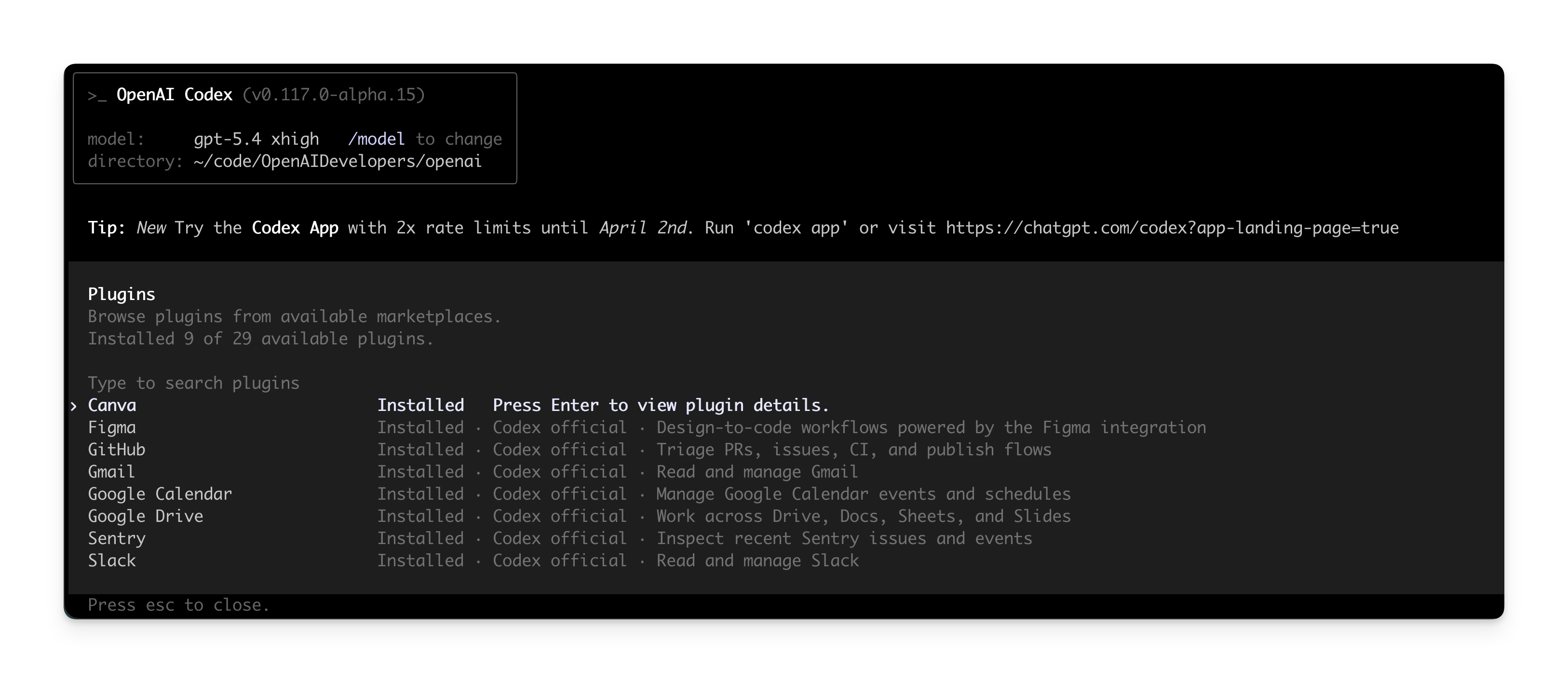
Once you enable Codex Security for a repository, the plugin activates a set of skills that let the agent read your code, write to a scratchpad, run tests in a sandbox, and propose patches. The plugin itself does not store your code outside the isolated environment, and the scans run commit by commit so that you can catch issues as they are introduced rather than waiting for a quarterly audit.
There is also a growing ecosystem of community-built plugins around Codex Security. The Codex Plugin Scanner, for example, is an open-source tool that scores Codex plugins from 0 to 100 based on manifest hygiene, MCP risk, workflow security, and release readiness. This is helpful because plugins are becoming a serious part of how teams extend Codex, and the ecosystem is still young enough that you cannot blindly trust every plugin you find in the marketplace.
The Three Core Skills
Identification: The agent analyzes the repository, builds a custom threat model, and explores realistic attack paths to find potential vulnerabilities.
Validation: Every potential finding is reproduced in an isolated sandbox to confirm whether it is actually exploitable before it is shown to you.
Remediation: For each validated issue, Codex Security generates a minimal patch that addresses the root cause and offers it as a pull request you can review.
Scan Performance and Coverage
OpenAI made a lot of noise about the numbers behind Codex Security. During the beta period it scanned more than 1.2 million commits across external repositories and identified 792 critical and 10,561 high-severity findings. The list of projects where it found issues includes some heavyweight names like OpenSSH, GnuTLS, GOGS, Thorium, libssh, PHP and Chromium. That is impressive on paper because these are projects that have been reviewed by humans many times over.
Independent reviewers ran their own tests and the picture is a bit more mixed. One review tested Codex Security across four production repositories totalling about 162,000 lines of code and reported 31 findings, of which 23 were confirmed real vulnerabilities. That works out to a true positive rate of around 74 percent, which is better than many traditional scanners but still means roughly one in four flagged issues is noise.
The other thing worth knowing is that Codex Security is repository centric. It is excellent at finding bugs that live entirely in source code, things like buffer overflows, use-after-free errors and authentication logic flaws. But it is, by design, not built to catch the kind of runtime issues that only show up when an application is actually running and interacting with real traffic. If your security strategy depends entirely on Codex Security you will miss entire categories of vulnerabilities that only DAST tools or live testing can find.
User Experience
Sitting down with Codex Security feels different from sitting down with a traditional scanner. The flow is conversational. You connect a repo, the agent goes off and builds its threat model, and then it surfaces findings with plain-language explanations of what is wrong, why it matters, and what the suggested fix is. For a lot of developers this is the most genuinely useful part of the product because it removes the wall of jargon that usually comes with security alerts.
One reviewer who tested it on a Slack bot repository described how Codex Security flagged a server-side request forgery risk in code that fetched arbitrary URLs. The agent explained the why behind the finding, proposed a fix, and made it easy to create a pull request from inside the interface. That kind of end-to-end flow is what most security tools have been promising for years and rarely delivered.
That said, the experience is not without rough edges. Codex Security only works with GitHub repositories at the moment, which leaves out anyone hosting on GitLab, Bitbucket or self-hosted Git servers. The agent can also be slow on larger repositories because it has to build that threat model from scratch, and the longer the repository history, the longer the initial setup. There is also no IDE integration yet, so if you want to catch issues before you commit you still need a separate tool.
Cost is another factor. There is no standalone Codex Security subscription, so you need to be on ChatGPT Pro at $200 per month, or one of the team plans starting around $25 per user per month for Business, or an Enterprise contract. That is reasonable for established teams but a real barrier for solo developers and tiny startups who would otherwise benefit most from automated security review.
Pros and Cons
What Codex Security Does Well
Context-aware threat modeling that catches complex vulnerabilities other agentic tools miss.
Sandbox validation reduces false positives compared to traditional static analysis.
Plain-language explanations make findings actually understandable for developers without a security background.
End-to-end workflow from detection to pull request keeps everything inside one tool.
Free access for open-source maintainers via the Codex for OSS program.
Real track record of finding bugs in heavily reviewed projects like OpenSSH and Chromium.
Where It Falls Short
Still in research preview, which means features and stability can change without much notice.
GitHub only, so anyone on GitLab, Bitbucket or self-hosted Git is locked out.
No IDE plugin, so you cannot catch issues before you commit.
Cannot find runtime vulnerabilities that only appear when the application is live.
Locked behind premium ChatGPT plans, with no standalone subscription option.
Reported true positive rate of around 74 percent is good but not a silver bullet.
Initial threat model build is slow on large repositories.
ICON POLLS Verdict: 2.9 / 5
So where does that leave us. After spending real time with Codex Security and reading what other reviewers and the official documentation say, our editorial team at ICON POLLS gives it a rating of 2.9 out of 5. That score reflects a tool that is genuinely impressive in some areas but still has too many limitations to be the all-in-one security solution that some of the launch coverage made it out to be.
The pieces we love: the threat modeling, the sandbox validation, the patch generation, and the way it integrates security work into a flow developers already use. These are the kind of features that make security feel less like a chore and more like part of building software.
The pieces that pull the rating down: the GitHub-only restriction, the lack of IDE integration, the research preview status, the price barrier for small teams, the inability to catch runtime issues, and a true positive rate that, while good, is not perfect enough to skip human review. Codex Security is a strong addition to a security toolkit, but it is not a replacement for one. Teams who treat it as a first line of defence and pair it with runtime testing and human review will get real value. Teams who treat it as their entire security strategy will get burned.
Our recommendation: if you are on a qualifying ChatGPT plan and you have a GitHub repository, it is worth trying during the free preview period to see how it behaves on your code. If you are not on one of those plans, the price of entry is steep enough that we would wait until OpenAI either ships a standalone tier or expands beyond research preview.
Codex Security FAQs (2026)
1. Is Codex Security free to use?
Codex Security is not free on its own. You need to be on a ChatGPT Pro, Enterprise, Business or Edu plan to access it. OpenAI offered free usage during the first month of the research preview, and open-source maintainers can apply for the Codex for OSS program which provides free ChatGPT Pro accounts including Codex Security access. Beyond that there is no standalone free tier.
2. What is the difference between Codex Security and Aardvark?
They are essentially the same product at different stages. Aardvark was the internal and private beta name OpenAI used from October 2025. When the tool moved to research preview in March 2026, OpenAI rebranded it as Codex Security and folded it into the broader Codex product line. The underlying agent and methodology are the same, but Codex Security is the polished, publicly available version.
3. Does Codex Security replace traditional security scanners?
No, and you should be careful with anyone who tells you it does. Codex Security is excellent at finding source code vulnerabilities through context-aware threat modeling, but it cannot replace dynamic application security testing, runtime monitoring, dependency scanners or penetration testing. Think of it as a powerful addition to your security stack, not a one-stop solution.
4. Which repositories does Codex Security support?
As of May 2026, Codex Security only works with GitHub repositories connected through the Codex Web interface. There is no support yet for GitLab, Bitbucket, Azure DevOps or self-hosted Git servers. OpenAI has not publicly committed to expanding repository support, so if you are not on GitHub you will have to wait or use a different tool.
5. How accurate is Codex Security in finding real vulnerabilities?
Independent testing has reported a true positive rate of around 74 percent, meaning roughly three out of every four findings are actual exploitable issues. That is significantly better than many traditional scanners but still means about one in four findings is a false positive. OpenAI has also reported a more than 50 percent drop in false positives over time as the system has been refined.
6. Can Codex Security automatically fix vulnerabilities?
Codex Security generates suggested patches for each validated vulnerability and presents them as pull requests, but it does not automatically push fixes to your production code. A developer or security engineer still needs to review the proposed patch, approve it, and merge it. This human-in-the-loop design is intentional and we think it is the right call for now.
7. Is my code safe when I use Codex Security?
Codex Security runs scans in isolated sandbox environments and OpenAI states that Business, Enterprise and Edu plans do not use your data for training. The product also integrates with the security and compliance stack of those plans, including SOC 2 Type 2 alignment, SSO, and audit logging. Still, you should review OpenAI's data handling and privacy documentation against your own internal compliance requirements before connecting any sensitive repository.
8. What kinds of vulnerabilities does Codex Security detect best?
Codex Security is at its best with source-code-resident vulnerabilities like buffer overflows, use-after-free errors, authentication logic flaws, server-side request forgery, broken authorization, and certain classes of injection bugs. It is less reliable for vulnerabilities that depend on runtime state, deployment configuration, infrastructure misconfigurations or third-party dependency chains. For those you still need other tools.
9. How does Codex Security compare to Snyk or Semgrep?
Independent benchmark testing has put Codex Security alongside Snyk and Semgrep on the same repositories. Codex Security tends to find a smaller number of higher-confidence findings with better explanations and proposed fixes. Snyk and Semgrep typically find a larger volume of issues but with more false positives. Many teams in 2026 are running them in parallel rather than choosing one, since their strengths complement each other.
10. Is Codex Security worth it for solo developers and small startups?
Honestly, probably not yet, unless you are already paying for ChatGPT Pro for other reasons. The $200 per month entry point for Pro is hard to justify if security is your only use case. If you maintain an open-source project, the Codex for OSS program is a much better fit. For everyone else, waiting for a more affordable standalone tier or pairing free open-source scanners with selective use of Codex Security on critical repositories is the more practical approach in 2026.











