Quick Verdict
Krisp built one of the most technically impressive pieces of audio software available to consumers, and for its core noise cancellation function it remains one of the genuinely best solutions on the market in 2026. Removing over 40 decibels of background noise in real time, processing entirely on-device so your audio never leaves your machine, working with every application that uses audio without needing per-platform plugins, and running at minimal CPU overhead is a real achievement. Named one of TIME's Best Inventions of 2020, it now processes over one billion minutes of voice audio monthly across more than 150 million devices. The 2026 version has grown considerably beyond that original noise cancellation identity to include a full AI meeting assistant with bot-free transcription, AI-generated summaries and action items, accent conversion, and CRM integration. For the right user, specifically someone who needs both cleaner audio and meeting notes without deploying a visible bot into their calls, this combination is difficult to replicate from a single tool. The rating sits at 3.0 because the limitations are equally real. The free plan's 60-minute-per-day noise cancellation cap cuts off mid-day for professionals who have back-to-back calls. Mobile devices get transcription but no noise cancellation. Bluetooth headsets underperform compared to wired USB connections. Long-term users report software bloat and rising CPU demands. The accent conversion feature, while useful, sounds slightly robotic to some listeners. The AI note-taking side joined a crowded field later than Otter or Fireflies and still shows it in some areas. For its core noise function, Krisp is genuinely excellent. For the broader meeting assistant ambitions, it is a work in progress at a price point that competes with more mature alternatives.
At a Glance: Icon Polls Ratings
Here is how Krisp scored across the areas we evaluated in our 2026 research:
|
Category |
Stars |
Score |
|
Noise Cancellation Quality |
★★★★★ |
5/5 |
|
Privacy and On-Device Processing |
★★★★★ |
5/5 |
|
AI Note Taker and Summaries |
★★★★☆ |
3.5/5 |
|
Free Plan Value |
★★★☆☆ |
2.5/5 |
|
Mobile Experience |
★★☆☆☆ |
2/5 |
|
Accent Conversion |
★★★☆☆ |
3/5 |
|
Pricing Value at Paid Tiers |
★★★☆☆ |
3/5 |
|
Overall |
★★★☆☆ |
3/5 |
What Is Krisp?
Krisp is a Voice AI platform founded in 2017, headquartered in San Francisco with significant operations in Yerevan, Armenia. The company was founded by Davit Baghdasaryan and Arto Minasyan with a focused mission: solve the background noise problem in voice communication using machine learning that runs entirely on the user's own device. That founding insight, that audio processing should happen locally rather than in the cloud, is still the product's most important architectural decision and one of its primary differentiators in 2026.
The company attracted early attention by being genuinely excellent at something that matters to a large and growing population of remote workers. The COVID-19 pandemic accelerated adoption dramatically, as millions of people working from home discovered that their environments were not quiet enough for professional video calls and that existing software solutions were inadequate. Krisp's technology worked where others struggled, and it spread through word of mouth among remote workers, customer support teams, and content creators who needed cleaner audio.
By 2026, Krisp operates across several distinct product lines. The AI Meeting Assistant is what most individual users interact with, combining noise cancellation with transcription, AI summaries, and meeting history. The Voice AI Platform is an enterprise-focused call center solution bundling real-time translation across over 80 languages, agent assist features, and automated post-call summaries. The Voice SDK allows developers to embed Krisp's noise cancellation technology directly into their own applications. And Accent AI converts speakers' English into regional accent-neutral versions for cleaner cross-cultural communication.
The product has been named one of TIME Magazine's Best Inventions of 2020 in the artificial intelligence category. It runs on over 150 million devices and has processed more than 4 trillion minutes of audio across its lifetime. In June 2025, Krisp launched a consolidated Voice AI Platform specifically for call centers, adding Latin American English accent packs and introducing VIVA, a new AI model designed to improve natural turn-taking in voice AI conversations.
Downloading and Installing Krisp
Krisp is available as a desktop application for macOS and Windows, as a mobile app for iOS and Android, and as a browser extension for Chrome. The download is free and no credit card is required to create an account or access the free tier. For most users, the primary installation is the desktop application, which is where the full feature set including real-time noise cancellation lives.
The installation process involves downloading the Krisp app from krisp.ai, running the installer, and setting up a virtual audio device on your computer. This virtual device is how Krisp works with every application on your machine: rather than integrating with each video conferencing tool individually, Krisp creates a virtual microphone and a virtual speaker. You select Krisp Microphone as your input and Krisp Speaker as your output in whatever app you are using, and Krisp processes the audio between the actual hardware and the application. This approach means it works with any software that uses audio, including Zoom, Google Meet, Microsoft Teams, Slack, Discord, Skype, WebEx, GoToMeeting, phone call apps, and literally anything else that accesses your microphone or speakers.
Windows users on versions below 3.0 have occasionally encountered failed updates, where the app gets stuck mid-installation. The new Krisp Downloader introduced in recent versions has addressed this for most users. If an update fails, the documented fix is to fully uninstall the application, reboot the computer, and install the latest version fresh from krisp.ai rather than trying to repair the existing installation.
The browser extension is available on the Chrome Web Store and provides noise cancellation for browser-based calls without requiring the full desktop installation. This is useful for users who primarily join meetings through a web browser rather than through a dedicated application, and for those working on managed machines where full application installation may be restricted. The extension is more limited than the desktop application, particularly for note-taking features.
Login and Account Setup
Creating a Krisp account starts at krisp.ai. You can sign up with an email address and password or through Google authentication, which is the faster option for most users. No credit card is required for the free tier. After creating an account, you download and install the desktop application, which links to your account automatically. The connection between the web account and the desktop app handles settings sync, meeting history storage, and subscription status.
The login process across desktop and mobile uses the same credentials. The mobile app and the desktop app share an account and meeting history, so transcripts and summaries generated during a desktop call are accessible from the mobile app afterward. The account dashboard at krisp.ai serves as the web-based control panel for subscription management, billing, meeting history, and workspace settings for team accounts.
For teams deploying Krisp across an organization, the Business and Advanced plans add workspace management features where an admin can manage user accounts, view team usage analytics, and configure shared settings. Single sign-on is available on these plans, allowing teams to authenticate through their existing identity provider rather than creating separate Krisp credentials. This matters for IT departments managing software access at scale and for organizations with security policies that restrict third-party account proliferation.
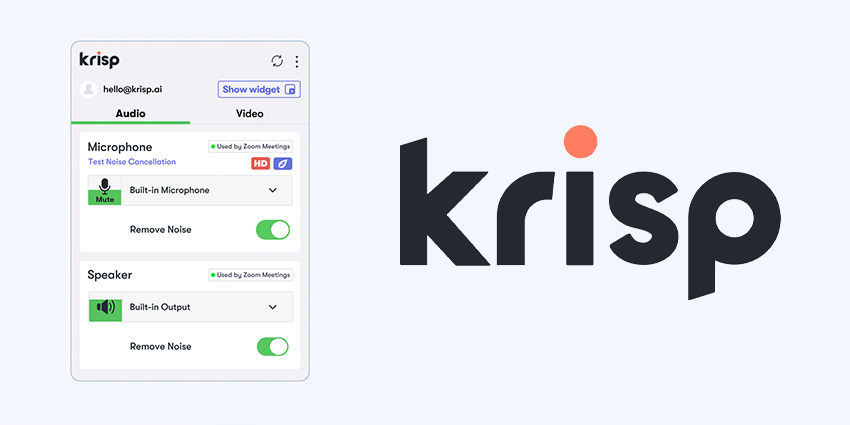
First-time users who are setting up Krisp for noise cancellation specifically should take a few minutes to configure the audio settings after installation. The automatic mode handles most situations well, but switching to the stronger noise cancellation mode makes a measurable difference in environments with loud or irregular noise sources. Testing in the Krisp dashboard before a real call, using the live preview that shows what callers on the other end will hear, is a useful step that prevents the common experience of turning on noise cancellation for the first time mid-call and being uncertain how it sounds to others.
Krisp's Core Feature: Noise Cancellation
The noise cancellation is what Krisp built its reputation on, and it is still the feature that most clearly separates the product from alternatives. The system removes over 40 decibels of background noise in real time from both the microphone and the speaker sides of a call. That means callers on the other end of your call hear you without your background noise, and you hear them without their background noise, simultaneously. Most noise cancellation tools only address one direction.
The processing happens entirely on your device using machine learning models trained on millions of audio samples to distinguish between human speech and background noise. Street noise, keyboard typing, barking dogs, HVAC systems, construction, crying children, coffee shop chatter: all of these are removed while speech remains clear. Nubia Magazine's independent review described testing Krisp against generator drone, noisy keyboard typing, and Lagos traffic coming through an open window, with callers consistently reporting surgically clean audio in all three conditions.
The local processing architecture is not just a privacy feature, though it is that too. It also means Krisp can function without a reliable internet connection for the noise cancellation component. The AI features including transcription and summaries do require an internet connection, but the core audio cleaning works offline. For users in areas with unreliable connectivity, or who work from networks where cloud processing would add latency, this is a meaningful practical advantage.
CPU usage for the noise cancellation runs at approximately 3 to 7 percent on modern hardware, which is low enough to be essentially invisible during normal work. On pre-2018 hardware, CPU demands are meaningfully higher and some users on older machines report the app becoming noticeably resource-intensive. Long-term users who have been with Krisp since its early versions also report increased resource usage as the application has grown to include more features, which is the software bloat concern mentioned in reviews from people who remember how lightweight the original version was.
Bluetooth and Wired Headset Performance
The one consistent hardware caveat that multiple independent reviews identify in 2026 is the difference in noise cancellation quality between wired USB headsets and Bluetooth or 3.5mm connections. Krisp performs at its best with wired USB audio devices, where it has clean digital access to the audio stream. Bluetooth and 3.5mm setups introduce compression artifacts and variable connection quality that reduce the effectiveness of the noise cancellation processing. This is not a failure of Krisp specifically. It is a consequence of how Bluetooth audio codecs work. But for users who primarily use wireless Bluetooth headsets, the real-world noise cancellation quality will be noticeably lower than what Krisp's marketing benchmarks demonstrate on wired hardware.
The AI Note Taker: Meeting Transcription and Summaries
Krisp's AI note-taking capability is the feature that transforms it from a noise filter into a full meeting productivity tool. The bot-free transcription approach is its most distinctive characteristic in this space: rather than joining your meeting as a visible participant bot, Krisp captures audio directly through your device and transcribes locally, without any bot appearing in the meeting interface. This matters for meeting dynamics, particularly in client-facing or executive calls where a visible bot attending the meeting changes the feel of the conversation.
Transcription supports 16 languages with speaker identification built in, meaning the transcript labels who said what throughout the meeting rather than generating an undifferentiated wall of text. After each meeting, Krisp generates an AI summary with action items automatically. An Ask Krisp interface allows you to query your meeting history conversationally, asking questions like what commitments were made in last Tuesday's client call or what feedback did the team give about the product roadmap in the past month.
The quality of the transcription is strong for standard business English in good audio conditions. Accuracy declines with heavy accents, technical jargon outside the model's training, multiple people speaking simultaneously, and poor input audio quality. For most professional meeting contexts, the transcription is accurate enough to be useful without requiring significant correction.
Where Krisp's note-taking shows its relative youth is in the depth of post-meeting workflow tools compared to dedicated meeting intelligence platforms. Tools like Otter.ai and Fireflies.ai have been building out their note-taking and meeting intelligence features for longer, and the difference in feature depth shows in things like custom note templates, more sophisticated meeting analytics, and deeper integration with project management tools. Krisp's summaries are good and the action items are useful, but the broader workflow around organizing, tagging, and acting on meeting insights is less mature than what the leading dedicated alternatives provide.
Accent Conversion: What It Does and What It Does Not
Accent AI is Krisp's feature for converting a speaker's English into a more accent-neutral version optimized for listeners in different regions. The use case is international business calls where a speaker's regional accent creates comprehension friction for listeners in other markets. A customer support representative whose first language is not English, or an international sales professional communicating with clients in multiple regions, can use Accent AI to reduce the friction that comes from accent differences.
The technology works in real time, changing how the speaker sounds to the listener without requiring any effort from either party. For call centers, the documented impact is substantial. TTEC, an enterprise client, reported a 54 percent reduction in language-barrier complaints after deploying Krisp's accent conversion across their support operations. This is a meaningful outcome that reflects a real business problem being solved at scale.
For individual professional users, the experience is more mixed. The accent conversion process involves AI reconstruction of speech, and in some listening conditions or at some settings this reconstruction introduces a quality that some listeners describe as slightly robotic or processed. CompareTiers's analysis notes that accent conversion on the free tier is limited to one hour per day, which means a 30-minute call with international participants consumes 50 percent of the daily allocation, creating upgrade pressure for anyone using it regularly. The June 2025 addition of Latin American English accent packs expanded the geographic coverage of the feature and is part of Krisp's push to serve call centers and support teams in Spanish-dominant markets.
Krisp's Free Plan: What You Get and Where It Stops
Krisp's free tier is a genuine free plan, not a time-limited trial. You can sign up and use it indefinitely without paying anything. What the free plan provides: 60 minutes per day of real-time noise cancellation, unlimited transcription of calls, unlimited audio recording, 2 AI-generated meeting notes per day, 7 days of meeting history, and access to the basic AI summaries and action items. This is more generous than some noise cancellation competitors offer at the free tier.
The limitation that most professionals hit immediately is the 60-minute daily noise cancellation cap. A professional who has two or three calls in a day, each lasting 30 to 60 minutes, exhausts the daily noise cancellation allowance before lunch. After the daily limit is reached, Krisp turns off noise cancellation for the rest of the day. Transcription and recording continue, but the audio cleaning that is the product's core value stops. This is the primary upgrade driver and for anyone using Krisp in a professional context with regular calls, it makes the free plan an evaluation tool rather than a working solution.
CompareTiers specifically flags the free tier's accent conversion limit of one hour per day as deceptive marketing, noting that a single 30-minute call with international participants uses 50 percent of the daily allocation, creating immediate pressure to upgrade for anyone who encounters it in a professional context. The 2 AI notes per day limit on the free tier is similarly tight for professionals who have more than two meetings daily, which is the majority of the target user base.
The 7-day meeting history window means notes and transcripts from meetings more than a week ago are no longer accessible on the free plan. For anyone building a searchable record of meeting history that they can query with Ask Krisp, this window is too short to be useful. The Pro plan at $8 per month on annual billing extends this significantly and unlocks unlimited noise cancellation, which are the two most practically significant upgrades for professional users.
Krisp Pricing: Free, Core, Advanced, and Business
Krisp's pricing in 2026 follows a freemium structure with three paid tiers for individual and team users. Annual billing saves significantly compared to monthly rates:
|
Plan |
Price |
Key Features |
|
Free |
$0/month |
60 min/day noise cancellation. Unlimited transcription and recording. 2 AI meeting notes per day. 7-day meeting history. Free tier permanently, no credit card needed. |
|
Core |
$8/month (annual), $16/month (monthly) |
Unlimited noise cancellation. Unlimited AI notes and summaries. 5 GB storage. 30-day meeting history. Mobile app access. Integrations with Slack and basic CRM. No credit card needed for 7-day trial. |
|
Advanced |
$15/month (annual), $30/month (monthly) |
Everything in Core plus Accent Conversion (4 hrs/day speaker, unlimited listener). Salesforce and ConnectWise integrations. Manager view. 30 GB storage. Designed for sales teams with CRM workflows. |
|
Business |
Custom / team pricing |
Everything in Advanced plus team administration, SSO, shared workspaces, premium support, advanced security. Enterprise pricing available on request. |
Annual billing saves approximately 50% versus monthly rates. A 7-day free trial with all features is available, no credit card required. Call center and Voice SDK pricing is separate from the plans listed above. Prices verified May 2026 from krisp.ai and multiple independent pricing databases.
Is the Pricing Competitive?
At $8 per month annually for the Core plan, Krisp provides a combination of noise cancellation and meeting notes that would require purchasing separate tools to replicate. A dedicated hardware noise cancellation device costs considerably more upfront. Dedicated meeting note-taking services like Otter.ai Pro start at $16.99 per month. For users who need both noise cancellation and AI meeting notes, the Core plan represents genuine value consolidation.
The Advanced plan at $15 per month annually is specifically positioned for sales teams who need the Salesforce integration and accent conversion. The CompareTiers analysis notes that for a five-person sales team paying $15 per seat, the total of $75 per month is expensive relative to standalone CRM tools. The pricing makes sense if the team is already paying for both a noise cancellation solution and a meeting notes tool, but it requires active use of both feature categories to justify the cost.
Krisp as a Meeting Assistant in Context
The broader meeting assistant landscape in 2026 is crowded. Otter.ai, Fireflies.ai, Fathom, Gong, and Chorus all compete for the meeting notes and conversation intelligence space. Each has different strengths. Krisp's differentiation is the combination of audio quality and notes from a single local-processing application without a meeting bot.
For sales professionals in particular, the absence of a bot is genuinely significant. When a visible bot joins a client meeting, it changes the dynamic. Some clients ask about it, some feel surveilled, and in some enterprise contexts bots are blocked by IT policy. Krisp's approach of capturing audio locally through the host's device sidesteps this entirely. The meeting is recorded and transcribed without any participant being aware of a separate software entity joining their call.
The trade-off is that Krisp's transcription only captures audio from the host's device rather than having a dedicated bot in the call that can see the full participant list, screen shares, and chat. For some meeting intelligence use cases, the bot's access to the full meeting context produces richer data. For users where the bot's presence is the barrier, Krisp's approach is the better fit.
The Ask Krisp chat interface for querying meeting history represents one of the more practically useful post-meeting features. Being able to ask what was agreed in the sales call on Tuesday and receive a specific answer from the transcript is the kind of meeting intelligence that saves real time. The depth of this feature is still developing relative to dedicated platforms, but for users who primarily need to retrieve specific commitments and action items, it functions well.
The User Experience: Practical Realities
The day-to-day experience of using Krisp in 2026 divides clearly between the audio quality experience, which is consistently excellent, and the broader meeting assistant experience, which is more variable.
During a call, Krisp sits quietly in the system tray with a small dashboard showing how much noise has been removed, talk time, and quick toggles for noise cancellation and the meeting assistant. This minimal footprint is deliberately designed: the app should not add cognitive overhead during a call. The real-time display of noise removed gives users a concrete sense of what is being filtered, which is both useful and somewhat satisfying for anyone who has spent years apologizing for their noisy environment on calls.
After a call ends, the meeting summary and action items are generated and available in the app and in the web dashboard within a few minutes. For a 60-minute meeting, the summary is typically three to five bullet points capturing the main discussion topics, plus a list of action items with owners where ownership was explicitly stated during the conversation. This is fast and useful for anyone who needs to send a follow-up email immediately after a meeting or update a CRM record. The quality of summaries for structured business meetings is good. For more casual or exploratory conversations, the summary can feel generic.
The mobile experience is a genuine limitation. On iOS and Android, Krisp provides transcription for recorded calls but does not offer real-time noise cancellation. This means users who primarily take calls from their phones, or who move between desktop and mobile environments, get an inconsistent experience. Noise cancellation only works on the desktop, which restricts the product's usefulness for workers who are not always at a computer. The mobile app is essentially a companion for reviewing meeting history and notes rather than a full-featured version of the desktop tool.
Pros and Cons
What Krisp Gets Right
Best-in-class noise cancellation that removes over 40 decibels of background noise from both microphone and speaker sides simultaneously, with measurably clean results verified across independent reviews
On-device processing means audio never leaves your device during noise cancellation, providing a strong privacy guarantee that cloud-based noise suppression tools cannot match
Works as a virtual audio device with every application that uses audio, requiring no per-platform plugins or integrations, and covering apps that dedicated meeting tools do not support
Bot-free transcription and note-taking that captures meetings without placing a visible participant bot in the call, preserving meeting dynamics in client and executive contexts
Runs on over 150 million devices with more than 4 trillion minutes of audio processed, reflecting mature, battle-tested infrastructure rather than experimental technology
The AI note taker generates summaries and action items automatically within minutes of a meeting ending, and the Ask Krisp interface lets users query historical meeting content conversationally
Transcription in 16 languages with speaker identification covers the multilingual professional contexts where many remote workers operate
Core plan at $8 per month annually consolidates noise cancellation and meeting notes into a single tool at a price that is competitive with either function purchased separately
June 2025 call center platform launch and VIVA model represent continued active development rather than a product in maintenance mode
Where Krisp Has Real Limitations
The free plan's 60-minute daily noise cancellation limit runs out quickly for professionals with regular back-to-back calls, making it an evaluation tool rather than a working solution without upgrading
Mobile apps on iOS and Android provide transcription but no real-time noise cancellation, creating an inconsistent experience for users who move between desktop and mobile calling environments
Bluetooth and 3.5mm headset connections underperform compared to wired USB devices, with audio compression artifacts reducing the effectiveness of noise cancellation on wireless hardware
The AI note-taking joined a crowded and more mature market later than Otter.ai and Fireflies.ai, and the post-meeting workflow depth and meeting analytics breadth still lag behind dedicated alternatives
Long-term users report software bloat and increased CPU demands as the application has grown from a focused noise cancellation tool into a full feature suite
Accent conversion sounds slightly robotic to some listeners in real-world conditions, and the free tier's one-hour-per-day limit is quickly exhausted in any professional context with regular international calls
AI features including transcription and summaries require an internet connection even when the local noise cancellation does not, creating partial functionality in low-connectivity environments
Enterprise pricing is not publicly listed, creating procurement friction for large organizations that cannot budget without a sales conversation
Frequently Asked Questions About Krisp (2026)
1. What does Krisp do and who is it for?
Krisp is a Voice AI application that does two main things: it removes background noise from your calls in real time, and it records, transcribes, and summarizes meetings automatically without requiring a bot to join the call. The noise cancellation removes over 40 decibels of background noise from both your microphone and the audio you receive from others, covering street noise, keyboard sounds, dogs, children, HVAC systems, and virtually any other background sound. The meeting assistant captures the audio of your calls, generates a written transcript with speaker labels, and produces an AI summary with action items after each meeting. It also includes accent conversion for speakers whose regional accent creates comprehension friction with international listeners. Krisp runs on Mac and Windows for the full feature set, with iOS and Android for reviewing meeting notes on mobile. It is used by remote workers, customer support teams, sales professionals, consultants, educators, and content creators. The enterprise version serves call centers with additional features for agent assistance and real-time translation.
2. How do I download Krisp?
Download Krisp from krisp.ai for free. Select the version for your operating system, either macOS or Windows, and run the installer. No credit card is required and the free tier is available immediately after creating an account. The installation sets up a virtual audio device on your computer, which is how Krisp works with every application that uses audio. After installation, open Krisp and test the noise cancellation using the live preview in the dashboard, which lets you hear what callers will hear before you join an actual call. The Chrome browser extension is also available on the Chrome Web Store for browser-based calls without the full application install. For mobile, the iOS app is on the Apple App Store and Android on Google Play, but these provide transcription review rather than real-time noise cancellation. If you experience a failed update on Windows, the recommended fix is to fully uninstall, reboot, and install the latest version fresh from krisp.ai.
3. Is Krisp free to use?
Yes. Krisp has a permanent free tier that does not require a credit card. The free plan provides 60 minutes per day of noise cancellation, unlimited transcription of calls, unlimited audio recording, 2 AI meeting notes per day, and 7 days of meeting history. The free tier is useful for light use and for evaluating whether the product fits your workflow. The limitation that most professionals hit is the 60-minute daily noise cancellation cap. Back-to-back calls in a professional schedule will exhaust this before the end of the morning. Transcription continues after the noise cancellation limit is reached, but the audio cleaning stops. The Core plan at $8 per month on annual billing removes the daily cap and is the appropriate starting point for anyone using Krisp regularly for professional calls. A 7-day free trial of the paid features is available with no credit card required.
4. How do I log in to Krisp?
Log in to Krisp at krisp.ai or through the desktop application using your registered email address and password, or through Google authentication if you used that option during signup. The desktop app, mobile apps, and web dashboard all use the same account credentials. If you forget your password, the Forgot Password link sends a reset email to your registered address. For team accounts using the Business plan with SSO configured, team members log in through their organization's identity provider rather than directly through Krisp credentials. First-time setup after logging in involves selecting Krisp Microphone as the input device and Krisp Speaker as the output device in whichever meeting app you use. This needs to be done once per application. After that, Krisp runs automatically in the background and you can toggle noise cancellation and the meeting assistant on and off from the system tray icon or the dashboard.
5. How does Krisp's noise cancellation actually work?
Krisp installs as a virtual audio device on your computer, sitting between your physical microphone and any application that uses audio. When you speak, your voice goes through Krisp before it reaches Zoom, Google Meet, or any other app. Krisp's machine learning model, trained on millions of audio samples, identifies the difference between your voice and background noise in real time and strips out the noise before passing the cleaned audio to the application. The same process works on the incoming audio from other participants, so you hear their audio cleaned of their background noise as well. The processing happens entirely on your device, with no audio sent to Krisp's servers during this stage. The model runs in 3 to 7 percent of CPU on modern hardware, which is low enough that most users do not notice the processing overhead. The system works with any application that accepts audio input, including every major video conferencing platform, VoIP services, recording software, and streaming tools.
6. What is the Krisp AI note taker and how does it work?
Krisp's AI note taker records and transcribes your meetings automatically without deploying a bot account into your call. While a conventional meeting note-taking service joins your Zoom or Teams meeting as a visible participant, Krisp captures audio through your device directly, so no other meeting participants see a recording bot. After the meeting ends, Krisp generates a transcript with speaker labels identifying who said what, followed by an AI-generated summary with action items. The summary is available in the Krisp dashboard and can be shared directly or exported. Ask Krisp, a conversational AI interface, allows you to query your meeting history in plain language. You can ask what was agreed in the last client meeting, what action items are outstanding from this week, or what feedback the team gave about a specific topic, and Krisp retrieves the relevant information from your meeting transcripts. Transcription is available in 16 languages with automatic language detection. On the free plan, 2 AI notes per day are included. Unlimited notes are available on paid plans.
7. Does Krisp work on mobile phones?
Krisp has iOS and Android apps available from the Apple App Store and Google Play respectively. The important limitation to understand is that the mobile apps do not provide real-time noise cancellation during calls. Noise cancellation is a desktop-only feature in 2026. On mobile, Krisp provides transcription of recorded calls and access to your meeting notes and history from desktop sessions. This creates an inconsistent experience for users who switch between desktop and mobile calling environments. If you take a client call from your phone while commuting, Krisp will not clean the background noise from that call. If you join the same call from your laptop, the noise cancellation applies. For professionals who primarily use their phones for calls, this mobile limitation means Krisp addresses only part of their communication environment. The mobile apps are most useful as a companion for reviewing notes from desktop meetings rather than as a standalone mobile calling enhancement.
8. Is Krisp safe and private?
Krisp is designed with privacy as a stated core architecture principle, and the on-device processing is its strongest privacy claim. For the noise cancellation function, no audio leaves your device. The machine learning model runs locally, and Krisp does not have access to the content of your calls during the cleaning process. This is a meaningful privacy advantage over cloud-based audio processing services where your voice travels to external servers. The AI features including transcription and summaries are processed with internet connectivity and do involve your audio being handled through Krisp's infrastructure. For users who handle sensitive conversations where even transcription creates a data exposure concern, this is a relevant consideration. Krisp describes its security posture as enterprise-grade with SOC 2 compliance on Business plans. For most professional use cases, the privacy architecture is appropriate and the on-device noise cancellation removes the most sensitive audio processing from external exposure. Using the application without transcription enabled keeps all audio on-device if maximum privacy is required.
9. What are the best alternatives to Krisp?
The best alternative to Krisp depends on which aspect of the product you most need. For pure noise cancellation without meeting note features, NVIDIA RTX Voice (free for NVIDIA GPU owners) and Cleanfeed are frequently mentioned. Apple's built-in voice isolation in macOS and iOS handles light noise reduction for free. For meeting notes and transcription without the noise cancellation focus, Otter.ai and Fireflies.ai have more mature note-taking workflows, deeper integrations with project management tools, and more sophisticated meeting analytics. Fathom offers a strong free tier for meeting notes with an excellent user experience for individual professionals. If noise cancellation is the primary need and you have a compatible NVIDIA GPU, RTX Voice is free and performs well. If meeting notes are the primary need and noise is not a significant issue in your environment, Otter, Fireflies, or Fathom provide more developed meeting intelligence at comparable price points. Krisp's differentiation is the combination of both functions in a single on-device privacy-first application, which justifies its position when both needs are active.
10. Is Krisp worth paying for in 2026?
Krisp Pro, now called Core, at $8 per month on annual billing is worth paying for if you regularly take professional calls in environments with meaningful background noise and want automatic meeting notes without a visible bot. The Core plan's value case rests on consolidating two tools: noise cancellation software and a meeting note-taking service. Purchasing either function from a dedicated alternative would cost comparable or more. If you only need noise cancellation and do not care about meeting notes, the $8 monthly price needs to be weighed against the NVIDIA RTX Voice alternative if you have compatible hardware. If you only need meeting notes and your environment is quiet enough that noise cancellation is not a meaningful need, Fathom's generous free tier or Otter.ai's comparable pricing may serve you better with more mature note-taking features. The sweet spot for Krisp Core is the professional who has both an audio environment problem and a meeting documentation problem and wants to solve both with one tool that keeps audio processing private. For that specific user profile, the $8 monthly price is a genuine value.
Icon polls Verdict
Krisp earns a 3.0 out of 5 from Icon Polls in 2026. The rating reflects a product with one genuinely outstanding component and a broader suite that is still catching up to what it is promising.
The noise cancellation is a 5.0 product. It is the best available from a software application, it runs locally for maximum privacy, it works on both sides of the call, it operates with every audio application without configuration, and it has been battle-tested at a scale of 4 trillion minutes of processed audio. There is nothing to criticize about the core noise function in 2026.
The 3.0 reflects the full picture. The free tier's 60-minute cap makes it impractical as a daily working tool. The mobile apps provide no real-time noise cancellation, which leaves a significant gap for professionals who are not always at a desk. The Bluetooth headset quality drop is real and affects a large proportion of wireless headset users. The AI note-taking is good but entered a mature market later than its competitors and still shows that in the depth of post-meeting workflow tools. The software has grown heavier over time, and users who want a lightweight noise filter are getting a full platform whether they need it or not.
For users whose environment genuinely creates audio problems on calls, Krisp Core at $8 per month is defensible value. For professionals who want the combination of noise cleaning and bot-free meeting notes in a single privacy-respecting application, the combination is genuinely difficult to replicate elsewhere at the same price. For everyone else, evaluating the free tier first and testing whether the daily noise cancellation limit is a dealbreaker before committing to a subscription is the straightforward advice.











