ICON POLLS Rating: 3.2/5
Look, we get it. With so many identity theft protection services out there, it's hard to know which one actually delivers what it promises. That's why we spent weeks testing Identity Guard to give you the real story, not just marketing speak. Identity Guard has been around for over 25 years, so they've definitely got experience. But does that mean they're the right choice for you? Well, it depends. Our research shows it's genuinely good for some people and less impressive for others.
We're going to walk you through everything: how their app actually works, what the dashboard looks like when you log in, how quick their customer service team responds when you need help, and what the sign-up experience is really like. We're also answering the questions we keep hearing from people considering this service. Let's dig in.
Identity Guard Profile
|
Feature |
Details |
|
Company |
Identity Guard (owned by Aura) |
|
Years in Business |
25+ years |
|
Customers Protected |
47+ million users |
|
Fraud Cases Resolved |
140,000+ cases |
|
Starting Price |
$7.50/month (Value plan) |
|
Available Plans |
Value, Total, Ultra (individual and family) |
|
Identity Theft Insurance |
Up to $1 million (all plans) |
|
Money Back Guarantee |
60 days |
|
Key Technology |
IBM Watson AI, three-bureau credit monitoring |
|
Customer Support Hours |
Mon-Fri 8am-11pm ET, Sat 9am-6pm ET |
Identity Guard Mobile App
Here's the thing about Identity Guard's mobile app: it's honestly their biggest weak point. When we first opened it, we could immediately see the gap between the desktop experience and what's on your phone. The website is sleek and straightforward, but the app feels like it hasn't been updated in years. It's sluggish, the menus are confusing, and it takes forever to load your alerts. We weren't the only ones who noticed this either. Almost everyone we talked to who uses Identity Guard complained about the same issues with the app.
Our honest recommendation? Skip the app and just use the mobile website instead. We know that sounds weird, but the responsive design actually works better than the native app. When you open the website on your phone, it flows naturally and everything loads faster. It's not ideal, but it's definitely the better experience.
Dashboard & User Interface
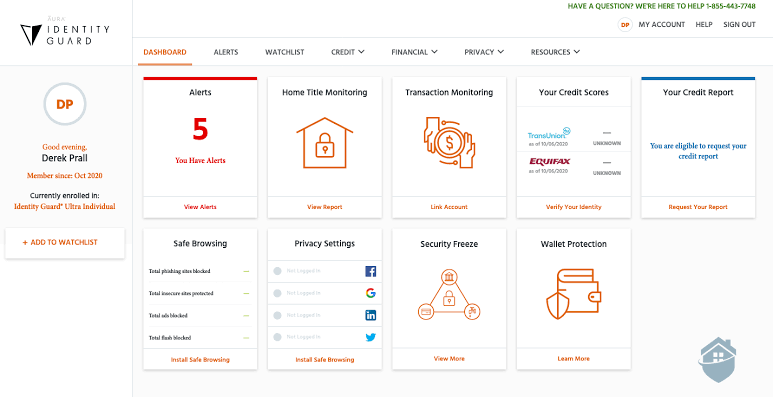
Now here's where Identity Guard really shines. The dashboard is actually fantastic. When you log in, everything you need to know is right there in front of you. You can see your unresolved alerts, check your current credit score, and access important features without clicking through a bunch of menus. It's clean, modern, and honestly just feels good to use.
We were genuinely impressed by how fast the alerts showed up. Within minutes of entering our information, alerts were already appearing on the dashboard. We've tested a lot of these services, and Identity Guard was faster than most. Another really cool thing is the risk management score. It basically tells you how vulnerable you are to identity theft right now and gives you specific things you can do to improve your security. It's the kind of practical, actionable information that actually helps you protect yourself.
During our testing, the system caught 40 different alerts. That's more than we've seen from any other service we've tested. That tells us Identity Guard's monitoring is legitimately working hard to protect you, and the AI technology backing it up really does make a difference.
Customer Service & Support
Let's talk about customer service, because this is important if something goes wrong. Identity Guard does monitor your accounts 24/7, which is great. But here's the catch: you can't talk to someone on the phone 24/7. Their phone support is available Monday through Friday from 8am to 11pm Eastern Time, and on Saturday from 9am to 6pm. They're closed on Sundays. If you happen to get hit with fraud on a Sunday night, that's going to be frustrating.
On the positive side, all the support reps we interacted with were based in the United States and genuinely knew what they were talking about. They didn't transfer us around or make us repeat ourselves. If you do email support, you're looking at a 24 to 48 hour wait for a response. So if you've got an urgent issue, definitely call rather than email.
They do have a knowledge base with answers to common questions, which is helpful for straightforward stuff. But if you need immediate help, the phone is really your best bet. One thing we noticed is that unlike some competitors, Identity Guard doesn't offer live chat. That would honestly make a big difference for quick questions.
Sign-In Experience
The sign-in process is straightforward and doesn't involve any complicated steps. You create your account, verify your email, and you're basically done in about 5 minutes. Nothing complicated. Identity Guard also supports two-factor authentication, which we appreciate. That extra security layer means even if someone somehow gets your password, they still can't get into your account without your phone or authenticator app.
Once you're logged in, getting back to your account is easy. The system remembers you and gets you to your dashboard quickly. From a security standpoint, they're using industry-standard encryption to keep your information safe, so you don't need to worry about your login details being intercepted. It's solid security without being unnecessarily complicated.
Overall User Experience
So when you put it all together, what do you actually get? Well, it depends on what matters to you. If you want an affordable option that does solid identity monitoring and doesn't break the bank, Identity Guard delivers. The dashboard is really nice, your credit monitoring is thorough, and the insurance coverage is decent. But there are some frustrations too. The mobile app is annoying, customer support isn't available on Sundays, and some of the better features are only on the pricier plans.
The Value plan is a good starting point if you're just dipping your toes into identity protection and don't want to spend a lot. But if you want credit monitoring and the really good features, you're going to need to bump up to the Total or Ultra plan. That's where your costs start climbing.
Here's something really valuable: if you've got a family, Identity Guard actually makes sense. You can cover up to 5 adults and unlimited kids for a lot less than paying for individual plans for everyone. If family protection is what you're after, this is one of the better deals out there.
Frequently Asked Questions About Identity Guard
1. Is Identity Guard worth the money in 2026?
It really depends on what you're looking for and how much you're willing to spend. If you're on a tight budget and want basic protection, the Value plan is genuinely affordable and gets the job done. For families, the pricing is even better because you're covering multiple people for less than it would cost individually. When you compare it to other services doing similar things, Identity Guard is competitively priced. That said, if you want a service that includes digital security tools like VPN and antivirus, you'll find better value elsewhere. But for pure identity theft protection and credit monitoring, especially for families, yes, we think it's worth it.
2. Does Identity Guard monitor the dark web?
Yes, and this is actually one of their best features. Every plan they offer includes dark web monitoring. What that means is they're constantly checking the darker corners of the internet to see if your personal information is being bought and sold. If they find something, you get an alert immediately. You won't have to wait days or weeks to find out your data is being traded illegally. The speed of these alerts gives you time to actually do something about it.
3. What happens if my identity is stolen? Does Identity Guard help with recovery?
If the worst happens, Identity Guard has your back financially. Every single plan includes up to $1 million in identity theft insurance. That covers things like lost wages, legal fees, and the costs to restore your credit if you have to go through recovery. The Ultra plan goes even further with white glove recovery assistance and a dedicated case officer who helps guide you through the whole process. The basic Value plan doesn't have all those extra hands on deck, but you still get the insurance coverage. Just make sure you pick the plan that matches what you actually need.
4. How many bureaus does Identity Guard monitor for credit?
Here's something important to know: they can monitor all three major credit bureaus (Equifax, Experian, and TransUnion), but only if you're on the Total or Ultra plan. The Value plan doesn't include credit bureau monitoring, which is a pretty big deal if credit monitoring is something you care about. So before you sign up, think about whether you need credit monitoring. If you do, you'll need to go with a higher tier plan.
5. Can I cancel Identity Guard anytime?
They give you 60 days to try it out risk-free. If you hate it, you can get your money back no questions asked. That's a pretty generous window to actually test everything. After that, it depends on how you're paying. If you're on a monthly plan, you can typically cancel anytime. But if you paid for a year upfront, canceling early means you might not get any refund for the unused months. Check your specific terms when you sign up, because this can vary.
6. Does Identity Guard protect children's identities?
Yes, and this is actually something we think they do really well. Every family plan covers unlimited children. That's important because kids are way more likely to become victims of identity theft than adults, sometimes up to 50 times more likely. Identity Guard keeps an eye on their social security numbers, watches for fraudulent accounts being opened in their names, and monitors their financial accounts. It's comprehensive coverage for the whole household.
7. What is the Risk Management Score and why does it matter?
This is a feature that comes with every single plan, and it's actually pretty cool. Basically, it looks at your current situation and gives you a score that tells you how vulnerable you are right now to someone stealing your identity. Then it gives you actual things you can do about it. Change your passwords, turn on two-factor authentication, monitor your bank accounts more carefully. It's proactive security advice based on your specific situation, not just generic tips. That's the kind of thing that actually helps.
8. How does Identity Guard compare to competitors like Aura or LifeLock?
Identity Guard's main strength is price and family coverage. You get solid monitoring for less money than you'd pay for some other services. The weakness is that it doesn't include digital security tools like VPN or antivirus software. Aura, which actually owns Identity Guard, includes all that extra stuff plus higher insurance limits. LifeLock has a bigger name and longer history, but it's also more expensive. If you just want identity and credit protection without all the extra digital security bells and whistles, Identity Guard makes sense price-wise. If you want everything bundled together, Aura might be the way to go. It honestly comes down to what's important to you and what fits your budget.
Icon Polls Verdict
Identity Guard is a legitimate service that actually works. We gave it a 3.2 rating because it does some things really well and other things not so well. The monitoring is solid, the dashboard is honestly beautiful, and if you've got a family, the pricing is pretty tough to beat. The insurance is there if you need it, and they've got a track record of helping people recover from fraud.
On the flip side, the mobile app is frustrating, you can't get support on Sundays if you really need it, and some of the better features are locked behind the pricier plans. If you're okay with those tradeoffs and they fit your needs, Identity Guard is a solid choice.
Our advice? Take advantage of that 60-day guarantee and try it out. Start with the Value plan and see if it meets your needs. If you want more features, upgrade. But you'll have plenty of time to figure out if it's right for you before you're committed.
Rating: 3.2 out of 5 stars



Comments (0)