|
Profile detail |
Information |
|
Product name |
Codex by OpenAI |
|
Category |
AI coding agent and software development assistant |
|
Main use |
Writing code, reviewing code, fixing bugs, answering codebase questions, running tasks, and preparing pull requests |
|
Available surfaces |
Desktop app, CLI, IDE extension, web or cloud, and mobile access through ChatGPT preview |
|
Desktop app support |
macOS and Windows |
|
CLI support |
macOS, Windows, and Linux |
|
Cloud use |
Can work in background cloud environments and connect to GitHub repositories |
|
Pricing model |
Included in eligible ChatGPT plans, with usage limits and credit options varying by plan |
|
ICON POLLS rating |
4.0 out of 5 |
|
Best for |
Developers, startup teams, technical founders, agencies, and teams that need faster engineering workflows |
Codex by OpenAI Review in 2026
Codex by OpenAI is no longer just a simple code suggestion tool. In 2026, it works more like a coding agent that can sit inside a developer workflow and help with real tasks. It can read code, edit files, run commands, review changes, answer questions about a repository, and work on software tasks in the background.
ICON POLLS rates Codex by OpenAI 4.0 out of 5. The rating is strong because Codex has become useful across different working styles. A developer can use it in a terminal, a desktop app, a cloud workspace, or an editor style setup. It is not perfect, and it still needs human review, but it is one of the clearest examples of AI moving from chat help into practical software work.
Our review found that Codex is best for people who already work with code. Beginners can still benefit from it, but the best results come when the user understands the project, checks the output, and gives clear instructions. Codex can save serious time, but it should not be treated as a replacement for engineering judgment.
Codex by OpenAI Download in 2026
Users searching for Codex download usually want to know where to get the desktop app or how to install the command line version. In 2026, Codex has a desktop app for macOS and Windows. The app gives users a more visual way to manage coding threads, review work, switch between projects, and supervise multiple agent tasks.
There is also Codex CLI for users who prefer the terminal. The CLI can run locally, inspect a selected project directory, edit files, and run commands. This is one of the best options for developers who already spend most of their time in a terminal and want the agent close to their code.
Codex by OpenAI Open in 2026
Opening Codex depends on the surface you choose. In the desktop app, the user installs the app, opens it, signs in, and selects a project folder. In the CLI, the user runs Codex from the terminal and signs in with a ChatGPT account or API key. In the cloud version, users can connect a GitHub account so Codex can work with repositories and prepare pull requests.
The setup is much better than early AI coding tools, but it still requires care. Users should know which folder or repository they are allowing Codex to access. For business teams, admins may need to manage access, billing, permissions, and workspace settings before everyone can use it smoothly.
Codex by OpenAI Gpt in 2026
Many users search for Codex GPT because they want to know whether Codex is the same as ChatGPT. The simple answer is that Codex is powered by OpenAI models and is connected to the ChatGPT ecosystem, but its purpose is more focused. ChatGPT is broad. Codex is aimed at coding workflows.
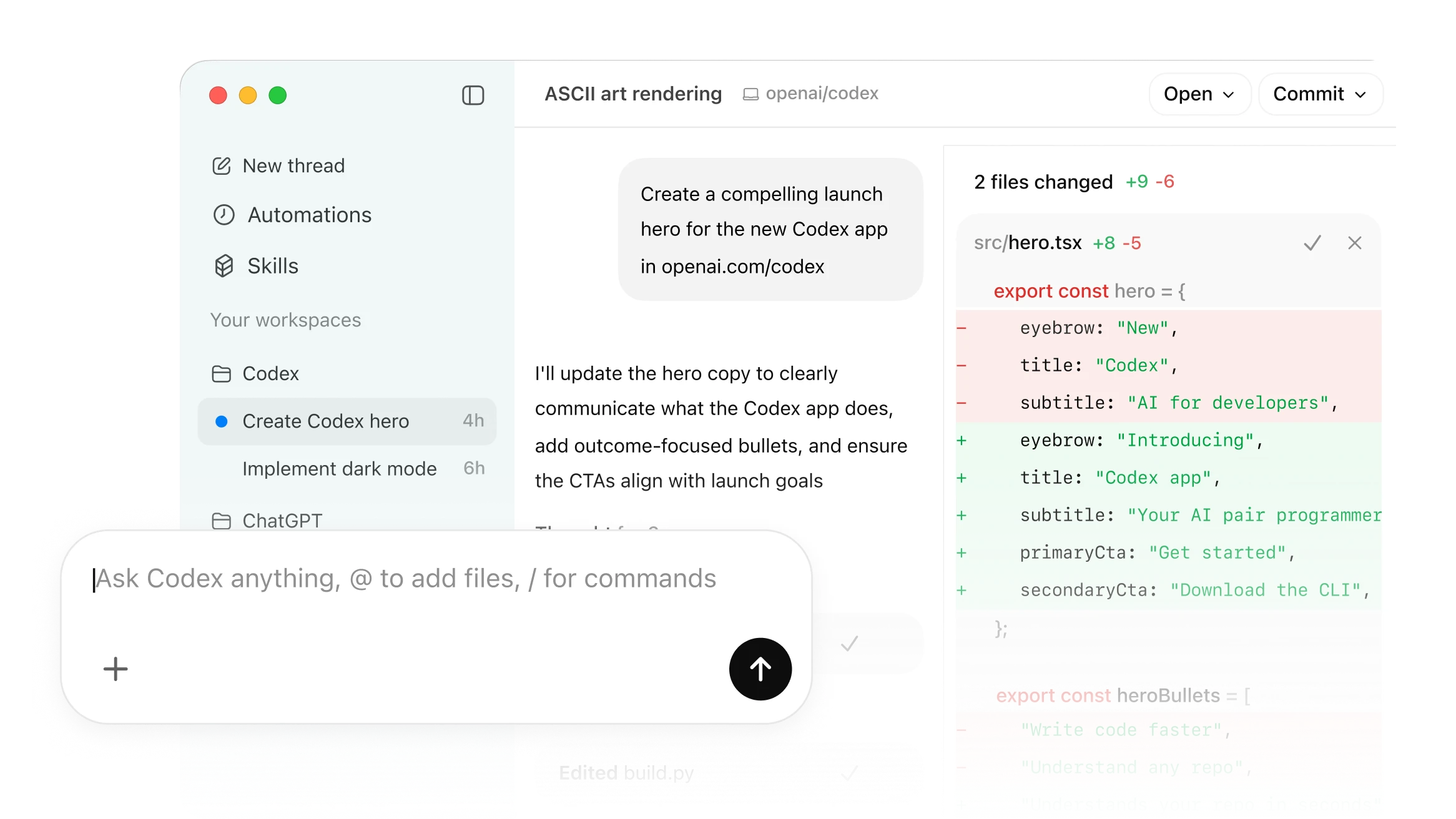
This difference matters. In a normal chat, a user asks for help and receives an answer. In Codex, the agent can work inside a project, inspect files, make changes, run tests, and show diffs. That makes it more practical for developers who want action, not only explanation.
Codex by OpenAI Cloud in 2026
Codex cloud is one of the strongest parts of the product. It allows Codex to work on tasks in a background cloud environment, including parallel tasks. This is useful for teams that want to hand off bug fixes, feature drafts, refactors, documentation updates, and review work without keeping every task tied to a single laptop.
The cloud experience is especially helpful when paired with GitHub. A user can connect repositories, ask Codex to work on a task, and review the output as a pull request. This makes Codex feel less like a chatbot and more like a junior teammate that can prepare work for human approval.
Codex by OpenAI App in 2026
The Codex app is the most polished surface for users who want a dedicated command center. It supports working with multiple threads, project organization, Git functionality, worktrees, automations, and review flows. For people who manage many coding tasks at once, this is a big advantage over a single chat window.
The app also makes Codex easier to understand visually. Instead of hiding everything in a terminal, it lets users see active threads, inspect changes, comment on work, and move between projects. In 2026, this is one reason Codex feels more mature than many AI coding tools.
Codex by OpenAI Pricing in 2026
Pricing is one area users should read carefully. Codex is included across eligible ChatGPT plans, including Free, Go, Plus, Pro, Business, Edu, and Enterprise, but usage limits and credit options vary. That means access does not always mean unlimited use.
In 2026, Codex pricing moved toward token-based usage for credit consumption. This means usage can depend on input tokens, cached input tokens, and output tokens rather than a simple per-message estimate. For light users, the included plan access may be enough. For heavy teams, credits, limits, and spend controls matter more.
ICON POLLS sees pricing as fair for developers who use Codex regularly, but it may confuse non-technical users at first. The value is strongest when Codex saves hours of engineering work, helps prepare pull requests, or reduces time spent on repetitive code tasks.
Codex by OpenAI User Experience in 2026
The user experience is strong, but it depends on the person using it. Developers who know how to write clear tasks, review diffs, and run tests will get the most value. Codex can be impressive when it understands the repository and follows a narrow instruction. It can also become messy if the task is vague or the project has weak setup instructions.
The best part of the experience is flexibility. Some people want the app. Some want the terminal. Some want cloud tasks. Some want to check work from mobile. Codex now supports enough surfaces that users can choose the workflow that matches them.
The weaker side is that users still need to supervise. Codex may make assumptions, miss product context, or produce changes that need cleanup. That is not a deal breaker. It simply means Codex is strongest as a coding partner, not an unchecked autopilot.
Pros and Cons of Codex by OpenAI
Pros: Codex is powerful, flexible, and useful across real development workflows. It can work locally, in the cloud, and through app-style interfaces. It is also good for repetitive coding work, code reviews, bug fixes, and project understanding.
Cons: The pricing and limits can be confusing, especially for users who do not understand token usage. It also needs human review, and its output quality depends heavily on the project setup, task clarity, and available context.
Final Verdict
Codex by OpenAI earns a 4.0 out of 5 from ICON POLLS. It is one of the strongest AI coding products in 2026 because it moves beyond simple suggestions and helps users carry out real software tasks. It is not perfect, and it is not a replacement for responsible developers, but it is a serious productivity tool for anyone who works with code.
Frequently Asked Questions About Codex by OpenAI
1. What is Codex by OpenAI?
Codex by OpenAI is an AI coding agent that helps users write, review, understand, and ship code across app, CLI, cloud, IDE, and mobile connected workflows.
2. What is the ICON POLLS rating for Codex by OpenAI in 2026?
ICON POLLS rates Codex by OpenAI 4.0 out of 5 because it is powerful, flexible, and useful for real software development, although it still needs human supervision.
3. Can I download Codex by OpenAI?
Yes. Codex has a desktop app for macOS and Windows, and developers can also install and use Codex CLI from the terminal.
4. How do I open Codex by OpenAI?
You can open Codex through the desktop app, run it from the terminal with the CLI, use it in supported editor workflows, or access Codex web for cloud tasks.
5. Is Codex the same as ChatGPT?
No. Codex is connected to the ChatGPT and OpenAI ecosystem, but it is focused on coding tasks. ChatGPT is broader, while Codex is built for software development work.
6. Does Codex by OpenAI use GPT?
Codex is powered by OpenAI models designed for coding and agentic workflows. Users often search for Codex GPT because they want to understand its link to ChatGPT.
7. What is Codex cloud?
Codex cloud lets Codex work on tasks in background cloud environments. It can work with repositories, handle parallel tasks, and prepare code changes for review.
8. Is Codex by OpenAI free?
Codex is included in eligible ChatGPT plans, including Free, but limits vary by plan. Heavy use may require credits or a higher plan.
9. How does Codex pricing work in 2026?
Codex pricing uses plan access, limits, and credit usage. Credit consumption is tied to token usage, including input, cached input, and output tokens.
10. Is Codex good for beginners?
It can help beginners, but it is better for users who understand code basics and can review its output. Beginners should use it as a learning assistant, not as a blind shortcut.
11. Can Codex create pull requests?
Yes, Codex can work with connected repositories and prepare changes that users can review before merging.
12. What is the best use of Codex by OpenAI?
The best use is handing it clear software tasks such as fixing bugs, writing features, refactoring code, explaining a repository, reviewing changes, and updating documentation.











