
|
Company Name |
Figr (Figr AI / Figr.design) |
|
Founders |
Moksh Garg and Chirag Singla |
|
CEO |
Moksh Garg |
|
Founded |
2023 |
|
Full Product Launch |
2026 |
|
Headquarters |
Bengaluru, India (with operations in Delhi) |
|
Category |
AI Product Design Agent / UX Design Software |
|
Core Products |
Figr (AI design agent) and Figr Identity (Figma plugin for design systems) |
|
Total Funding |
Around $2.5M raised across three rounds (Seed) |
|
Notable Investors |
Kalaari Capital, Antler India, Golden Sparrow Ventures, Google Accelerator |
|
Pricing Model |
Freemium, paid plans starting from $16 per month |
|
Free Plan |
Yes, 10 credits per month with Figma export and shareable projects |
|
Public / IPO Status |
Private company, not publicly traded as of 2026 |
|
Key Integrations |
Figma, Chrome extension, analytics platforms, design tokens |
|
Security |
SOC 2 Type II certified, SSO support, zero data retention policy |
|
Best For |
Product teams, PMs, UX designers, and startups shipping real apps |
|
Official Website |
figr.design |
|
ICON POLLS Rating |
3.9 out of 5 |
What Exactly Is Figr AI in 2026?
Figr AI is a product aware design agent built for product teams, designers, and product managers. The company describes itself as a design tool that learns your actual product first and then generates UI screens, user flows, prototypes, and PRDs on top of that context. That phrasing sounds like marketing at first, but after testing it for ourselves, it is genuinely the cleanest way to describe what the platform does.
The tool was co founded by Moksh Garg and Chirag Singla and is headquartered in Bengaluru, India. It is backed by Kalaari Capital, Antler India, Golden Sparrow Ventures, and Google Accelerator, with around $2.5M raised in seed funding. The full Figr product publicly launched in 2026, although the brand had already gained a strong reputation in the Figma community through its earlier plugin, Figr Identity.
Unlike most AI tools that start from a blank canvas and ask you to describe what you want, Figr starts by ingesting your existing product. You can drop in Figma files, screenshots, analytics CSVs, product requirement documents, or even capture a live app using its Chrome extension. From there, the platform builds a working model of your product and uses that model to reason through new design tasks.
Figr AI Design: How Good Are the Outputs Really?
Design quality is where most AI tools quietly disappoint. We have tested platforms that produce screens that look great in a portfolio shot but feel generic the second you try to use them inside a real product. Figr AI takes a noticeably different approach.
During our testing, we fed Figr a mid sized SaaS dashboard and asked it to design a new billing settings flow. What stood out was that the output respected the existing typography scale, button style, and component naming. Buttons sat where they were supposed to sit. Empty states were not invented from thin air. The platform also flagged three edge cases we honestly had not thought about, including a downgrade flow that needed a confirmation step.
The design system enforcement is a quiet superpower here. Figr uses your design tokens for color, spacing, type, and radius, and it will not break them by default. For teams that have spent months building a system in Figma, that consistency removes hours of manual cleanup that most AI tools force you back into.
Is it perfect? No. Some of the more complex layouts, especially data heavy tables with nested filters, still need a designer to step in and refine. But as a starting point that gets you 70 to 80 percent of the way there, it is genuinely strong.
Figr Identity: The Design System Engine Behind the Brand
Long before the full Figr AI agent launched, the team built a Figma plugin called Figr Identity. It is still one of the most loved tools in the Figma community and it serves as the design system backbone for the broader platform.
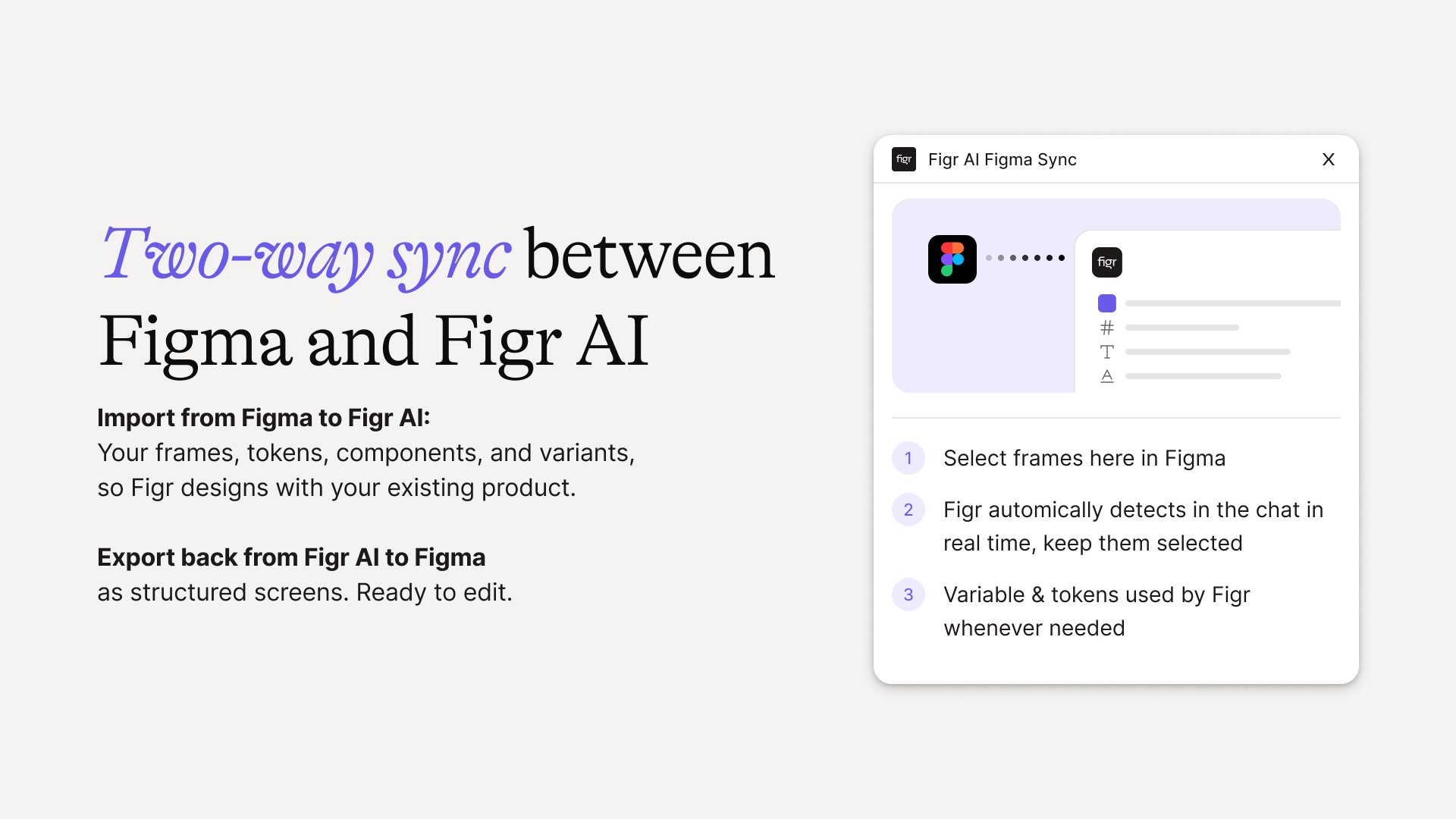
Figr Identity lets you generate a complete design system in Figma in a matter of minutes. With a few clicks you can produce tokens for color, typography, spacing, radius, grids, and elevation. It also generates a custom component library that automatically reflects those tokens. For teams setting up a new product or trying to clean up an inconsistent file, the time savings are significant.
What makes Identity especially useful inside the wider Figr ecosystem is that the design system you build there is the same system the AI agent enforces when it generates new screens. So you are not maintaining two separate sources of truth. Tokens you set in Identity are respected when you generate flows or prototypes in the main Figr product.
During our review, we used Figr Identity to set up a fresh system for a fintech mock product and exported the styles into Figma. The output was clean, the naming was consistent, and the variables were ready for handoff. For solo designers and small teams especially, this is one of the strongest design system shortcuts on the market right now.
Figr AI and Figma: Does the Integration Actually Work?
Figma is the daily home for most product teams, so any AI design tool that cannot talk to Figma cleanly is dead on arrival. Figr understood this early on and built the relationship in both directions.
You can import Figma files into Figr as visual references so the AI can learn your existing patterns, colors, and component logic. From there, any screen the platform generates can be exported back to Figma as production ready frames. We tested this with three different files of varying complexity, and the export was reliable each time. Layers were named sensibly. Components stayed structured. Styles were applied as variables, not flattened.
There is one caveat worth flagging. The import currently treats Figma files more like high quality reference images than fully editable component libraries. If you want pixel level component parity, you still need to do some manual linking. The team has hinted at deeper integration on the roadmap, but for now what is there works smoothly enough for the majority of teams.
If your team already lives in Figma, Figr fits into the workflow with very little friction. That alone puts it ahead of most competitors that pretend to integrate but really just dump screenshots into your file.
Figr AI IPO: Is the Company Going Public?
This is one of the most searched questions about the brand in 2026, and there is a lot of confusion out there. So let us clear it up directly.
Figr AI is a private company. As of this review in 2026, there has been no IPO, no public filing, and no formal signal from the founders that one is on the way. The company has raised roughly $2.5M in seed funding across three rounds, with its most recent round closing in late 2024. That is still very early stage capital, and companies at this stage rarely move toward a public listing.
Part of the confusion comes from the ticker symbol FIGR on the Nasdaq. That ticker belongs to Figure Technology Solutions, a blockchain and consumer lending company based in Reno, Nevada. It is a completely separate business with no connection to Figr AI or the design tool we are reviewing here. If you have seen articles about FIGR stock price movements or earnings reports, they are about that company, not Figr AI.
Could Figr AI go public one day? Possibly. The market for AI design tools is heating up, and competitors like Figma itself have already gone through a public listing process. But for now, the only way to participate in Figr is by using the product or, for accredited investors, watching for future venture rounds. There is no public stock to buy.
User Experience: What It Feels Like to Actually Use Figr
A tool can have great features and still feel exhausting to use. We always pay attention to the texture of an interface, the rhythm of a workflow, and how it holds up over a full work week. Figr held up well.
Onboarding is gentle. The free plan gives you 10 credits a month, which is enough to test a small flow or two and decide if it is worth upgrading. For paid users, the team provides a structured setup where you load product screenshots, design tokens, and any relevant documentation. This setup takes 20 to 60 minutes depending on the complexity of your product, but it pays for itself within the first real sprint.
Inside the tool, the interface is clean and stays out of the way. The platform asks clarifying questions before it generates anything, which felt slow at first but quickly became one of our favorite parts of the workflow. It forces you to think through the problem instead of just accepting whatever the AI produces.
Click to refine editing is also worth highlighting. You can click any element on a generated screen and ask the AI to change the copy, adjust the state, or reshape the layout, and it will preserve the rest of the design system. That kind of targeted editing is rare and a real productivity win.
The only friction worth mentioning is the credit system. Different actions cost different credit amounts, and for new users it can take a couple of sessions to develop a feel for how quickly credits get consumed. Once you adjust, the pricing feels fair, but the learning curve is real.
Pros and Cons Based on Our Testing
What we liked:
Product aware outputs that respect existing design systems
Strong Figma integration in both directions
Figr Identity plugin is genuinely excellent for setting up design systems
Edge case detection that catches scenarios most teams miss
SOC 2 Type II certification and zero data retention for enterprise teams
Free plan is real and lets you test the product properly
What could be better:
Credit system has a learning curve and can feel opaque early on
Complex data heavy layouts still need designer intervention
Figma import treats files more as references than fully editable libraries
Best results require a live product to learn from, so brand new ideas get less benefit
Final Verdict from ICON POLLS
After running Figr AI through real product workflows over several weeks, our verdict is that it is one of the few AI design tools that earns its place in a serious product team. It is not flawless, and the credit model takes some adjustment, but the core promise of designing with real product context actually holds up. For product managers and designers tired of generic AI mockups that need to be rebuilt anyway, Figr is worth a serious look.
ICON POLLS rates Figr AI 3.9 out of 5 in 2026. It loses points for the credit complexity and the gaps in handling extremely intricate enterprise layouts, but gains them back for thoughtful UX, strong Figma support, and genuine product understanding.
Frequently Asked Questions About Figr AI
1. What is Figr AI used for?
Figr AI is used by product teams, designers, and product managers to generate UI screens, user flows, prototypes, and product requirement documents that match an existing product. Unlike generic AI design tools, it learns your actual app first and then designs on top of that context, which makes the outputs immediately usable rather than throwaway mockups.
2. Who founded Figr AI and where is it based?
Figr was co founded by Moksh Garg and Chirag Singla. Moksh Garg currently serves as the CEO. The company is headquartered in Bengaluru, India, with additional operations in Delhi. It launched its full product publicly in 2026 after building a reputation through its Figma plugin, Figr Identity.
3. Is Figr AI free to use?
Yes, Figr offers a free plan that includes 10 credits per month, Figma export, the inspiration tool, and shareable projects. The free tier is designed for evaluation rather than full production use. Most teams upgrade to a paid plan after a sprint or two once they see how the context aware outputs compare to other AI tools.
4. How much does Figr AI cost in 2026?
Figr AI uses a freemium model with paid plans starting from around $16 per month. The Starter plan is roughly $19 per month and adds 100 credits, additional product setups, unlimited Figma imports, and a basic design system. The Team plan is around $24 per seat per month and includes collaboration, user roles, and priority support. Custom enterprise pricing is available on request.
5. Is Figr AI publicly traded or planning an IPO?
No, Figr AI is a private company and has not announced any IPO plans as of 2026. It has raised about $2.5M in seed funding from investors including Kalaari Capital, Antler India, and Golden Sparrow Ventures. The Nasdaq ticker FIGR belongs to a different company called Figure Technology Solutions, which is in blockchain lending and is not related to Figr AI in any way.
6. Does Figr AI work with Figma?
Yes, Figma integration is one of the strongest parts of the product. You can import Figma files so the AI learns your existing visual patterns, and you can export any generated design back to Figma as production ready frames. The team also maintains the Figr Identity plugin inside the Figma community, which generates full design systems with tokens, styles, and a custom component library.
7. What makes Figr AI different from other AI design tools?
The biggest difference is product awareness. Most AI design tools start from a blank canvas and ask you to describe what you want. Figr starts by ingesting your live product through screenshots, Figma files, analytics data, or a Chrome extension capture, and then designs with that context in mind. The outputs respect your existing design system, components, and user flows, which means significantly less rework after the fact.
8. Is Figr AI safe and secure for business use?
Yes, Figr AI is built with enterprise security in mind. The platform is SOC 2 Type II certified, supports single sign on for team accounts, and follows a zero data retention policy. That combination makes it suitable for product teams that handle sensitive product information, customer data, or proprietary design systems. Always review the latest security documentation directly on the Figr website for the most current details.











