
|
ChatGPT for Excel: Product Profile |
|
|---|---|
|
Product Name |
ChatGPT for Excel |
|
Developer |
OpenAI |
|
Product Type |
AI add-in for Microsoft Excel |
|
Launch Date (Beta) |
March 5, 2026 |
|
General Availability |
May 5, 2026 |
|
Underlying Model |
GPT-5.5 (initially launched on GPT-5.4 Thinking) |
|
Supported Platforms |
Excel 2016 or later on Mac, Excel 2013 or later on Windows, Excel on the web |
|
Available Plans |
Free, Go, Plus, Pro, Business, Enterprise, Edu, Teachers, K-12 |
|
Pricing (Plus) |
About $20 per month |
|
Pricing (Pro) |
About $200 per month |
|
Pricing (Business) |
Starts at around $25 per user per month |
|
Free Preview |
Business, Enterprise, Edu, and K-12 users get free preview through June 2, 2026 |
|
Installation |
Excel Home tab, Add-ins, then search ChatGPT |
|
Official Website |
chatgpt.com/apps/spreadsheets |
|
ICON POLLS Rating |
2.9 out of 5 |
What Is ChatGPT for Excel?
ChatGPT for Excel is an official OpenAI add-in that places a ChatGPT sidebar directly inside Microsoft Excel. Instead of switching between a browser and your spreadsheet, you can describe what you want in plain English, and ChatGPT will build formulas, update cells, run scenario analyses, clean up messy data, or explain how a model works. The add-in reads your active workbook, references specific cells, asks for permission before making changes, and shows you exactly what it edited so you can review or undo.
At launch, the product ran on GPT-5.4 Thinking, OpenAI's reasoning focused model. By general availability in May, it had been upgraded to GPT-5.5, which OpenAI claims is faster and produces fewer hallucinations on numerical tasks. On OpenAI's internal investment banking benchmark, performance on three statement modeling went from 43.7 percent with GPT-5 to 87.3 percent with GPT-5.4 Thinking. That is a real jump, and it explains why finance teams have been the early test users.
The add-in supports large multi tab workbooks, ties answers back to specific cells, and integrates with apps and skills from your wider ChatGPT account, subject to admin controls. It is also separate from your regular ChatGPT chat history, which is a privacy decision that confuses some users at first.
ChatGPT for Excel Review on Reddit: What Users Are Actually Saying
Reddit is the closest thing to an unfiltered focus group, so we read through threads in r/excel, r/ChatGPT, r/Finance, and r/OpenAI to see how the product is landing with everyday users. The reactions are split.
The positive Reddit reactions
Many users praised the formula generation. Power users who already know Excel said ChatGPT for Excel is fastest when they need a long nested formula that would have taken twenty minutes to write by hand. Several posts mentioned that the explain this formula feature is genuinely useful for cleaning up inherited spreadsheets from a former colleague. Small business owners also liked how quickly it could build a project tracker or expense summary from a vague prompt.
The complaints
The criticism shows up in clusters. Users complained that the add-in sometimes gets stuck writing formula without producing a result, especially on slower machines or larger workbooks. Others said outputs occasionally need cleanup to match their preferred formatting. Privacy came up repeatedly, with users uneasy about workbook content being shared with both OpenAI and Microsoft to enable reading and updating. Several Reddit threads also flagged that advanced features like Power Query, Office Scripts, Pivot Data Model, slicers, and VBA macros are not fully supported yet, which is a deal breaker for anyone running serious automation.
There is also a recurring frustration about availability. Plus and Pro users outside specific regions hit walls during the beta phase, and even after general availability some workspaces require an admin to enable the add-in before anyone on the team can use it. For an OpenAI product, the rollout has felt rougher than people expected.
ChatGPT for Excel on Mac: Does It Actually Work?
Mac users asked this question constantly during the beta, partly because Microsoft has a history of releasing features on Windows months before Mac. The good news is that ChatGPT for Excel does work on Mac. According to OpenAI's official documentation and the AppSource listing, the add-in supports Excel 2016 or later on Mac, Excel 2013 or later on Windows, and Excel on the web.
In our testing on a MacBook running the latest Excel build, installation went smoothly through the Home tab, Add-ins menu. Once signed in with the OpenAI account tied to a paid ChatGPT plan, the sidebar opened in the ribbon as expected. Performance felt similar to the Windows build for most tasks, with a slight lag on very large multi tab workbooks.
That said, Mac users still hit a few rough spots. Some of the deeper Excel automation features that ChatGPT for Excel struggles with, such as macros and Pivot Data Model, are already weaker on Mac compared to Windows, so the overall Mac experience for power users still trails what Windows users get. If you are a Mac user doing financial modeling, formulas, and data cleanup, the experience is solid. If your work depends on VBA or Office Scripts, you will still feel limited.
ChatGPT for Excel Beta Experience
The beta opened on March 5, 2026 and ran until general availability on May 5, 2026. During that window, users on ChatGPT Plus, Pro, Business, and Enterprise plans could try it, with Business, Enterprise, Edu, and K-12 customers getting a free preview through June 2, 2026.
Our beta experience matched what most reviewers reported. The product was clearly capable but unfinished. Some responses took longer than expected as OpenAI optimized performance behind the scenes. Outputs sometimes needed cleanup to match preferred formatting or layout. Complex formulas occasionally required a second pass. The consent prompts before edits, which let you approve every change, were a nice safety net, but they also slowed down workflows that should have been quick.
OpenAI was transparent about the limitations during beta, openly stating that outputs may be incomplete or incorrect and asking users to verify formulas, calculations, and citations. That honesty is appreciated, but it also reinforces the point that ChatGPT for Excel is not yet a tool you can leave alone with important workbooks. The general availability release in May improved speed and reduced hallucinations, but the same caution applies.
ChatGPT for Excel Price: How Much Does It Cost in 2026?
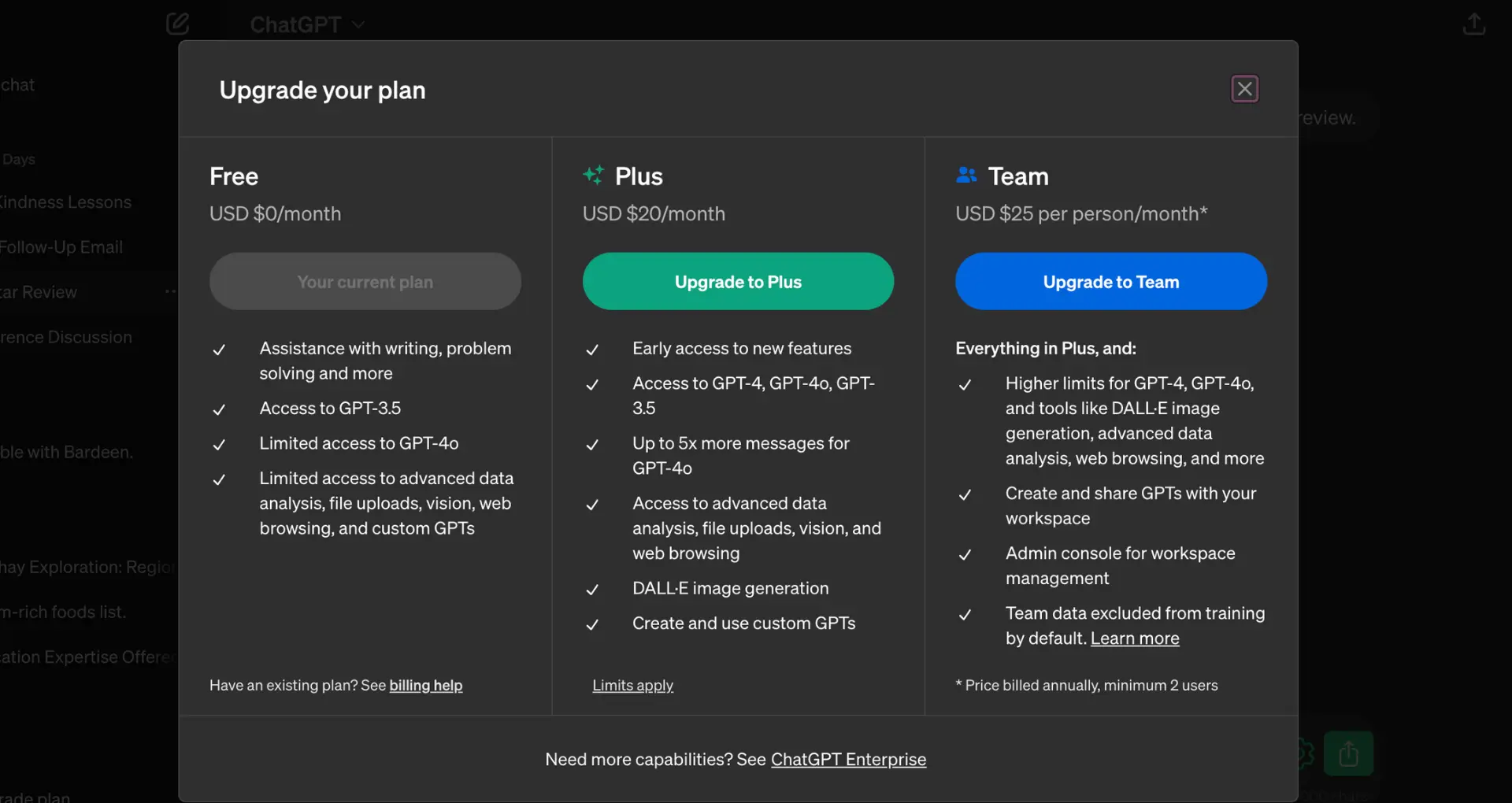
ChatGPT for Excel does not have a separate price tag. Access is bundled into the existing ChatGPT plans, which means what you pay for ChatGPT is what you pay to use the Excel add-in. Here is how the pricing tiers break down as of May 2026:
Free and Go plans
Yes, Free and Go users can access ChatGPT for Excel, but with limited usage. If you only need it for the occasional formula or a quick data summary, this might be enough. For heavier work, the usage limits will hit fast.
Plus plan (about $20 per month)
Plus users get access subject to the plan's agentic usage limit. For most freelancers, small business owners, and finance professionals working solo, Plus is the realistic starting tier. It opens up the GPT-5.5 model and most app integrations.
Pro plan (about $200 per month)
Pro is designed for power users who push the model hard every day. The agentic usage limits are higher, and you get priority access during peak times. For analysts who live inside complex models, Pro pays for itself if it saves a few hours each week.
Business and Enterprise plans
Business starts at around 25 dollars per user per month, with Enterprise pricing customized per organization. Business, Enterprise, Edu, and K-12 customers had a free preview through June 2, 2026, after which usage moves to each plan's credits and usage terms. These tiers also include admin controls, EKM, and Inference Residency support, which matter for compliance heavy industries.
Bottom line: if you already pay for ChatGPT, you already have access. If you are deciding which tier to pick specifically for Excel work, Plus is enough for most individuals and Business is the right move for teams that want governance controls.
ChatGPT for Excel User Experience
This is where the 2.9 rating starts to make sense. The user experience is genuinely good in some places and genuinely frustrating in others. We graded it across five everyday dimensions.
Installation and setup
Installation is one of the easiest parts of the product. Open Excel, go to Home, click Add-ins, search ChatGPT, install, and sign in. The sidebar appears in the ribbon, ready to use. Setup takes under three minutes for most people. The only friction is when an admin has not enabled the add-in for a workspace, which happens more often than it should.
Formula generation and explanation
This is the strongest feature. Ask for a formula in plain English, and ChatGPT for Excel writes it correctly most of the time. Ask it to explain a formula you inherited, and the explanation is usually clear and accurate. The cell linking, which shows you exactly which references the formula depends on, is one of the best touches in the product.
Data analysis and reporting
Solid for medium complexity. Building trackers, budgets, summaries, and pivot style tables works well. Cross tab analysis works most of the time. Where it breaks down is when workbooks get very large or when you ask for Power Query, Pivot Data Model, or VBA driven analysis. For those, the add-in either skips them entirely or produces partial results.
Speed and responsiveness
Mixed. Simple queries return in seconds. Larger requests, especially on multi tab workbooks, can take a noticeable pause. OpenAI has openly acknowledged that some responses take longer as they optimize performance. The trade off is real.
Accuracy and trust
This is where users are most cautious. The improved benchmarks are encouraging, but real world spreadsheets have weird edge cases. ChatGPT for Excel can still produce a formula that looks right and quietly contains a wrong reference. The product asks for permission before edits and links to changed cells, but the responsibility to verify falls on you. For investor facing models or financial reporting, that means every output needs a human review.
The verdict on user experience is that ChatGPT for Excel is useful, but it is not a set and forget tool. Treat it as a fast junior analyst who needs supervision, not a senior accountant you can trust blindly.
Frequently Asked Questions About ChatGPT for Excel in 2026
1. Is ChatGPT for Excel free to use?
ChatGPT for Excel is available to Free and Go users with limited usage, which means light users can try it without paying. Plus and Pro users get more access subject to agentic usage limits, and Business, Enterprise, Edu, and K-12 plans had a free preview through June 2, 2026. After that date, usage on those tiers follows each plan's credits and usage terms.
2. Does ChatGPT for Excel work on Mac?
Yes. ChatGPT for Excel supports Excel 2016 or later on Mac, Excel 2013 or later on Windows, and Excel on the web. Mac users can install the add-in through the Home tab, Add-ins menu, and sign in with their OpenAI account. Performance on Mac is similar to Windows for most tasks, although Mac already has weaker support for some advanced Excel features like VBA, so power users may notice gaps.
3. How do I install ChatGPT for Excel?
Open Excel, click the Home tab, click Add-ins, search for ChatGPT, and install it. The ChatGPT icon will appear in the ribbon. Open it and sign in with the OpenAI account tied to your ChatGPT subscription. If the option is missing, your workspace admin may need to enable the add-in first.
4. Is my Excel data safe with ChatGPT for Excel?
ChatGPT for Excel processes your prompts, attachments, and workbook content to answer your requests. According to OpenAI, some logs may be stored for up to 30 days for safety and integrity. Business and Enterprise customers get additional controls including Inference Residency and Enterprise Key Management. If you handle sensitive data, review the privacy settings and consult your admin before using the add-in on confidential workbooks.
5. What is the difference between ChatGPT for Excel and Microsoft Copilot for Excel?
Both place an AI assistant inside Excel, but they come from different companies with different strengths. Microsoft Copilot is built natively into the Microsoft 365 stack and has deeper coverage of Office Scripts, Power Query, and Pivot tools. ChatGPT for Excel is powered by GPT-5.5 and tends to perform better on complex financial modeling and reasoning tasks, with measured investment banking benchmark scores above 80 percent. Many teams now use both, picking the one that fits each task.
6. Can ChatGPT for Excel handle large spreadsheets?
It supports large multi tab workbooks with thousands of cells and references, but very large workbooks can exceed the model's context window, which leads to partial results. For best performance, work on the relevant tabs or sections rather than asking it to process an entire massive workbook at once.
7. What features of Excel are not supported by ChatGPT for Excel?
Several advanced features are not fully supported, including Office Scripts, Power Query, Pivot and Data Model, data validation, the named ranges manager, slicers, timelines, external connection administration, some advanced charting beyond the standard set, and macro or Visual Basic for Applications automation. If your work depends heavily on any of these, expect gaps.
8. Does ChatGPT for Excel sync with my regular ChatGPT chat history?
No. ChatGPT for Excel operates separately from your ChatGPT chat history. Conversations and data inside Excel are not shared with your ChatGPT.com chats, and activity does not sync between the two experiences. You can download or delete your locally stored Excel chat conversations through the add-in's Settings.
9. Is ChatGPT for Excel worth paying for in 2026?
It depends on how much time you spend in Excel. If you write complex formulas every week, inherit messy workbooks, or build financial models, ChatGPT for Excel can save real hours. If you only use Excel occasionally, the Free or Go tier is enough to test it without commitment. For most users, Plus at around 20 dollars per month gives the best balance of features and price.
10. What rating does ICON POLLS give ChatGPT for Excel?
ICON POLLS rates ChatGPT for Excel 2.9 out of 5 as of May 2026. The product has strong formula generation, useful explanations, and growing accuracy, but it also has occasional stability issues, partial feature support, privacy considerations, and a learning curve that limits its score. We expect this rating to improve as OpenAI continues updating the add-in over the rest of 2026.











