
|
Brand Name |
Letterbook |
|
Website |
letterbook.ai |
|
Founders |
Dawson Chen and Ethan Hou |
|
Year Launched |
2026 |
|
Backed By |
Y Combinator |
|
Category |
AI Customer Support Platform |
|
Target Users |
Founders, startups, lean B2C and self-serve B2B teams |
|
Key Integrations |
Gmail, Stripe, internal databases, knowledge bases |
|
Starting Price |
$30 per month (Starter plan) |
|
Free Option |
Yes, with a demo option available |
|
ICON POLLS Rating |
2.9 out of 5 |
What Letterbook Means and What It Does
Letterbook is an AI-native customer support platform built primarily for founders and lean startup teams. The idea is simple. Instead of forcing small teams to use heavy ticketing systems designed for big support departments, Letterbook handles support emails and form submissions using AI that already knows the customer.
It connects to your support inbox, your product database and your Stripe account. From there, the AI pulls real context like the customer's purchase history, subscription status, invoices and recent activity, then drafts a reply along with a suggested action. The founder or team member reviews the draft, edits it if needed, and sends it with one click.
The brand name itself plays on the idea of a tidy book of letters or correspondence, which fits a tool that is essentially organising and answering customer messages on your behalf. It positions itself less as a chatbot and more as a junior support agent that already understands your business.
The Letterbook App and Setup Experience

Letterbook is a web-based platform rather than a traditional mobile app. You sign up at letterbook.ai, connect your support inbox, paste in a restricted API key for Stripe and your database, and the AI begins preparing draft replies for incoming tickets.
The founders claim setup takes around five minutes, and based on what users have shared publicly, that estimate is mostly accurate for simple inboxes. People migrating from larger tools like Zendesk or Helpscout report a longer process because of the volume of existing data, and Letterbook currently handles those migrations manually through a Slack channel with the founders. It is hands-on, but not yet self-serve.
The interface itself is clean and modern, leaning closer to a productivity tool than a traditional helpdesk. Unified inbox, AI draft suggestions, a hosted help center and basic analytics are the main pillars. There is no native mobile app at the moment, which some users have flagged as a missing piece for founders who handle support on the go.
The AI Behind Letterbook
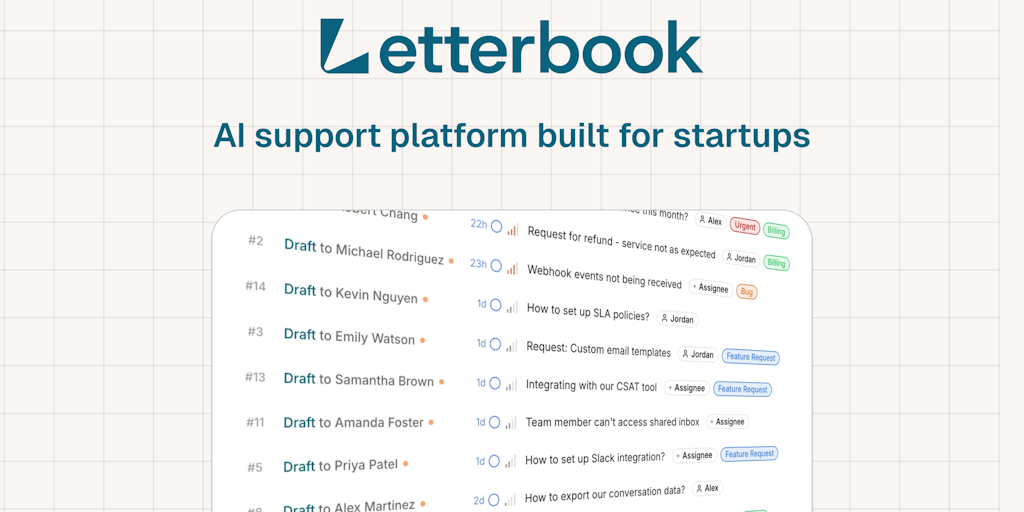
The AI engine is where Letterbook makes its strongest case. It is built around what the team calls scenarios, which are basically playbooks for common ticket types such as refunds, login issues, billing problems, account changes and feature questions. The AI reads incoming tickets, matches them to a scenario, then drafts a personalised reply using real customer data pulled from your connected systems.
Two things stand out about how the AI works. First, it does not send replies on its own by default. Every draft is presented to a human for approval, which is reassuring for founders who do not yet trust AI to handle sensitive billing or account matters. Second, the system learns from past replies. The more you use it, the closer the drafts get to your tone and style, and the less editing you have to do.
There is also a Cmd plus K shortcut that lets users tweak a draft in place using a simple instruction, similar to how you would prompt an AI writing tool. Users have called this one of the more useful day to day features.
That said, the AI has limits. It does not yet auto-resolve tickets without human approval, and complex or emotional tickets still need a person. It also lacks deeper integrations with engineering tools like Jira or Linear, which some teams want for closing the loop between bug reports and product fixes.
User Experience
From a usability standpoint, Letterbook feels like it was designed by founders for founders. The dashboard is uncluttered, the language is straightforward and the workflow assumes you do not have a full support team helping you. Connecting tools is mostly a copy and paste affair, and the unified inbox keeps everything in one place.
Users have praised the speed of setup, the AI draft quality after a few weeks of training, and the simplicity of the approval workflow. The biggest pain points in early feedback are the lack of a fully autonomous send option, limited reporting depth, no native mobile experience, and the absence of one-click migration tools from older helpdesks.
For a product that only launched in 2026, the experience is more polished than expected. It is not yet at the depth of a mature platform like Zendesk or Intercom, but it does not try to be. It is built for teams that want speed, clarity and just enough automation, not for enterprise support orgs with complex routing rules.
Pros and Cons of Letterbook in 2026
What Works Well
Setup is genuinely fast, often under ten minutes for a new inbox.
The AI pulls real customer context from Stripe and your database, so replies feel personal.
The approval workflow keeps humans in control of every reply.
Pricing is reasonable for early stage teams, starting at $30 a month.
The interface is modern and easy to navigate, with little learning curve.
Where It Falls Short
No autonomous send option means the AI still depends on human approval for every ticket.
No native mobile app, which limits founders who handle support on the move.
Migration from existing helpdesks is manual and requires a call with the founders.
Reporting and analytics are still fairly basic compared to mature platforms.
Limited integrations beyond Stripe, databases and standard inboxes.
Not yet suitable for enterprise support teams with complex routing or compliance needs.
Brand is still new, so long term reliability and roadmap are unproven.
Letterbook FAQs in 2026
1. Is Letterbook legit and safe to use in 2026?
Yes, Letterbook is a real company backed by Y Combinator and founded by Dawson Chen and Ethan Hou, the team behind a previous product called Martin. It connects to sensitive tools like Stripe using restricted API keys, which means it only has the permissions you explicitly grant. While it is still a young brand, there is nothing suggesting it is unsafe to use.
2. Who is Letterbook built for?
It is built for founders, solo operators and lean startup teams running B2C or self-serve B2B products. If you are getting customer support emails but cannot justify hiring a support team, Letterbook is designed for your situation. Enterprise teams with complex compliance or routing needs are not the target user.
3. How much does Letterbook cost?
Pricing starts at $30 per month for the Starter plan, which includes three seats and around 300 tickets per month. The Growth plan is $200 per month for 1,000 tickets and ten seats. Enterprise pricing is custom. There is also a free option and the ability to book a demo before paying.
4. Does Letterbook send replies automatically?
No, not by default. As of 2026, every AI generated reply has to be approved by a human before it is sent. The founders have said they want to add an auto-send option for routine cases in the future, but for now the workflow is built around review and approve.
5. What does the name Letterbook mean?
The name plays on the idea of a book or ledger of letters and correspondence, which fits a tool that organises, drafts and manages customer messages on your behalf. It signals something cleaner and more personal than the traditional ticket system metaphor used by older helpdesks.
6. How is Letterbook different from Zendesk, Intercom and Freshdesk?
The older tools were built for large support teams with managers, agents and complex workflows. Letterbook is built for founders and small teams, and the AI is the main worker rather than a small add on. It also sets up in minutes rather than days, and it pulls real customer context from Stripe and your database to draft replies.
7. Does Letterbook have a mobile app?
There is no dedicated mobile app at the moment. Letterbook is a web platform, so you can open it in a mobile browser, but a polished native app for iOS or Android is not yet available. This is one of the features users have asked the team to add.
8. Can I migrate from Zendesk or Helpscout to Letterbook?
Yes, but the migration is still done manually. The founders hop into a Slack channel and help teams move their data across. One click migration from older helpdesks is not available yet, although the team has said it is on their wish list.
9. Does Letterbook learn from my past support emails?
Yes. The system learns from your previous replies and improves its drafts over time, so the more you use it, the closer the AI gets to your tone and the less editing you have to do. Users have called this one of the most useful aspects of the tool.
10. Is Letterbook worth it in 2026?
For a solo founder or small team drowning in repetitive support emails, Letterbook can save real hours every week and is reasonably priced. For larger or more compliance heavy teams, it is probably too early to rely on as a primary support system. It is a strong starter tool, not yet a complete platform.











