
Quick Verdict
Loom remains the fastest way to record your screen and send a video instead of holding a meeting, and that core promise still works beautifully in 2026. You hit record, talk over your screen for two minutes, and paste a link wherever your team lives. The recording experience is quick, the sharing is frictionless, and the instant hosting with viewer analytics and timestamped comments creates real value for teams that communicate asynchronously across time zones. Since the platform was acquired by Atlassian, the 2026 version has become far more than a screen recorder, adding AI that generates titles, summaries, and chapters, removes filler words and silences, converts recordings into documents and tickets, and now records and recaps meetings, along with deep integration into Jira and Confluence. For an async-first team that already lives in the Atlassian ecosystem and records video daily, Loom is genuinely excellent. The 3.5 rating reflects the real friction that has appeared alongside these strengths. The free plan caps recordings at five minutes and limits how many videos you can keep, which most regular users exhaust within their first week. Almost every feature worth paying for, including the AI tools and advanced editing, now lives behind the higher-priced tier, with no way to add AI on its own. The per-seat pricing adds up quickly and users have reported surprise charges when seats are added. And since the migration to new infrastructure, there have been consistent reports of lag, audio sync problems, failed uploads, and login difficulties that represent a real regression from the rock-solid reliability that made Loom popular. Loom is still one of the best tools in its category, with a steeper price and more rough edges than it used to have.
At a Glance: Icon Polls Ratings
Here is how Loom scored across the areas we evaluated in our 2026 research:
|
Category |
Stars |
Score |
|
Core Recording and Sharing |
★★★★★ |
4.5/5 |
|
AI Features (Summaries, Editing) |
★★★★☆ |
4/5 |
|
Browser Extension and Apps |
★★★★☆ |
4/5 |
|
Atlassian and Tool Integrations |
★★★★★ |
4.5/5 |
|
Free Plan Value |
★★★☆☆ |
2.5/5 |
|
Pricing and Billing Transparency |
★★★☆☆ |
2.5/5 |
|
Post-Migration Stability |
★★★☆☆ |
2.5/5 |
|
Overall |
★★★★☆ |
3.5/5 |
What Is Loom?
Loom is an asynchronous video messaging platform built to replace unnecessary meetings and long email threads with quick, shareable screen recordings. The core idea is simple and genuinely useful: instead of scheduling a meeting to explain something, you record your screen, your webcam, or both, stop recording, and instantly get a shareable link. The recipient watches whenever it suits them, can leave timestamped comments, and can react, all without anyone needing to coordinate calendars or sit through a live call.
That async model is the heart of Loom's value. A four-minute Loom that replaces a thirty-minute meeting is a real productivity win, especially for remote and distributed teams working across time zones. It is well suited to explaining a complex decision to engineers without a meeting, recording a bug or usability issue to share with design, walking a client through a deliverable, onboarding new team members, and giving feedback that would take far longer to write out than to simply say while pointing at the screen. The best way to think about Loom is as a voice note with a screen attached: low-stakes, fast, and far quicker than a meeting.
Loom was acquired by Atlassian in late 2023, and the 2026 version reflects that ownership heavily. It is no longer just a screen recorder. It has become an AI-heavy async video platform with deep hooks into Atlassian's other products, particularly Jira and Confluence. The 2025 and 2026 updates added automatic transcripts, AI-generated summaries, chapter markers, action item extraction, filler-word and silence removal, the ability to convert a recording into a document or a ticket, and automated meeting recording with AI notes and recap emails for the major video-calling platforms. Transcription and AI enhancements are supported across more than fifty languages.
This evolution is both Loom's biggest strength and the source of its biggest frustrations in 2026. The added intelligence makes Loom considerably more useful than a plain screen recorder, turning recordings into searchable, navigable, actionable content. But it has also pushed the product toward a higher-priced, more complex, more enterprise-oriented shape, and the migration onto new infrastructure has introduced stability problems that did not exist when Loom was a simpler, standalone tool. Understanding Loom in 2026 means weighing the genuinely valuable new capabilities against the higher cost and the rough edges that came with them.
Recording Video With Loom
The actual recording experience is where Loom has always shined, and it remains strong. You can record your screen alone, your webcam alone, or both together with your camera shown as a small movable bubble over your screen. Starting a recording takes a click, and when you stop, the video is processed and a shareable link is ready almost immediately, with no manual uploading or file transfer. This speed from intention to shareable link is the single thing Loom does best, and it is the reason the tool became popular in the first place.
Recordings can capture system audio and microphone audio, and the desktop apps in particular handle high-definition recording and system-audio capture well. Once a video exists, Loom offers editing that has grown more capable over time: you can trim and stitch clips, and on the higher tier you can edit by transcript, where deleting words from the text removes the corresponding part of the video, along with adding text overlays and annotations. The AI can also automatically remove filler words and silences to tighten a rambling first take into something more polished without manual editing.
After recording, the AI layer adds genuine value to the video itself. It generates a title, writes a summary, and creates chapter markers so a longer video becomes navigable, and it can extract action items so the key tasks from a recording are captured automatically. These features make Looms easier to search, skim, and act on, which matters because the natural objection to video, that it is slower to consume than text, is partly answered when the AI provides a text summary and chapters alongside the recording. For viewers, timestamped comments and reactions allow asynchronous discussion attached directly to the relevant moment in the video.
One honest framing worth keeping in mind is what Loom is and is not built for. It is a screen recorder and async messaging tool, optimized for fast, low-stakes, everyday communication. It is not a polished marketing-video production studio, and trying to make perfect, highly produced videos in it works against its whole strength. The practical advice is to not try to make your Looms perfect. The value is in sending a quick two-minute recording today rather than laboring over a polished video that never gets made, and letting the AI handle titles, summaries, and chapters after the fact.
The Loom Browser Extension and Apps
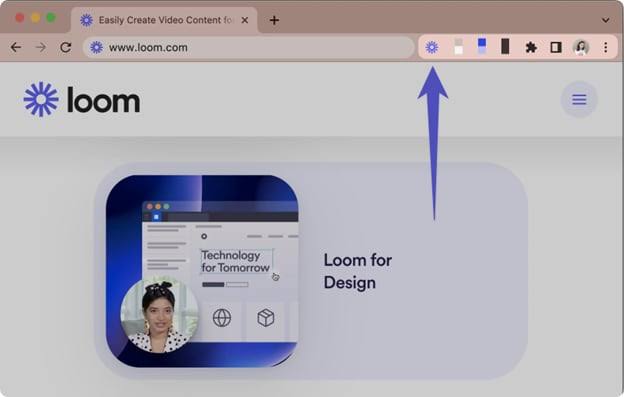
Loom shows up in several places, and each surface has a clear best use. The desktop applications for macOS and Windows are the most capable surface, offering the best system-audio capture and high-definition recording, and they are the recommended choice for anyone who records frequently or needs the most reliable capture. The browser extension, primarily for Chrome, is the quickest way to record directly from within the browser without a separate app, which suits people who live in web tools and want to record a tab or their screen on the fly. The web application at the Loom website provides access to your video library, sharing settings, editing, and account management from any browser. There are also mobile apps for recording and viewing on the go.
The browser extension is convenient and popular, and for many users it is their primary way of recording. It sits in the browser toolbar, and a click starts a recording of your screen, tab, or camera. However, the extension is also where some of the post-migration stability problems show up most visibly, with users reporting that recordings occasionally lag or fail and that the common fixes involve updating the extension, clearing the browser cache, or switching to the desktop app. For users who need maximum reliability, the desktop app is generally the more dependable surface than the extension.
Across all surfaces, the experience is designed to be low-friction, and when it works smoothly it is excellent. The consistency of having the same library and sharing model whether you record from the desktop app, the extension, or your phone is a genuine convenience, and recordings made on one surface are immediately available everywhere through your account. The main caveat is that the reliability across these surfaces has become less uniform since the infrastructure migration, which is covered in detail in the stability section of this review.
Login and the Website
Logging in to Loom and using the website is generally straightforward, but it is also an area where some users have encountered friction since the platform moved onto its new owner's infrastructure. Login is done through your Loom account, and for teams connected to the broader Atlassian ecosystem, authentication increasingly ties into Atlassian's account and identity systems. For most users this works without issue, but there have been consistent reports of login difficulties and authentication problems appearing alongside the migration, which is worth being aware of if you are relying on Loom for time-sensitive communication.
The Loom website is the hub for everything beyond recording: your video library, where all your recordings live and can be organized and searched; sharing and privacy controls, including password protection and domain-restricted sharing on paid plans; the editing interface; viewer insights and engagement tracking that show who watched your videos and how much they viewed; and account and billing management. The web experience is clean and functional, and the viewer analytics in particular are a genuinely useful feature for understanding whether the videos you send are actually being watched.
For administrators managing a team, the website is also where seat management, workspace settings, and security controls live. This is an important area to understand carefully, because the way seats are added and billed is the source of one of the most common complaints about Loom in 2026, covered in the pricing section. The administrative experience is capable, but the billing behavior around adding seats is something admins should approach with caution rather than assuming charges will be clearly flagged before they happen.
AI Features in 2026
The AI capabilities are the defining addition to Loom in the post-acquisition era, and they are genuinely useful when you have access to them. The headline features include automatically generated video titles, summaries, and chapters created without any manual editing, so a recording becomes navigable and skimmable the moment it is processed. The AI removes filler words and silences to polish a first-take recording. It can convert a screen recording into a structured document, a standard operating procedure, or a bug report, turning a spoken walkthrough into written documentation with a click. And it can transform recordings into tickets for issue trackers, bridging the gap between explaining a problem on video and logging it for action.
Beyond individual recordings, Loom added automated meeting recording, where it can join and record meetings on the major video-calling platforms and then generate meeting notes, action items, and recap emails automatically. This extends Loom from async screen recordings into the live-meeting documentation space, positioning it as a broader communication and documentation hub rather than just a recorder. The transcription and AI enhancements work across more than fifty languages, which is meaningful for international and distributed teams.
The significant catch with all of this is access. The AI features are not available on the free plan or even on the entry-level paid plan. They live exclusively on the higher-priced tier, and there is no way to add AI as a standalone option to a cheaper plan. This means that to get the AI capabilities that represent most of what is genuinely new and valuable about Loom in 2026, you have to commit to the top consumer tier. For teams that record video daily and will use the AI heavily, the time saved can justify the cost. For lighter users, the AI being locked behind the most expensive tier means the most compelling modern features are effectively out of reach unless they pay the premium, which is a major factor in how the value equation works out.
Loom Pricing in 2026
Loom's pricing in 2026 runs across four tiers. Here is the structure as verified in our research:
|
Plan |
Price |
What You Get |
|
Starter (Free) |
$0 |
Up to 25 videos per person, 5-minute maximum per recording, 720p, unlimited screenshots, basic editing, transcriptions, basic viewer engagement. Fills up fast for regular use. |
|
Business |
$15/user/mo (annual), ~$18 monthly |
Unlimited videos and recording length, up to 4K, trim and stitch editing, custom branding, video upload and download, privacy controls. No AI features. |
|
Business + AI |
$20/user/mo (annual), ~$24 monthly |
Everything in Business plus AI titles, summaries, and chapters, filler-word and silence removal, edit-by-transcript, text overlays and annotations, meeting recording and recaps. The only tier with AI. |
|
Enterprise |
Custom (contact sales) |
Everything in Business + AI plus SSO (SAML), SCIM provisioning, advanced privacy and retention controls, admin management, and enterprise security and uptime commitments. |
Pricing verified in 2026 research. Annual billing saves roughly 17 to 20 percent versus monthly. There is no way to add AI as a standalone feature; AI requires the Business + AI tier. A 14-day free trial of the AI tier is available. An education plan exists for verified educators and students. Annual billing under the new ownership uses fixed user brackets rather than exact seat counts in some cases, which can cause smaller teams to overpay by being pushed into a higher bracket.
The Pricing Frustrations Worth Knowing
Three pricing issues come up consistently and deserve attention before committing. First, the AI paywall. The entry-level Business plan deliberately excludes the AI features, which means if you assume that paying for Loom gets you the modern AI capabilities, you will be disappointed. The AI requires the top consumer tier, and Business without AI is in some ways a more limited version of the product than the marketing implies, since the features that make Loom feel current in 2026 are all gated above it.
Second, the per-seat math and surprise charges. Loom is priced per user per month, and the cost adds up quickly as a team grows. More concerning, users have reported being charged for added seats without a clear warning, with multiple accounts describing surprise invoices after adding team members, sometimes for significant amounts. The per-seat model means every change to your team affects your bill, and the interface does not always make the cost of adding a seat obvious before it happens. Administrators should treat seat changes carefully and verify the billing impact rather than assuming they will be clearly prompted.
Third, the billing-bracket behavior under the new ownership. Annual billing in some cases now uses fixed user tiers rather than exact seat counts, which means a team that sits just above a bracket boundary can end up paying for a much larger bracket than it actually needs, causing smaller teams to overpay. There have also been reports of bills changing unexpectedly following billing-system integration with the parent company. The practical guidance is to understand exactly what bracket and billing model you are on before committing to an annual plan, and to monitor your invoices rather than assuming they will match what you signed up for.
Post-Migration Stability and Performance
The most significant negative development for Loom in 2026 is a decline in the reliability that was once its hallmark. When Loom was a simpler, standalone product, its defining quality was that it just worked: you hit record, you got a video, you shared the link, every time. Since the platform began migrating onto its new owner's infrastructure, that reliability has become less dependable, and the change is noticeable enough that it materially affects our rating.
The specific problems that have been reported consistently include lag during recording and playback, audio that falls out of sync with the video, uploads that fail to complete, and login and authentication difficulties. These are not isolated one-off glitches. They have appeared consistently enough, across enough users, over a long enough period, to look systemic rather than incidental. For a tool whose entire value rests on being faster and more frictionless than a meeting, reliability problems are particularly damaging, because a recording that lags, loses audio sync, or fails to upload defeats the whole purpose of choosing video over a quick written message.
There are common workarounds that resolve many of these issues for many users, including keeping the browser extension updated, clearing the browser cache, and switching from the extension to the desktop app, which tends to be the more stable surface. For users who have not been affected by the stability problems, Loom continues to feel like the reliable tool it always was. But the fact that a meaningful share of users have been affected, and that the problems track with the infrastructure migration rather than being random, represents a genuine regression from the dependability that made Loom popular. Anyone evaluating Loom in 2026 for a workflow where reliability is non-negotiable should weigh this carefully and test thoroughly before committing to an annual plan.
Loom Alternatives in 2026
Because reliability and pricing have become real considerations, it is worth understanding the kinds of alternatives available, so you can make an informed choice rather than defaulting to Loom out of habit. The async screen-recording and video-messaging space has more credible options in 2026 than it did a few years ago, and several of them compete directly on the points where Loom has weakened.
The most common reasons people look at alternatives are price and simplicity. Several competing tools offer lighter, faster recording experiences at lower price points, and some include screen recording bundled into a broader work-management or productivity suite, which can make them more economical for teams that already use that suite or that do not need Loom's full feature set. For teams whose need is simply fast, reliable screen recording and sharing without the AI layer, a simpler and cheaper tool can deliver the core value Loom is known for at a fraction of the per-seat cost.
There are also alternatives oriented toward different goals than async messaging. If your actual aim is to produce polished, highly produced product-demo or marketing videos, dedicated demo and screen-production tools are built specifically for that and will serve you better than Loom, which is fundamentally a fast screen recorder rather than a production studio. And for teams that want multi-format quick capture, including screenshots, GIFs, and annotated images alongside video, some tools offer more flexibility than Loom's video-focused approach. There are also free and open options for users whose needs are basic and who are comfortable with a less polished experience.
The honest framing on alternatives is this: Loom is still one of the best tools in its category for its specific strength, which is fast async video messaging, especially for teams in the Atlassian ecosystem. But its weakened reliability, its steep AI paywall, and its per-seat pricing mean it is no longer the automatic default it once was. For a new team evaluating options in 2026, the sensible approach is to trial Loom alongside one or two alternatives on your actual workflow before committing, rather than assuming Loom is the obvious choice. For an established team already invested in Loom and not significantly affected by the stability issues, the collaboration features, viewer analytics, and integrations are usually worth staying for.
User Experience: Strong Core, Rougher Edges
The day-to-day experience of using Loom in 2026 is genuinely good at its center and frustrating at its margins, and both halves are real. When everything works, the core workflow of record, share, and collaborate is excellent. The speed from hitting record to having a shareable link is still best in class, the viewer analytics and commenting create real collaborative value, and the instant hosting means you never deal with files or uploads in the normal flow. For teams that have built async video into how they communicate, Loom delivers a workflow that genuinely replaces meetings and saves time, and that value is the reason it remains widely adopted and well regarded despite its problems.
The AI features, when you have access to them on the top tier, add meaningfully to the experience. Having a recording automatically titled, summarized, and chaptered, with filler words removed and action items extracted, turns a rough spoken walkthrough into something polished and navigable without any manual effort. For high-volume users, this is a real time saver and one of the strongest reasons to be on the AI tier. The integration with Jira and Confluence is also a genuine advantage for teams already in that ecosystem, letting video slot naturally into existing workflows rather than sitting in a separate silo.
The frustrations are equally real and cluster in a few areas. The free plan's five-minute cap and video limit push users toward paying quickly, often before they have fully evaluated the tool, since most explanations and tutorials run longer than five minutes and the free tier gets exhausted within the first week of real use. The aggressive prompting to upgrade to the AI tier feels pushy to many users. The per-seat pricing and the surprise-charge billing behavior create cost anxiety and occasional unpleasant invoices. And the post-migration stability problems, when they hit, undercut the reliability that is supposed to be Loom's foundation. The overall experience is of a strong, valuable core product that has accumulated friction around its edges since changing ownership.
The balanced way to characterize the experience is that Loom is still very good at the thing it is for, but it asks more of you in cost and tolerance for occasional unreliability than it used to. If you record video regularly, work in an async-first team, and especially if you are in the Atlassian ecosystem, the strengths clearly outweigh the frustrations. If you are a light user, highly price-sensitive, or need guaranteed reliability, the frustrations weigh more heavily and an alternative may serve you better.
Pros and Cons
What Loom Gets Right
The core workflow of record, share, and collaborate is still best in class, with the fastest path from hitting record to having a shareable link of any tool in the category
Instant hosting with no uploading or file transfer, so a recording is ready to share the moment you stop recording
Viewer analytics and engagement tracking show who watched your videos and how much they viewed, which is genuinely useful for understanding whether your videos land
Timestamped comments and reactions enable asynchronous discussion attached directly to the relevant moment in a video
The AI features on the top tier generate titles, summaries, and chapters, remove filler words and silences, extract action items, and convert recordings into documents and tickets, turning rough recordings into polished, navigable, actionable content
Automated meeting recording with AI notes and recap emails for the major video-calling platforms extends Loom beyond async recordings into live-meeting documentation
Deep integration with Jira and Confluence is a real advantage for teams already in the Atlassian ecosystem, letting video slot into existing workflows
Transcription and AI enhancements work across more than fifty languages, supporting international and distributed teams
Multiple recording surfaces, desktop apps, browser extension, web, and mobile, with a consistent library and sharing model across all of them
Where Loom Falls Short
The free plan caps recordings at five minutes and limits how many videos you can keep, which most regular users exhaust within their first week
Almost every feature worth paying for, including all the AI tools and advanced editing, lives behind the top consumer tier, with no way to add AI as a standalone option
The entry-level Business plan excludes AI, so paying for Loom does not get you the modern features unless you pay for the most expensive consumer tier
Per-seat pricing adds up quickly, and users have reported surprise charges when seats are added without a clear warning before billing
Annual billing in some cases uses fixed user brackets rather than exact seat counts, causing smaller teams to overpay by being pushed into a higher bracket
Since the infrastructure migration under new ownership, lag, audio sync problems, failed uploads, and login difficulties have been reported consistently enough to look systemic rather than isolated
The decline in reliability is a genuine regression from the rock-solid dependability that made Loom popular in the first place
Aggressive prompting to upgrade to the AI tier feels pushy to many users
Frequently Asked Questions About Loom (2026)
1. What is Loom and how does it work?
Loom is an asynchronous video messaging tool that lets you record your screen, your webcam, or both, and instantly share the recording as a link. The workflow is simple: you hit record, talk over your screen for as long as you need, stop recording, and immediately get a shareable link with no uploading or file transfer. The recipient watches whenever it suits them, can leave timestamped comments, and can react. The whole point is to replace meetings and long written explanations with quick video, which is especially valuable for remote and distributed teams working across time zones. A short Loom that replaces a thirty-minute meeting is a genuine productivity win. In 2026, after being acquired by Atlassian, Loom has added a substantial AI layer that automatically generates titles, summaries, and chapters, removes filler words and silences, extracts action items, and can convert recordings into documents or tickets, along with deep integration into Jira and Confluence. The best way to think of Loom is as a voice note with a screen attached: fast, low-stakes, and quicker than a meeting.
2. Is Loom free?
Loom has a free plan called Starter, but it is limited in ways that most regular users hit quickly. The free plan allows up to 25 videos per person, caps each recording at five minutes, records at 720p, and includes unlimited screenshots, basic editing, transcriptions, and basic viewer engagement. The five-minute cap is the most common frustration, because most explanations, tutorials, and demos run longer than five minutes, so regular users tend to exhaust the free tier within their first week. The video count is also a total cap rather than a monthly allowance, so you have to delete old videos to make room. Importantly, the free plan does not include any of the AI features and does not allow downloading your own videos. For light, occasional use, the free plan can work, but for anyone using Loom regularly it functions more as a trial that pushes you toward a paid plan. Paid plans start at the Business tier, with the AI features requiring the higher Business plus AI tier.
3. How much does Loom cost in 2026?
Loom runs four tiers in 2026. The Starter plan is free with the limits described above. The Business plan is around $15 per user per month on annual billing, or roughly $18 on monthly billing, and it removes the caps, giving unlimited videos and recording length, up to 4K resolution, trim and stitch editing, custom branding, and video upload and download, but it does not include AI. The Business plus AI plan is around $20 per user per month on annual billing, or roughly $24 monthly, and it is the only tier with the AI features, adding auto-generated titles, summaries, and chapters, filler-word and silence removal, edit-by-transcript, overlays and annotations, and meeting recording and recaps. Enterprise is custom-priced and adds single sign-on, provisioning, advanced security and retention controls, and admin management. Annual billing saves roughly 17 to 20 percent versus monthly. Two things to watch on cost: there is no way to add AI as a standalone feature, so getting AI means paying for the full Business plus AI tier, and the per-seat pricing adds up quickly as your team grows, so calculate the total for your actual team size rather than focusing on the per-user figure.
4. What is the Loom browser extension and which surface should I use?
Loom is available as a browser extension, primarily for Chrome, as desktop apps for macOS and Windows, as a web application, and as mobile apps. Each surface has a best use. The desktop apps are the most capable and reliable surface, offering the best system-audio capture and high-definition recording, and they are the recommended choice for frequent recording or when you need maximum dependability. The browser extension is the quickest way to record directly from within the browser without opening a separate app, which suits people who work mostly in web tools and want to record a tab or their screen on the fly. The web application is where your video library, sharing settings, editing, analytics, and account management live. The mobile apps handle recording and viewing on the go. One practical note: the browser extension is where some of the post-migration stability problems show up most visibly, and if you experience lag or failed recordings, the common fixes are updating the extension, clearing your browser cache, or switching to the more stable desktop app.
5. What AI features does Loom have in 2026?
Loom's AI features, available on the Business plus AI tier, are the biggest addition in the post-acquisition era. They include automatically generated video titles, summaries, and chapter markers created without any manual editing, so a recording becomes navigable and skimmable as soon as it is processed. The AI removes filler words and silences to polish a first-take recording. It can convert a screen recording into a structured document, a standard operating procedure, or a bug report, and can turn recordings into tickets for issue trackers. Loom also added automated meeting recording, where it joins and records meetings on the major video-calling platforms and then generates meeting notes, action items, and recap emails automatically. Transcription and AI enhancements work across more than fifty languages. These features are genuinely useful and turn rough recordings into polished, actionable content, but the significant catch is that they are only available on the higher-priced Business plus AI tier. There is no way to add AI to a cheaper plan, so accessing the modern AI capabilities means committing to the top consumer tier.
6. Why is Loom having stability and login problems?
Since Loom began migrating onto its new owner's infrastructure following the acquisition, there have been consistent reports of performance and reliability problems, including lag during recording and playback, audio falling out of sync with video, uploads failing to complete, and login and authentication difficulties. These problems have appeared consistently enough, across enough users, over a long enough period, to look systemic rather than like isolated glitches, and they track with the infrastructure migration rather than being random. This represents a real regression from the dependability that was once Loom's defining quality, when it simply worked every time. If you experience these issues, the common workarounds that resolve them for many users include keeping the browser extension updated, clearing your browser cache, and switching from the extension to the desktop app, which tends to be the more stable surface. Many users are not affected and continue to find Loom as reliable as ever, but the fact that a meaningful share have been affected is a genuine consideration. If reliability is non-negotiable for your workflow, test Loom thoroughly before committing to an annual plan.
7. Why did my Loom bill change or charge me unexpectedly?
Unexpected billing is one of the more common complaints about Loom in 2026, and there are a few reasons it happens. First, the per-seat model means that when an administrator adds a team member to a workspace, Loom charges for the new seat, and users have reported that this happens sometimes without a clear confirmation or warning before the charge, leading to surprise invoices. Second, since the billing system was integrated with the parent company, some users have reported bills changing following that integration. Third, annual billing in some cases now uses fixed user brackets rather than exact seat counts, so a team that grows just past a bracket boundary can be pushed into a much larger and more expensive bracket than the number of seats it actually added would suggest. The practical guidance is to treat seat additions carefully and verify the billing impact before adding users rather than assuming you will be clearly warned, to understand exactly which billing bracket and model you are on before committing to an annual plan, and to monitor your invoices rather than assuming they will match what you originally signed up for.
8. What are the best alternatives to Loom in 2026?
Because Loom's pricing has risen and its reliability has become less dependable, it is worth knowing the kinds of alternatives available. The space has several credible options in 2026. For teams that want simply fast, reliable screen recording and sharing without the AI layer, lighter and cheaper tools can deliver the core value Loom is known for at a fraction of the per-seat cost, and some screen recorders come bundled into broader work-management or productivity suites, which can be more economical for teams that already use that suite. For teams whose actual goal is to produce polished, highly produced product-demo or marketing videos rather than quick async messages, dedicated demo and screen-production tools are built specifically for that and will serve better than Loom, which is fundamentally a fast recorder rather than a production studio. For users who want multi-format quick capture including screenshots, GIFs, and annotated images alongside video, some tools offer more flexibility than Loom's video-focused approach. And there are free and open options for basic needs. The sensible approach for a new team is to trial Loom alongside one or two alternatives on your real workflow before committing, rather than defaulting to Loom out of habit, since it is no longer the automatic choice it once was.
9. Is Loom good for teams and businesses?
Loom is well suited to teams and businesses, particularly async-first and remote teams that communicate across time zones, and it is especially strong for teams already using the Atlassian ecosystem of Jira and Confluence, since the integration lets video slot naturally into existing workflows. The collaboration features, including timestamped comments, viewer analytics that show who watched and how much, secure sharing with password protection and domain management, and the AI tools on the top tier, create genuine value for teams doing regular async communication, client walkthroughs, training videos, and documentation. Small and mid-sized teams in consulting, marketing, software, and similar fields are among the most active and satisfied users. The considerations for teams are the per-seat cost, which adds up and requires calculating the total for your actual team size, the billing behavior around adding seats that has caught some teams off guard, and the post-migration stability issues that can affect time-sensitive communication. For a team that records video regularly, works asynchronously, and can absorb the per-seat cost, Loom delivers real productivity value. For a team that is highly price-sensitive or needs guaranteed reliability, the cost and stability considerations weigh more heavily and an alternative may fit better.
10. Is Loom worth it in 2026?
Loom is worth it for the specific user it is built for: an async-first team that records video regularly, values replacing meetings with quick recordings, and ideally already works in the Atlassian ecosystem. For that user, the core recording and sharing experience is still best in class, the AI features on the top tier deliver real time savings by turning rough recordings into polished, navigable, actionable content, and the integrations make video a natural part of existing workflows. The productivity value of replacing meetings with short Looms is genuine and, for heavy users, easily justifies the cost. The reasons for caution are real and concentrated in three areas. The free plan is too limited for regular use and pushes you to pay quickly. The AI features that represent most of what is new and valuable are locked behind the most expensive consumer tier, with per-seat pricing that adds up and billing behavior that has surprised some teams. And the post-migration stability problems represent a genuine regression from the reliability that made Loom popular. The honest summary is that Loom remains one of the best tools in its category, with a steeper price and more rough edges than it used to have. If you are a heavy async-video user in the right ecosystem, it is worth it; if you are a light or highly price-sensitive user, trial it against cheaper alternatives before committing, and stress-test the reliability and the AI features during the free trial before locking into an annual plan.
Icon polls Verdict
Loom earns a 3.5 out of 5 from Icon Polls in 2026. The rating reflects a tool with a genuinely excellent core and real, valuable AI additions, held back by a steep paywall, per-seat pricing frustrations, and a decline in the reliability that was once its signature strength.
At its center, Loom is still the best at what it was built to do. The speed from hitting record to having a shareable link remains unmatched, the instant hosting and viewer analytics create real collaborative value, and the async model genuinely replaces meetings and saves time for distributed teams. The AI features added since the acquisition, when you have access to them, meaningfully extend the product, turning rough recordings into titled, summarized, chaptered, polished content and bridging video into documents, tickets, and meeting recaps. For an async-first team in the Atlassian ecosystem that records daily, Loom is genuinely excellent and the strengths clearly outweigh the frustrations.
The 3.5 rather than higher reflects the friction that has accumulated around that strong core. The free plan's five-minute cap exhausts within a week of real use. The AI features that define modern Loom are locked behind the most expensive consumer tier with no standalone option. The per-seat pricing adds up and has produced surprise charges and confusing billing brackets that have caught teams off guard. And most importantly, the post-migration stability problems, the lag, the audio sync failures, the failed uploads, and the login difficulties, represent a real regression from the rock-solid dependability that made Loom popular in the first place. These are not minor complaints; they go to the heart of why people chose Loom.
The practical guidance from Icon Polls: if you record video regularly, work in an async-first team, and especially if you use Jira and Confluence, Loom is worth it, and the Business plus AI tier is the one that makes sense since the cheaper Business tier omits the features that make Loom feel current. Start with the free plan to test the core workflow, then use the AI trial to stress-test the features and the reliability on your real work before committing to an annual plan. Watch the per-seat math carefully, verify the billing impact before adding seats, and understand your billing bracket before locking in annually. And if you are a light or highly price-sensitive user, or if guaranteed reliability is non-negotiable, trial Loom against a cheaper or simpler alternative before defaulting to it, because in 2026 it is no longer the automatic choice it once was. Loom is still one of the best tools in its category. It just asks more of you, in cost and in tolerance for occasional rough edges, than it used to.











