Quick Verdict
Pinecone is genuinely useful for what it is designed to do, which is providing managed vector search infrastructure for AI applications like RAG systems and semantic search. A 3.0 rating reflects that Pinecone excels in its core purpose but comes with real tradeoffs that matter depending on your situation. For teams building AI applications and willing to accept vendor lock-in, Pinecone works well. The serverless architecture removes infrastructure headaches. The API is clean and well-documented. Setup is fast. Performance is solid for most use cases. The ecosystem integration with LangChain, LlamaIndex, and OpenAI is excellent. For teams under 10 million vectors, Pinecone is likely the lowest total cost of ownership once you factor in operations time you would spend managing self-hosted alternatives. The reasons it rates 3.0 and not higher are honest. Pricing at scale gets expensive, especially compared to self-hosted Milvus or Weaviate. The platform is cloud-only with no self-hosted option. You cannot escape vendor lock-in once you build on Pinecone. The platform is single-purpose, only handling vectors, not relational data. Learning vector embeddings has a learning curve if you are new to them. For teams that fit the use case and accept the constraints, Pinecone delivers. For teams with different needs, look elsewhere.
At a Glance: Icon Polls Ratings
Here's how Pinecone scored across what we evaluated in 2026:
|
Category |
Stars |
Score |
|
Setup and Ease of Use |
★★★★☆ |
4/5 |
|
API and Developer Experience |
★★★★☆ |
4/5 |
|
Query Performance and Latency |
★★★★☆ |
3.5/5 |
|
Free Tier Usefulness |
★★★★☆ |
3.5/5 |
|
Pricing and Value |
★★★☆☆ |
3/5 |
|
Ecosystem Integration |
★★★★☆ |
4/5 |
|
Scalability at Enterprise |
★★★☆☆ |
2.5/5 |
|
Overall |
★★★☆☆ |
3/5 |
What Is Pinecone?
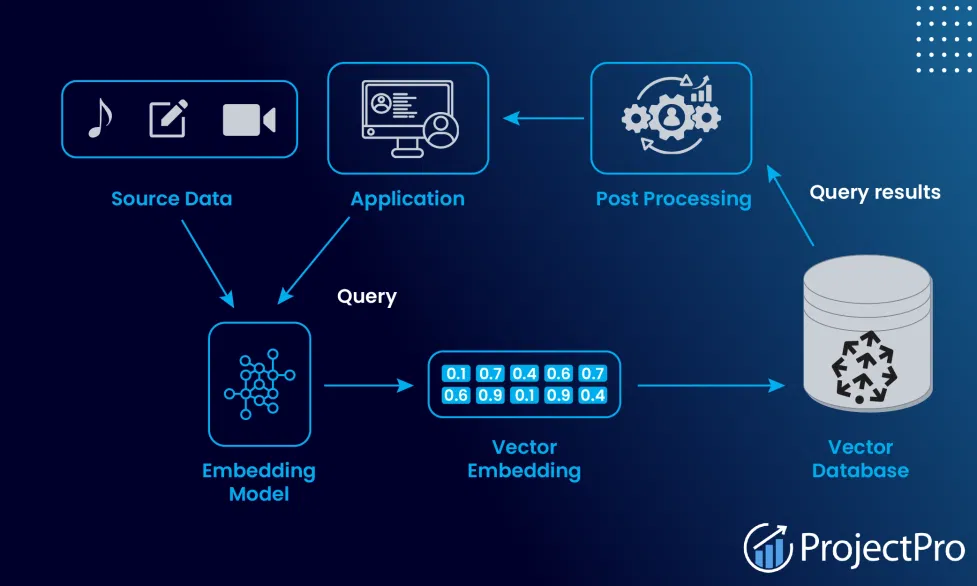
Pinecone is a fully managed vector database built specifically for AI applications. It is a cloud-only service created by Edo Liberty, formerly head of Amazon AI Labs. The core function is storing and searching vector embeddings, which are numerical representations of data that capture semantic meaning. You send Pinecone vectors from your embedding models, and it returns the most similar vectors based on distance metrics, all in milliseconds even across billions of records. This is the foundation for RAG systems where your AI assistant retrieves relevant documents before answering questions. Pinecone handles the infrastructure, scaling, and indexing. You just provide vectors and queries through an API.
Sign-Up and Console Access
Signing up for Pinecone is straightforward. You go to the website, create an account, and get immediate access to the console. You can start with the free tier right away without a credit card. The console is clean and modern, with clear navigation to create indexes and manage your data. Getting your first index running takes minutes, not hours. That is genuinely impressive compared to setting up your own infrastructure.
The App and Download
Pinecone is not downloaded software. It is a cloud service accessed through your web browser console or through API clients for Python, Node.js, Java, and Go. There is no desktop app to download. Everything runs in your web browser or through code in your application. That is typical for modern cloud services. No installation means no complexity, but it also means you are locked into the cloud infrastructure.
Free Tier and Pricing
The free tier is genuinely useful for building and testing. You get a free serverless index with limited queries and storage. The free tier is enough to build a proof of concept or small prototype. For production, you move to paid plans. The Standard plan has a fifty dollar monthly minimum and charges for read units, write units, and storage consumed. The Enterprise plan starts at five hundred dollars monthly and adds compliance, dedicated support, and custom security.
|
Plan |
Price |
What You Get |
|
Free |
$0 |
Limited serverless index, free quota on reads/writes, good for testing and small projects. No credit card needed. |
|
Standard |
$50/month minimum |
Serverless indexes with usage-based pricing for reads, writes, storage. Scales from thousands to billions of vectors. |
|
Enterprise |
$500/month minimum |
Dedicated support, higher capacity limits, private networking, CMEK encryption, HIPAA compliance. Custom pricing for large scale. |
Pricing as we found it in 2026. Serverless indexes charge for read units, write units, and storage separately. Dedicated Read Nodes available for predictable latency at high throughput. Minimum commitments apply to paid plans.
Is The Pricing Fair?
For most teams under 10 million vectors, the pricing is fair when you factor in the operations time you would spend managing self-hosted alternatives. You avoid hiring DevOps engineers to tune Kubernetes clusters. At very large scale with hundreds of millions of vectors and consistent query patterns, self-hosted Milvus or Weaviate becomes cheaper. The pricing is pay-as-you-go which is good for variable workloads but bad if you have predictable high throughput. For those cases, Dedicated Read Nodes help but add cost.
Setup and Developer Experience
This is where Pinecone shines. Getting started is genuinely simple. Create an account, create an index through the console, generate an API key, and start pushing vectors through the API. The documentation is clear with examples in multiple languages. The error messages are helpful. The Python SDK is straightforward. If you have built other API integrations, Pinecone is approachable. The learning curve is less about the tool and more about understanding vector embeddings if you are new to them.
Performance and Query Latency
Query latency is solid. Pinecone delivers sub-100 millisecond response times on large indexes, often in the 20 to 50 millisecond range depending on index size and configuration. That is fast enough for real-time applications. Compared to self-hosted solutions, Pinecone's managed approach means consistent performance without tuning. You do not have to worry about shard balancing or index optimization. It just works.
Ecosystem Integration
Pinecone integrates deeply with the AI stack. LangChain, LlamaIndex, OpenAI, Cohere, Hugging Face, all have native Pinecone integrations. If you are building a RAG system with LangChain and OpenAI, Pinecone works seamlessly. The integration ecosystem is strong, which matters because you will be connecting Pinecone to other services constantly.
Cloud-Only and Vendor Lock-In
Pinecone is cloud-only. There is no self-hosted option, no downloadable binary, no way to run it on-premise. If you need on-premise for compliance or privacy, look at Qdrant or Milvus. The vendor lock-in is real. Once you build your entire RAG stack on Pinecone, migrating away means exporting all your vectors and rebuilding indexes on another platform. There is no standard vector database protocol. That lock-in matters when making the decision to adopt.
Alternatives to Pinecone
Weaviate is open-source and has a managed cloud version. Milvus is open-source and can be self-hosted or managed through Zilliz Cloud. Qdrant is another popular open-source vector database. MongoDB Atlas Vector Search and AWS OpenSearch Vector let you handle vectors on top of existing databases. pgvector is an extension for PostgreSQL if you want to keep vectors with relational data. For pure managed simplicity, Pinecone is the easiest. For cost at scale or open-source requirements, alternatives make sense. For compliance and on-premise requirements, you need something other than Pinecone.
Security and Compliance
Pinecone is SOC 2 Type II certified and HIPAA compliant on Enterprise plans. ISO 27001 and GDPR certification are documented. Customer data is not used for training Pinecone models. You can delete vectors anytime. These credentials matter for enterprises handling sensitive data. The free and Standard plans do not sign HIPAA business associate agreements, so healthcare use requires Enterprise.
User Experience Overall
The experience of using Pinecone is smooth for teams that fit the product. Setup is fast. The API is clean. Performance is predictable. Integration is straightforward. The learning curve is manageable. For teams building AI applications and comfortable with cloud services, Pinecone delivers. The friction points are the cost at scale, the cloud-only nature, vendor lock-in, and the inability to store relational data alongside vectors.
Pros and Cons
What Works Well
Serverless architecture with zero infrastructure management
Fast setup, get running in minutes not days
Clean, well-documented API with SDKs for multiple languages
Solid query performance with sub-100ms latency
Generous free tier good for testing and prototypes
Deep integration with LangChain, OpenAI, and AI frameworks
SOC 2 Type II, HIPAA, ISO 27001, GDPR certified
Reasonable pricing for teams under 10 million vectors
What Falls Short
Cloud-only, no self-hosted or on-premise option
Vendor lock-in, migrating away requires rebuilding indexes
Pricing at very large scale becomes expensive versus self-hosted
Cannot store relational data alongside vectors
Closed-source, no visibility into indexing algorithms
Learning curve for understanding vector embeddings
$50 monthly minimum for production use
Enterprise tier expensive for compliance requirements
Frequently Asked Questions About Pinecone (2026)
1. Is Pinecone worth it for building RAG systems?
Yes, especially if you want to avoid managing vector database infrastructure. For RAG pipelines, Pinecone works well. It handles embedding storage and similarity search at scale. If you want to focus on your application rather than database operations, Pinecone is worth considering. Compare pricing at your expected scale before deciding.
2. How much does Pinecone cost for a production application?
The Standard plan has a fifty dollar monthly minimum plus usage-based billing for read units, write units, and storage. For a small application with thousands of vectors and moderate queries, you might stay near the minimum. For applications with millions of vectors and high query volume, costs climb significantly. Calculate your expected usage before committing.
3. Can I use Pinecone if I need my data on-premise?
No, Pinecone is cloud-only. There is no self-hosted option. If you need on-premise or air-gapped deployment, use Qdrant or Milvus instead. Both can be self-hosted and have managed cloud versions if you prefer later.
4. Is Pinecone suitable for healthcare or HIPAA compliance?
The Enterprise tier is HIPAA compliant and signs business associate agreements. The free and Standard tiers do not. If you need HIPAA compliance, you must use Enterprise, which starts at five hundred dollars monthly. If your budget cannot support that, look at alternatives or enterprise PostgreSQL with pgvector.
5. How does Pinecone compare to Weaviate?
Weaviate is open-source and can be self-hosted or managed in the cloud. Pinecone is proprietary and cloud-only. Weaviate gives you more control and avoids vendor lock-in. Pinecone is easier to set up and requires zero infrastructure management. The choice depends on whether you prioritize simplicity or control.
6. What happens if I want to leave Pinecone later?
You export your vectors and rebuild indexes on another platform. There is no standard vector database protocol, so the export format and rebuilding process depends on where you move to. The lock-in is real. Plan for this before building your entire stack on Pinecone.
7. Does Pinecone integrate with LangChain?
Yes, LangChain has native Pinecone integration. Setting up a RAG pipeline with LangChain and Pinecone is straightforward. The integration is well-documented and widely used. If you are already using LangChain, Pinecone works seamlessly.
8. Is Pinecone suitable for semantic search at scale?
Yes, Pinecone is designed for this. Teams like Notion and Gong use Pinecone for semantic search. If you need to search through billions of documents fast by semantic meaning, Pinecone handles it. Performance stays solid even at massive scale if you accept the cost.
9. Can I store structured data in Pinecone alongside vectors?
No, Pinecone only stores vectors and metadata filtering. If you need to store and query relational data alongside vectors, you need a different solution. PostgreSQL with pgvector or MongoDB Atlas Vector Search might be better if relational data matters.
10. Should I use Pinecone or build my own vector search?
For most teams, use Pinecone. Building your own vector database requires infrastructure expertise you probably do not have or want to spend time on. Pinecone lets you focus on your application. Only build your own if you have very specific requirements Pinecone cannot meet.
Icon polls Verdict
Pinecone earns a 3.0 out of 5. That rating reflects a product that is genuinely good at what it is designed for, which is providing managed vector search infrastructure, but comes with real tradeoffs that matter depending on your situation. The developer experience is excellent. The setup is fast. The API is clean. The performance is solid. Integration with the AI ecosystem is strong. For teams building RAG systems and willing to accept vendor lock-in and cloud-only infrastructure, Pinecone delivers.
The reasons it does not rate higher are honest. Pricing at large scale becomes expensive compared to self-hosted alternatives. The cloud-only nature is limiting for some organizations. Vendor lock-in means you are committed once you build on Pinecone. The platform is single-purpose, only handling vectors. These are not flaws for most teams, but they are real constraints.
The 3.0 is fair because Pinecone works well for its intended use case but is not universally great. If your needs match Pinecone's design, it is excellent. If your needs diverge, you will hit limitations. Evaluate your requirements carefully before committing.











