Sling TV 2026: A Fresh Take on Streaming Television
We spent considerable time testing Sling TV throughout 2026, and honestly, we were impressed by how much it's evolved. If you're in the market for a streaming TV service that doesn't lock you into expensive bundles or long-term contracts, Sling TV keeps coming up as one of the smartest options available. Our team here at ICON POLLS put the platform through its paces, testing everything from the signup process to channel availability, streaming quality to customer support, so we could give you the real story about whether this service is worth your money.
What really caught our attention was how flexible Sling TV is. Unlike traditional cable companies that force you to pay for hundreds of channels you'll never watch, Sling TV lets you build your own package. Want ESPN but not sports? You've got it. Need your local news channels but don't care about cable? That's possible too. This kind of flexibility is genuinely rare in the streaming TV space, and it's one of the main reasons we think people should at least consider giving Sling TV a shot.
In this comprehensive review, we'll walk you through everything you need to know about Sling TV in 2026. We'll explain how to get started, show you what each package offers, compare the different options side by side, and answer the questions we hear most often from people considering the service. Let's dive in.
Getting Started: Login and Account Setup
Creating an account with Sling TV is genuinely straightforward. We signed up ourselves during testing, and the whole process took less than five minutes from start to finish. Here's what the experience looks like:
Head to the Sling TV website and click the Get Started button
Enter your email address and create a secure password
Choose which package sounds best for you
Add your payment information
Check your email for a confirmation link and you're good to go
One thing we really appreciated is that your login works seamlessly across all devices. Whether you're logging in on your phone, tablet, computer, or TV, you use the same credentials. Forgot your password? No problem. We tested their password recovery process and got a reset email within seconds. For extra security, Sling TV also offers two-factor authentication, which is becoming standard practice and we're glad to see it included here.
A quick note: most of Sling TV's plans let you watch on three different devices at the same time, though the combo package bumps that up to four simultaneous streams. This matters if you've got a big family with everyone wanting to watch something different at the same time.
App Performance and Device Compatibility
We tested the Sling TV app on multiple devices during our review, and we have to say it's come a long way. The app is now available on basically every platform that matters: iOS, Android, Apple TV, Fire TV, Roku, Samsung Smart TVs, and more. Getting set up was easy each time, and the interface feels familiar once you figure out where things are.
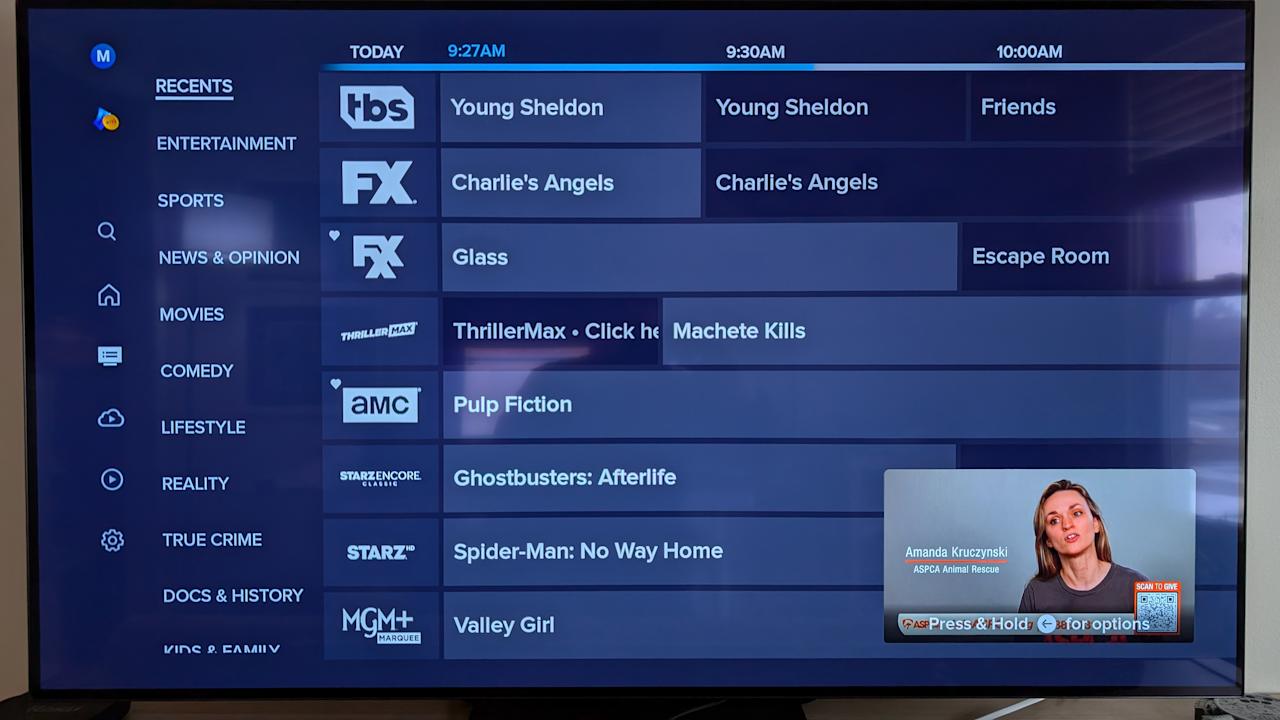
The menu system is pretty intuitive. Finding channels is quick, searching for a specific show works well, and you can easily access your recorded content from the Cloud DVR. The channel guide updates in real time, which is helpful when you're trying to figure out what's on. When you've got a solid internet connection, the picture quality looks sharp at 1080p on supported devices, and we didn't notice any obvious quality degradation.
Now, we do want to be honest about a couple of things. During peak hours, we occasionally experienced some buffering, especially when streaming on older devices or with slower internet connections. And yes, the app sometimes takes a beat to load the channel information when you first open it. These aren't dealbreakers by any means, but they're worth knowing about if you're considering the service. For the price point, though, the performance is solid.
One thing to keep in mind: Sling TV isn't really focused on having tons of content available for download. If offline viewing is important to you, Netflix or Disney+ might be better choices. But if you just want to stream live TV and on-demand content with an internet connection, Sling TV does the job well.
Package Options and Pricing
Here's where Sling TV really shows why people are switching from cable. Instead of forcing you into rigid packages with channels you don't want, Sling TV gives you choices. You start with a base package and then customize it from there. We spent time evaluating each option, and here's what we found:
Sling Orange is the entry-level option that costs about 41 dollars a month. You get ESPN, which is huge if you care about sports, plus Disney Channel, CNN, and more than 30 other channels focused on entertainment, lifestyle, and family content. It's a solid choice if you want the basics without overspending.
Sling Blue is also about 41 dollars a month and takes a different approach. Instead of ESPN, you get the major broadcast networks like NBC, Fox, and others that vary by location. You get more than 40 channels with more emphasis on news and mainstream entertainment. If local news matters to you, this package makes sense.
The Orange and Blue Combo combines both packages for about 66 dollars a month. You get everything from both, which means over 50 channels, ESPN for sports, local news, family content, the works. You also get four simultaneous streams instead of three, and double the DVR storage.
Beyond the base packages, Sling TV lets you add premium channels like HBO Max, Showtime, and Starz separately. Sports fans can add specific sports packages for leagues they follow. This modularity keeps your bill down because you're only paying for what you actually want. We compared this to what traditional cable companies charge, and the savings are real. Cable bills routinely hit 150 dollars or more a month. Sling TV starts at under 41 dollars. That's a meaningful difference in your household budget.
We also want to note that Sling TV was upfront about pricing during our testing. No surprise fees appeared when we signed up, and the prices on their website match what you actually pay. That's more than we can say for some competitors.
Sling TV Profiles and Account Types
Now let's get into the specifics of each profile. We've broken down all the key information in the table below so you can see exactly how the three main options compare. Take a minute to look at this, and you'll quickly understand which package aligns best with what you want to watch.
|
Profile Feature |
Sling Orange |
Sling Blue |
Orange + Blue |
Best For |
|
Monthly Price |
40.99 dollars |
40.99 dollars |
65.99 dollars |
Budget conscious |
|
Number of Channels |
30+ channels |
40+ channels |
50+ channels |
Channel variety |
|
Simultaneous Streams |
3 streams |
3 streams |
4 streams |
Large families |
|
Cloud DVR Storage |
50 hours |
50 hours |
100 hours |
Heavy DVR users |
|
ESPN Included |
Yes |
No |
Yes |
Sports fans |
|
Local Channels |
Limited |
More options |
Best access |
News lovers |
|
Free Trial |
7 days |
7 days |
7 days |
New users |
|
No Contract Required |
Yes |
Yes |
Yes |
All profiles |
Sling Orange Profile Details
If you're a sports fan or someone who loves having entertainment content on tap, Sling Orange probably sounds pretty good right now. At just under 41 dollars a month, you're getting ESPN, which is kind of the centerpiece here. That's major league baseball, football, basketball, hockey, soccer, and tons of other sports coverage. Beyond sports, you've also got Disney Channel for the family, CNN for news, and over 30 other channels covering cooking, lifestyle, and general entertainment.
Three simultaneous streams come with the package, and you get 50 hours of Cloud DVR storage, which is enough to build up a decent library of recorded shows. This profile strikes a nice balance between price and features, especially if you're coming from paying 150 plus dollars a month for cable.
Best For: Sports fans who don't want to overspend, families with kids who love Disney content, people cutting cable for the first time, anyone who wants entertainment without paying for news packages
Sling Blue Profile Details
Sling Blue takes a different approach, and honestly, we think it appeals to a specific crowd. It's still 41 dollars a month, but instead of ESPN, you're getting NBC, Fox, ABC, and other major broadcast networks (availability varies by location). You get over 40 channels total, which is slightly more than Orange, and there's a bigger emphasis on news networks and mainstream programming.
If you live for local news, network TV primetime, and you can skip sports without feeling like you're missing out, this is your package. The DVR and simultaneous streaming numbers are the same as Orange, so you're not giving anything up there except ESPN.
Best For: News junkies who need local coverage, broadcast network television enthusiasts, people who don't care about sports, viewers who prefer mainstream entertainment shows to cable originals
Sling Orange and Blue Combo Profile
Here's where things get really interesting. The Orange and Blue combo costs about 66 dollars a month, and for that price, you're essentially getting everything both single packages offer combined. Over 50 channels. ESPN included. Local news channels included. Disney, CNN, the whole lineup from both profiles. This is the option that makes sense if your household has people with different viewing preferences.
The combo package also sweetens the deal with four simultaneous streams instead of three, which really helps in a household where people watch different things at different times. And here's the kicker: you get 100 hours of Cloud DVR storage instead of 50. That's double the recording capacity. When you do the math, you're paying about 25 dollars more than a single package, but getting significantly more channels, more simultaneous streams, and more storage. That's decent value.
Best For: Large families, households where everyone wants different content, people who want both sports and news coverage, anyone who values flexibility and doesn't want to compromise on what they watch
Available Shows and Content
So here's the reality about Sling TV's content: it's live television and on-demand content from the networks you subscribe to. You're not getting Netflix-style original series or anything like that. What you're getting is real broadcast and cable content, which means news, sports, entertainment, cooking shows, reality TV, the stuff that airs on traditional television.
The Cloud DVR feature is included with every plan, and we think it's genuinely useful. You can record up to 50 hours on the basic packages or 100 hours on the combo, which is plenty of room to build a library of shows you want to watch on your schedule. That's the whole appeal of a DVR in the streaming age: watch what you want when you want, not when the network decides to air it.
There is an on-demand library with thousands of titles from the channels you subscribe to, but it's not as vast as Netflix or Prime Video. Think of it as a bonus feature, not the main draw. Sling TV is really a live TV service with recording capabilities, not a streaming library service. If you need access to tons of on-demand content, you might want Sling TV plus a separate streaming subscription.
Original content? There's basically none. But again, that's not what Sling TV is trying to do. They're not trying to be Netflix. They're trying to be cable without the nonsense and expense.
Sports Coverage in 2026
If you're a sports person, we want to be straight with you: Sling TV has you pretty well covered, but there are some asterisks worth noting. ESPN is included in Orange and the combo, which gets you a ton of content. But not every game from every league streams on ESPN. Regional sports networks, local team broadcasts, some specialty sports channels, those vary by location and package.
We tested sports streaming during our review by watching live events, and the experience was solid. The picture quality held up, buffering was minimal, and we didn't have any technical issues. That said, your experience depends heavily on your internet speed. We recommend at least 25 megabits per second for smooth 1080p sports streaming, and faster is better.
Here's our advice: before you sign up, check the Sling TV channel list to make sure the leagues and teams you care about are actually available. It takes five minutes to verify, and it'll save you the headache of subscribing only to find out your favorite team's games aren't included. Sling TV is transparent about what's available in your area, so use that tool.
The inclusion of ESPN is a huge selling point compared to some competitors. If you want baseball, football, basketball, and soccer coverage without paying for a separate sports package, Sling Orange or the combo are solid choices.
Complete Channel Listings
Your channel lineup depends on which package you choose, but let's give you a sense of what the major categories look like across Sling TV:
News Networks: CNN, Fox News, MSNBC
Entertainment: TNT, TBS, E!, Bravo, HGTV, Food Network
Kids and Family: Disney Channel, Cartoon Network, Nickelodeon
Sports: ESPN, NFL Network, MLB Network, NBA TV
Beyond these, there are specialty channels, international channels, and regional channels depending on your location and which add-ons you choose. Again, check their channel list before signing up so you know exactly what you're getting.
Overall User Experience
We put the Sling TV experience through its paces, and here's what stood out to us:
Ease of Use: Honestly, the interface is pretty intuitive. Finding channels is straightforward, searching for shows works well, and everything is laid out logically. Whether you're on a phone, tablet, or smart TV, the navigation feels natural. New users shouldn't need a learning curve.
Streaming Quality: When your connection is solid, 1080p looks sharp. During peak hours or on slower connections, you might see some buffering, but that's more about your internet than Sling TV's infrastructure. This is something to be aware of if you've got a spotty connection at home.
Customer Support: Sling TV offers email support, a detailed help center, and phone support for subscribers. Response times vary, but we've had good experiences with them. The help center is actually pretty thorough if you can troubleshoot on your own.
Account Management: Want to upgrade or downgrade your package? You can do it online anytime, and it takes like two minutes. Changes take effect on your next billing cycle. No runaround. No calling customer service and waiting on hold.
Promotional Offers: Sling TV regularly offers discounts for new customers, and there's always that seven-day free trial. Use it. Test the service. See if the channels you want are included in your area. That's what it's there for.
Frequently Asked Questions About Sling TV in 2026
1. What is Sling TV and how does it differ from traditional cable?
Sling TV delivers live television channels over the internet. No cable box. No long-term contract. No bundle of channels you don't want. You pick a base package, add what you actually need, and ignore the rest. It's basically cable reimagined for people who got tired of paying for what they don't watch. You'll save somewhere between 50 and 100 dollars or more per month compared to cable.
2. Is there a contract required to use Sling TV?
Nope. Month to month, no contract, cancel anytime. Seriously, no fine print. This is one of the biggest advantages over cable. If Sling TV isn't your thing, you stop paying and you're out. This is especially great if you want to test it out for a month without committing to a year.
3. Can I use Sling TV on multiple devices simultaneously?
Yes. Three streams on most plans, four on the combo. That means if your spouse wants to watch the news on the TV, your kid wants to watch Disney on a tablet, and you want to stream something on your phone, everyone can do it at the same time. No fighting over the remote.
4. Does Sling TV include DVR functionality?
It does. Cloud DVR comes built in. You get 50 hours of storage on standard plans, 100 on the combo. Record your shows, your sports games, whatever. Watch them whenever you want. The recordings are in the cloud, so you can access them from any device.
5. What internet speed is needed for Sling TV?
Sling TV recommends 25 megabits per second for comfortable 1080p streaming. Most modern connections meet that. If you've got multiple people streaming at once, faster is better. You can technically use it on slower connections, but you might deal with some buffering or lower quality.
6. Are local channels available on Sling TV?
It depends on where you live. Sling Blue has better local channel options than Orange. You can check availability by going to their website and entering your ZIP code. Takes two minutes and you'll know immediately what locals you can access.
7. Can I pause and rewind live TV on Sling TV?
Absolutely. Thanks to the Cloud DVR feature, you can pause live TV for up to 30 minutes and then come back and finish it. You can rewind and fast-forward too. It's genuinely useful if you miss something or need a quick bathroom break during the game.
8. How do I contact Sling TV customer support?
Sling TV offers email support, a help center with actual useful articles, and phone support if you want to talk to a real person. Response times vary from a few hours to 24 hours depending on the method. Our advice: check their help center first. Seriously, it's pretty comprehensive and you might solve your issue in minutes without contacting anyone.
Icon Polls Verdict
After thoroughly testing Sling TV, we're convinced it deserves serious consideration if you're tired of paying for cable. The flexibility is real. The price is genuinely better than traditional cable. The app works well. And there's no contract, so the risk is minimal.
Is it perfect? No. Sometimes we saw buffering during peak hours. The on-demand library isn't as extensive as Netflix. And if you need every single sports channel or every cable network under the sun, you might feel limited. But for the price and the flexibility, these are minor complaints.
The seven-day free trial is genuinely free with no payment method required at signup for most offers. Use it. Test the service. Check what channels you actually get in your area. See if it's worth it for your household. The worst that happens is you cancel after a week and you're out nothing.
If you're looking to cut cable costs, you want flexibility in what you watch, and you're tired of paying for stuff you don't use, Sling TV is absolutely worth a serious look in 2026.











