There is a reason why the best YouTubers, TikTok creators, and LinkedIn video producers all sound so polished and confident on camera. It is not because they have perfect memories. It is because they are reading from a teleprompter. And in 2026, you do not need a television studio or a $500 hardware rig to get that same advantage. A decent Android app and your phone's front camera will do the job.
The teleprompter app market on Android has grown considerably over the past couple of years. What used to be a category dominated by basic scroll and read tools now includes apps with voice activated scrolling, floating overlays that work on top of any camera app, built in video recording, automatic captioning, and even AI eye contact correction. Some of these apps are free. Others cost less than a cup of coffee per month. A few try to be entire video production suites.
The challenge is working out which one actually fits your workflow. A TikTok creator filming quick 60 second videos has very different needs from someone recording a 20 minute YouTube tutorial or a corporate training presentation. Icon Polls tested and compared the leading options to put together this ranking, focusing on what matters most to Android content creators: reliability, ease of use, scroll quality, recording features, and overall value.
At a Glance: Top 10 Teleprompter Apps for Android in 2026
|
# |
App Name |
Best For |
Voice Scroll |
Starting Price |
Free Plan |
Platform |
|
1 |
PromptSmart |
Voice tracking |
Yes (VoiceTrack) |
$9.99/mo |
Limited |
Android, iOS |
|
2 |
BIGVU |
All in one suite |
No |
$7.49/mo |
Yes (watermark) |
Android, iOS, Web |
|
3 |
Teleprompter.com |
Cross device sync |
Yes (VoiceGlide) |
$7.50/mo |
Yes |
Android, iOS, Web |
|
4 |
Nano Teleprompter |
Floating overlay |
No |
Free (IAP) |
Yes |
Android |
|
5 |
Elegant Teleprompter |
Simplicity |
No |
Free (ads) |
Yes |
Android |
|
6 |
Teleprompter for Video |
Recording + editing |
No |
$8.99/mo |
Yes (limited) |
Android, iOS |
|
7 |
CapCut (Prompter) |
Editors who caption |
No |
Free / $19.99 Pro |
Yes |
Android, iOS, Web |
|
8 |
SpeechWay |
Versatile modes |
No |
$4.99/mo |
Yes |
Android |
|
9 |
Selvi Teleprompter |
Budget creators |
No |
Free (IAP) |
Yes |
Android |
|
10 |
TeleprompterPAD |
Hardware rigs |
No |
Free |
Yes |
Android, iOS |
1. PromptSmart
PromptSmart earns the top spot for one reason that no other established teleprompter app on Android can match: its VoiceTrack technology genuinely listens to what you are saying and scrolls accordingly. This is not simple volume detection where the app scrolls faster when you speak louder. VoiceTrack performs actual speech recognition, following your words through the script in real time. If you pause to collect your thoughts, the text pauses. If you ad lib a sentence that is not in the script, it waits until you pick up where you left off.
For content creators who record longer videos, this feature is transformative. Fixed speed scrolling forces you to match the app's pace, which almost always leads to either rushing or awkward pauses. VoiceTrack eliminates that problem entirely. The technology works offline, which means it functions in locations with no internet connection, and it handles clear English speech with impressive accuracy. Heavier accents or very fast speech can occasionally trip it up, but for most creators it works reliably.
PromptSmart also includes a built in video recorder, support for Bluetooth remotes, and SRT caption export that generates subtitle timing directly from the scroll speed. Plans start at $9.99 per month, with an extended package at $19.99 per year for additional features. The free version is limited, but the paid tiers deliver serious value for anyone who records regularly.
2. BIGVU
BIGVU is not just a teleprompter. It is a full video creation platform that happens to include one of the better teleprompting experiences on Android. The app lets you write or import a script, record yourself reading it with the teleprompter overlay, and then immediately edit the footage, add captions, insert logos, swap backgrounds, trim clips, and publish directly to social media. All of that lives inside a single app.
For content creators who want to streamline their workflow and avoid jumping between five different tools, BIGVU makes a compelling case. The automatic captioning feature is accurate at around 92 to 95 percent on clean audio, and the AI eye contact correction helps mask the fact that you are reading from a screen. The video editor is surprisingly capable for a mobile tool, with support for green screen replacement, audio boosting, and multiple aspect ratios.
The catch is pricing. BIGVU's free plan is heavily restricted, with watermarked exports and short recording limits. Paid plans start at around $7.49 per month on annual billing for the Starter tier, rising to $29 per month for Creator and $49 per month for Pro. That makes it one of the pricier options on this list. But if you are currently paying for separate teleprompter, editing, and captioning tools, BIGVU could actually save you money by replacing all three.
3. Teleprompter.com
Teleprompter.com offers a polished, feature rich teleprompter experience that works across Android, iOS, and the web. The standout feature is VoiceGlide, a voice activated scrolling system similar to PromptSmart's VoiceTrack. VoiceGlide syncs the script to your speech in real time, pausing when you pause and resuming when you do. It gives you the same hands free, natural delivery that makes voice controlled scrolling so appealing.
Beyond voice scrolling, the app supports three distinct scroll modes, including speed based, timed, and voice activated, which makes it flexible enough for different recording situations. You can import scripts from Word documents, text files, and PDFs directly from cloud storage, and the app syncs scripts and folders across all your devices. Customisation is strong, covering font sizes, mirror mode for hardware rigs, and cue markers for key moments in your script.
The Pro plan costs $7.50 per month on annual billing, making it one of the most affordable premium options available. There is also a functional free tier. Icon Polls considers this the best value for money option for creators who want voice scrolling without the commitment of a full production suite like BIGVU.
4. Nano Teleprompter
Nano Teleprompter takes a different approach from most apps on this list. Instead of replacing your camera app, Nano runs as a floating overlay widget that sits on top of whatever app you are already using. That means you can film with your favourite camera app, record a livestream on Instagram or TikTok, or even use it during a Zoom call, all while reading your script in a transparent, resizable window on screen.
The widget is movable and adjustable. You can change the size, position, transparency, font, and scroll speed to suit your setup. For creators who prefer to use a specific camera app for its quality or features but still want a teleprompter, Nano fills a gap that most other apps ignore. It is genuinely lightweight and does not bog down your phone's performance while running alongside another app.
The base app is free with optional in app purchases for premium features. There are no subscription fees, which makes Nano one of the most cost effective options available. The trade off is that it does not include voice activated scrolling or built in recording. You are getting a focused, well executed overlay tool.
5. Elegant Teleprompter
Sometimes you do not need bells and whistles. You just need your script to scroll smoothly while you look into a camera. Elegant Teleprompter understands that. The app has been downloaded millions of times and has built a loyal following by doing the basics well without overcomplicating things.
You paste or type your script, set the font size and scroll speed, hit play, and start talking. That is it. The interface is clean and intuitive, which means you are spending your time recording instead of fiddling with settings. Elegant Teleprompter also works as a floating overlay, similar to Nano, so you can use it on top of other apps during livestreams or video calls. The app is free and supported by ads, with a premium option to remove them. It is particularly popular among livestreamers and presenters who need a quick, no fuss solution.
6. Teleprompter for Video (by Norton Five)
Teleprompter for Video bridges the gap between simple scroll tools and full production suites. It records video using the front or rear camera, supports both portrait and landscape orientations, works with external microphones, and includes editing features like captions, logos, text overlays, aspect ratio adjustments, and green screen backgrounds.
The teleprompter uses traditional adjustable speed scrolling rather than voice recognition, so you will need to rehearse your pace or use a Bluetooth remote to control it. Script importing from cloud services is well integrated, and the floating overlay mode lets you use it alongside other camera apps. The free version handles short scripts, while the premium plan costs $8.99 per month or $34.99 per year. That yearly rate works out to under $3 per month, which is excellent value for a capable recording and prompting tool.
7. CapCut (Built in Prompter Mode)
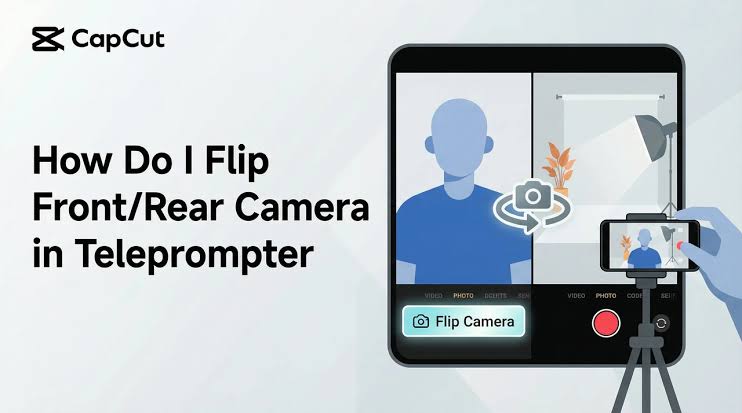
Most people know CapCut as a video editor, but the app also includes a built in teleprompter feature that is worth knowing about. If you already use CapCut for editing, adding captions, or creating TikTok content, the prompter mode means you can write your script, record yourself reading it, and then immediately edit and publish without ever leaving the app.
The teleprompter itself is fairly basic, with fixed speed scrolling and adjustable font and positioning. There is no voice tracking or floating overlay. But the real strength is the seamless connection to CapCut's editing tools. You finish recording and you are immediately in one of the best mobile editors available, with access to auto captions, transitions, effects, music, and direct export to social platforms. The prompter feature is available on the free plan.
8. SpeechWay
SpeechWay positions itself as the Swiss army knife of Android teleprompters, offering three distinct modes: a classic teleprompter with mirror support for hardware rigs, a camera teleprompter for recording directly through the app, and a floating widget mode for use over other applications.
The configuration options are extensive, covering scroll speed, timer settings, indicator styles, colour themes, mirror modes, text sizes, margins for both orientations, pause configurations, and a do not disturb mode. It also supports remote control through Bluetooth with configurable key mappings. The app is free with a premium upgrade from around $4.99 per month. For creators who like to fine tune every detail of their setup, SpeechWay provides more customisation than almost anything else available.
9. Selvi Teleprompter
Selvi is designed for one specific purpose: helping you read a script while recording video on your Android phone. The app displays your prepared script over the camera viewfinder, letting you maintain eye contact with the lens while reading your lines. You can import text from your device, adjust settings for font and speed, switch between the selfie camera and the rear camera, and share videos directly to social media.
It is not the most polished or feature rich teleprompter on this list, but it is free, lightweight, and reliable. The latest versions have added a floating widget for use with other apps and video resolution selection. For budget conscious creators who just want a working teleprompter without paying anything, Selvi gets the job done.
10. TeleprompterPAD
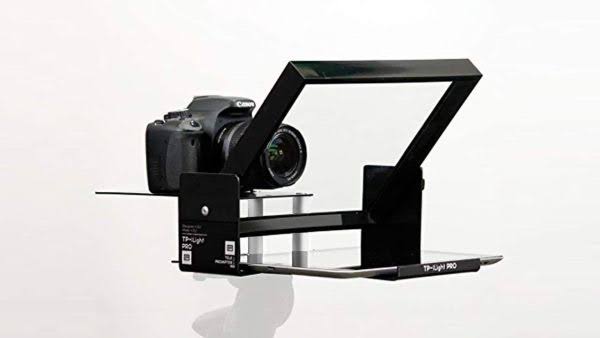
TeleprompterPAD rounds out this list as a simple, free teleprompter app with one feature that earns it a place: full mirror mode support for professional teleprompter hardware rigs. If you have invested in a physical beam splitter teleprompter and need an Android app to feed the mirrored script to a mounted tablet, TeleprompterPAD is one of the more reliable options available.
The app itself is straightforward. You load a script, set the scroll speed, enable mirror mode if needed, and go. There are no recording features, no voice tracking, and no floating overlay. But for its intended use case, working with physical teleprompter hardware, it does exactly what is needed. The app is free and available on both Android and iOS.