Quick Verdict
PayPal is one of the most recognized names in digital payments for a reason. It operates in over 200 countries, supports more than 25 currencies, processes hundreds of millions of transactions, and gives both buyers and sellers a layer of protection that many payment methods do not provide at all. For personal use, peer-to-peer payments, and online shopping at merchants where PayPal is accepted, it is genuinely convenient and widely trusted. For small businesses and freelancers, PayPal has been the default way to get paid online for two decades. That foundation is real. The problems are equally real and well-documented. Trustpilot shows PayPal UK at 1.2 out of 5 and PayPal US at 1.1 out of 5 from tens of thousands of verified reviews. The dominant complaints are account freezes without explanation, funds held for up to 180 days under Section 10 of the User Agreement, customer service that is difficult to reach and often unhelpful when reached, dispute resolution that does not consistently apply the Buyer Protection it advertises, and fees that add up faster than most users expect when they read the fine print. PayPal is useful. It is not trustworthy in the way that a bank is trustworthy, and the gap between those two things matters a great deal when something goes wrong. We rate PayPal 3.0 out of 5 for 2026.
At a Glance: Icon Polls Ratings
Here is how PayPal scored across the areas we evaluated in our 2026 research:
|
Category |
Stars |
Score |
|
Global Reach and Acceptance |
★★★★★ |
4.5/5 |
|
App Design and Ease of Use |
★★★★☆ |
4/5 |
|
Buyer Protection (When It Works) |
★★★★☆ |
3.5/5 |
|
Account Freeze and Hold Policies |
★★☆☆☆ |
1.5/5 |
|
Transaction Fees |
★★★☆☆ |
2.5/5 |
|
Customer Service Quality |
★★☆☆☆ |
1.5/5 |
|
Dispute Resolution Process |
★★☆☆☆ |
2/5 |
|
Overall |
★★★☆☆ |
3/5 |
What Is PayPal?
PayPal is a digital payment platform founded in 1998, initially under the name Confinity, by a group that included Peter Thiel, Max Levchin, and others. It merged with Elon Musk's X.com in 2000 and became PayPal after acquiring that brand. eBay acquired PayPal in 2002 and spun it off as an independent company in 2015. Today PayPal is a publicly traded company headquartered in San Jose, California, and is one of the largest fintech companies in the world by market capitalization and transaction volume.
The service allows individuals and businesses to send and receive money electronically using an email address or phone number, without directly sharing bank account or card details with a recipient. PayPal acts as an intermediary that holds and transfers funds between linked payment methods. Over 400 million accounts are registered on the platform globally, and PayPal is accepted at millions of online merchants worldwide, making it one of the most universally recognized checkout options on the internet.
The PayPal ecosystem in 2026 includes the core PayPal wallet and payment platform, Venmo (the US peer-to-peer payment app PayPal owns), PayPal Credit (a buy now pay later product in the US), the PayPal Debit Card, business accounts with invoicing and recurring payment tools, and a range of developer APIs for integrating PayPal into websites and applications. The breadth of what PayPal now offers has expanded considerably from its origins as a simple money transfer service.
Despite the breadth of features and the global scale, PayPal occupies a complicated position in how users think about it. Almost everyone has a PayPal account. Fewer people trust it completely. The gap between those two facts is what this review is designed to address.
The PayPal App: Download and Daily Use
The PayPal app is available as a free download from the Apple App Store for iOS devices and from Google Play for Android. It is also accessible through any web browser at paypal.com. The download requires no payment and account creation is free. The app covers everything from personal money transfers to business invoicing, all within a single interface.
The app design in 2026 is significantly cleaner than PayPal's historical interface, which went through years of cluttered and confusing updates. The current version surfaces the most common actions quickly: sending money, requesting money, checking balance, and viewing recent transactions are all accessible from the home screen without navigating multiple menus. QR code payments, which allow in-person transactions by scanning a code, work reliably and make the app genuinely useful for small business and market-stall payments.
The web interface at paypal.com provides the same functionality as the app and is more practical for business users who need to access invoicing, detailed transaction history, reports, and account settings from a desktop environment. The business dashboard within the web interface is functional for tracking payments and managing subscription billing, though multiple Capterra reviewers from 2026 describe it as dated in its customization options for invoices and limited in its reporting depth compared to what modern accounting-integrated tools provide.
The Venmo app, which PayPal owns, functions independently from the main PayPal app and is designed specifically for peer-to-peer transfers in a more social, feed-based interface. Venmo is primarily a US product. PayPal operates the core wallet internationally. For most users outside the United States, PayPal is the only relevant product in the family.
Notifications and Activity Monitoring
Real-time push notifications for every transaction are one of the more useful practical features of the PayPal app. When a payment arrives, when a dispute is opened, or when an account limit is applied, the notification arrives promptly. For users who actively monitor their PayPal account for business purposes, this real-time visibility is useful. The downside is that PayPal's notification system also sends marketing and promotional alerts that cannot be selectively disabled without disabling security notifications alongside them, which is a design choice that prioritizes PayPal's commercial communication over user control.
Signing In and Account Creation
Creating a PayPal account starts at paypal.com or through the app. You provide your name, email address, and a password, then link a bank account, debit card, or credit card as a funding source and withdrawal destination. For personal accounts, the setup takes about five minutes. For business accounts, additional information including business type and an EIN or Social Security number is required for tax compliance purposes. PayPal sends a verification email to the provided address, and the account is usable after verification.
Signing in uses your registered email address and password. Two-factor authentication is available and strongly recommended given the documented history of credential stuffing attacks on PayPal accounts. In December 2022, attackers used a technique that matched stolen credentials from other breached databases against PayPal accounts, successfully accessing approximately 34,942 accounts before the attack was detected and stopped. The exposed data included names, addresses, Social Security numbers, dates of birth, and tax identification numbers for affected users. Two-factor authentication would have blocked the access in this case.
One specific vulnerability in PayPal's account system that a Trustpilot reviewer documented in 2026 is worth naming: PayPal allows all variations of Gmail addresses to be treated as valid unique accounts. The reviewer described how [email protected] and [email protected] (which Gmail treats as identical addresses) can be registered as separate PayPal accounts. This creates an avenue for fraudulent accounts to be created using address variations that appear to share an identity with legitimate accounts. The reviewer raised the concern as a platform-level security gap that enables fraud.
For users who forget their password, the standard reset flow sends a code to the registered email address or phone number. For users who have lost access to both, the account recovery process is documented as difficult and slow, matching the broader pattern of customer service accessibility that appears across PayPal's complaint record.
What Is Free on PayPal and What Costs Money
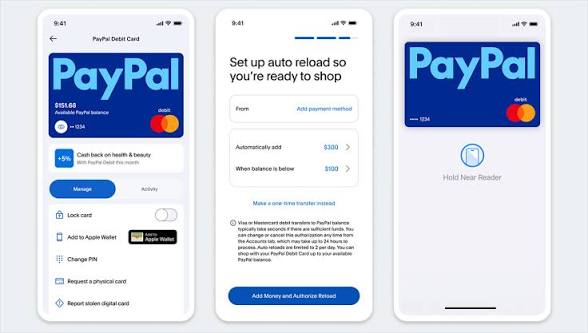
PayPal markets itself as free for personal use, and for the most common personal transactions this is accurate. Sending money to a friend or family member from a linked bank account or existing PayPal balance within the same country costs nothing. Receiving money as a personal user has no fee on the receiving side for domestic transfers. The PayPal app is free to download and the account has no monthly maintenance fee for personal accounts.
Where fees appear, and where most users are surprised to find them, is in the specifics. Here is how the fee structure works in practice for major transaction types:
|
Transaction Type |
Fee Rate |
Notes |
|
Domestic P2P (bank/balance) |
Free |
Sending from bank account or PayPal balance to another user within the same country. Free. |
|
Domestic P2P (debit/credit card) |
2.9% + fixed fee |
Sending from a debit or credit card, even to friends. Not free. |
|
International transfer |
5% (min $0.99, max $4.99) + exchange rate spread |
Currency conversion adds an additional 3-4% spread above mid-market rate. |
|
Receiving payments for goods/services |
3.49% + fixed fee (US) |
Applies to business transactions. Varies by country. |
|
Credit/debit card as payment source |
2.9% + fixed fee |
Fee added when using card rather than balance or bank. |
|
Instant transfer to bank |
1.75% (min $0.25, max $25) |
Fast withdrawal; standard withdrawal to bank is free but takes 1-3 days. |
|
Currency conversion |
3-4% spread above mid-market rate |
Applied in addition to any transfer fee when currencies differ. |
Fee rates verified May 2026 from paypal.com/fees. Rates vary by country, transaction type, and account tier. Business accounts have different rate structures. Fixed fees per transaction vary by currency.
The pattern that generates the most complaint is the fee on card-funded transfers to friends. Many users who send money through PayPal using their debit card expect this to work like sending from their bank account and are surprised to see a percentage fee. PayPal's interface does present the fee before confirmation, but it is not prominently highlighted in a way that prevents surprise for users who are not carefully reading every checkout step.
The international transfer fee plus the currency conversion spread is the other significant cost that most users underestimate. A $500 international transfer could cost between $25 and $40 in total fees when the transfer fee and currency spread are combined, depending on the countries and currencies involved. For frequent international senders, this adds up to a meaningful ongoing cost.
Account Freezes and Fund Holds: The Most Serious Issue
This section covers the issue that drives the majority of PayPal's negative reviews and that separates PayPal's experience from what most users would consider a trustworthy financial service. It deserves direct and detailed coverage.
PayPal's User Agreement, Section 10, grants PayPal the right to hold funds in an account for up to 180 days under circumstances it describes as including unusual selling activity, a high rate of disputes, or other indicators of risk. This 180-day hold is not a theoretical edge case. Trustpilot, Reddit, the BBB, and consumer protection complaint databases are filled with documented cases of users finding their PayPal balance frozen for six months while PayPal's automated systems review an activity pattern that triggered an alert.
One of the most extreme documented cases from Trustpilot describes a user whose account held $37,000. The account was frozen for 180 days. After approximately 140 days, PayPal wiped the balance to zero using what it described as PayPal Loss Recovery, a term the reviewer was not familiar with and had not been informed was possible before it happened. The reviewer described the experience as feeling like robbery and filed formal complaints. Cases of this severity are at the extreme end, but they are not fabricated, and they illustrate the extent of the authority PayPal reserves under its own terms.
For smaller businesses and freelancers, the freeze experience is more commonly at lower dollar amounts but is no less disruptive. A small business that processes $3,000 in a week and has that amount frozen while under review cannot pay suppliers, cannot pay staff, and cannot communicate a clear timeline to clients about when services will resume. The standard customer service response in these situations is that the matter is under review and that the team cannot remove the limitation by phone, which is confirmed by PayPal's own help documentation.
The triggers for account limitation are not fully disclosed by PayPal, which is itself a legitimate criticism. Common documented triggers include sudden spikes in transaction volume, first-time large transactions, high rates of chargebacks or disputes, operating in certain business categories that PayPal considers higher risk, or simply not having verified identity on an account before a significant transaction occurs. The difficulty is that the automated risk system does not distinguish between a legitimate small business experiencing a good month and an account being used for fraud, and the appeal process to resolve a false-positive flag is slow and unreliable.
One user who submitted a Trustpilot review in 2026 described a 21-year account history with zero incidents, accepted a PayPal credit card in early 2026, used it for a routine purchase, and had the card frozen for suspicious activity within the first month. The freeze was eventually removed but the reviewer described it as creating anxiety about the platform's automated systems that had not existed before. After 21 years of an unblemished record, using the card as intended was enough to trigger a restriction.
Buyer Protection: What It Covers and Where It Fails
PayPal's Buyer Protection is one of the platform's most marketed features and a genuine reason many shoppers prefer to pay via PayPal when purchasing from unfamiliar merchants. The protection covers situations where an item is not received or arrives significantly not as described, and in straightforward cases it works effectively. A buyer who purchases something, receives nothing, files a dispute with evidence, and waits for the process to conclude will often receive a refund.
Where Buyer Protection is documented as failing, and failing specifically and publicly, is in cases involving larger amounts, cross-border transactions, and situations where the evidence is disputed by the seller. One Trustpilot review from 2026 describes a purchase of 1,369 euros for an item that was returned with proof of delivery in hand. A PayPal support agent admitted in writing that the documentation confirmed the return. PayPal still refused the refund and told the buyer to contact their bank. The reviewer filed a formal complaint with the CSSF, the Luxembourg financial regulator. Another reviewer describes a $250 dispute in March 2026 where they followed instructions to return an item, did so, and were still not refunded.
The structural problem with Buyer Protection in high-value cases appears to be that the dispute resolution process relies on automated systems making initial decisions, and that those systems do not have the contextual judgment to evaluate complex evidence appropriately. A support agent may acknowledge the evidence in a chat and still be unable to override an automated decision, leaving buyers with a documented contradiction between what they were told and what happened to their money.
Seller protection has its own documented issues, which mirror the buyer experience in some respects. Sellers describe buyers opening disputes for transactions that were legitimate, PayPal siding with buyers before sellers have the opportunity to provide comprehensive evidence, and funds being reversed without clear communication. A G2 reviewer from 2026 specifically noted that the dispute resolution process can be lengthy and sometimes favors buyers over sellers in ways that feel unbalanced.
Customer Service: The Biggest Gap Between Expectation and Reality
PayPal's customer service is the area that generates the most consistent and severe criticism across every review platform. Trustpilot ratings of 1.1 to 1.2 out of 5 across PayPal's US and UK profiles, representing tens of thousands of verified reviews, reflect what the Scot Onomics review from 2025 describes as representing systematic problems including long response times, inadequate issue resolution, and limited access to qualified support personnel.
The specific failure modes documented in reviews fall into consistent patterns. Phone support exists but navigating the automated phone system to reach a human agent for a non-standard issue requires persistence that many users give up on. Chat support is available through the app and website but frequently routes through automated bot responses before escalating to a human, and the human agents who are reached are described in multiple reviews as unable to resolve account-level or dispute-level issues and limited to providing generic responses and links to help documentation.
The most operationally damaging customer service failure is the standard response to account freezes and fund holds: the support team cannot remove the limitation by phone. This is confirmed by PayPal's own documentation. It means that a business or individual whose account is frozen and whose funds are inaccessible has no functional recourse through the customer service channel during the freeze period. They can submit documentation through the Resolution Center and wait for the automated review to complete. How long that takes is not disclosed. What the decision criteria are is not disclosed. Whether the decision can be appealed if it goes against the user is not clearly explained.
A Trustpilot review from April 2026 captures this dynamic specifically. The reviewer describes PayPal as not having a valid phone number, using bots for customer service, and characterizes the behavior of charging twice for a purchase and refusing to acknowledge it as scamy if not borderline illegal. The recommendation to other users is to try another payment method entirely. That recommendation, from a user who reached the end of their patience with the platform's service failures, appears in enough similar forms across review platforms to represent a documented pattern rather than an outlier reaction.
Complaints: The Documented Record in 2026
The complaint record for PayPal in 2026 is extensive and spans multiple platforms. Trustpilot shows 38,535 reviews for the main PayPal.com domain with ratings that its own AI analysis summarizes as: most reviewers were let down by their experience overall. Many people were dissatisfied with the payment process, encountering issues with unexpected fees, difficulties with refunds, and problems with transactions not being processed correctly or issues with unaccounted funds. Customers also frequently reported negative experiences with customer service, describing it as unhelpful and difficult to resolve issues.
The Better Business Bureau profile for PayPal US, verified March 2026, shows a documented pattern of complaints centered on account access issues and transaction disputes. PayPal does respond to BBB complaints, and a portion are resolved through that channel, which is actually one of the more effective escalation paths for users who have exhausted standard support channels.
The most serious documented complaint pattern beyond the account freeze issue is the dispute resolution outcome for high-value purchases where Buyer Protection does not deliver the refund that its marketing implies it will. The case of the 1,369 euro return where a PayPal agent acknowledged the return in writing and still denied the refund is documented on Trustpilot and represents the kind of breach of trust that creates lasting negative brand associations.
A separate documented complaint pattern involves billing errors where users are charged amounts they did not expect, dispute the charge, and find the dispute process unhelpful. One Trustpilot reviewer from 2026 describes being billed four times the expected amount by a company and contacting PayPal for resolution, describing the process as concerned about apparent miscommunication and lack of efficiency. Another describes being charged a late payment fee of 12 pounds for a payment that was two days late, characterizing the inflexibility as disproportionate to the infraction.
Security and Privacy in 2026
PayPal uses 256-bit SSL encryption for all transactions, tokenization to avoid storing raw card numbers across merchants, and real-time fraud monitoring that is one of the more sophisticated in the fintech space. These are genuine technical strengths. The platform has not suffered a direct breach of its core transaction systems. The December 2022 credential stuffing incident that exposed approximately 34,942 accounts was the result of attackers using credentials stolen from other platforms, not a vulnerability in PayPal's own security systems. Enabling two-factor authentication protects against this type of attack.
The privacy picture is more complicated. PayPal's privacy policy, verified March 2026 by Axis Intelligence, permits sharing behavioral and transaction data with advertising partners for targeted advertising and with a broad range of affiliated companies and service providers. This means that your PayPal purchase history, browsing behavior on PayPal-enabled merchant sites, and transaction patterns can be used to inform advertising targeting. California residents can opt out through PayPal's Privacy Settings under CCPA rights. EU users have equivalent rights under GDPR.
For users who specifically want to make payments without that behavioral data being used for advertising, this is a meaningful privacy consideration. PayPal is broadly comparable to other large fintech platforms in this regard, but it is less privacy-respecting than payment options like Apple Pay, which retains minimal transaction data. The tradeoff is that Apple Pay is only available on Apple devices and in participating merchants, while PayPal works across essentially every device and with hundreds of millions of merchant integrations.
The phishing ecosystem around PayPal is one of the largest for any brand. Fraudulent emails mimicking PayPal communications are among the most common phishing attempts reported globally. PayPal's security team maintains [email protected] as a reporting address and actively investigates reported fraudulent emails. The standard advice is to never click links in emails claiming to be from PayPal and to navigate directly to paypal.com through your browser for any transaction or account management.
User Experience: Who PayPal Works Best For
The user experience of PayPal in 2026 differs substantially depending on how you use the platform and in what volume. These differences explain why PayPal can simultaneously hold 1.1 stars on Trustpilot and be widely used by hundreds of millions of people.
For occasional personal users who send money to friends, split bills, or make purchases at established online retailers where PayPal checkout is available, the experience is genuinely smooth. The app works quickly, the payment flow is familiar, and the buyer protection for straightforward cases provides more reassurance than paying with a card directly at an unfamiliar merchant. This segment of users rarely encounters the freeze and dispute problems because their transaction patterns are regular and their individual transaction amounts are modest.
For freelancers and small businesses who use PayPal as a primary payment collection method, the experience is more variable. For those with stable, consistent payment histories and modest monthly volumes, PayPal works acceptably as a way to invoice and get paid. For those who experience sudden growth, who operate in categories that PayPal's risk system flags, or whose clients dispute transactions, the account freeze risk creates a real and undiversified business continuity problem. Multiple financial advisors recommend that small businesses not keep significant balances in PayPal for this reason and transfer received funds to a bank account promptly.
For international users, PayPal is one of the very few platforms with truly global reach across 200-plus countries, and for transfers to countries where local banking infrastructure is limited, it may be the most practical available option. The fee cost is real, but the availability in markets where alternatives do not exist justifies it for users who have no other choice.
For users who have experienced an account freeze or a failed dispute resolution, the experience permanently changes the relationship with the platform. Reviews from users in this category describe a loss of trust that no subsequent smooth transaction repairs. They are correct to note that the risk profile of the platform is not adequately communicated in PayPal's marketing, which emphasizes protection and security without similarly emphasizing the circumstances under which PayPal will hold your money for 180 days or decline to enforce Buyer Protection on a high-value disputed item.
Pros and Cons
What PayPal Gets Right
Global reach across 200-plus countries and 25-plus currencies makes it one of the only payment platforms with this level of geographic coverage, particularly valuable for international freelancers and cross-border commerce
Widely accepted by online merchants worldwide, including millions of e-commerce sites, making it the most universally recognized checkout alternative to direct card payment on the internet
Buyer Protection for qualifying purchases provides genuine recourse in straightforward non-delivery and misrepresentation cases that paying directly with a debit card would not provide
256-bit SSL encryption, tokenization, and real-time fraud monitoring represent a technically strong security infrastructure for the transaction layer
The app is clean, fast, and easy to use for standard personal transactions including peer-to-peer transfers, QR code in-person payments, and checking balances
Free for domestic personal transfers funded from bank account or PayPal balance, which covers the majority of casual personal use cases
Instant payment notifications give users real-time visibility into account activity, which is useful both for business monitoring and for catching unauthorized transactions quickly
The developer API ecosystem is extensive and well-documented, making PayPal integration straightforward for e-commerce developers
Where PayPal Creates Serious Problems
Account freezes under Section 10 of the User Agreement can hold funds for up to 180 days with no clear explanation of what triggered the freeze and no functional path to appeal through customer service
Trustpilot ratings of 1.1 to 1.2 out of 5 across PayPal US and UK represent tens of thousands of documented user experiences, reflecting systematic rather than isolated failures
Customer service is frequently described as unable to resolve account-level issues, limited to automated responses, and structurally unable to remove account limitations through the phone channel
Buyer Protection does not consistently deliver in high-value dispute cases, with documented cases from 2026 where agents acknowledged return evidence in writing and still denied refunds
The fee structure for international transfers, currency conversion, and card-funded transactions adds up to costs that are higher than many users expect and higher than several competing services for the same functions
The automated risk system flags legitimate business accounts with no documented prior issues and has no transparent mechanism for users to understand or contest what triggered the flag
Privacy policy permits sharing behavioral and transaction data with advertising partners, making PayPal less private than it appears to users who assume payment data is not used for advertising purposes
The credential stuffing attack in December 2022 exposed names, addresses, Social Security numbers, and tax identification numbers for nearly 35,000 users, underlining the importance of two-factor authentication that many users do not enable
Frequently Asked Questions About PayPal (2026)
1. Is PayPal safe to use in 2026?
PayPal is technically secure for transactions. It uses 256-bit SSL encryption, tokenization for card data, and real-time fraud monitoring. Its core systems have not been directly breached. The December 2022 credential stuffing incident exposed approximately 34,942 accounts but resulted from attackers using credentials stolen from other platforms rather than a PayPal system vulnerability. Enabling two-factor authentication significantly reduces the risk from this type of attack. The safety concerns with PayPal are not primarily technical. They are structural. The User Agreement permits PayPal to hold funds for up to 180 days under certain circumstances, and this provision is applied to both fraudulent accounts and legitimate ones that trigger risk alerts. PayPal's privacy policy permits sharing transaction and behavioral data with advertising partners. And Buyer Protection, while genuine for straightforward cases, has documented failures in high-value disputes. PayPal is safe for occasional personal transactions and for shopping at established retailers with the app. It requires more caution as a primary business payment processing tool given the account freeze risk.
2. How do I download PayPal?
Download the PayPal app for free from the Apple App Store on iPhone and iPad, or from Google Play on Android devices. Search for PayPal and install the app published by PayPal, Inc. The app is free to download and account creation is free. You can also access PayPal through any web browser at paypal.com without installing anything. The web interface provides the same core features as the app and is more practical for business users who need access to detailed reporting and invoicing from a desktop. After installing the app, create a new account or sign in to an existing one using your registered email address and password. Linking a bank account or card during initial setup allows you to send and receive money immediately after verification. Enabling two-factor authentication in account settings after login is strongly recommended given PayPal's documented history of credential-based account compromise.
3. How do I sign in to PayPal?
Sign in to PayPal at paypal.com or through the mobile app using your registered email address and password. If you have enabled two-factor authentication, you will also need to enter the code sent to your phone number or generated by your authentication app. If you forget your password, the Forgot Password link on the sign-in page sends a reset email to your registered address. If you have lost access to both your password and your registered email address, account recovery requires contacting PayPal support, which the complaint record suggests can be a slow process. For users who specifically want to avoid this risk, ensuring your registered email address is current and accessible is the most important account maintenance step. Sign in to PayPal only at paypal.com, never through links in emails, even if those emails appear to be from PayPal. Phishing emails mimicking PayPal are among the most common on the internet. If you receive a suspicious email, forward it to [email protected] before deleting it.
4. Is PayPal free?
PayPal is free for personal domestic transactions funded from a bank account or existing PayPal balance. Sending money to friends and family within the same country from your bank account has no fee. Receiving money as a personal user for domestic transfers also has no receiving fee. Where fees appear: sending money funded by a debit or credit card incurs a percentage fee even for personal transfers. International transfers carry a fee of approximately 5 percent (with a minimum and maximum cap) plus a currency conversion spread of 3 to 4 percent above the mid-market exchange rate. Instant bank transfers carry a 1.75 percent fee (with a maximum of $25) versus the free standard transfer that takes 1 to 3 business days. Receiving payments for goods and services (rather than personal transfers) incurs a transaction fee of approximately 3.49 percent plus a fixed fee in the US. For routine personal use between friends in the same country with bank-funded transfers, PayPal is genuinely free. For business use and international transfers, the cumulative fees are real and worth calculating before committing to PayPal as a primary payment method.
5. Why did PayPal freeze or limit my account?
PayPal limits or freezes accounts for a range of reasons that it does not fully disclose publicly. Common documented triggers include sudden increases in transaction volume that differ significantly from past patterns, a high rate of disputes or chargebacks, transactions in business categories that PayPal considers higher risk, first-time large transactions, identity verification requirements for accounts that have not been verified, or activity patterns that the automated risk system flags as unusual. PayPal's User Agreement, Section 10, authorizes it to hold funds for up to 180 days under these circumstances. When your account is limited, the Resolution Center in your account shows what information or documentation PayPal is requesting. Providing the requested documentation promptly is the first step. Calling customer service to expedite the process is generally not effective, as PayPal's own documentation states that the customer service team cannot remove limitations by phone. If the limitation is not resolved after providing documentation, the escalation paths include filing a complaint with the BBB, contacting your state attorney general's consumer protection office, and filing a complaint with the Consumer Financial Protection Bureau. These external escalations are documented as more effective than additional PayPal customer service contacts in resolving frozen accounts that have been stuck for extended periods.
6. What is PayPal Buyer Protection and how do I use it?
PayPal Buyer Protection covers eligible purchases made through PayPal where an item is not received or arrives significantly not as described. To use it, go to your Activity in the PayPal app or website, find the transaction in question, and click Dispute a Problem. You will be asked to categorize the issue and provide details. Disputes must be opened within 180 days of the transaction. PayPal then contacts the seller and gives them an opportunity to respond. If the seller does not respond or the response is not satisfactory, PayPal makes a decision on the case. For straightforward non-delivery cases with clear tracking evidence, Buyer Protection generally works and refunds are issued. For more complex cases involving international sellers, high amounts, or disputed evidence, the process is less reliable. Multiple 2026 reviews document cases where buyers had clear evidence of item return and were still denied refunds. For high-value purchases, paying with a credit card linked to PayPal rather than from a bank account directly gives you an additional chargeback path through your card issuer if PayPal's dispute process does not resolve in your favor.
7. What are PayPal's fees in 2026?
PayPal's fee structure in 2026 includes several layers that add up in ways many users find surprising. Sending money to friends from a bank account or PayPal balance within the same country is free. Sending from a debit or credit card, even to friends, incurs a fee of approximately 2.9 percent plus a fixed amount. International transfers cost approximately 5 percent (with a minimum of $0.99 and a maximum of $4.99) plus a currency conversion spread of 3 to 4 percent above the mid-market rate. Instant transfers to your bank account cost 1.75 percent with a $25 maximum; the standard transfer that takes 1 to 3 days is free. Receiving money as a business for goods and services costs approximately 3.49 percent plus a fixed fee in the US. Currency conversion carries a spread of 3 to 4 percent above the mid-market rate regardless of transfer type. For frequent international senders, these fees are worth calculating specifically for your most common transaction type and amount before choosing PayPal over alternatives that may offer more competitive international transfer rates.
8. How do I contact PayPal customer service?
PayPal customer service can be reached through the Help Center at paypal.com/help, through live chat in the app or on the website, and by phone at the number listed in the Help section for your country. The most important thing to know before contacting PayPal is that for account limitation and freeze issues, phone support is documented as unable to remove the limitation. PayPal's own help documentation states this specifically. For account limitations, the Resolution Center in your account is the correct place to submit documentation and respond to PayPal's requests. For billing disputes and other issues, chat and phone support are available with varying wait times. If standard support channels do not resolve your issue, escalation paths that have documented higher resolution rates include filing a complaint with the Better Business Bureau at bbb.org, contacting the Consumer Financial Protection Bureau at consumerfinance.gov, and for EU users, filing with the relevant national financial regulator. PayPal is required to respond to formal regulatory complaints. These external escalations take more time but bypass the internal support system that many users find unresponsive.
9. Can PayPal hold my money for 180 days?
Yes. Section 10 of PayPal's User Agreement grants PayPal the right to hold funds in your account for up to 180 days under circumstances that include unusual activity, a high rate of disputes, or other indicators of risk as determined by PayPal's systems. This provision is real, regularly applied, and documented in thousands of user complaints across Trustpilot, Reddit, and the BBB. The 180-day hold is the upper limit, not a typical duration, but it has been applied in documented cases and is a material risk for anyone using PayPal to hold significant business funds. The most consistently cited practical advice from financial advisors and experienced PayPal users is to transfer received funds to your bank account promptly and not maintain large balances in your PayPal account. This does not prevent a freeze from being applied to incoming transactions, but it limits the amount of money at risk if a freeze is triggered. The circumstances that trigger a freeze are not fully disclosed by PayPal. If you believe a freeze has been applied incorrectly to your account, providing the documentation requested in the Resolution Center is the first step, followed by the regulatory complaint escalation paths described in the customer service question above.
10. Is PayPal good for business?
PayPal works well for certain types of business use and carries specific risks for others. For freelancers and small businesses with consistent, moderate-volume payment flows, established PayPal histories, and the ability to operate with some payment method redundancy, PayPal is a functional and widely trusted tool for getting paid online. The invoicing tools work, international payments are possible in most markets, and the buyer protection that PayPal provides to clients can actually make it easier to get paid because customers feel more protected. The risks for business use are the same ones documented throughout this review. Account freezes under the risk monitoring system can happen to legitimate businesses without warning and without a fast resolution path. Customer service cannot remove limitations by phone. Funds held during a freeze period cannot be accessed to pay expenses. For these reasons, multiple financial advisors specifically recommend that businesses not use PayPal as their only payment processing method, maintain the ability to accept payments through at least one alternative channel, and transfer PayPal balances to a bank account regularly rather than accumulating funds in the PayPal wallet. If your business processes large volumes or is in a category that payment processors consider higher risk (digital goods, travel, event tickets, and similar), it is particularly important to read PayPal's Acceptable Use Policy and understand the account freeze risk before making PayPal a primary processing channel.
Icon polls Verdict
PayPal earns a 3.0 out of 5 from Icon Polls in 2026. The score reflects a platform that is genuinely useful and genuinely problematic in ways that exist simultaneously rather than canceling each other out.
The global reach, the buyer protection for straightforward cases, the clean app experience, and the near-universal merchant acceptance are real strengths that justify PayPal's continued presence in hundreds of millions of users' payment habits. For personal use and for casual shopping at established merchants, the experience is mostly positive and the risks are mostly manageable with good security hygiene.
The account freeze mechanism, the customer service that cannot resolve it, the Buyer Protection that does not always protect, and the fee structure that surprises users who did not read the fine print carefully are equally real. The 1.1 to 1.2 Trustpilot ratings across PayPal's profiles represent tens of thousands of documented negative experiences that cannot be dismissed as a vocal minority. They represent a systematic pattern of failure at specific points in the user journey that PayPal has not solved.
The most practical guidance from Icon Polls is: use PayPal for what it does well, which is convenient personal payments and protected purchases at reputable merchants. Do not rely on PayPal as your sole business payment processing method, do not maintain large balances in the PayPal wallet, enable two-factor authentication immediately, pay with a credit card as your PayPal funding source when possible for additional chargeback protection, and know the external escalation paths before you need them. PayPal is a 3.0 out of 5. It is useful when it works and genuinely damaging when it does not.











