
|
Profile item |
Details |
|
Product name |
Amara |
|
Tagline |
Imagine, create and iterate 3D environments instantly |
|
Category |
AI-assisted 3D environment and scene creation tool |
|
Primary workflow |
Create and refine scenes inside Unreal Engine |
|
Main input |
Natural-language instructions, images and floor plans |
|
Core tools |
3D model generation, scene planning, asset search, lighting and composition |
|
AI agent approach |
Plans and carries out scene changes, with user review controls |
|
Availability |
Web-linked workflow and Unreal Engine plugin experience |
|
GitHub status |
No official public open-source GitHub repository was identified for the product |
|
Best for |
Unreal Engine artists, designers, visualisation teams and rapid prototyping |
|
ICON POLLS rating |
3.8 out of 5 |
Amara review in 2026
Amara has a simple promise: turn an idea for a 3D space into something you can see, adjust and rebuild inside Unreal Engine without doing every first pass by hand. That is a big promise, but it is also the right problem to solve. Environment work can take a long time before an artist even knows whether a direction is worth pursuing.
ICON POLLS reviewed Amara as a fast-moving AI 3D tool built around exploration. Instead of asking users to settle on one perfect prompt, it encourages a loop of describing, reviewing, replacing and refining. For creative teams that already work in Unreal Engine, this makes much more sense than a generic image generator that stops at a flat concept picture.
Our 3.8 out of 5 score reflects a product with a compelling workflow and useful recent features, but one that remains more specialised than an everyday design app. It works best when the user understands the visual goal and is willing to guide the result.
What is Amara?
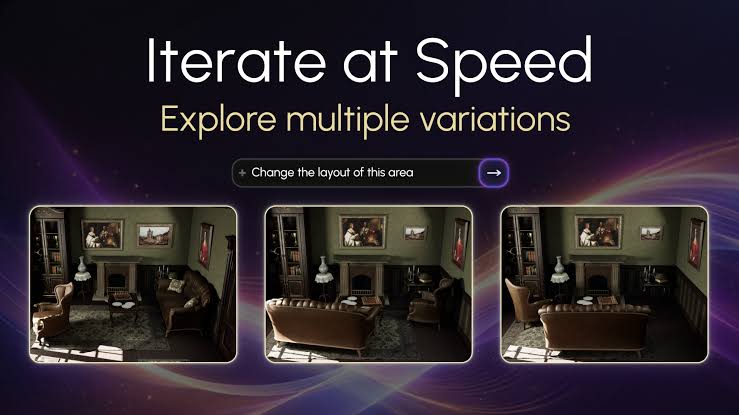
Amara is an AI-assisted environment creator for Unreal Engine. It can help generate 3D assets from text or images, find suitable assets by description and place objects into a scene. It also supports scene-level changes such as improving scale, correcting rotation, changing composition and adjusting lighting.
The important word is assisted. Amara is not simply a button that replaces 3D artists. Its value is speed at the early and middle stages of a project, where teams need to test several layouts, moods or styles before committing to detailed manual work.
Amara AI and agent review
Amara feels most useful when treated like a scene-building assistant. You give it a description of the space, then it can make a plan, ask a short set of targeted questions, choose or generate assets and arrange them in the environment. The workflow has three practical modes: Review Mode for approving actions, Plan Mode for working through the scene first and Auto Mode for a faster one-prompt approach.
That control is a positive. An agent that moves objects without asking can be exciting on a demo day and frustrating during a real job. Review Mode is the safer choice for client work or scenes that already contain carefully placed assets. Auto Mode is better for rough exploration, where speed matters more than perfection.
Amara 3D features
The 3D side of Amara is broader than simple text-to-model generation. Users can create meshes from natural language, turn a 2D image into a textured model, use semantic search to locate assets by meaning rather than file name, and populate a scene with context-appropriate objects. Floor-plan input also gives the tool a more practical starting point for interiors and layout-led work.
Other refinements are equally useful: lighting control, object grounding, automatic composition, scale fixes and rotation fixes. These do not sound flashy, but they are the small details that stop a generated scene from looking careless. Amara also offers fast and detailed output choices for model generation, which helps users decide when a quick preview is enough and when quality deserves more time.
Amara download and setup
Amara is not best understood as a standard mobile or desktop download. Its key experience is connected to Unreal Engine through a plugin workflow, with the product also offering a web-facing 3D model generator. For most users, the first question should be whether Unreal Engine is already part of their pipeline. If it is not, Amara may feel like more setup than they need.
A project also needs enough planning before opening the tool. A clear reference, room type, style direction and list of key objects will usually produce a better starting point than a vague request. The product can accelerate decisions, but it cannot decide the whole creative brief for you.
Amara GitHub review
Searches for Amara GitHub are understandable, especially from artists and technical teams who want to inspect source code, follow issues or self-host a tool. At the time of this review, Amara is presented as a product rather than an official public open-source project. We did not identify an official public GitHub repository for the core Amara environment-builder product.
This is not automatically a negative, but it changes the buying decision. Teams looking for code-level customisation, a self-hosted setup or public community contributions should confirm those requirements directly before adopting it. Teams that want a guided Unreal Engine workflow may be less concerned about this.
Amara user experience
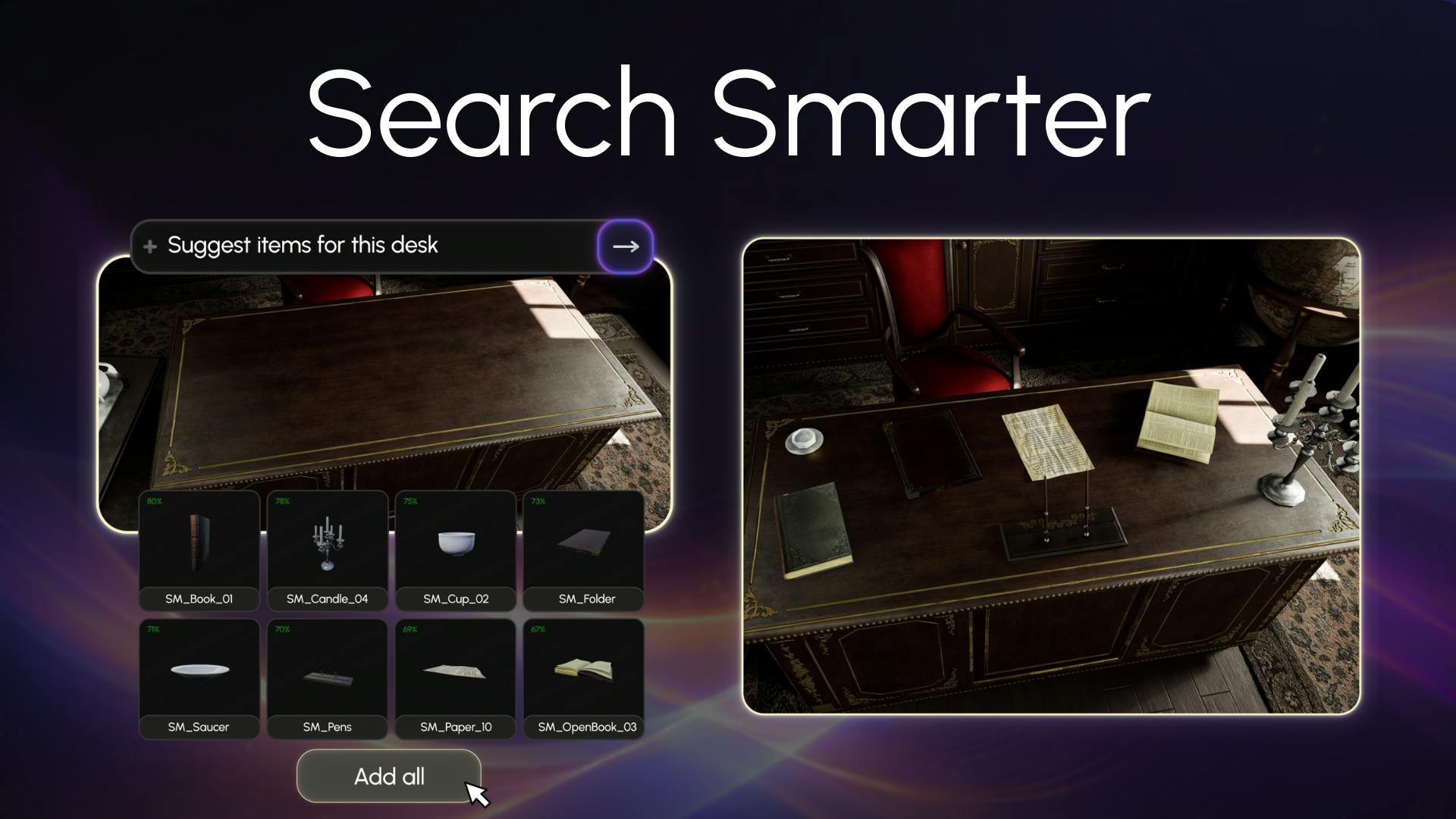
The user experience is strongest when it stays in context. Asking for changes in natural language while looking at the Unreal scene is easier than jumping between a prompt tool, an asset library and a manual placement process. Features such as undo, clear scene, voice input and a visible context indicator also make the experience feel more practical than an early AI experiment.
Still, the learning curve is real. New users have to understand Unreal Engine, the quality limits of generated assets and the difference between a good concept scene and a production-ready environment. Amara can save time, but it will not remove the need for art direction, quality checks and final cleanup.
What Amara does well
Makes environment exploration faster inside an Unreal Engine workflow.
Offers a thoughtful balance between automatic creation and user approval.
Handles useful refinement jobs such as scale, rotation, composition and grounding.
Lets users work from text, images, templates and floor plans.
Supports rapid concepting before teams spend time on detailed production work.
Where Amara could improve
Provide clearer public information on pricing, access and the full setup path.
Make the learning journey easier for people new to Unreal Engine.
Continue improving reliability and artistic control for complex production scenes.
Offer more transparent technical documentation for teams researching integrations and developer options.
Final verdict
Amara earns its 3.8 out of 5 rating because it is solving a real creative bottleneck. It does not ask artists to abandon Unreal Engine or hand over the whole job to AI. Instead, it gives them a faster way to make a first scene, test alternatives and tidy obvious problems. That is valuable for concept work, visualisation and teams that need to make decisions quickly.
It is not the right tool for everyone. A person looking for a casual 3D app or an open-source project may find it too specialised. But for Unreal Engine users who want a more conversational way to build and iterate environments, Amara is one of the more interesting AI workflows to watch in 2026.
Frequently Asked Questions about Amara
1. What is Amara?
Amara is an AI-assisted tool for creating and refining 3D environments, with a workflow designed around Unreal Engine.
2. What does Amara do?
It helps users generate or find assets, plan scenes, place objects and improve details such as lighting, scale and composition.
3. Is Amara an AI agent?
It has an agent-style workflow because it can plan and carry out scene tasks from natural-language instructions, while offering user review controls.
4. Is Amara available as a download?
It is mainly used through a connected Unreal Engine plugin workflow and a web-facing 3D model generator, rather than a typical consumer mobile download.
5. Does Amara work with Unreal Engine?
Yes. Building and iterating 3D environments inside Unreal Engine is central to the product.
6. Does Amara have an official GitHub repository?
No official public open-source repository for the core product was identified in this review.
7. Can Amara make 3D models from text?
Yes. Its 3D model generator supports creating meshes from natural-language descriptions.
8. Can Amara convert an image into a 3D model?
Yes. The product supports image-to-3D generation for creating a textured model from a 2D image.
9. Can Amara work from a floor plan?
Yes. Users can provide a floor plan or sketch as a starting point for a 3D environment.
10. What are Amara Review Mode, Plan Mode and Auto Mode?
Review Mode asks for approval, Plan Mode works through planning and asset choices, and Auto Mode aims for faster execution from a prompt.
11. Is Amara free?
Access options can change, so users should confirm the current plan and trial details before starting a project.
12. Who should use Amara?
It is best suited to Unreal Engine artists, designers, visualisation teams and creators who need to explore 3D environment ideas quickly.
13. Can Amara help with lighting?
Yes. The product includes scene-lighting controls that help users adjust the mood and visibility of an environment.
14. Can I undo an Amara change?
Yes. Amara includes an undo control for reverting the most recent action inside Unreal Engine.
15. Can Amara find assets without exact file names?
Yes. Semantic search lets users search for assets by description or visual meaning, rather than relying only on exact file names.
16. Can Amara automatically arrange objects?
Yes. It can use scene composition and object-grounding tools to help arrange items in a more believable layout.
17. Does Amara support voice input?
Yes. Users can describe a scene by voice in the Unreal Engine workflow.
18. Is Amara ready for final production scenes?
It can speed up early and middle-stage creation, but final production work still needs artistic direction, checking and cleanup.











