
|
Anima Profile |
Details |
|
Platform name |
Anima: UX Design Agent |
|
Category |
AI design-to-code and app-building platform |
|
Best for |
Designers, product teams, developers and rapid prototyping |
|
Main access |
Browser-based workspace, Figma plugin and VS Code extension |
|
Core use |
Turn prompts, URLs and design files into editable web projects and code |
|
AI features |
Design-aware generation, iteration, website cloning and code refinement |
|
Supported output |
HTML, CSS, React, Vue, Tailwind, TypeScript, JavaScript and related workflows |
|
Free plan |
Yes, with limited daily messages, imports and code generations |
|
Mobile APK |
No verified official APK for this UX Design Agent |
|
ICON POLLS rating |
3.6/5 |
Quick Verdict
Anima is one of the more useful design-to-code platforms for teams that already have a clear visual direction. It does not simply generate a generic page from a short prompt. It can work from Figma files, existing web pages and brand references, which gives it a better chance of keeping the result close to the intended product.
For this 2026 review, ICON POLLS rates Anima 3.6 out of 5. The score reflects a capable tool with a solid bridge between design and development, especially for fast prototypes and frontend handoff. The main limitation is that AI-generated projects still need human review before they become a serious production product.
What Is Anima: UX Design Agent?
Anima is a design-aware AI agent for creating websites and web applications. A user can begin with a written prompt, bring in a design file, paste a public web address or continue with an existing project. The platform then creates an editable project that can be previewed in the browser and refined through further prompts.
The practical idea is simple: instead of rebuilding a design by hand, a designer or developer can use Anima as a starting point for code, screens and responsive layouts. It is aimed at shortening the distance between the visual work and the working frontend.
Anima App and Website Experience
People often search for the Anima app, but the UX Design Agent is mainly a web-based product rather than a typical phone app. The central workspace runs in a browser, where users can build, preview, edit, publish or export their work. This makes it easier to use alongside design files and development tools on a computer.
The website experience is strongest when you come in with context. A clean design file, a clear prompt or a well-structured page gives Anima something useful to work with. Starting from a vague idea is still possible, but the output may need more guidance before it feels specific to a real brand or product.
Anima AI Features
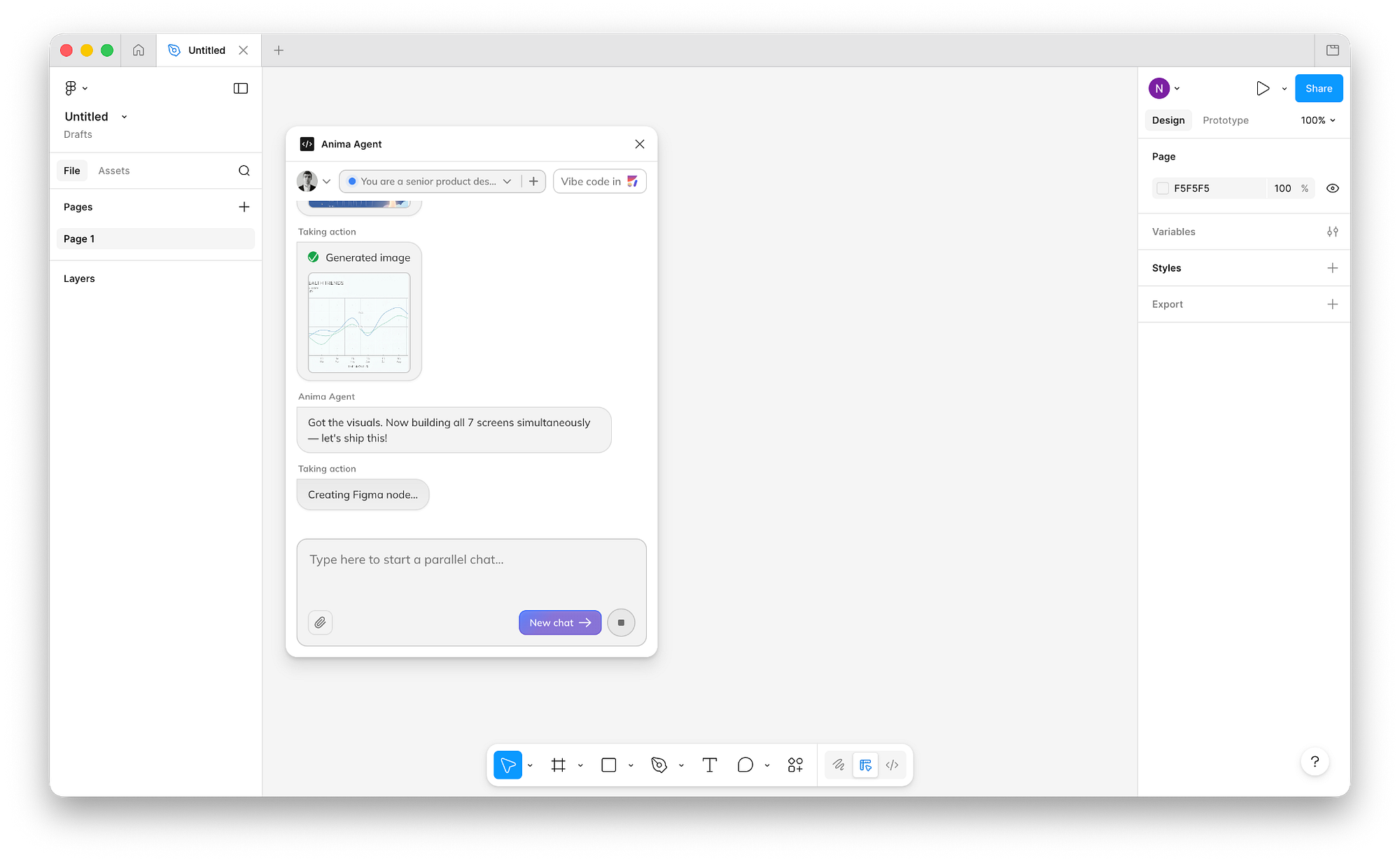
The AI side of Anima is not limited to generating a first screen. It can continue the project, make requested changes, help shape layouts and keep the result tied to design references. Teams can also work from a Figma link, imports or an existing website structure, which is a practical option for redesigns and quick internal demos.
This is where Anima feels more focused than a general AI website maker. Its value is the design context. When the source material uses tidy layouts, components and naming, the generated output is more likely to be understandable and easier to continue working on.
Anima Plugin: Figma and VS Code
Anima offers a plugin workflow for Figma, including design and developer-focused use cases. It can generate code from selected frames, components or wider flows. The platform supports several frontend outputs, so it can fit teams working with React, HTML and CSS, Vue, Tailwind or related stacks.
There is also a VS Code extension for developers who want to move from a design reference to a component inside their usual coding environment. That combination is one of Anima’s biggest strengths. It gives designers a clearer way to hand off work and gives developers an editable starting point instead of a screenshot and a long list of specs.
Is Anima Free in 2026?
Anima has a free entry option, but it is intentionally limited. Free users can try a small number of daily AI messages, design imports or website clones, plus limited code generations through the plugin workflow. It is enough to understand the product and test a simple project.
For ongoing work, the limits may arrive quickly. That is not unusual for AI tools, but it means the free version is best treated as a trial space rather than a full replacement for a paid team workflow. Users should check the plan details before relying on it for repeated client work or a large design system.
Anima Download and APK: What Users Should Know
Anima can be accessed online, and its extensions are installed within supported desktop design or coding workflows. There is no verified official Android APK for Anima: UX Design Agent. Search results for “Anima APK” can point to unrelated mobile applications with the same name, so users should be careful not to confuse them with this design-to-code service.
For the right product, use the official browser workspace or the supported plugin and extension routes. Avoid third-party APK download pages that claim to offer the UX Design Agent as a mobile app.
Anima User Experience in 2026
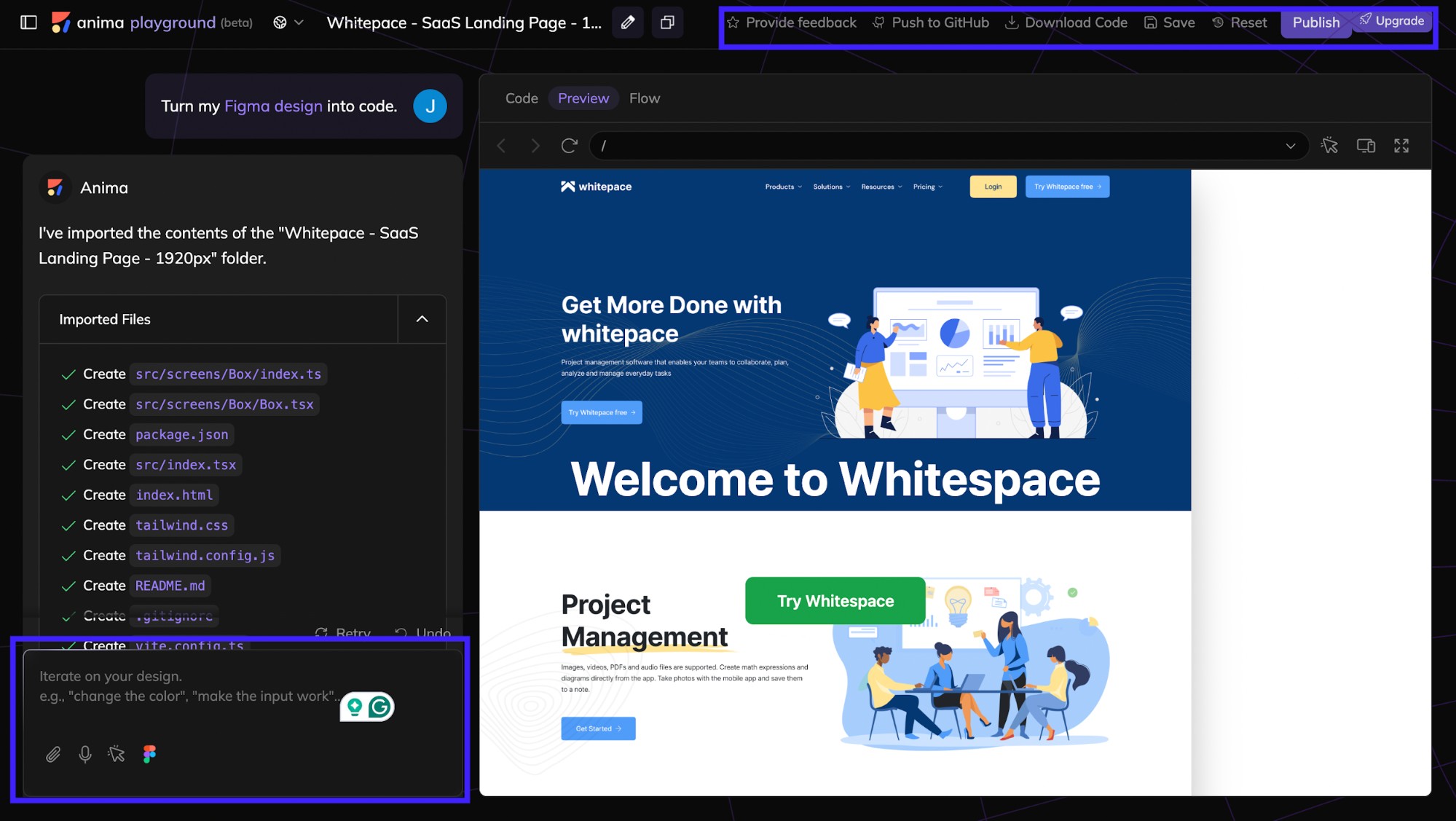
The user experience is generally clean once a project is open. The real advantage is being able to see a result, make a request in plain language and keep moving. For a designer who wants a working demonstration without waiting for a full development cycle, that can feel genuinely useful.
However, Anima is not a shortcut around good product thinking. It can reproduce design structure and help create frontend code, but it does not automatically solve accessibility, product logic, security, performance or every responsive edge case. The better the input, the better the output. Teams should still review components, test paths and clean up code before launch.
What We Liked
Anima works well when a project already has visual direction. Its Figma-centered workflow, browser preview, AI iteration and code handoff tools make it useful across the design and development process. The free plan also gives curious users a reasonable way to test whether the workflow fits them.
What Could Be Better
The product has a learning curve for users who have never worked with design systems or frontend code. Free usage limits are modest, and the result can vary depending on how well the original design is structured. It is a strong accelerator, not a promise that a complex app can be launched without technical review.
Frequently Asked Questions About Anima
1. What is Anima: UX Design Agent?
It is an AI design-to-code platform that helps turn prompts, Figma designs, URLs and visual references into editable websites, app interfaces and frontend code.
2. Is Anima free to use?
Yes. Anima offers a free plan with limited daily AI messages, imports, website clones and code generations. Larger or regular workflows may require a paid plan.
3. Does Anima have an app?
Anima is primarily a browser-based workspace. It also has supported plugins and extensions for design and coding workflows rather than a standard mobile app.
4. Is there an Anima APK to download?
There is no verified official APK for Anima: UX Design Agent. APK results may refer to unrelated apps with a similar name.
5. Does Anima have a Figma plugin?
Yes. The Anima plugin can be used in Figma workflows to generate and inspect code from selected designs, screens and components.
6. Can Anima generate React code?
Yes. Anima supports React-oriented output and can also work with HTML, CSS, Vue, Tailwind, TypeScript, JavaScript and other frontend workflows.
7. Can I use Anima without Figma?
Yes. You can begin from a prompt, a public Figma link, a URL or an existing project. Figma is helpful but not required for every workflow.
8. Can Anima clone a website?
It can create an editable project from a public website reference. Users should only clone pages and content they are authorized to use.
9. Is Anima good for beginners?
It can be useful for beginners who want to explore app ideas visually. Basic knowledge of design structure and frontend concepts will make the results easier to understand and improve.
10. Is Anima code ready for production?
Generated code can be a strong starting point, but it should still be reviewed, tested and adapted by a developer before a production launch.
11. Does Anima work with VS Code?
Yes. Anima provides a VS Code extension for design-to-code work inside a developer’s editor.
12. What is the ICON POLLS rating for Anima in 2026?
ICON POLLS gives Anima 3.6 out of 5 for its design-aware AI workflow, useful plugins and practical handoff features, balanced against usage limits and the need for human code review.











