|
Product name |
Axel |
|
Developer |
Txtx, Inc. |
|
Category |
AI coding agent orchestrator and task manager |
|
Status |
Beta, under active development |
|
Platform |
Native macOS 14 or later. iOS and visionOS builds also listed |
|
Companion CLI |
axel, written in Rust, installed via axel-cli |
|
Supported agents |
Claude Code, Codex, OpenCode, Antigravity |
|
Terminal layer |
tmux with Ghostty or iTerm2 |
|
Isolation model |
One git worktree and branch per agent |
|
Config file |
AXEL.md, YAML frontmatter plus markdown |
|
Notable features |
Permission inbox, token and cost tracking, portable skills, CRDT sync |
|
Price |
Free download. No published paid plan or pricing page |
|
GitHub |
scarce/axel, roughly 206 stars and 15 forks |
|
Declared licence |
None shown on the repository |
|
Website |
axel.build |
|
Documentation |
docs.axel.build |
|
Icon Polls rating |
3.8 out of 5 |
How We Arrived at 3.8
We scored Axel across six areas rather than handing down a single impression. The average of the six is the published rating.
|
Criterion |
Score |
Note |
|
Concept and workflow design |
4.5 |
Focused, opinionated, solves one real problem |
|
Documentation and onboarding |
4.0 |
Clear, short, honest about prerequisites |
|
Agent flexibility |
4.5 |
Four agents supported, not locked to one vendor |
|
Platform availability |
2.5 |
macOS only, no Windows or Linux app |
|
Maturity and stability |
3.0 |
Beta, small commit history, no tagged releases |
|
Cost |
4.5 |
Free, and it reuses subscriptions you already pay for |
AI
Axel does not have its own model, and that is deliberate. It is a layer above whatever agent you already use. You point it at Claude Code, Codex, OpenCode or Antigravity, and it handles the scheduling, the terminal panes and the approvals.
Three things about that approach stood out to us.
Agent portability is the strongest idea in the product. You write a skill or system prompt once, store it in ~/.config/axel/skills, and Axel symlinks it into whichever location each agent expects at launch. Anyone who has maintained parallel config files for two agents will understand why this matters.
Nothing runs without approval. Every file edit and shell command generates a permission request. You can set auto approve rules for read only operations or small edits, but the default is a gate. For a tool whose entire purpose is running several agents unsupervised, that default is the right one.
Token and cost tracking is built in, per task and cumulative per session, in tokens and in dollars. Very few tools in this category show you the bill as you go.
The obvious limitation is that Axel inherits whatever your agent gets wrong. It coordinates agents, it does not improve them. If Claude writes a bad refactor, Axel will cheerfully run it in a clean worktree and tell you how much it cost.
GitHub
The repository is scarce/axel. At the time of writing it has around 206 stars, 15 forks, one open issue and roughly 64 commits. The tree splits into app, cli, web and docs directories. The Mac app is SwiftUI, the CLI is Rust.
A few observations from actually reading the repo rather than the landing page.
There is no declared licence. GitHub shows a readme but no licence entry, and no LICENSE file appears in the root. For a tool you might build a team workflow on, that is a genuine open question rather than a nitpick. If you are in a company with any procurement process, ask before you standardise on it.
There are no tagged releases. The Mac app is distributed as a DMG from an S3 bucket, and the CLI comes from an install script or from Cargo. That works, but it means no changelog and no easy version pinning.
The repo naming is a little tangled. The product site links to txtx/axel-app, the readme points to txtx/axel for the CLI, and the canonical repo resolves to scarce/axel. Nothing sinister, just early stage housekeeping.
64 commits and a single watcher tell you this is a young project carried by very few people. That is worth knowing before you depend on it.
Tutorial
Getting started is genuinely quick if you already live in a terminal. The documented path is as follows.
First, install the prerequisites. You need tmux, version 3.0 or later recommended, and at least one coding agent such as Claude Code or Codex. On a Mac that means brew install tmux.
Second, install the CLI. The fast route is the install script at install.axel.rs piped to bash. If you would rather not pipe a script to your shell, and there are good reasons not to, cargo install axel-cli builds it from source instead. Confirm with axel --version.
Third, install the Mac app. Download the DMG from the product site. The app can install the CLI to ~/.local/bin itself if it does not find one.
Fourth, define your workspace. An AXEL.md file in your project sets out panes, skills and grid positions using YAML frontmatter. This is the piece worth spending time on, because it is what makes a layout reproducible instead of something you rebuild by hand every morning.
Then the loop itself: create a task, assign it to an agent, and Axel spawns a tmux session in a new git worktree. Running axel -w feat/auth does that directly from the terminal. Live output, events and permission prompts surface in the app. You review, merge and mark it done.
One practical note. Building the app from source needs Xcode 15 or later, and the repo instructions assume you will open Axel.xcodeproj and run a shell script. Most people should just take the DMG.
Pricing
Axel is free, and this is the section where we have to correct a common assumption. There is no pricing page. There are no tiers, no seat costs, no free trial that converts, and no published paid plan of any kind. You download a DMG and use it.
That is not the whole cost picture though. Axel does not include model access. Your real spend is whatever you already pay for Claude Code, Codex, OpenCode or Antigravity, and running several agents in parallel will push that number up rather than down. Parallelism is not free even when the orchestrator is. To its credit, Axel is one of the few tools here that shows you the running total.
The honest caveat: a free beta from a small company with no declared licence and no pricing model has not yet told you what it intends to become. It may stay free, it may add a paid team tier, it may not ship at all. Budget accordingly if you are planning around it.
Alternative
This category filled up fast during 2026, and git worktree isolation is now the shared foundation almost every tool builds on. If Axel does not fit, these are the realistic substitutes.
Conductor, from Melty Labs, is the closest comparison. Polished native Mac app, free, runs Claude Code and Codex in parallel worktrees with review and merge built in. It is proprietary and Mac only, same as Axel, but further along.
Nimbalyst, which continues the project formerly called Crystal, is open source and cross platform with a kanban style board and inline diff review. The obvious pick if you need Windows or Linux.
Claude Squad is a terminal user interface rather than a desktop app. If you find Axel too much of a GUI, this is the more minimal take.
Vibe Kanban is an open source board style orchestrator that runs via npx across Claude Code, Codex, Gemini and Copilot. More mouse driven and more team oriented.
Composio Agent Orchestrator is the option for a self hosted open source fleet with a worktree per agent.
Pane is worth a look specifically for Windows developers, since it runs natively there and supports the same parallel worktree shape.
Where Axel wins on paper is the combination of keyboard first design, four supported agents, portable skill files and visible cost tracking. Where it loses is maturity and platform reach. If you are not on a Mac, the decision is made for you.
User Experience
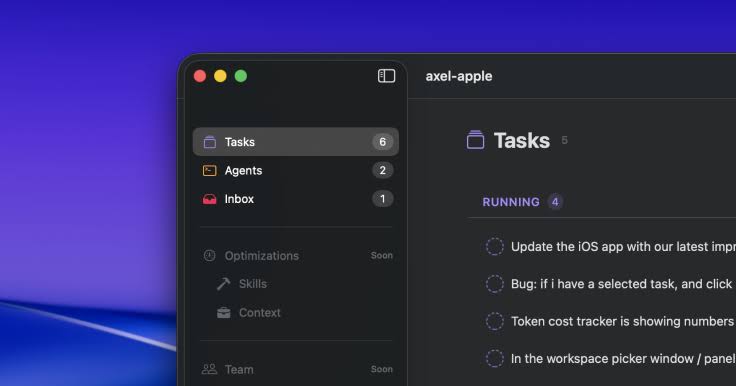
The design intent here is unusually clear, and it is stated openly: a calm task list for agents in chaos, with an interface modelled on Things. In practice that means a five column workspace covering tasks, inbox, terminals, skills and team, and keyboard shortcuts for everything including new pane, dispatch, reorder and kill.
What we think will land well.
The single inbox is the best part of the concept. Permission requests arrive with the file path, a diff preview and the command arguments before you approve, plus macOS notifications when an agent is blocked. Approving edits across five terminals without that is the actual pain this product exists to remove.
Real terminals rather than a simulation. tmux panes and genuine worktrees mean sessions persist, you can close the terminal and reattach, and nothing breaks when you go around the app.
Drag to reorder priorities while tasks are already running, without a restart.
What we expect to frustrate people.
The setup assumes fluency with tmux, git worktrees and at least one agent CLI. This is not a tool for anyone easing into AI coding.
macOS only in practice, and macOS 14 or later at that.
It is beta, and the developers say so plainly on the repository. Expect bugs and expect the workflow to shift under you between versions.
Sync uses Automerge CRDT with Supabase. Conflict free collaboration is a strong claim and one we could not verify, so treat the team features as unproven for now.
The short version: if you are already orchestrating three or more agents by hand in tmux, Axel will probably feel like a relief. If you are running one agent in an IDE, it is solving a problem you do not have yet.
Verdict
Axel is one of the more thoughtfully designed entries in a crowded 2026 category, and the free price and multi agent support make it easy to try. The things holding it to 3.8 rather than higher are structural rather than aesthetic: it is beta, it is Mac only, it carries no declared licence, and it has no tagged releases or changelog.
Try it if you are a Mac developer running several coding agents at once and you are comfortable with tmux. Wait if you need Windows or Linux, if your employer needs licence clarity, or if you want something you can depend on without watching it closely.
Frequently Asked Questions About Axel
1. What is Axel?
Axel is a native macOS app and Rust CLI from Txtx, Inc. that queues tasks for AI coding agents, runs each one in its own git worktree and tmux pane, and collects all their permission requests in a single inbox.
2. Is Axel free?
Yes. The Mac app is a free download and the CLI is free to install. There is no pricing page and no published paid plan as of August 2026. You still pay for your own agent subscriptions.
3. How much does Axel cost per month?
Nothing. Axel itself has no subscription. Your actual monthly cost is whatever you already spend on Claude Code, Codex, OpenCode or Antigravity, and running agents in parallel tends to increase that.
4. Which AI agents does Axel support?
Claude Code, Codex, OpenCode and Antigravity. Axel supplies no model of its own, so you bring your own agent and your own subscription.
5. Is Axel open source?
The code is publicly readable on GitHub at scarce/axel, but no licence is declared on the repository. Public source and open source are not the same thing, so confirm the terms before commercial use.
6. Does Axel work on Windows or Linux?
The app does not. It is a native SwiftUI application requiring macOS 14 or later, with iOS and visionOS builds also listed. The Rust CLI has broader reach, but the full experience is Mac only. Windows users should look at Pane or Nimbalyst.
7. How do I install Axel?
Install tmux first, then run the install script at install.axel.rs or use cargo install axel-cli, then download the Mac app DMG from axel.build. The app can install the CLI itself if it does not find one.
8. What is an AXEL.md file?
It is Axel's per project config file. YAML frontmatter plus markdown defines your panes, skills and grid layout so a workspace can be launched the same way every time instead of rebuilt by hand.
9. Is Axel stable enough for production work?
Not yet, by the developers' own account. The repository states plainly that Axel is in beta and may have bugs. There are no tagged releases and the commit history is short.
10. What are the best Axel alternatives in 2026?
Conductor is the closest Mac equivalent and is further along. Nimbalyst, formerly Crystal, is open source and cross platform. Claude Squad suits terminal purists, Vibe Kanban suits teams who prefer a board, and Pane is the pick for Windows.
11. Do I need to know tmux to use Axel?
Effectively yes. Axel orchestrates real tmux panes and git worktrees rather than simulating them, and the setup assumes you are comfortable with both.
12. Does Axel track how much my agents are spending?
Yes, and it is one of the few tools in this category that does. It reports input and output tokens plus dollar cost per task, with cumulative totals per session.
13. Is Axel the same as the axel download manager?
No, and this trips people up. The long standing axel command line download accelerator for Linux is an unrelated project. Axelera AI, the Dutch chip company, is also unrelated.
14. Can a team use Axel together?
It ships sync built on Automerge CRDT with Supabase and includes a team column in the workspace. We could not verify how well the collaboration holds up in practice, so treat it as promising but unproven.











