|
Product |
BetterBugs MCP |
|
Category |
AI assisted bug reporting and debugging connector |
|
ICON POLLS rating |
3.9 out of 5 |
|
Best for |
QA, developers, product teams and AI coding workflows |
|
Core job |
Passes a BetterBugs report and its technical context to an MCP capable AI client |
|
Server type |
Remote Streamable HTTP MCP server |
|
MCP endpoint |
https://mcp.betterbugs.io/mcp |
|
GitHub support |
Can create GitHub issues from BetterBugs reports |
|
Android |
No dedicated BetterBugs MCP Android app confirmed; desktop browser workflow is the practical fit |
|
Pricing |
No separate public MCP price clearly listed at review time |
|
Login options |
Email, Google account or GitHub account |
|
ICON POLLS VERDICT: BetterBugs MCP earns 3.9 out of 5. It is a genuinely useful bridge between visual bug reports and AI debugging, but the value depends on your team already using BetterBugs and an MCP compatible desktop client. |
BetterBugs MCP review in 2026
BetterBugs MCP is not a separate bug tracker trying to replace every tool in a development team. Its job is more focused. It takes a BetterBugs report link and gives an AI assistant the context that normally gets lost in a handoff: screenshots or recordings, console activity, network requests, system details and the steps around the problem. In the right workflow, that can turn a vague report into a much more useful debugging conversation.
Our ICON POLLS review found the idea strong and practical. Good bug reports are often limited by missing detail, not by a developer’s ability to fix the issue. BetterBugs addresses that problem at the capture stage, then MCP makes that evidence available inside tools such as Cursor, Claude compatible clients and other AI development environments that support the protocol.
BetterBugs MCP Server: how it works
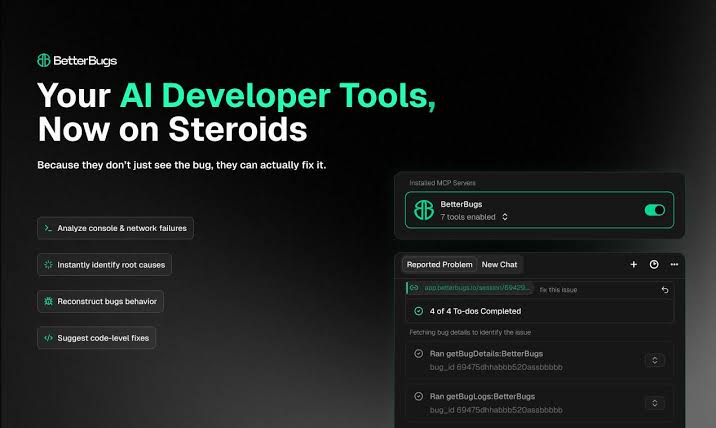
The BetterBugs MCP server is a remote service. Rather than installing a local package and maintaining it yourself, a user adds the server URL to an MCP client. The current setup uses a Streamable HTTP endpoint, with legacy SSE endpoints also documented. Once the client is connected, a BetterBugs report link can be supplied to the AI agent so it can work from the collected evidence instead of a short ticket description.
That distinction matters. MCP does not magically fix a broken app. It improves the context available to the person or agent doing the diagnosis. The most convincing use case is a browser or web application defect where the report already includes visual proof, console logs and network behaviour.
BetterBugs MCP and GitHub
BetterBugs has a direct GitHub integration for creating GitHub issues from its reports. That makes the wider workflow sensible: capture the bug in BetterBugs, send the ticket to the team’s repository, then share the BetterBugs report with an AI agent when deeper analysis is needed. The report link keeps the technical evidence in one place instead of forcing a developer to reconstruct it from scattered messages.
The GitHub connection is useful, but it is not the same thing as automatic code repair. Teams still need normal review, validation and security checks before accepting AI suggested changes. BetterBugs MCP is best seen as a fast research assistant for a real debugging process.
Android and mobile support
Search interest around “BetterBugs MCP Android” is understandable, but the product is primarily built around a desktop browser extension and a remote MCP server. ICON POLLS did not find a dedicated Android app for BetterBugs MCP. An Android browser can open web links, but the full capture and MCP setup experience is much more realistic on a desktop browser and supported AI coding client.
That is a limitation for mobile first QA teams. If your bug reporting happens mainly on physical Android devices, you should test the exact capture route before committing. Do not assume the desktop extension experience transfers directly to mobile Chrome.
BetterBugs MCP login and account setup
The account setup is straightforward. BetterBugs allows sign in with email, Google or GitHub, and an account is needed to save and manage bug reports. The MCP connection itself is lightweight, but the full workflow still requires a BetterBugs report to share. New users should create a workspace, install the browser extension, capture a sample issue and then connect their preferred AI client.
BetterBugs MCP card and integrations
The phrase “BetterBugs MCP card” can be confusing because it does not refer to a payment card. In practice, it usually means the BetterBugs integration card or listing inside a tool, workspace or MCP client setup screen. The important checks are simple: confirm that the listing points to the official BetterBugs server, confirm the requested permissions, and make sure the AI client supports remote MCP connections.
Beyond GitHub, BetterBugs supports workflow integrations for tools such as Jira, Linear, GitLab and webhooks. That gives teams flexibility, although it also means administrators should be deliberate about which report data is sent to which system.
BetterBugs MCP pricing in 2026
Pricing is the least clear part of the BetterBugs MCP picture. At the time of this review, there was no clearly published standalone price for the MCP server. BetterBugs plans and the surrounding bug reporting product may have their own billing rules, while an AI client can also have separate subscription costs. In plain terms, teams should not treat MCP as automatically free just because the connection setup is simple.
Our advice is to confirm the current BetterBugs plan, included report limits, workspace seats, integrations and any AI usage limits before purchase. That small check can prevent a good technical trial from becoming a budget surprise.
BetterBugs MCP user experience
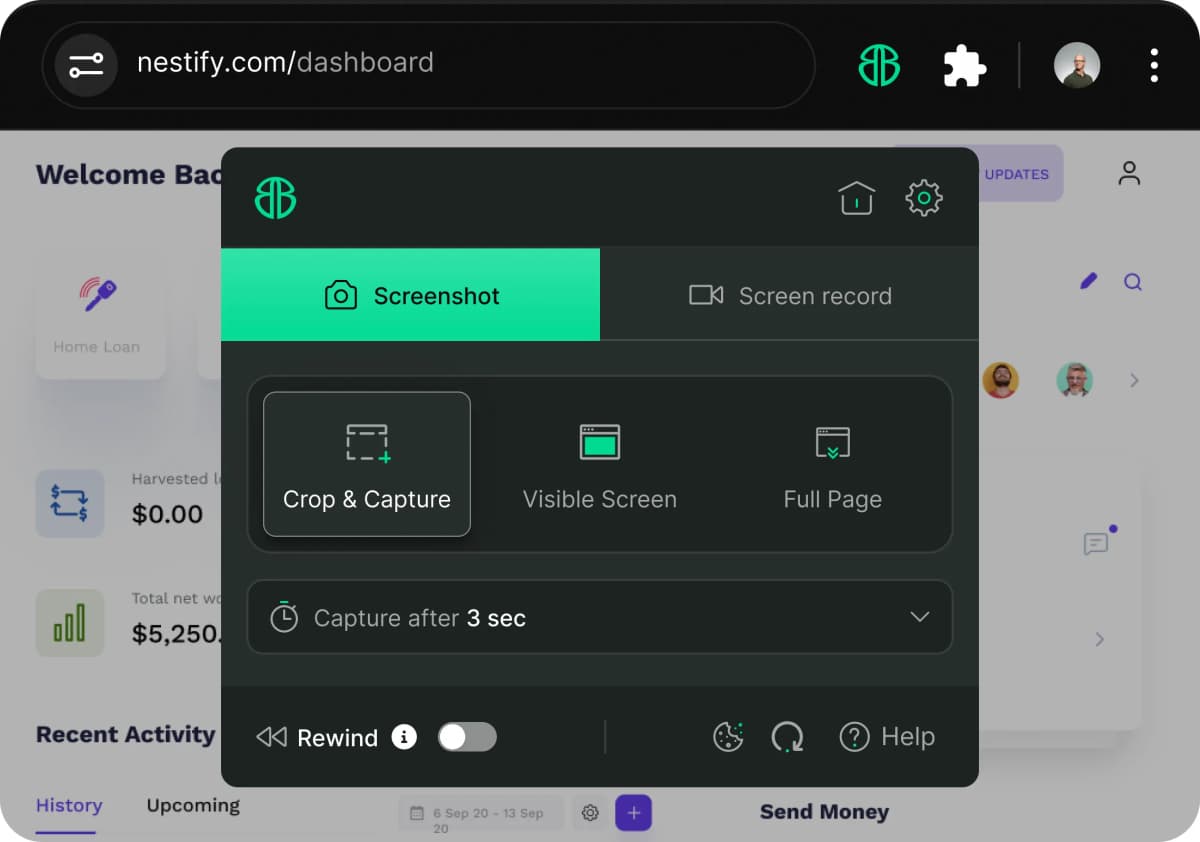
The experience is best when the first report is already clean. BetterBugs makes it easier to capture the evidence, but the user still needs to describe what they expected and what actually happened. Once that is done, the AI handoff feels natural: paste the report into the agent conversation, ask for likely causes, reproduction gaps, test cases or a debugging plan, then verify the answer against the actual codebase.
The main friction is setup complexity. A non technical reporter may find BetterBugs easy, while MCP settings, remote server configuration and AI client permissions can feel unfamiliar. Documentation helps, but this is still a developer facing feature. That is why the rating lands at 3.9, not higher. The technology is useful, but it asks a little more from the user than a one click reporting tool.
Pros and cons
What worked for us
Strong context handoff: Visual evidence, environment information and technical logs can reach the AI agent together.
Remote MCP setup: No local server maintenance is required for the documented remote endpoint.
GitHub friendly workflow: Reports can become GitHub issues while the detailed evidence remains available through BetterBugs.
Good for web debugging: The product is especially suited to browser based issues and QA handoffs.
What to consider
Mobile uncertainty: A dedicated Android MCP app was not confirmed, so desktop remains the safer workflow.
Pricing clarity: A separate public MCP price is not clearly stated.
Needs the ecosystem: The best experience requires BetterBugs, a supported MCP client and a well captured report.
AI still needs review: Suggestions are helpful, but not a substitute for testing and engineering judgment.
Final rating: 3.9 out of 5
BetterBugs MCP is a thoughtful addition to a real problem: the AI agent cannot debug what it cannot see. By bringing report context into the conversation, it can reduce the empty back and forth that slows down QA and engineering. It is worth trying for web teams already comfortable with BetterBugs and AI coding tools. Teams needing native Android capture, simple all in one pricing or a zero configuration experience should test it carefully before rolling it out.
Frequently asked questions about BetterBugs MCP
1. What is BetterBugs MCP?
It is a remote Model Context Protocol server that lets compatible AI agents use BetterBugs report links and their debugging context.
2. What is BetterBugs MCP used for?
It is used to give an AI assistant more complete bug evidence, including visual proof and technical context, during debugging.
3. Is BetterBugs MCP free?
The server does not show a clearly published standalone price in this review. Check the current BetterBugs plan and any AI client costs before relying on it.
4. Does BetterBugs MCP work on Android?
No dedicated BetterBugs MCP Android app was confirmed. The desktop browser and AI client workflow is the safer option.
5. How do I connect to the BetterBugs MCP server?
Add the official remote MCP URL to a compatible MCP client, then follow that client’s connection and permission steps.
6. What is the BetterBugs MCP server URL?
The documented remote endpoint is https://mcp.betterbugs.io/mcp.
7. Does BetterBugs integrate with GitHub?
Yes. BetterBugs can create GitHub issues from captured bug reports after the GitHub connection is authorized.
8. Can BetterBugs MCP fix bugs automatically?
No. It can help an AI agent analyse the report and suggest causes or next steps, but engineers should review and test every proposed change.
9. How do I log in to BetterBugs?
You can create or access an account with email, Google or GitHub.
10. What does BetterBugs MCP card mean?
It normally refers to the BetterBugs integration card or listing in an app or MCP setup screen, not a payment card.
11. Which AI tools can use BetterBugs MCP?
It is intended for AI development environments and agents that support remote MCP connections. Confirm compatibility in your chosen client before setup.
12. Is BetterBugs MCP worth using in 2026?
Yes for teams that already use BetterBugs and want richer AI assisted debugging. It is less compelling if your workflow is mainly mobile or does not use MCP capable AI tools.











