Bruno API Client Review 2026: Download, GitHub, Testing, User Experience and FAQs

By ICON Team · Aug 17, 2026 · 13 min read
Bruno API Client Review 2026: Download, GitHub, Testing, User Experience and FAQs

Detail

Information

Product Name

Bruno API Client

Official Website

usebruno.com

Founded

2021

Founder / CEO

Anoop M D

Headquarters

Bengaluru, India

Latest Version

v4.0.0 (Released July 2026)

License

MIT (Open Source)

Supported Platforms

Windows, macOS, Linux

Pricing

Free (Open Source Core) | Ultimate Plan available

GitHub Stars

44,000+ (as of mid-2026)

Total Downloads

2.5 million+

Daily Active Users

150,000+

Key Protocols

REST, GraphQL, gRPC, WebSocket

Unique Feature

Git-native, offline-first, file-based collections (.bru format)

ICON POLLS Rating

4.0 / 5.0


What Is Bruno API Client?


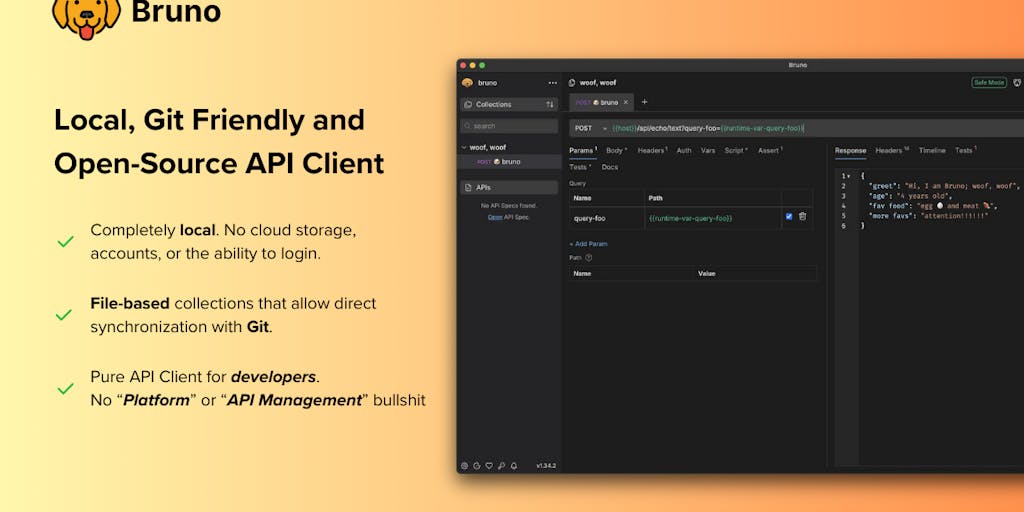
If you have been following the API development space over the past couple of years, chances are you have come across the name Bruno. It is an open-source, offline-first API client built by Anoop M D and his growing team out of Bengaluru, India. What makes Bruno stand out from every other tool in the category is a decision that sounds simple but changes everything: your API collections are stored as plain text files on your local file system, not on a vendor's cloud server.

That one architectural choice means your requests live alongside your code, get version-controlled through Git, show up in pull requests, and never end up locked behind a subscription paywall. For teams that were already frustrated with Postman's mandatory cloud login and rising seat-based pricing, Bruno arrived at exactly the right time.

At ICON POLLS, we spent several weeks putting Bruno through its paces. We tested it across macOS, Windows, and Linux. We imported Postman collections, wrote test scripts, ran the CLI in CI pipelines, and compared the overall workflow against the tools most developers already know. This review covers everything we found, the good and the not-so-good, so you can decide whether Bruno belongs in your workflow.


Download and Installation


Getting Bruno on your machine is about as straightforward as it gets. Head over to usebruno.com/downloads and pick the installer for your operating system. There are dedicated builds for Windows (x64 and ARM64), macOS (Intel and Apple Silicon), and several Linux flavors including .deb, .AppImage, and Snap packages. You can also install it through popular package managers like Homebrew on Mac, Chocolatey or Scoop on Windows, and Snap or Flatpak on Linux.

The latest release as of this writing is version 4.0.0, which shipped in July 2026. It is worth noting that v4 includes some breaking changes for users migrating from v3, particularly around how secrets and environment variables are handled. The Bruno team has published a migration guide, and the app itself shows a heads-up notification if it detects older collection formats. During our testing, the installation process took under a minute on all three platforms, and there was no account creation or sign-in step required. You download, install, and start working immediately.


GitHub Presence and Community


Bruno's GitHub repository (github.com/usebruno/bruno) has crossed 44,000 stars by mid-2026, making it one of the fastest-growing developer tools in the open-source ecosystem. For context, the project launched in 2022 and has been shipping updates two to three times per month ever since. That kind of momentum does not happen by accident. It reflects a community that genuinely cares about the tool and actively contributes to it.

The repository is well maintained. Issues get triaged regularly, pull requests are reviewed promptly, and the changelog on the official site is detailed enough for anyone to track what changed between versions. In early 2026, Bruno also won the API World 2026 Award for Best in API Developer Experience, which speaks to how the broader industry views the project. It is not just a scrappy side project anymore. It is a serious contender.


The Bruno App Experience

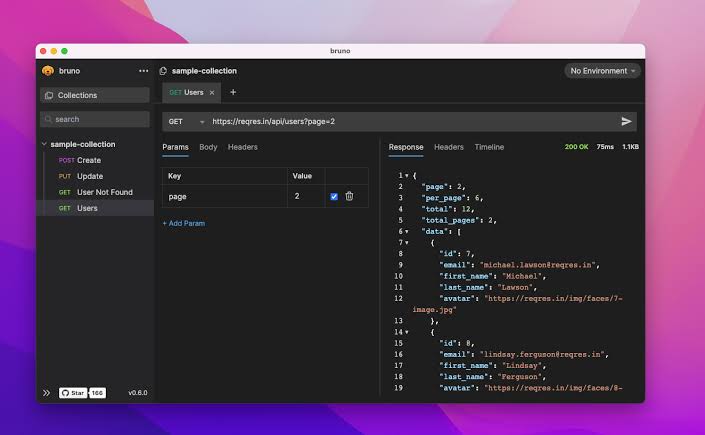
Bruno is a desktop application built with Electron, and it runs natively on Windows, macOS, and Linux. The interface is clean and focused. When you open the app, you are greeted by a workspace view where you can create or open collections. Each collection maps to a folder on your file system, and each request inside it is saved as a .bru file, a plain text format the team designed specifically for readability and version control.

The tabbed interface lets you work with multiple requests at the same time, which is essential for any real-world API testing workflow. You can organize requests into folders, drag them around, and even right-click a folder to run every request inside it in sequence. Environment variables are managed per collection, and Bruno supports multiple environment tiers so you can switch between development, staging, and production without manually editing values each time.

One thing we noticed is that version 3 introduced a refreshed UI with new themes, and community feedback has been overwhelmingly positive. The app feels light, responsive, and does not eat through system memory the way some competing tools do. It is built to do one job well, and it does not try to be a platform.


API Testing Capabilities


Testing is where Bruno really earns its stripes. The client supports REST, GraphQL, gRPC, and WebSocket protocols out of the box. You can write pre-request and post-response scripts in JavaScript, set up assertions, chain requests using variables, and use data-driven testing with CSV files. For teams that need automated regression testing, the Bruno CLI integrates directly into CI/CD pipelines and generates HTML test reports.

Bruno also supports importing collections from Postman and Swagger/OpenAPI specs, which makes migration considerably less painful. During our testing, we imported a 60-request Postman collection and had it running inside Bruno within minutes. A few minor formatting quirks came up in the body payloads, but nothing that required significant manual cleanup.

Version 4 introduced improved secret management, letting teams use external secret managers to keep credentials out of collection files entirely. This is a meaningful step forward for enterprise-grade workflows where rotating credentials and audit trails matter. The scripting environment supports popular assertion libraries, and the overall testing experience feels mature and capable for a tool at this stage of its lifecycle.


Performance on Mac


We tested Bruno on both an Intel MacBook Pro and an M-series MacBook Air, and the experience was smooth across the board. The app launches fast, stays responsive under load, and does not exhibit the sluggishness that some Electron-based tools are known for. Native Apple Silicon support has been available since version 3, and it shows. Memory consumption stayed reasonable even with 30+ tabs open and multiple collections loaded simultaneously.

Installation on Mac is possible through a direct .dmg download from the website or via Homebrew with a single terminal command. Both methods worked without any issues during our review. If you are a Mac user currently on Postman or Insomnia and looking for something lighter, Bruno is worth a serious look.


Web Version and Online Access


One thing to know upfront is that Bruno does not offer a web-based version of its client. This is a deliberate decision, not an oversight. The entire philosophy behind Bruno is local-first, meaning your data stays on your machine and never touches a third-party cloud. For developers who want a browser-based API testing tool, alternatives like Hoppscotch or Postman's web client are available. But if you value data sovereignty and offline capability, Bruno's desktop-only approach is a feature, not a limitation.

That said, the official website at usebruno.com serves as a solid resource hub. You will find comprehensive documentation, a detailed changelog, a community section with testimonials, and links to their GitHub and Discord channels. The docs cover everything from basic installation to advanced scripting and CI/CD integration, which is helpful for onboarding new team members.


User Experience

The overall user experience with Bruno is refreshingly straightforward. There is no account wall, no sign-up flow, no onboarding wizard trying to push you toward a paid plan. You open the app, create or import a collection, and start making requests. For developers who have grown tired of tools that try to do too much, this simplicity is a breath of fresh air.

The learning curve is gentle if you have used Postman or any similar tool before. The interface is intuitive, and the .bru file format is readable enough that you can edit requests directly in a text editor if you prefer. Where Bruno shines is in team workflows. Because collections are just files and folders, you can commit them to the same Git repository as your code. Pull requests become the natural collaboration layer, and you get all the benefits of code review applied to your API tests.

There are a few rough edges. The plugin ecosystem is still growing, and some advanced features like built-in mock servers or contract testing are not available the way they are in Postman. Documentation is solid but can sometimes lag behind the latest release. These are not dealbreakers, but they are worth knowing about if you are evaluating the tool for a large team with complex requirements.


What We Liked and What Could Be Better


What We Liked:


Completely free and open source with an MIT license.

No cloud sync, no account required, no vendor lock-in.

Collections stored as plain text files that work naturally with Git.

Supports REST, GraphQL, gRPC, and WebSocket protocols.

Lightweight and fast across Windows, macOS, and Linux.

Active development with frequent updates and strong community support.

CLI tool for CI/CD pipeline integration.

Easy migration from Postman and OpenAPI/Swagger collections.


What Could Be Better:


No web-based or browser version available.

Smaller ecosystem compared to Postman (no built-in mock servers or monitors).

Documentation can occasionally lag behind the latest features.

Team collaboration relies entirely on Git, which may not suit non-technical team members.

The transition from Golden Edition to subscription-style Ultimate plan has caused some community concern.


ICON POLLS Verdict


Bruno has earned its spot as one of the top API clients available in 2026. It is not trying to replace Postman feature for feature. Instead, it takes a fundamentally different approach to how API collections should be stored, versioned, and shared. For solo developers and Git-centric teams, it is the best tool in the category right now. For larger organizations that rely heavily on Postman's platform features like mock servers, monitors, and built-in documentation hosting, the switch may require some adjustment.

We are giving Bruno a rating of 4.0 out of 5.0. It loses a point for the absence of a web client and some enterprise-oriented features that more mature platforms offer. But what it does, it does exceptionally well, and the trajectory of the project suggests those gaps will continue to narrow. If you have not tried Bruno yet, now is a great time to give it a go.


Frequently Asked Questions (FAQs)


1. Is Bruno API Client really free to use?

Yes. Bruno's core application is completely free and open source under the MIT license. You can download it, use it for personal or commercial projects, and contribute to it without paying anything. There is an optional Ultimate plan that unlocks additional features like enhanced secret management and priority support, but the free version covers everything most developers and small teams need for day-to-day API testing.

2. How does Bruno compare to Postman in 2026?

Postman remains the most feature-rich API client on the market, with built-in mock servers, monitors, contract testing, generated documentation, and a large plugin ecosystem. Bruno takes a different approach by focusing on being a fast, lightweight, and privacy-first tool. The biggest practical difference is where your collections live. Postman stores them in the cloud behind a login. Bruno stores them as files on your machine that you can version-control with Git. If data privacy, speed, and version control matter more to you than a full-suite platform, Bruno is the stronger pick.

3. Can I import my Postman collections into Bruno?

Absolutely. Bruno supports importing Postman collections, Insomnia collections, and OpenAPI/Swagger specifications. The import process is built into the app and handles most collections without any manual adjustments. We tested it with a collection containing over 60 requests and the transition was smooth, with only minor formatting differences in a few request bodies.

4. Does Bruno work on Mac, Windows, and Linux?

Yes. Bruno offers native installers for all three major desktop platforms. On Mac, it supports both Intel and Apple Silicon processors with dedicated builds. On Windows, it supports x64 and ARM64 architectures. Linux users can install it via .deb packages, AppImage, Snap, or Flatpak. You can also install it through package managers like Homebrew, Chocolatey, or Scoop.

5. Is there a web or browser version of Bruno?

No, and this is intentional. Bruno is designed as a desktop-only, offline-first application. The team has stated that there are no plans to build a cloud-synced or browser-based version. This approach ensures that all your API data remains on your local machine and under your control. If you specifically need a browser-based API client, tools like Hoppscotch or Postman's web app would be alternatives to consider.

6. What is the .bru file format and why does it matter?

The .bru format is a plain text markup language that Bruno uses to store API request information. Each request in your collection is saved as a separate .bru file on your file system. Because these files are human-readable and diff-friendly, they integrate naturally with Git and other version control systems. You can review changes to API requests in a pull request the same way you review changes to code. This is one of Bruno's core differentiators and a major reason developers are adopting it.

7. Can Bruno be used for CI/CD pipeline integration?

Yes. Bruno includes a command-line interface (CLI) called bru that you can install via npm and use in any CI/CD environment. You can run entire collections or individual folders of requests, pass environment files, and generate HTML reports for test results. It supports data-driven testing with CSV files and includes a bail flag to stop execution on the first failure. This makes it practical for automated regression testing as part of your deployment pipeline.

8. Who is behind Bruno and is the project actively maintained?

Bruno was created by Anoop M D, a full-stack developer based in Bengaluru, India. The project launched in 2022 and has grown into a company with around 50 employees as of early 2026. The team ships updates multiple times per month, the GitHub repository is actively maintained, and the project won the API World 2026 Award for Best in API Developer Experience. Community engagement is strong across GitHub, Discord, and social media, and the project shows no signs of slowing down.

9. What happened to the Bruno Golden Edition license?

The Golden Edition was a one-time purchase license priced at $19 that gave users access to premium features. Bruno has since transitioned to a new pricing model with a free open-source tier and an Ultimate plan for teams that need advanced features and enterprise support. Existing Golden Edition license holders continue to receive updates as originally promised. New users can start with the free tier and evaluate the Ultimate plan through a 14-day trial if they need the additional capabilities.

10. Is Bruno safe and does it collect user data?

Bruno is designed with privacy as a core principle. It operates entirely offline and does not sync any data to external servers. Your API collections, environment variables, and credentials stay on your local machine. The source code is publicly available on GitHub under the MIT license, which means anyone can audit it. The team has explicitly stated that there are no plans to add cloud sync to Bruno, which gives users confidence that the privacy-first approach is not going to change down the road.