|
Feature |
Details |
|
Product Name |
Claude Code Remote Control |
|
Developer |
Anthropic |
|
Launch Date |
February 24, 2026 (Research Preview) |
|
Category |
AI Coding Agent / Remote Developer Tool |
|
Supported Platforms |
macOS, Linux, iOS, Android, Web |
|
Required Plan |
Claude Pro ($20/mo) or Max ($100/$200/mo) |
|
Activation Command |
claude rc or /remote-control |
|
VSCode Support |
Limited (terminal works, extension support pending) |
|
GitHub Integration |
Yes, through GitHub Actions and gh CLI |
|
Security Model |
Encrypted bridge, code stays local |
|
Team or Enterprise Access |
Not yet available |
|
Current Version Status |
Research Preview (as of May 2026) |
|
Official Website |
claude.com/code |
|
ICON POLLS Rating |
3.2 / 5 |
Claude Code Remote Control and VSCode Integration
One of the first things developers ask us about is whether Remote Control plays nicely with Visual Studio Code, and the answer is yes and no. Claude Code itself has a fully working VSCode extension that includes a command menu where you can start a Remote Control session through the slash remote control option. So if you live inside VSCode, you can still kick things off without leaving the editor.
That said, the integration is not perfectly smooth yet. There is an open issue on the Anthropic GitHub repo where users have reported that the slash rc command does not always work inside the VSCode extension, and that remote control settings configured in the CLI are sometimes ignored when launched from VSCode. For a tool that is meant to free you from your desk, this is a small but annoying friction point. If you mostly use the terminal directly, you will have a smoother time. If you depend on VSCode as your main interface, expect a few hiccups until Anthropic ships the next update.
Security and Privacy in Claude Code Remote Control
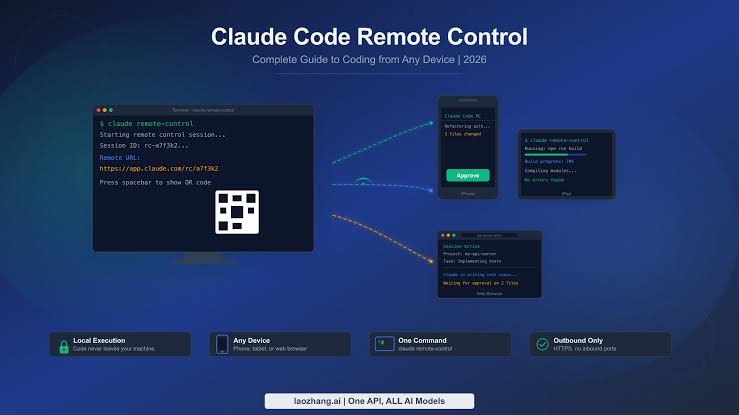
Security is where Remote Control actually impressed our testing team at ICON POLLS. Anthropic took a privacy first approach to the design. Your code never leaves your local machine. Only chat messages, prompts and tool results travel through what Anthropic describes as an encrypted bridge between your CLI and your mobile or web app. Your files, your MCP servers, your environment variables and your project settings all stay on the device where the session started.
On top of that, Remote Control still respects the standard permission model. Even when you are controlling your laptop from a phone, sensitive actions still require your approval. The dangerously skip permissions flag, which some power users rely on, currently does not work with Remote Control, and honestly that is a good thing for a feature that exposes your dev environment to a second device.
Claude Code also has a built in slash security review command and a GitHub Actions integration that scans pull requests for vulnerabilities like SQL injection, XSS and insecure data handling. So even if you are reviewing a PR from your phone, you are still backed by automated security checks. That is a thoughtful touch that we feel many competing tools overlook.
Version and Release Notes
Remote Control launched as a Research Preview, and Anthropic has been very clear that it is still a work in progress. As of May 2026, the feature has shipped multiple updates, with Claude Code itself reaching version 2.1.133 and beyond. Unfortunately, one of the issues that surfaced along the way is that version 2.1.100 and later are reported to inflate token consumption by roughly forty percent, which can hit your monthly limits faster than expected if you are heavy on long sessions.
Anthropic has been pushing fixes for memory leaks, sub agent skill discovery and other quirks, but the token inflation bug has not been publicly patched at the time of writing. For an early adopter feature, version stability is decent but not perfect. We recommend keeping an eye on the official release notes if you plan to rely on Remote Control daily.
GitHub Integration with Claude Code Remote Control
If you live on GitHub, Claude Code Remote Control has a lot to offer. Through the GitHub CLI and Claude Code Web, you can manage issues, create pull requests, approve reviews, run GitHub Actions, check workflow logs, manage releases and even handle project boards and Discussions, all by giving natural language instructions to the agent. The whole point is that you do not need to touch the command line yourself. You just tell Claude what you want done, and it handles the rest.
From a Remote Control perspective, this means you can be on a train, open your phone, ask Claude to check the status of a workflow on a repo and merge a PR once tests pass, then close your phone and trust that the work is happening. The setup involves generating a personal access token with the correct repo and workflow scopes, which Anthropic documents clearly. Once that is in place, the GitHub workflow becomes one of the strongest use cases of Remote Control in 2026.
Pro Plan Access and Pricing
Originally, when Remote Control launched, it was limited to Max subscribers paying between one hundred and two hundred dollars per month. Pro access was promised soon after, and by April 2026 Pro users on the twenty dollar per month plan had also been given the green light. Team and Enterprise plans still do not have official Remote Control access, which is a real letdown for organizations that want to roll this out company wide.
For solo developers, the Pro plan at twenty dollars per month is the sweet spot. You get Claude Code in your terminal, Claude on the web and desktop, plus access to the Remote Control feature. Heavy users who burn through the Pro limits in five hour windows may want to upgrade to Max, but most casual to moderate users will find Pro perfectly fine for daily Remote Control needs.
User Experience and Real World Usage
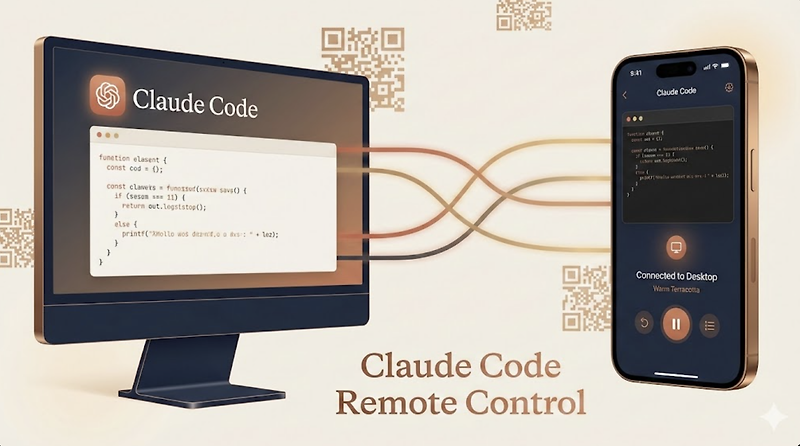
This is where opinions get divided. In our testing, the user experience of Claude Code Remote Control is genuinely impressive when everything works. Type claude rc in your terminal, scan the QR code with your phone, and within seconds you are watching your AI agent work in real time from your mobile device. You can approve or reject file changes, redirect work, give new instructions and even monitor multiple sessions at once.
However, there are clear pain points. Session crashes sometimes produce vague API errors instead of meaningful messages. Restarting a dropped session requires starting from scratch rather than reconnecting to the old one. Some users have also reported sync delays when the network is unstable. These issues are forgivable for a Research Preview, but they prevent us from rating Remote Control higher than 3.2 out of 5. Once Anthropic polishes the rough edges and opens it to Team and Enterprise plans, this rating could climb significantly.
Compared to community alternatives like the 247 project on GitHub or the older SSH plus tmux approach, Remote Control is far easier to set up and much more secure. It just needs a bit more time to mature before we can call it bulletproof.
ICON POLLS Verdict on Claude Code Remote Control
Claude Code Remote Control is a genuinely useful feature with a clear vision. It removes the desk dependency that has held back AI coding agents for years, and it does so without sacrificing security or pushing your code to the cloud. The GitHub integration alone makes it worth trying if you are already on a Pro or Max plan.
That said, it is not for everyone yet. The Research Preview label is real. VSCode support has gaps, sessions can crash with cryptic errors, and Team and Enterprise customers are still locked out. For now, we give it a fair and honest 3.2 out of 5. It has the potential to easily become a 4.5 by the end of 2026 if Anthropic keeps shipping at the current pace, but as of today it is a powerful but rough feature that early adopters will love and cautious teams will want to wait on.
Frequently Asked Questions About Claude Code Remote Control
1. What exactly is Claude Code Remote Control?
Claude Code Remote Control is a feature from Anthropic that lets you start a coding session on your laptop and continue controlling it from your phone, tablet or web browser. It launched on February 24, 2026 as a Research Preview and uses an encrypted bridge so your code stays local while you steer the agent from anywhere.
2. Is Claude Code Remote Control free to use?
No, it is not free. You need at least a Claude Pro subscription at twenty dollars per month to access it. Max subscribers at one hundred or two hundred dollars per month also get full access. Team Standard, Team Premium and Enterprise plans currently do not include Remote Control.
3. Does Claude Code Remote Control work with VSCode?
It works partially. The Claude Code VSCode extension includes a remote control option in its command menu, but some users have reported that the slash rc command and CLI defaults are not always honored when launched through the extension. The terminal experience is currently more reliable than the VSCode one.
4. Is Claude Code Remote Control secure?
Yes, security is one of its strongest points. Your code never leaves your local machine. Only prompts, messages and tool results travel through an encrypted connection. Sensitive actions still require your approval, and the feature works alongside the built in slash security review command and GitHub Actions security integration.
5. Can I use Remote Control on a team or enterprise plan?
Not yet. As of 2026, Remote Control is only available to individual Pro and Max subscribers. Team and Enterprise plans have not received access, which Anthropic says is intentional while it gathers feedback from solo developers first.
6. Does Claude Code Remote Control integrate with GitHub?
Yes. Through the GitHub CLI and personal access tokens, you can manage issues, pull requests, GitHub Actions workflows, releases and project boards directly from Claude Code while controlling it remotely. This makes it particularly useful for developers who do most of their work through GitHub.
7. What are the main weaknesses of Claude Code Remote Control?
The biggest weaknesses are session stability, occasional cryptic API errors when crashes happen, lack of seamless reconnection to dropped sessions, partial VSCode extension support and the absence of Team and Enterprise availability. It is also still labeled as a Research Preview, so things can change quickly.
8. How do I start a Claude Code Remote Control session?
Open your terminal, run claude rc or use the slash remote control command, then scan the QR code with your phone or open the Claude mobile app. Once paired, your phone becomes a live window into the coding session running on your computer.
9. Is Claude Code Remote Control worth it in 2026?
For solo developers on Pro or Max plans who often step away from their desks during long sessions, it is absolutely worth trying. For team leads or enterprise users, we suggest waiting until Anthropic expands support. ICON POLLS gives it a fair 3.2 out of 5 today, with strong potential to improve as the year goes on.











