|
Product name |
Cline CLI 2.0 |
|
Category |
AI coding agent and terminal automation tool |
|
Developer |
Cline Bot Inc. and open-source contributors |
|
Core format |
Command-line interface, interactive terminal UI and headless automation |
|
Main install method |
Global npm installation: npm install -g cline |
|
Supported desktop systems |
macOS, Linux and Windows with the 2.0 generation |
|
Android |
No official native Android app. Unofficial terminal use may be possible but is not a normal supported setup. |
|
GitHub status |
Open-source project under the Apache 2.0 licence |
|
Login |
cline auth, using Cline, ClinePass or a supported provider account/API key |
|
ICON POLLS rating |
3.4/5 |
Cline CLI 2.0 Review Summary
Cline CLI 2.0 is one of the more serious attempts to bring an AI coding agent out of the editor sidebar and into the terminal. It can work as an interactive assistant for a developer at a prompt, but it can also run headless jobs for scripts and CI/CD. That flexibility is the main reason to look at it. It is not simply a chat box that writes snippets. It is built to inspect a repository, use tools, run commands and keep moving through a coding task.
Our 3.4/5 rating reflects a product with real range but a higher setup and maintenance burden than casual users may expect. The command line is powerful when you already work in Git, Node.js and terminals. It can feel unforgiving when authentication, model choice, provider billing or updates become part of the task. Cline is compelling for developers who want control. It is less convincing as a one-click coding app for everybody else.
What Cline CLI 2.0 Actually Is
Cline CLI 2.0 is the terminal version of Cline, an open-source AI coding agent that is also available through IDE extensions and an SDK. In interactive mode, it gives you a conversational terminal experience. In headless mode, it can accept a prompt, pipe input, return structured JSON and fit into automated workflows. That makes it useful for code review, test repair, documentation work, issue analysis and repeatable development jobs.
The important word is agent. Cline can be asked to take actions, not merely answer questions. That can save time, but it also means users need to understand permissions and review their changes. Auto-approval can speed up trusted jobs, yet it should be used carefully in a clean branch or disposable environment. The product earns points for giving technical users that choice instead of hiding it behind a simplified interface.
Cline CLI 2.0 GitHub Review
The GitHub project is a genuine strength. The codebase is public, the project documents its CLI, SDK and IDE paths, and the issue tracker gives users a visible picture of rough edges as well as fixes. Cline supports Git-aware work such as reviewing diffs, working inside repositories and using worktrees for some multi-agent workflows. This makes it easier for developers to audit how the tool is evolving and to report problems with useful detail.
Open source is not the same as effortless. A busy issue tracker also shows that the project moves quickly, and fast-moving tools can create version changes that affect familiar workflows. Developers who need locked-down, predictable environments should test an update in a non-critical project before treating it as part of a production workflow.
Install and Download: What You Need
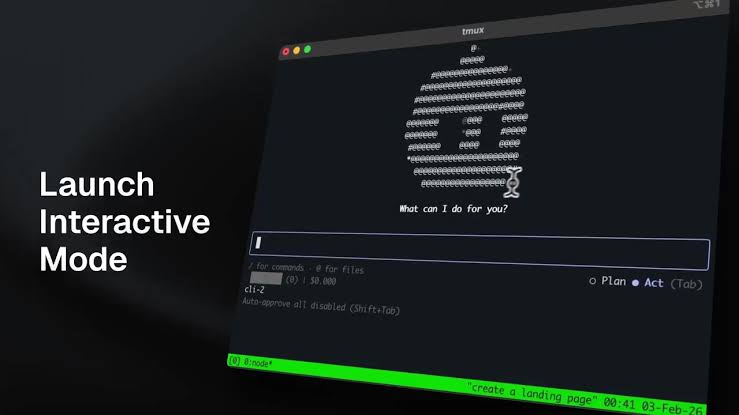
Cline CLI 2.0 is downloaded through npm rather than a typical Windows-style installer. The standard route is to install Node.js first, with Node 22 recommended, then run npm install -g cline. After installation, the normal first commands are cline auth and then cline or cline followed by a task. This is quick if your development environment is already set up, but it is not beginner-friendly if npm, PATH variables and provider keys are new to you.
There is no reason to download the source code from GitHub just to use the CLI. The npm package is the practical route for most people. Users who prefer a graphical environment may be happier with the Cline extension in VS Code, Cursor, Windsurf, VSCodium or a supported JetBrains IDE. That is the better answer to searches for a Cline “app” if what you want is buttons, diffs and a visual workspace.
Windows, Android and App Availability
Windows is a real part of the Cline CLI 2.0 story. The 2.0 generation brought official Windows support, removing an older platform limitation. However, Windows users should still leave room for setup troubleshooting. There have been reports of the CLI being installed but not immediately detected by the VS Code extension, and reports around update behaviour. That does not make the tool unusable, but it keeps the experience below the smoothness level people expect from mature desktop software.
Android is different. Cline does not offer an official native Android app or a Play Store-style Cline CLI download. A technically confident user may experiment with a terminal environment such as Termux, but that is outside the normal supported path and browser-based authentication can be awkward on a phone. For most users, Cline on Android should be treated as experimental, not as a reliable mobile coding setup.
Cline Login and Model Access
Login happens through the cline auth command. Users can choose the Cline provider, ClinePass or their own supported provider setup. The broad model choice is useful because it lets a developer balance quality, price and privacy. You can use cloud providers, a gateway, an API key or, in some cases, a local model runtime such as Ollama or LM Studio.
This freedom is also a source of friction. New users may expect “install Cline” to mean “start coding for free.” In reality, they still need to understand which provider will supply the model, what usage costs apply and how credentials are stored. The login flow itself is straightforward on a laptop, but it is another moving piece in a tool that already asks for terminal confidence.
User Experience: Strong for Developers, Busy for Everyone Else
The CLI feels capable when the task is concrete. Give it a repo, a test failure, a pull request diff or a focused refactor and it has a sensible place in the workflow. Interactive chat is useful for planning and approval. Headless output is useful for scripts. Rules, skills, plugins and MCP connections can extend the tool far beyond simple code generation.
The trade-off is cognitive load. You must decide on a provider and model, understand the scope of the current workspace and keep an eye on what the agent is about to do. The default CLI path can start in an action-oriented mode, so careful users should review options before running broad prompts. We also found the project’s fast release pace to be double-edged: new capabilities land quickly, but version drift and auto-update reports can make stability-conscious users nervous.
What Cline CLI 2.0 Does Well
Terminal-first workflow that supports both interactive work and headless automation.
Open-source project with visible documentation, repository activity and issue tracking.
Broad model and provider flexibility, including local-runtime options for users who value privacy.
Useful automation building blocks, including JSON output, pipes, MCP support, plugins, skills and scheduled tasks.
Official Windows support in the 2.0 generation, expanding its practical audience.
Where Cline CLI 2.0 Falls Short
The setup is more technical than a typical desktop app, especially for people unfamiliar with Node.js and npm.
There is no official Android app or straightforward mobile experience.
Provider selection, costs and authentication add decisions before the real work begins.
Some Windows and update-related reports show that the newest workflows can still be uneven.
Autonomous execution is useful, but it asks users to be disciplined about approvals, branches and review.
ICON POLLS Verdict: Is Cline CLI 2.0 Worth It?
Cline CLI 2.0 is worth trying if you already live in a terminal and want an agent that can participate in real development work. Its open-source base, terminal automation and wide model support give it more depth than many simple AI coding interfaces. It can become part of a serious workflow, particularly for repeatable tasks and developer teams willing to tune it.
It is not the easiest starting point for someone who only wants to ask an AI to build an app from their phone or click through a polished desktop interface. The 3.4/5 score is a fair middle ground: ambitious, flexible and worth watching, but still demanding enough that user experience and stability need more polish.
Frequently Asked Questions About Cline CLI 2.0
1. What is Cline CLI 2.0?
It is the terminal version of Cline, an AI coding agent that can work interactively or run automated tasks in scripts and CI/CD workflows.
2. How do I install Cline CLI 2.0?
Install Node.js 20 or later, preferably Node 22, then run npm install -g cline in your terminal. Next, run cline auth and start Cline with cline.
3. Is Cline CLI 2.0 free?
The CLI is open source, but model access can involve provider charges or a subscription. The total cost depends on the provider and model you choose.
4. Is Cline CLI 2.0 available on Windows?
Yes. Cline CLI 2.0 officially supports Windows. Some users may still need to troubleshoot terminal, PATH or editor integration details.
5. Is there a Cline CLI 2.0 Android app?
No official Android app is available. Terminal experiments on Android are possible for advanced users, but they are not the normal supported experience.
6. Where can I download Cline CLI 2.0?
For normal CLI use, install it from npm with npm install -g cline. It is not usually distributed as a standalone desktop installer.
7. Does Cline CLI 2.0 have a graphical app?
The CLI itself is terminal-based. For a graphical Cline experience, use its IDE extensions in supported editors such as VS Code or JetBrains products.
8. How do I log in to Cline CLI 2.0?
Run cline auth. You can then sign in through Cline, use ClinePass or configure a compatible provider account or API key.
9. Can Cline CLI 2.0 use GitHub projects?
Yes. It can work inside repositories, review diffs and support automated GitHub-related workflows. Some examples also use GitHub CLI for issue and pull-request tasks.
10. Is Cline CLI 2.0 safe to use with auto-approve?
Only for tasks and repositories you trust. Auto-approve can let the agent modify files and run commands without asking each time, so use a clean branch and review the results.
11. Can Cline CLI 2.0 use OpenAI or local models?
Yes. Cline supports multiple providers and can also work with local runtimes such as Ollama or LM Studio when your hardware is suitable.
12. Why is ICON POLLS rating Cline CLI 2.0 a 3.4/5?
It offers serious automation and flexibility, but technical setup, provider complexity, mobile limitations and current stability concerns stop it from receiving a higher score.











