
Quick Verdict
HyNote AI is a practical note-taking and voice recording tool for people who regularly deal with meetings, lectures, interviews, calls, and long audio files. It records speech, turns it into written text, and then reshapes the material into summaries, action points, study notes, flashcards, and other useful formats. The main attraction is convenience. Instead of listening to an hour-long recording again, users can open a structured note and find the important parts much faster.
Our 3.8 out of 5 rating reflects a product that is easy to understand and genuinely useful, but not completely trouble-free. The app works best with clear audio, a stable internet connection, and a plan that matches the amount of transcription a user needs. Some people may also find the subscription choices confusing because web prices, annual billing, trials, and in-app offers can look different. HyNote AI is strongest as a time-saving assistant. It should not be treated as a perfect replacement for checking names, figures, technical terms, or sensitive meeting details.
At a Glance: Icon Polls Ratings
Here is how HyNote AI scored across the areas we evaluated in 2026:
|
Category |
Stars |
Score |
|
Voice Recording and Transcription |
★★★★☆ |
4.1/5 |
|
AI Summaries and Templates |
★★★★☆ |
4.0/5 |
|
App and Cross-Device Access |
★★★★☆ |
3.9/5 |
|
Login and Account Setup |
★★★★☆ |
4.0/5 |
|
Pricing and Plan Clarity |
★★★☆☆ |
3.3/5 |
|
Export and Sharing Options |
★★★★☆ |
3.8/5 |
|
Reliability and Processing Speed |
★★★★☆ |
3.6/5 |
|
Overall |
★★★★☆ |
3.8/5 |
What Is HyNote AI?
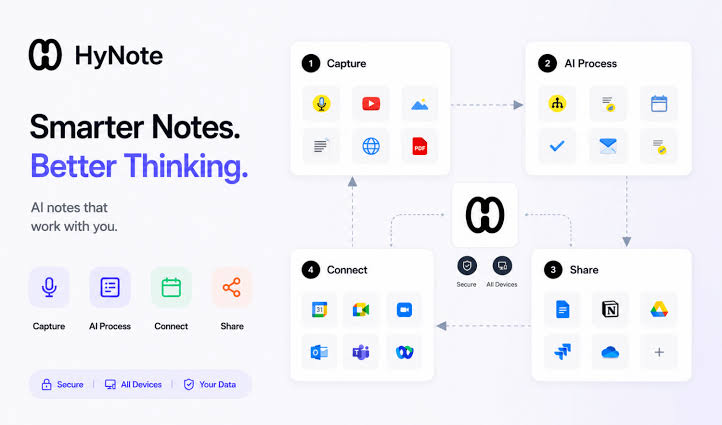
HyNote AI is an AI-powered note-taking platform designed to capture information from speech, recordings, files, images, webpages, and videos. Its main workflow is simple: give the software something to process, allow it to create a transcript, and then choose how the information should be organised. A user can request key points, action items, meeting minutes, lecture notes, a brief summary, questions, flashcards, or another template.
The service is available through mobile apps, a web app, a Mac version, and a browser extension. Notes can sync between supported devices when the same account is used. This makes it useful for students who record on a phone, professionals who review notes on a computer, and creators who want to turn spoken ideas into a more organised first draft.
HyNote AI App
The HyNote AI app is the centre of the experience for most users. The home screen is built around creating a new note, recording audio, uploading material, or opening previous notes. The design is generally clean, and the most common actions are easy to find. A new user does not need technical knowledge to begin recording.
On supported phones and tablets, the app can be used for meetings, classes, interviews, voice memos, and personal ideas. It also includes document scanning and image text recognition, which can be useful when notes begin on paper. Apple users may find the watch support convenient for starting a quick recording without opening the phone. The app is free to download, although several advanced tools and higher usage limits require a paid plan.
The biggest limitation is that core AI features depend heavily on internet access. Recording may feel like a local activity, but transcription, summarisation, syncing, and most transformations are cloud-based. Anyone working in an area with an unreliable connection should test the workflow before depending on it for an important session.
HyNote AI Login and Account Access
HyNote AI login is straightforward. Users open the app or web platform, choose the sign-in option, and use the email address or supported account method linked to their profile. Signing in with the same account is important because that is how recordings, notes, and summaries remain available across devices.
When login problems occur, the first things to check are the email address, password, internet connection, and whether the correct sign-in method is being used. A person who originally joined with an Apple or Google account may create confusion by later trying a separate password. Password reset tools can help with standard email accounts. Users should also avoid creating several accounts by accident, especially when a paid subscription is connected to only one of them.
HyNote AI Download
HyNote AI can be downloaded for iPhone, iPad, and Android devices through their official app stores. The company also offers access through a web browser, a Mac app, and a Chrome extension. This range is useful because people do not always record and review information on the same device.
Before downloading, users should confirm that they have enough storage, a supported operating system, and a stable network connection. The app itself may not take much space, but saved recordings and repeated uploads can grow over time. Cloud storage reduces some pressure on the device, although users should still organise old recordings and remove material they no longer need.
For safety, the app should be obtained from the official download page or a recognised app store. Random APK websites and unofficial installers create unnecessary risks, particularly for an app that may contain private conversations, class notes, or business information.
HyNote AI Voice Recorder
The voice recorder is one of HyNote AI's most useful features. A user taps record, captures a meeting or spoken note, and stops when finished. The software then processes the audio into a transcript and can produce a summary, key points, action items, or another selected format. This is helpful for anyone who struggles to write while listening.
HyNote AI can also work with uploaded audio and supports phone-call and meeting-related workflows in certain versions or devices. Speaker identification is available on higher plans, which makes multi-person conversations easier to follow. Live transcription and live translation are also positioned as premium features rather than basic free tools.
Recording quality still matters. A phone placed far from the speakers, background music, people talking over one another, weak microphones, and unusual names can reduce accuracy. Our advice is to place the device near the centre of the conversation, reduce background noise, and review the final transcript before sharing it. Users must also respect local rules and obtain permission where recording consent is required.
HyNote AI Price in 2026
HyNote AI uses a free plan and several paid levels. The free plan is useful for testing recording, transcription, templates, file uploads, syncing, calendar integration, and private storage. It allows recordings of up to 120 minutes per session, but serious users will eventually meet limits around monthly transcription, exports, real-time features, or advanced integrations.
|
Plan |
Listed Annual Price |
Best For |
|
Free |
$0 |
Light testing, occasional notes and basic recording |
|
Pro |
$79.99 per year |
Regular transcription, translation and transcript exports |
|
Plus |
$129.99 per year |
Live transcription, speaker identification and app transfers |
|
Unlimited |
$189.99 per year |
Heavy real-time transcription and larger storage needs |
|
Teams |
$180 per seat yearly |
Teams needing controls, shared templates and priority support |
The displayed monthly equivalents are lower because the paid plans are billed annually. Prices and trial terms may differ by country, currency, app store, promotion, or purchase route. For that reason, users should read the final payment screen rather than relying on a screenshot or an older review. The Plus plan offers the most balanced set of features for people who need live transcription and clearer speaker separation, while the Unlimited plan makes more sense for heavy daily use.
HyNote AI User Experience
HyNote AI feels quickest when the task is simple: record a session, wait for processing, and open the summary. The interface does a good job of turning a complicated AI workflow into familiar buttons and templates. Searchable notes and cross-device syncing make it easier to return to old material without digging through separate audio files.
The templates are a strong part of the product. A lecture can become study notes or flashcards, while a meeting can become minutes, follow-up points, and an email draft. This is more useful than a plain transcript because most people do not want every spoken word. They want the decisions, key ideas, and next steps.
There are still rough edges. Processing can take longer for large files, unclear recordings may produce mistakes, and an internet problem can interrupt the flow. User feedback also suggests that subscription and refund expectations are not always understood clearly. Anyone considering a paid plan should use the trial with real recordings, check export quality, and cancel through the same store or platform used for payment if the service does not suit their needs.
Pros and Cons
What Works Well
Simple one-tap recording for meetings, lectures, interviews, and voice notes
Transforms transcripts into summaries, action items, flashcards, quizzes, and templates
Works across mobile, web, Mac, tablet, watch, and browser-based workflows
Free plan gives new users a meaningful way to test the core product
Supports uploads from audio, documents, images, webpages, and video sources
Cross-device syncing keeps recordings and notes in one account
Paid plans add live transcription, translation, exports, and speaker identification
Useful for people who find it difficult to listen and write at the same time
What Needs Improvement
Most AI features require a stable internet connection
Pricing can look confusing because annual, in-app, and promotional offers may differ
Transcription quality drops with noise, distance, accents, and overlapping speakers
Long files may take time to upload, process, and generate into different formats
Advanced features are spread across several paid plan levels
Users still need to check names, dates, figures, and technical terms
Private or sensitive recordings require careful consent and account security
Frequently Asked Questions About HyNote AI (2026)
1. What is HyNote AI used for?
HyNote AI is used to record speech, transcribe audio, summarise meetings and lectures, organise notes, create action items, and turn information into formats such as flashcards, quizzes, outlines, and study notes.
2. Is HyNote AI free?
Yes. HyNote AI has a free plan that includes basic audio recording and transcription, templates, file uploads, syncing, calendar integration, and private storage. Higher limits and advanced features require a paid plan.
3. How do I log in to HyNote AI?
Open the HyNote AI app or web platform and sign in with the email, Apple, Google, or other supported method used when the account was created. Use the same account on every device to keep notes synced.
4. Where can I download the HyNote AI app?
The mobile app is available through the Apple App Store and Google Play. HyNote AI also offers a web app, a Mac version, and a Chrome extension through its official platform.
5. Can HyNote AI record meetings and lectures?
Yes. Recording meetings and lectures is one of its main uses. The app can create a transcript and then generate a summary, key points, action items, lecture notes, or other selected templates.
6. Does HyNote AI work as a voice recorder?
Yes. It includes a built-in voice recorder for spoken notes, interviews, classes, and meetings. Clear audio and good microphone placement improve the final transcript.
7. Can HyNote AI identify different speakers?
Speaker identification is available on higher paid plans. It is useful for conversations with several people, but labels should still be checked because overlapping speech can cause mistakes.
8. Can HyNote AI transcribe in real time?
Yes, real-time transcription is offered on selected paid plans. The free plan focuses more on standard recording and transcription rather than unlimited live use.
9. Does HyNote AI work offline?
The main AI functions require an internet connection because transcription, summarisation, syncing, and most processing happen through cloud services. It should not be relied upon as a fully offline recorder and note generator.
10. How much does HyNote AI cost?
HyNote AI has a free plan. Listed annual prices in 2026 include Pro at $79.99, Plus at $129.99, Unlimited at $189.99, and Teams at $180 per seat yearly. Final prices may vary by region and purchase platform.
11. Can I export HyNote AI transcripts?
Transcript export is included from the Pro level, while higher plans add transfers to services such as Google Docs, Notion, and other connected tools. Export options may depend on the plan and device.
12. Is HyNote AI accurate?
It can be accurate with clear speech in a quiet environment, but no AI transcript is perfect. Names, numbers, specialised terms, strong background noise, and several people speaking together should always be reviewed.
Icon polls Verdict
HyNote AI earns 3.8 out of 5 in the ICON POLLS 2026 review. It solves a real problem for people who spend too much time recording, replaying, and rewriting spoken information. The voice recorder is simple, the summaries are useful, and the range of templates gives the product more value than a basic transcription app.
The rating stops below four because the experience still depends on recording quality, internet access, processing reliability, and choosing the right subscription. The pricing structure also deserves careful reading, particularly when a user moves between the website and an app store. HyNote AI can save hours, but users should test it with their own accent, device, meeting type, and export needs before paying for a full year.
Our practical recommendation is to begin with the free plan, record two or three real sessions, check the transcript for names and numbers, test the summary templates, and review the available exports. Upgrade only when the free limits begin to interrupt a workflow that is already proving useful.











