
|
Product name |
InspireNote: Prompt Deck Note |
|
Category |
Productivity and creative brainstorming |
|
Overall ICON POLLS rating |
3.2/5 |
|
Best for |
Solo creators, students and people who want fresh brainstorming prompts |
|
Supported devices |
iPhone and iPad |
|
Download model |
Free download with optional in-app purchase |
|
Pricing model |
One-time feature unlock, with price shown in the App Store by region |
|
Core tools |
Prompt cards, notes, projects, custom card packs, widgets and idea rating |
|
Careers |
No dedicated public careers page was identified during this review |
|
Review period |
2026 |
InspireNote is not trying to be another large workspace with a dozen tabs and complicated setup. It is a compact brainstorming app that uses prompt cards to help people get unstuck, capture a thought quickly and develop it into something useful. The approach is simple: instead of giving users an answer, the app gives them a different angle from which to think.
For this ICON POLLS review, we looked at the product’s public app information, feature direction, download availability and the questions users are most likely to ask before trying it. Our overall score is 3.2 out of 5. It earns credit for having a clear and focused idea, but it has a narrower audience and less public product information than more established note-taking platforms.
InspireNote Rating: 3.2/5
A 3.2 rating means InspireNote is a decent niche tool, not a complete replacement for a full notes or project-management app. The prompt-card concept is its strongest point. It can make a quiet brainstorming session feel more active, especially for writers, designers, students and solo builders who need a fresh starting point.
The trade-off is that its simple design may feel limited if you need team collaboration, advanced document organisation, desktop access or deep integrations. It works best as a creative companion rather than the main place where an entire team plans work.
InspireNote App: What Does It Do?
The InspireNote app combines card-based prompts with lightweight note taking. It includes a deck of creative prompts, quick idea capture, project organisation and the ability to create custom prompt packs. Users can also rate ideas so the strongest ones are easier to return to later.
The product is built around momentum. A prompt card can encourage users to question an assumption, try a new direction or break a broad problem into smaller pieces. That is useful when you have an idea but do not yet know how to develop it. It is less useful when you already need detailed research, long documents or a shared company knowledge base.
InspireNote Download in 2026
InspireNote is available as an iPhone and iPad app through the Apple App Store. The app can be downloaded for free, with optional in-app purchasing for feature access. Users should download only through the official App Store listing on their device rather than relying on unofficial file-sharing websites.
The app’s mobile-first availability is convenient for quick idea capture. On the other hand, people who mainly work on Windows, Android or a web browser should check compatibility before building it into their regular routine. We did not find a clear public indication of an official Android or desktop version for this creative prompt-card app during this review.
InspireNote Pricing
InspireNote describes its model as free to download, with a one-time purchase used to unlock all features. It does not present itself as a subscription-based product, which will be welcome for users who are tired of another monthly charge. The actual purchase amount can vary by App Store region and may change, so the safest place to confirm the live price is the app’s purchase screen before payment.
For the right user, a one-off unlock is easier to understand than a multi-tier plan. However, the product would benefit from clearer public pricing information outside the store. A simple pricing page explaining what is free and what is unlocked would make comparison easier for people who are still deciding.
InspireNote Careers
Career-related searches for InspireNote can be confusing because several unrelated organisations use similar names. For the InspireNote brainstorming app reviewed here, ICON POLLS did not identify a dedicated public careers page or a regularly updated job board. That does not mean the creator is not hiring. It simply means applicants should not assume that search results for other “Inspire” companies belong to this app.
If you are looking for work with the product team, check the developer information shown on the App Store listing and use any official contact route provided there. Be careful with job listings that do not clearly identify the app or its developer.
InspireNote User Experience
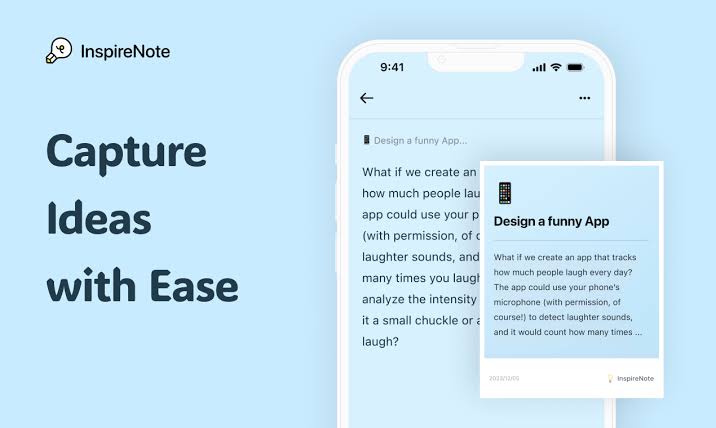
InspireNote’s user experience is strongest when the goal is small and immediate: get an idea moving. The card format is easy to understand and gives the app a different feel from a blank note page. Rather than staring at an empty screen, users receive a small prompt that can lead to the next thought.
The interface also appears designed to stay lightweight. That is a plus for people who want a quick thinking tool and do not enjoy complicated setup. The downside is that advanced users may outgrow it once their projects become larger. The lack of clearly promoted cross-platform access also limits how naturally it fits into a workday that moves between phone, laptop and team tools.
Who Should Use InspireNote?
InspireNote is worth considering if you create alone, regularly experience idea blocks or prefer structured prompts to AI-generated text. It can suit writers planning a scene, students approaching an assignment, designers exploring a concept and founders looking for new ways to frame a problem.
It is not the strongest choice for teams that need shared editing, detailed task management, enterprise controls or an all-in-one document system. In those cases, InspireNote can still be a useful personal side tool, but it should not be expected to manage the whole workflow.
InspireNote FAQs
1. What is InspireNote?
InspireNote is a mobile creativity and note-taking app that uses prompt cards to support brainstorming and idea development.
2. Is InspireNote free to download?
Yes. It is free to download on supported Apple devices, with optional in-app purchasing for feature access.
3. Does InspireNote have a subscription?
Its public app listing describes a one-time feature unlock rather than an ongoing subscription. Confirm the current purchase details in your local App Store before buying.
4. What devices support InspireNote?
InspireNote is designed for iPhone and iPad.
5. Is there an InspireNote app for Android?
ICON POLLS did not find a confirmed official Android version of the creative prompt-card app during this 2026 review.
6. What can users do with InspireNote?
Users can explore prompt cards, save notes, organise ideas into projects, build custom card packs, use widgets and rate ideas.
7. Is InspireNote good for brainstorming?
It can be useful for personal brainstorming because its card prompts encourage users to look at a problem from a new angle.
8. Is InspireNote a full note-taking app?
It supports note capture, but it is better viewed as a lightweight creative tool than a full replacement for a broad workplace notes platform.
9. Can users create their own prompt cards in InspireNote?
Yes. Custom prompt packs are one of the app’s stated features.
10. Does InspireNote have careers or jobs?
A dedicated official careers page was not publicly identified for the app at the time of this review. Check the developer details in the App Store for official contact information.
11. What is InspireNote’s ICON POLLS rating in 2026?
ICON POLLS gives InspireNote a 3.2 out of 5 rating for its focused creative idea, simple user experience and limitations in platform reach and public product detail.
Icon Polls Verdict
InspireNote has a straightforward purpose and follows it well. Its prompt cards offer a gentle way to restart creative thinking without overwhelming the user. The product will not suit everyone, especially people who need a large, cross-platform workspace, but it can be a helpful tool for solo ideation. Our 3.2/5 score reflects that balance: a thoughtful niche app with a clear direction, but still room to grow in accessibility, visibility and broader workflow support.











