Typing on a phone is slow, and most dictation tools give you a messy transcript to fix afterwards. Monologue sets out to solve both problems. You talk, and it returns text that reads as if you'd typed it with care: filler words removed, punctuation added, layout matched to the app you're using. The idea has gained a following since the iPhone version arrived in February 2026. Whether it's worth a monthly subscription is a less obvious call.
The Short Version in a Table
| App | Monologue |
|---|---|
| Developer | Every Media Inc. |
| General manager | Naveen Naidu |
| Category | Productivity, voice dictation |
| Platforms | Mac, iOS, Apple Watch |
| Mac launch | September 2025 |
| iOS launch | February 2026 |
| Pricing (mid 2026) | Free for 1,000 words, then $10 to $15 a month or $144 a year |
| Mac App Store rating | 4.9 out of 5 from more than 170 ratings |
| Icon Polls rating | 4.0 out of 5 |
| Languages | More than 100 |
| Standout feature | DeepContext, screen-aware formatting |
| Website | monologue.to |
| Windows | Not available |
Naveen Naidu built Monologue as an Entrepreneur in Residence at Every, initially working largely alone. It began as an internal project. It now reports thousands of daily users and more than a million words transcribed each week, and it holds a perfect 5.0 on Product Hunt. Those numbers come from the company and from public review pages, so read them as signals of momentum rather than independent audits.
A Keyboard That Edits While You Talk
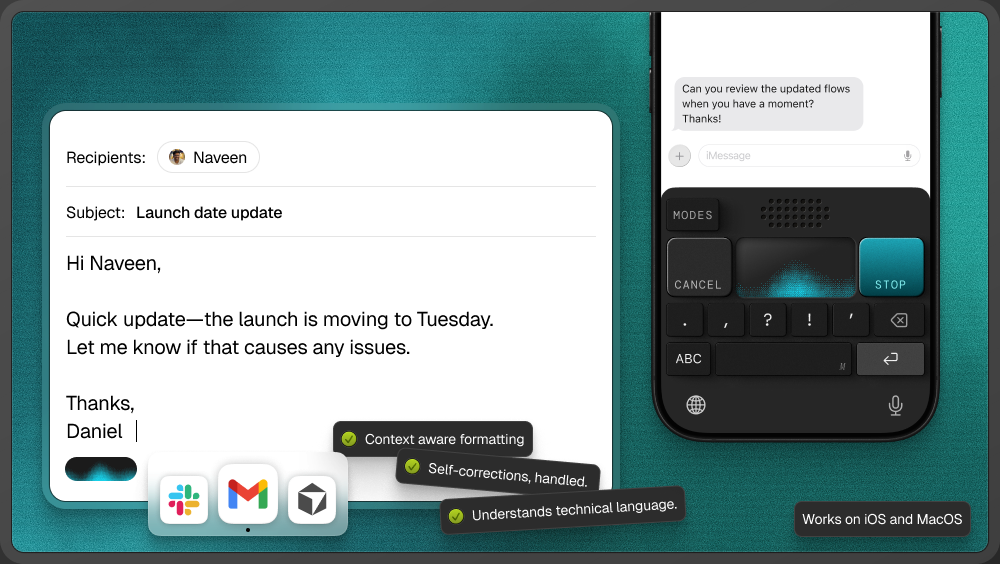
On the iPhone, Monologue installs as a custom keyboard, which is the most useful design decision in the app. You don't open a separate app, dictate, then copy and paste. Monologue sits wherever you're typing: Messages, Mail, Notes, or the prompt box of an AI assistant such as Claude.
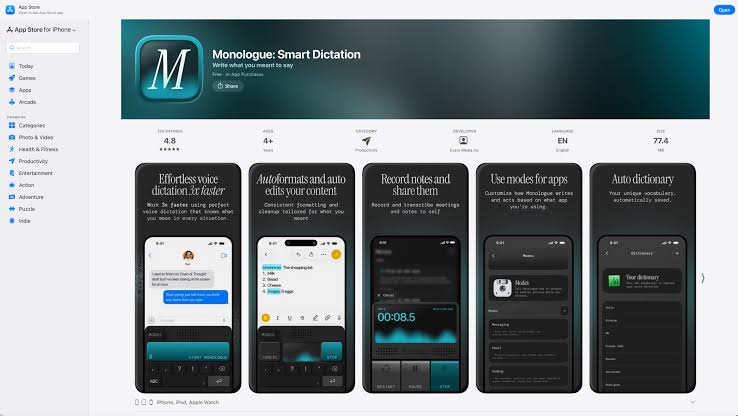
Setup is short. Download it from the App Store, create an account or sign in, grant microphone and keyboard permissions, and you're ready. The interface is deliberately bare. You tap the microphone, talk, and text appears. There's no maze of settings, and that restraint is part of its appeal.
Speed is the selling point, though there is a brief pause, around half a second to a second, before text lands. That's enough to notice but not enough to interrupt your train of thought. Users cited in coverage of the app say they work roughly three times faster than with thumb typing. That's anecdotal, but it's believable: almost everyone speaks faster than they type on glass.
What DeepContext Is Really Doing
Plenty of apps transcribe. Monologue's real argument is DeepContext, which reads what's on your screen to decide how your words should be formatted. Dictate in an email app and you get an email. Dictate a list in a notes app and you get a list. Along the way it removes the "ums" and "uhs" and adds punctuation without being asked.
That's the gap between a transcript and a draft, and it's why Monologue can charge more than a basic dictation tool. Combined with support for more than 100 languages, it explains why the reviews on public stores are so warm.
The 1,000 Word Problem
Now the friction. The free tier is 1,000 words and 10 notes, and that's a one-time allowance. It doesn't reset monthly or weekly. A single serious session can use it up.
As of mid 2026, Pro was listed at $15 a month, with an early-bird rate of $10 a month still available to some users, or $144 a year. Every subscribers get Monologue as part of the company's $30 a month bundle. Prices change, so check the App Store before you commit. There's no lifetime option.
Our view: 1,000 words is too few to judge an app whose main claim is that it changes how you write over days, not minutes. A monthly free allowance of around 5,000 words would let people assess it properly before paying.
Where the Mac Version Pulls Ahead
Monologue started on the Mac and that version is more mature. It runs as an overlay: press a keyboard shortcut, speak, and text goes wherever your cursor is, whether that's an editor, a browser, an email client or a coding tool. It also builds a personal dictionary over time, learning the jargon, brand names and technical terms you use, and it copes with switching between languages. For people who move between two languages through the day, that's a real benefit.
Scripts, Drafts and Brain Dumps
Many people find Monologue while searching for script tools, so a clarification: it isn't Final Draft or Celtx. It won't format a screenplay. What it does well is the stage before that, getting a spoken first draft into clean text you can then shape elsewhere.
Reported uses fall into a few groups:
- Everyday messages: emails and texts throughout the day.
- Brain dumps: talking through an idea freely and letting the app arrange it.
- Content drafting: blog posts, captions and first passes at scripts.
- Developer work: dictating alongside coding tools on the Mac.
One Product Hunt user said they dictate more than 5,000 words a day, which they estimated saves about two hours of typing. Monologue also adds some light gamification: it tracks words spoken, time saved and speaking pace, and shows whether you're in the top 2%, 5% or 10% of users. It's a small touch, but some people will find it motivating.
The Apple-Only Catch
As of this writing there's no Windows or Android version, and no announced plans for either. If you work on a Mac at home and a Windows PC at the office, Monologue covers only part of your day. Wispr Flow, its most obvious rival, runs on Mac, Windows, iOS and Android, which is a real advantage for anyone who uses more than one platform. If you have strong opinions about that divide, vote in our poll on the best computer operating systems.
Privacy Is the Quiet Trade-off
DeepContext works by reading your screen. For most messages that's fine. If you handle confidential client material, medical details or anything else sensitive, keep in mind that your screen content is being processed, and that processing happens in the cloud by default. There is an optional local model for on-device processing, but it needs extra setup, so most users will be relying on the cloud.
Where We Land
Icon Polls rates Monologue for iOS 4.0 out of 5. The core product is excellent: accuracy is highly rated, the context-aware formatting is ahead of most competitors, and working as a keyboard makes it feel built into the phone. It loses points for four reasons: a free tier too small to be a real trial, no Windows support, subscription-only pricing that's high for a dictation tool, and the privacy cost of screen reading. If you're fully in the Apple ecosystem and write a lot every day, it's worth trying. If you're not, the platform limits will decide for you.
Is Monologue for iOS free?
Only briefly. You get 1,000 words and 10 notes in total, not per month. After that you'll need Pro, listed in mid 2026 at $10 to $15 a month or $144 a year.
Does Monologue work offline?
Not by default. It processes in the cloud, though an optional local model can be configured for on-device use with some extra setup.
How is it different from Wispr Flow?
Both offer AI dictation with context-aware formatting. Wispr Flow covers Mac, Windows, iOS and Android. Monologue is limited to Apple devices but leans into personalisation and close integration with that ecosystem.











