Quick Verdict
Otter AI remains one of the best-known AI note-taking tools in 2026, especially for people who want automatic meeting transcripts, summaries, action points, and searchable notes. It works across web, desktop, iPhone, Android, and popular meeting platforms. The basic workflow is easy to understand: connect a calendar or start a recording, let Otter capture the conversation, and review the transcript when the meeting ends.
Our 3.3 out of 5 rating reflects a useful product with strong convenience, but also some limits that become noticeable with regular use. The free plan is good for testing, yet its 300 monthly transcription minutes, 30-minute conversation limit, three lifetime file imports, and restricted history can feel tight. Accuracy is usually acceptable with clear English speech, but names, accents, technical terms, background noise, and overlapping speakers still need human review. Otter is most valuable for frequent meetings, not for users who expect perfect transcripts without editing.
At a Glance: Icon Polls Ratings
Here is how Otter AI scored across the areas we evaluated in 2026:
|
Category |
Stars |
Score |
|
Meeting Note-Taking |
★★★★☆ |
3.8/5 |
|
Transcription Quality |
★★★☆☆ |
3.4/5 |
|
App and Download Options |
★★★★☆ |
3.8/5 |
|
Free Plan Value |
★★★☆☆ |
3.2/5 |
|
Login and Setup |
★★★★☆ |
3.8/5 |
|
Pricing and Plan Clarity |
★★★☆☆ |
3.0/5 |
|
User Experience |
★★★☆☆ |
3.3/5 |
|
Overall |
★★★☆☆ |
3.3/5 |
What Is Otter AI?
Otter AI is an automatic transcription and meeting note-taking platform. It can join online meetings, record audio, identify speakers, produce a live transcript, capture key points, and create a summary with action items. Users can also record directly from the mobile or desktop app and upload supported audio or video files for transcription.
The platform is aimed at professionals, students, journalists, sales teams, recruiters, educators, and anyone who spends a large part of the day in conversations. Otter Chat lets users ask questions about one meeting or search across several conversations. The service also connects with Zoom, Google Meet, Microsoft Teams, Slack, Dropbox, and selected business tools, depending on the plan.
Otter AI Login
Otter AI login is simple for most users. You can sign in through the website, desktop app, or mobile app using the account method selected during registration. New accounts must verify their email before all features become available. Using the same login on every device keeps meetings, transcripts, folders, and workspace information in sync.
Login problems often come from using a different sign-in method from the one used originally. For example, an account created through Google may not respond to a separate password in the expected way. Users should first confirm the correct email address, check the verification message, try a password reset where applicable, and make sure they are entering the correct personal or team workspace.
Otter AI Download
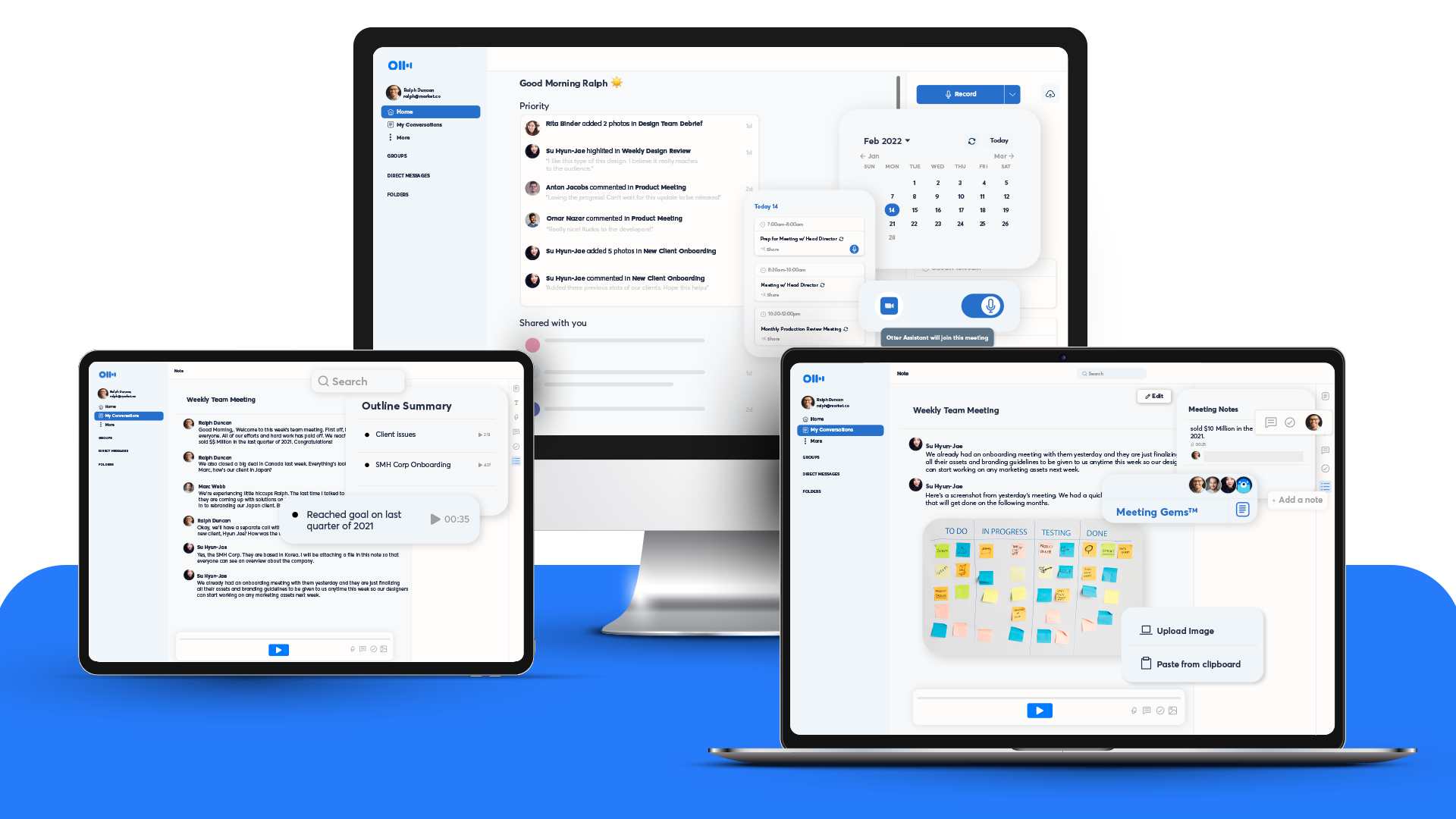
Otter AI is available as an iPhone and Android app, a Chrome extension, and a desktop app for both Mac and Windows. It also works in a regular web browser. The mobile app is useful for face-to-face meetings, lectures, interviews, and voice notes, while the desktop app is better suited to online meetings and longer work sessions.
The 2026 desktop app includes useful controls for recording without placing a visible note-taking bot inside the meeting. It can also provide meeting reminders and clearer pause or stop controls. Users should download Otter only from the official website or recognised app stores, especially because recordings may contain private business or personal information.
Otter AI Transcription
Transcription is the main reason most people use Otter. The platform creates live text while a person is speaking and saves the audio beside the transcript. Users can click a sentence to hear that part of the recording, correct words, label speakers, highlight important sections, and share the finished note with others.
In our view, the transcription works best when one person speaks at a time, the microphone is close, and the room is quiet. It becomes less reliable when people interrupt one another, speak far from the device, use specialised vocabulary, or have strong background noise. Speaker identification is helpful, but it should not be trusted blindly in busy group conversations.
Otter currently supports automatic transcription in English, French, and Spanish, alongside multi-language features listed in its plans. People who need a much wider language range or highly polished legal, medical, or broadcast transcripts may need another tool or a professional transcription service.
Is Otter AI Free?
Yes. Otter AI has a Basic plan that can be used without a subscription. It includes live transcription, speaker identification, audio playback, basic meeting connections, AI summaries, mobile apps, and limited AI meeting workflows. The free plan is useful for testing the interface before paying.
The limits matter. Basic users receive up to 300 transcription minutes each month, with a maximum of 30 minutes for each conversation. Only three audio or video files can be imported over the lifetime of the account, and the visible conversation history is limited to the 25 most recent conversations. Deleted meetings still count toward the monthly transcription allowance, so the free plan is better for occasional use than heavy weekly meetings.
Otter AI Pricing in 2026
Otter offers Basic, Pro, Business, and Enterprise plans. Prices can change by billing cycle, region, app store, taxes, and promotions, so users should always check the final checkout screen. The figures below reflect the listed US pricing available during our review period.
|
Plan |
Listed Price |
Best For |
|
Basic |
Free |
Occasional meetings and first-time users |
|
Pro |
$16.99 monthly or about $8.49 per user monthly when billed annually |
Individuals and small teams needing longer meetings and exports |
|
Business |
$30 monthly or about $20 per user monthly when billed annually |
Teams needing more minutes, admin tools and priority support |
|
Enterprise |
Custom pricing |
Large organisations needing security, SSO and custom integrations |
Pro raises the in-app recording allowance to 1,200 minutes, permits meetings of up to 90 minutes, adds more file imports, advanced search, export tools, unlimited storage, and stronger meeting templates. Business is designed for larger teams and includes up to 6,000 import minutes, four-hour conversations, enhanced administration, multiple concurrent meetings, and prioritised support.
Otter AI Note Taker
Otter Notetaker is the automatic meeting assistant that connects to a calendar and joins scheduled Zoom, Google Meet, or Microsoft Teams calls. It records the conversation, writes a live transcript, captures shared slides in supported meetings, and sends a summary afterward. This can save time for people who attend several meetings every day.
The convenience comes with a social consideration. Some participants do not like a bot joining a meeting, and some organisations have strict rules about recording. The host should disclose the note taker clearly, gain permission where required, and confirm that the conversation is suitable for cloud processing. For sensitive meetings, the desktop app can be a better option because it can record without adding a separate bot participant.
Otter AI Alternatives
Otter is not the only option. Fireflies.ai may suit teams focused on meeting analytics and integrations. Fathom is attractive to users who want a simple meeting assistant with generous individual features. Notta supports a broader range of languages and may suit international transcription. Granola appeals to people who prefer notes that combine their own typing with AI support. Microsoft Teams and Zoom also offer built-in transcription and summaries on selected plans.
The best alternative depends on the main problem. Choose based on language support, meeting platform, privacy rules, export formats, team controls, monthly minute limits, and whether you are comfortable with a bot entering meetings. Otter remains easy to adopt, but it is not automatically the best value for every user.
Otter AI User Experience
The interface is clean and familiar once the account is set up. Conversations appear in a searchable list, and each meeting contains audio, transcript text, a summary, speakers, and action points. The ability to search old meetings and ask questions through Otter Chat can be genuinely useful when someone needs to find a decision made weeks earlier.
The main frustration is that the product can feel generous at first and restrictive later. Free users may hit the 30-minute limit during an ordinary meeting, while paid users need to understand which minutes apply to live meetings, in-app recording, and file imports. Automated summaries are convenient but can miss context or turn a casual comment into an action item. The best experience comes when Otter is treated as a first draft and memory assistant, not as an unquestionable record.
Pros and Cons
What Works Well
Easy live transcription for online and in-person conversations
Mobile, desktop, browser, and Chrome extension access
Automatic summaries, outlines, takeaways, and action items
Connects with Zoom, Google Meet, and Microsoft Teams
Searchable meeting history saves time when reviewing decisions
Audio playback is linked directly to the transcript
Useful free plan for light or occasional users
Desktop app can record without adding a visible meeting bot
What Needs Improvement
Free conversations are limited to 30 minutes
Only three lifetime file imports are included on the Basic plan
Accuracy drops with noise, accents, technical words, and overlapping speakers
Automated speaker labels and action items still require checking
Plan limits and minute categories can be confusing
A meeting bot may feel intrusive to some participants
Cloud recording creates privacy and consent concerns
Paid plans can become expensive for larger teams
Frequently Asked Questions About Otter AI (2026)
1. What is Otter AI used for?
Otter AI records and transcribes meetings, lectures, interviews, calls, and voice notes. It also creates summaries, outlines, searchable notes, and action items.
2. Is Otter AI free to use?
Yes. The Basic plan is free and includes 300 transcription minutes each month, live transcription, summaries, speaker identification, and mobile apps. It has limits on conversation length, imports, and visible history.
3. How do I log in to Otter AI?
Open the Otter website or app and sign in using the same email or connected account used during registration. New users must verify their email before using the full service.
4. Where can I download Otter AI?
Otter can be downloaded for iPhone, Android, Mac, and Windows. It also offers a Chrome extension and can be used directly in a web browser.
5. How accurate is Otter AI transcription?
Accuracy is usually reasonable with clear speech and good audio. Background noise, uncommon names, technical language, multiple speakers, and heavy accents can produce mistakes, so important transcripts should be reviewed.
6. Can Otter AI join Zoom, Google Meet, and Microsoft Teams?
Yes. Otter Notetaker can join supported online meetings automatically after the calendar and meeting accounts are connected.
7. Does Otter AI record meetings without a bot?
Yes. The desktop app can record supported meetings without adding a separate Notetaker bot. Users should still tell participants that recording is taking place.
8. What languages does Otter AI support?
Otter lists automatic transcription in English, French, and Spanish. People who require many additional languages may find a multilingual alternative more suitable.
9. Can I upload an audio or video file to Otter?
Yes. The Basic plan allows three lifetime file imports. Paid plans increase the number of imports, and higher team plans provide much larger allowances.
10. Can I cancel an Otter AI subscription?
Yes. Cancellation should be completed through the same place where the subscription was purchased, such as the Otter website, Apple App Store, or Google Play. Access normally continues until the end of the paid period.
11. Is Otter AI safe for confidential meetings?
Otter provides business and enterprise security controls, but users must still follow their organisation’s privacy rules. Highly confidential discussions should not be recorded without approval, consent, and a clear data policy.
12. What is the best Otter AI alternative?
There is no single best alternative. Fireflies.ai, Fathom, Notta, Granola, Zoom, and Microsoft Teams may be better depending on language support, integrations, privacy needs, and budget.
Icon polls Verdict
Otter AI earns 3.3 out of 5 in the ICON POLLS 2026 review. It is a convenient meeting assistant with a polished interface, reliable cross-device access, and useful summaries. For professionals who attend several calls each week, the ability to search conversations and replay audio beside the transcript can save real time.
The rating is held back by transcription errors, strict free-plan limits, pricing that can become costly for teams, and the need to manage privacy carefully. Otter works best when users review the transcript, correct names and figures, and treat the summary as a helpful draft. It is less suitable for anyone who needs perfect transcripts, broad language support, or fully offline processing.
Our practical recommendation is to begin with the Basic plan and test Otter during several real meetings. Check how it handles your accent, microphone, technical vocabulary, meeting length, and preferred platform. Upgrade only when the time saved is greater than the subscription cost.











