|
App name |
Subscription Day. Calendar |
|
Developer |
Chuta Dmytro |
|
Category |
Finance |
|
Platforms |
iPhone, iPad and Mac |
|
Download model |
Free download with optional in-app purchases |
|
Core purpose |
Track recurring payments, trials, yearly plans and one-time purchases |
|
Standout tools |
Calendar, reminders, widgets, statistics, import/export and iCloud sync |
|
Current App Store rating |
4.8/5 from 18 ratings when checked in July 2026 |
|
ICON POLLS rating |
4.1/5 |
|
Best for |
People who prefer a visual, manual subscription tracker without bank linking |
Subscription Day for iOS Review in 2026
Subscription Day is one of those small apps that solves a very common money problem: forgetting what is about to renew. It does not try to become a full bank, budget app or financial dashboard. Instead, it puts subscriptions, trials and recurring payments into a clean calendar so the next charge is easier to see before it arrives.
After reviewing its App Store details, listed tools and the way the product is presented across its iOS and Mac versions, ICON POLLS gives Subscription Day a 4.1/5 rating. The score reflects a strong design focus, useful reminders and good organisation options, with a small deduction because users still need to enter or import their subscriptions rather than expect automatic bank-level detection.
Our 4.1/5 Rating Explained
|
Area |
ICON POLLS view |
|
Calendar and clarity |
4.5/5. The monthly view makes renewal dates easy to understand. |
|
Tracking options |
4.3/5. It supports monthly, yearly, trial, one-time and custom periods. |
|
Organisation |
4.2/5. Lists, custom categories, payment status and currencies add useful control. |
|
Ease of setup |
3.8/5. Quick entry and imports help, but a complete list still takes user effort. |
|
Value |
4.0/5. The free download makes it easy to try before deciding whether paid extras are worthwhile. |
Download and Free App: What You Get
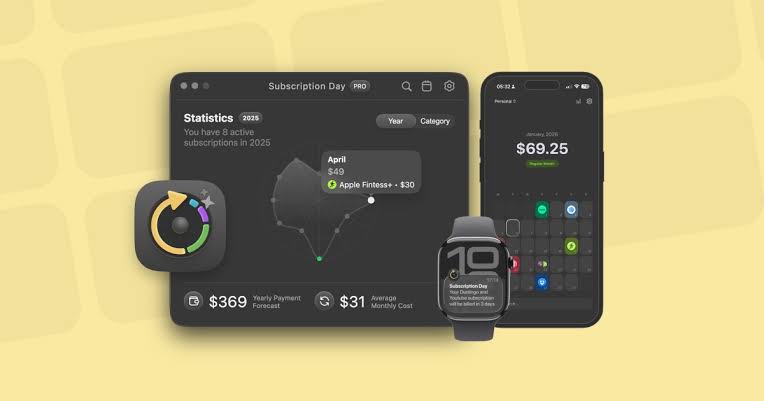
Subscription Day is available as a free App Store download for iPhone, iPad and Mac, with in-app purchases shown on its listing. That is a sensible starting point for a subscription tracker because people can first see whether the calendar suits their routine. The practical advice is simple: download it, add your most expensive or most urgent renewals, turn on reminders and use it for a few weeks before making any purchase decision.
The app supports a wide range of billing patterns. You can track monthly services, annual plans, free trials, one-off purchases and custom cycles. That makes it useful beyond streaming services. Insurance renewals, website domains, software licences and work tools can sit in the same tracker.
Calendar and Tracker Features
The calendar is the feature that gives Subscription Day its identity. Rather than hiding expenses in a long spreadsheet, it shows charges in the month where they are due. For many users, that is enough to spot an expensive week or remember to cancel a trial before the billing date.
The app also includes widgets, reminders, highlights for trial or annual payments, projected yearly spending, average monthly cost and peak-spending insights. There are personal, work and custom lists, plus custom categories. Multi-currency support is especially helpful for anyone paying for services priced in different currencies.
A useful distinction matters here. Subscription Day says it does not automatically fetch all subscriptions. You add them yourself or import them through its Smart Import Manager, including from Notion, Google Sheets, text files or an App Store subscription screenshot. That approach may feel more private and controlled, but it will not replace a bank-connected service for someone who wants automatic transaction scanning.
User Experience: What It Feels Like to Use
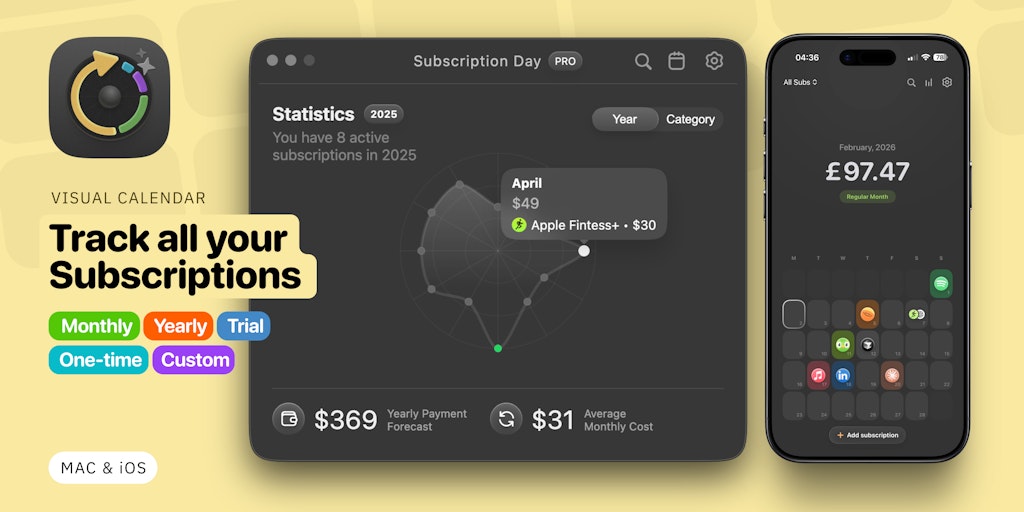
The best part of the experience is that the app is focused. A new user can understand the main job quickly: create a subscription, set its renewal pattern, give it a cost and choose a reminder. The suggestion tool can speed up entries by offering a service name, logo, category and colour, while custom icons are available for less common services.
The interface will suit people who like to stay deliberate about their money. It gives you a visible record and clean summaries without pretending to make cancellation decisions for you. iCloud sync also makes the product more practical for users who move between an iPhone, iPad and Mac.
The trade-off is setup time. Anyone with many old subscriptions needs to build the list or prepare an import. That is not a major weakness, but it is worth knowing before download. Subscription Day is a tracker and planning tool, not an automatic subscription detective.
Who Should Use Subscription Day?
Subscription Day is a good fit for students, freelancers, families and small teams that want a tidy visual tracker for recurring costs. It is especially appealing if you want reminders for trials and annual renewals, prefer manual control over bank linking, or already keep payment information in a sheet or Notion database.
It is less ideal for someone who wants one app to connect to a bank account, discover every recurring transaction automatically and take care of cancellations. Those users should compare it with broader budgeting or subscription-detection services before choosing.
Final Verdict
Subscription Day earns its 4.1/5 ICON POLLS rating because it makes a boring task easier to face. Its calendar-first layout, reminders, flexible payment periods and cross-device support are genuinely useful. The app is not trying to do everything, and that restraint is one of its strengths. If you are willing to keep your list current, it can make surprise renewals much less likely.
Subscription Day for iOS FAQs
1. Is Subscription Day free on iOS?
Yes. Subscription Day is listed as a free App Store download with optional in-app purchases. Available plans and prices can vary by region, so check the App Store page before buying.
2. Where can I download Subscription Day?
You can download Subscription Day. Calendar from the Apple App Store on a compatible iPhone, iPad or Mac.
3. Does Subscription Day automatically find my subscriptions?
No. The developer states that the app does not automatically fetch subscriptions. You can add them manually or use the import tools to bring in existing lists.
4. Does Subscription Day have a calendar view?
Yes. Its visual monthly calendar shows current and upcoming subscription payments in one place.
5. Can Subscription Day track free trials?
Yes. You can add trial versions and set reminders so you have time to decide whether to cancel before the first paid renewal.
6. Can I track yearly and custom billing periods?
Yes. The app supports monthly subscriptions, annual plans, one-time purchases and fully custom billing periods.
7. Does Subscription Day work on iPad and Mac?
Yes. The App Store listing identifies iPhone, iPad and Mac support, while iCloud sync is designed to keep subscription records aligned across devices.
8. Can Subscription Day track different currencies?
Yes. The app supports more than 150 currencies and converts figures into a selected currency for clearer totals.
9. Can I import subscriptions into Subscription Day?
Yes. Its Smart Import Manager can import from Notion, Google Sheets and text files. The listing also says it can recognise subscriptions from App Store screenshots.
10. Does Subscription Day help me cancel subscriptions?
It can remind you before a charge or trial renewal, but it is a tracking tool. You still cancel the relevant service through Apple or directly with the provider.











