
|
Product name |
TabAI |
|
Category |
AI assistant for finance and accounting work |
|
Primary platform |
Microsoft Excel add-in and connected workspace |
|
Best for |
Finance professionals, analysts, accountants and model-heavy teams |
|
Key tasks |
Data cleanup, financial modelling, PDF extraction, reporting and workbook support |
|
Company |
New York AI Labs |
|
Founder information |
Andrew Siah is publicly listed as a co-founder; public materials also identify a small New York-based team |
|
Music feature |
No. This TabAI is not a music-generation or music-streaming app |
|
Pricing approach |
Free usage credits for new accounts, with additional capacity and premium features available in-app |
|
ICON POLLS rating |
3.6/5 |
TabAI is not trying to be a general chatbot pasted into a spreadsheet. Its pitch is narrower and more practical: bring an AI analyst into Excel for the repetitive, technical and often frustrating parts of finance work. That focus is the reason it earns a respectable 3.6 out of 5 from ICON POLLS in 2026. The product has real promise for the right user, but it still asks users to trust a young tool with important models and data.
TabAI App Review in 2026
The TabAI app is built around Microsoft Excel. It is intended to help users clean and restructure data, work with PDFs, generate or review financial models, fix formula issues, make charts and turn spreadsheet work into a more guided process. The idea is easy to understand if you have ever spent an afternoon correcting a messy export before you could begin the actual analysis.
In our view, TabAI makes most sense for people whose job already lives inside Excel. A financial analyst working on a valuation, an accountant preparing a report, or a consultant sorting client data can see the point immediately. It is less convincing for someone who only needs a formula suggestion every few weeks. For that person, the setup and learning curve may outweigh the benefit.
TabAI and Excel
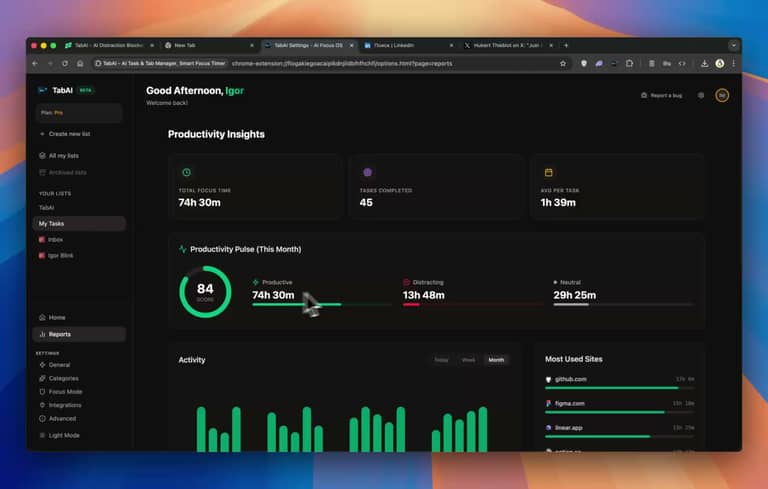
Excel is where TabAI has its strongest case. The product is positioned to handle common finance workflows such as building DCF or LBO models, preparing comparable-company analysis, reshaping source data, extracting tables from PDFs and checking formulas. It can also pull outside information into a workbook and help with report-style outputs.
That list sounds powerful, but a spreadsheet is not a place for blind trust. A good model depends on judgement: the assumptions, sources, treatment of unusual items and final checks still belong to the human using it. TabAI can reduce the manual grind, but it should be treated as a fast junior analyst, not the person signing off on a board pack or investment decision.
Who founded TabAI?
Andrew Siah is publicly identified as a co-founder of TabAI. The company presents itself as a small New York-based AI team working at the intersection of finance, accounting and Excel automation. That background fits the product. TabAI is clearly aiming at people who want more than generic prompts and lightweight spreadsheet help.
The founder story matters because it shows a focused product direction, but it should not be the sole reason to adopt the tool. For serious users, the more important questions are reliability, permission controls, support quality, auditability and how the product behaves when a workbook is complex or incomplete.
TabAI LinkedIn presence

TabAI's LinkedIn activity is useful for seeing where the company is heading. The updates lean heavily toward financial modelling, PDF-to-Excel work, data cleanup and AI education for finance professionals. The page also gives the product a visible professional identity rather than making it look like an anonymous extension.
At the same time, the company appears to be small. That is not automatically a problem. Small teams can move quickly and improve a product fast. It does mean customers should keep an eye on documentation, service response times and changes to pricing or features before building a critical workflow around it.
TabAI user experience
What works well
The best part of TabAI is that it speaks the language of its intended users. It is not built around vague promises to “make you productive.” It addresses everyday spreadsheet pressure: a broken reference, a difficult PDF table, an untidy export, a model that needs a sanity check, or a report that needs to be finished before the day ends. The ability to work within Excel is a major advantage because it cuts down on copying data between tools.
We also like the human-in-the-loop approach. Asking the tool to annotate, explain, repair or review a workbook is more useful than simply receiving an unexplained final answer. For learners, that can turn the tool into a useful training companion as well as a time saver.
What needs more work
The main caution is confidence. Financial work is high stakes, and an impressive-looking output can still include the wrong assumption, a missed formula dependency or data pulled from an unsuitable source. Users need clear, repeatable ways to inspect what changed and why. We would like to see more public evidence around difficult edge cases, limits and quality controls.
There is also the privacy question. An Excel add-in may need access to files and may send data over the internet. That is normal for this kind of product, but it is not a small detail. Individuals and teams should review permissions, their organisation's policy and the sensitivity of the workbook before uploading anything confidential.
TabAI pricing in 2026
TabAI provides free usage credits for new accounts, which is a sensible way to test the product before committing. More capacity and premium features are sold through in-app purchases. We did not find a simple, stable public price list that would suit every user, so we recommend confirming the current plan, usage limit and billing terms inside the product before subscribing.
Pros and cons
Pros
Focused on real Excel and finance workflows. Useful support for data cleanup, modelling and PDF-to-table work. Built around review and explanation rather than only one-click answers. A free starting point makes testing easier.
Cons
A young product in a high-trust category. Users must verify outputs before using them in important work. Price and usage details may require checking in-app. Permissions and data handling deserve careful review, especially for confidential finance files.
Final verdict
ICON POLLS rates TabAI 3.6 out of 5 in 2026. It is a focused and potentially very useful AI tool for people who work seriously in Excel, particularly in finance and accounting. The product feels more purposeful than a generic spreadsheet chatbot, and its workflow ambitions are good. The score stops at 3.6 because careful verification, data controls and clearer proof of reliability still matter enormously in this category. Test it on a non-sensitive workbook first, learn its strengths, then decide whether it deserves a place in your daily workflow.
Frequently Asked Questions About TabAI
1. What is TabAI used for?
TabAI is used for finance and accounting work in Excel, including data cleanup, modelling, PDF extraction, formula support and reporting.
2. Is TabAI an Excel add-in?
Yes. The product is built to work directly with Microsoft Excel and related finance workflows.
3. Who founded TabAI?
Andrew Siah is publicly listed as a co-founder of the finance-focused TabAI product reviewed here.
4. Is TabAI free?
New accounts include free usage credits. Extra capacity and premium features are available through in-app purchases.
5. Does TabAI create financial models?
It is designed to help build and review models such as DCF, LBO, comparables, sensitivity tables and scenario dashboards. Every important output should still be checked by a qualified user.
6. Can TabAI read PDFs into Excel?
TabAI promotes PDF-to-table extraction for documents such as statements, invoices and reports.
7. Is TabAI a music app?
No. This TabAI is an Excel and finance tool, not a music generator, streaming app or audio editor.
8. Is TabAI safe for confidential spreadsheets?
Users should inspect the current permissions, data policy and their organisation's rules before using confidential or regulated information.
9. Does TabAI have a LinkedIn page?
Yes. The company has a LinkedIn presence focused on AI for finance, accounting and Excel workflows.
10. Is TabAI worth it in 2026?
It can be worthwhile for regular Excel users in finance or accounting. It is less compelling for occasional spreadsheet tasks and should always be tested before wider adoption.











