
Quick Verdict
Windscribe remains one of the more interesting VPN services in 2026 because it does not feel like a copy of every other provider. The apps are packed with useful controls, the browser extension has its own privacy tools, and the free plan is generous enough for real everyday testing. Users can connect several personal devices, choose from multiple protocols, block unwanted domains, and decide which apps or websites should use the VPN tunnel.
Our 4.2 out of 5 rating reflects a service that offers strong value, especially for privacy-conscious users who want more control than a basic connect button. The free account is genuinely useful, the desktop and mobile apps are available across major platforms, and the Build-A-Plan option is unusually flexible. The experience is not perfect. Some settings can overwhelm beginners, free users have limited monthly data and fewer locations, and speed can vary by server, distance, network quality, and protocol. Windscribe works best for people who are willing to spend a few minutes learning the app instead of expecting every decision to be made automatically.
At a Glance: Icon Polls Ratings
Here is how Windscribe scored across the areas we evaluated in 2026:
|
Category |
Stars |
Score |
|
App Design and Controls |
★★★★☆ |
4.3/5 |
|
Free Plan Value |
★★★★☆ |
4.5/5 |
|
Browser Extension |
★★★★☆ |
4.2/5 |
|
Privacy Features |
★★★★☆ |
4.4/5 |
|
Sign Up and Login |
★★★★☆ |
4.1/5 |
|
Download and Device Support |
★★★★☆ |
4.3/5 |
|
Speed and Reliability |
★★★★☆ |
3.9/5 |
|
Overall |
★★★★☆ |
4.2/5 |
What Is Windscribe?
Windscribe is a VPN and online privacy service that encrypts a user’s internet connection and routes traffic through a selected server location. This can help reduce exposure on public Wi-Fi, hide the user’s normal IP address from websites, and make basic tracking more difficult. The service also includes tools for blocking ads, trackers, malicious domains, and selected website categories.
Windscribe offers apps for Windows, macOS, Linux, Android, iPhone, televisions, routers, and other supported devices. It also provides browser extensions for Chrome, Firefox, Edge, Opera, and compatible Chromium or Firefox-based browsers. The desktop app protects traffic across the device, while the browser extension focuses on browser activity and includes its own blocking and privacy controls.
Windscribe App
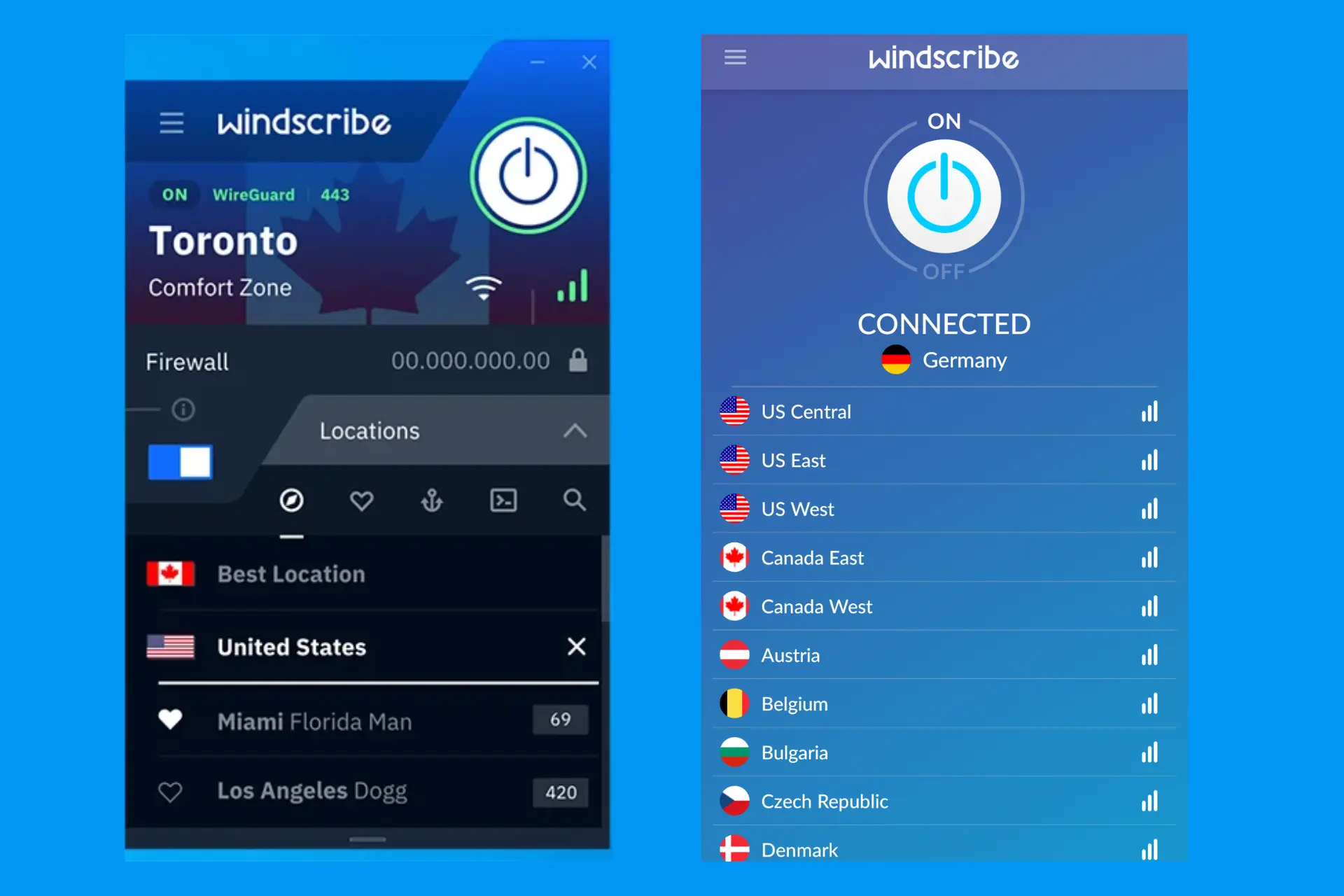
The Windscribe app is available on major desktop and mobile platforms. The main screen keeps the basic connection process simple: choose a location and press the power button. People who want more control can open the settings and change the protocol, connection port, firewall behaviour, split tunnelling, DNS preferences, network rules, and other options.
This balance is one of the app’s strongest qualities. A beginner can connect without touching advanced menus, while an experienced user can adjust how the VPN behaves on restrictive networks or with specific apps. Split tunnelling is available on Windows, macOS, Linux, and Android, allowing selected traffic to use the VPN while other traffic uses the normal internet connection.
The interface has personality, but some users may find the large number of technical settings confusing. The safest approach is to keep the automatic connection mode at first and change one option at a time only when there is a clear reason.
Windscribe Login
Windscribe login requires the username and password connected to the account. After signing in through the website or an app, users can view their plan, monthly data allowance, account status, connected services, and available upgrades. The same account can be used across personal devices, although the service is intended for the account holder rather than large groups of unrelated users.
Login problems are usually caused by an incorrect username, password, or sign-in method. Users who added an email address can request account recovery assistance. People who created an account without an email should store their password carefully because recovery may not be possible. The account page is also where users confirm an email address to increase the free monthly allowance.
Windscribe Sign Up
Windscribe sign up is unusual because an email address is optional. A new user chooses a username and password and can create a basic free account without entering personal contact information. An account without a confirmed email receives 2 GB of monthly VPN data. Adding and confirming an email increases the free allowance to 10 GB per month.
The optional email is a privacy-friendly idea, but it comes with an obvious trade-off. Without an email address, forgotten account details may be impossible to recover. Most everyday users will find the confirmed email account more practical because it provides the larger free allowance and a recovery route.
Windscribe Extension
The Windscribe browser extension works with Chrome, Firefox, Edge, Opera, and many browsers built from Chromium or Firefox. Safari is not currently supported. The extension changes the browser’s apparent IP address and adds controls for blocking ads, trackers, cookies, social widgets, and other unwanted browser activity.
It is important to understand that the extension protects browser traffic, not every app on the computer. The desktop VPN app protects the whole device. Windscribe recommends using both together for broader protection. The extension uses its own browser-level blocking system, while the desktop and mobile apps can use R.O.B.E.R.T., Windscribe’s DNS-based blocking tool.
The extension is useful for quick location changes and browser privacy, but users should not mistake it for complete device protection. Downloads through another program, game traffic, messaging apps, and background services will not automatically use the browser extension.
Windscribe Download
Windscribe can be downloaded from its official website and recognised app stores. Supported options include Windows, macOS, Linux, Android, iOS, browser extensions, television platforms, and router configurations. Windows users generally need a supported 64-bit version of Windows 10 or newer for the current recommended app.
Users should download the software only from the official Windscribe page, the Apple App Store, Google Play, or another trusted platform listed by the company. Unofficial APK files, modified installers, and websites offering cracked Pro accounts create a serious privacy risk because VPN software has deep access to network traffic.
Installation is simple on phones and computers. After installing, the user signs in, selects a server, and connects. Router setup and manual WireGuard, OpenVPN, or IKEv2 configurations take more work and are better suited to users who understand network settings.
Windscribe Free Plan
Windscribe has one of the more practical free VPN plans in 2026. Users receive 2 GB of monthly data without confirming an email address and 10 GB after confirming one. Free accounts can use the same core apps and encryption as paid users, connect multiple personal devices, and access servers in a smaller group of countries.
The free plan is suitable for occasional public Wi-Fi use, light browsing, messaging, and short sessions. Ten gigabytes can disappear quickly when streaming video, downloading large files, updating games, or leaving the VPN connected for heavy daily use. Free users also have fewer locations and less control over R.O.B.E.R.T. than Pro users.
Windscribe does not present the free plan as a short trial that automatically charges later. No payment card is required to create the standard free account. Users who need unlimited data can move to Build-A-Plan or the full Pro package.
Windscribe Pricing in 2026
Windscribe offers a free account, Build-A-Plan, and a full Pro subscription. Build-A-Plan is useful for people who need only a few countries. Each selected location costs $1 per month, and unlimited data with full R.O.B.E.R.T. access costs another $1, with a minimum monthly purchase of $3.
|
Plan |
Listed Price |
Best For |
|
Free |
$0 |
Light use with 2 GB or 10 GB monthly data |
|
Build-A-Plan |
$3 minimum per month |
Users who need unlimited data and a few selected locations |
|
Pro Monthly |
$9 per month |
Short-term full access to all standard Pro locations and features |
|
Pro Yearly |
$69 per year |
Regular users who want the lower annual cost |
|
ScribeForce |
From $5 per account monthly |
Teams with at least five accounts |
The yearly Pro plan provides unlimited bandwidth and access to servers in more than 69 countries and 120 cities. Static IP addresses are separate purchases. Prices can change by currency, tax, payment method, promotion, or app store, so users should check the final billing page before subscribing.
Windscribe User Experience
Windscribe feels quick once the app is installed. Location selection is clear, the connection button is easy to understand, and the app remembers recent choices. The firewall feature is useful because it can block internet traffic if the VPN connection drops, reducing the chance of accidental exposure. Users can also choose among WireGuard, IKEv2, OpenVPN, Stealth, and WSTunnel options depending on the device and network.
R.O.B.E.R.T. adds another layer of control by blocking ads, trackers, malware domains, and selected categories at the DNS level. Pro users can customise more categories and create personal rules. These tools are valuable, but aggressive blocking can occasionally stop a legitimate page or app from loading. The solution is usually to adjust the blocklist or allow the required domain.
Speed is generally good on nearby servers, but no VPN can guarantee the same result for every user. Distance, local internet quality, server load, protocol, device performance, and network restrictions all affect the outcome. Windscribe’s many connection options help when one method performs poorly, although beginners may need support before knowing which option to try.
Pros and Cons
What Works Well
Useful free plan with up to 10 GB of monthly data after email confirmation
Unlimited personal device connections on Free and Pro accounts
Apps for major desktop, mobile, browser, television, and router platforms
Browser extension includes strong browser-level privacy and blocking tools
R.O.B.E.R.T. blocks ads, trackers, malicious domains, and selected categories
Build-A-Plan offers a flexible low-cost route to unlimited data
Multiple protocols and ports help on restrictive or unstable networks
Split tunnelling allows selected apps or websites to bypass or use the VPN
What Needs Improvement
Free monthly data is too limited for regular streaming and large downloads
Advanced settings can overwhelm people using a VPN for the first time
Free accounts have access to fewer server countries
Speed varies depending on server, distance, protocol, and network conditions
The browser extension does not protect traffic outside the browser
Safari does not have an official Windscribe extension
Email-free accounts can be difficult or impossible to recover
Some websites and apps may block VPN connections or require split tunnelling
Frequently Asked Questions About Windscribe (2026)

Yes. Windscribe offers a permanent free account. Users receive 2 GB of data each month without confirming an email and 10 GB after confirming one.
2. How do I log in to Windscribe?Open the Windscribe app or website and enter the username and password connected to the account. Users with a confirmed email can use the available recovery process when needed.
3. How do I sign up for Windscribe?Choose Sign Up, create a username and password, and optionally add an email address. Confirming the email increases the monthly free allowance from 2 GB to 10 GB.
4. Where can I download Windscribe?Windscribe can be downloaded from its official website and recognised app stores for Windows, macOS, Linux, Android, iOS, browsers, televisions, and other supported platforms.
5. Does Windscribe have a browser extension?Yes. Windscribe offers extensions for Chrome, Firefox, Edge, Opera, and compatible browser forks. Safari is not currently supported.
6. Is the Windscribe extension the same as the VPN app?No. The extension mainly protects browser traffic. The desktop VPN app protects network traffic from the full device. Using both provides broader coverage.
7. How much data does Windscribe Free provide?A free account receives 2 GB per month without a confirmed email and 10 GB per month with a confirmed email. Promotional activities may sometimes add more data.
8. Can I use Windscribe on several devices?Yes. Windscribe allows unlimited connections on personal devices for both free and paid users. The account should not be shared as a public or commercial service.
9. Does Windscribe keep logs?Windscribe states that it does not keep identifying connection logs that match a user’s IP address with browsing activity. Users should still read the current privacy policy before relying on any VPN.
10. What is R.O.B.E.R.T. in Windscribe?R.O.B.E.R.T. is a DNS-based blocking tool that can stop ads, trackers, malicious domains, and selected website categories while Windscribe is connected.
11. Does Windscribe support split tunnelling?Yes. Split tunnelling is available on Windows, macOS, Linux, and Android. It allows selected apps, domains, or addresses to use or bypass the VPN tunnel.
12. Is Windscribe good for streaming?Windscribe can work with streaming services, especially on paid locations, but access and speed are not guaranteed. Streaming platforms can change their VPN restrictions at any time.
13. How much does Windscribe Pro cost?The listed price is $9 per month or $69 per year. Build-A-Plan starts with a $3 minimum monthly purchase and can be cheaper for users who need only selected locations.
14. Is Windscribe safe to download?The official app is designed for privacy and secure connections. Users should avoid unofficial installers, cracked versions, and random APK websites because modified VPN software can expose sensitive traffic.
Icon polls Verdict
Windscribe earns 4.2 out of 5 in the ICON POLLS 2026 review. It combines a strong free plan, flexible paid options, useful privacy tools, and apps for nearly every common device. The service is particularly attractive to users who want split tunnelling, several connection protocols, browser-level controls, and a DNS blocker that can be customised.
The rating stops short of perfect because the experience can feel technical, free data is limited, and performance depends heavily on location and network conditions. The extension also protects only browser traffic, which is easy for a new user to misunderstand. Windscribe gives users more control than many simple VPN products, but that control comes with a learning curve.
Our practical recommendation is to begin with the free account, confirm an email to receive the larger monthly allowance, install the official app, and test nearby server locations. Users who need unlimited data but only one or two countries should examine Build-A-Plan before paying for the full Pro subscription.











