Quick Verdict
Wordtune in 2026 is the best tool you can use if you have already written something and want to make it sound better. A 3.8 rating reflects genuinely excellent sentence-level editing with clear scope limitations. Wordtune does one job and does it really well: rewriting. You highlight a sentence and Wordtune gives you multiple better versions preserving your original idea. The tone adjustment from casual to formal is genuinely useful. The browser extension works everywhere. The free tier lets you try it. At six dollars ninety-nine per month billed annually, the price is accessible. For students, professionals, non-native English speakers, and anyone who writes emails or documents daily, Wordtune delivers measurable improvement to your communication. The 3.8 is not higher because Wordtune is strictly a refinement tool, not a content generator. If you need to write something from scratch, Wordtune cannot help. You need five minutes of draft text first. The free tier daily limits are frustrating when you hit them. Some rewrite suggestions occasionally miss your original intent. The tool works best as a tactical aid during editing, not a crutch for writing. Understand what Wordtune is and it becomes genuinely valuable. Expect it to generate full blog posts and you will be disappointed.
At a Glance: Icon Polls Ratings
Here's how Wordtune scored across what we evaluated in 2026:
|
Category |
Stars |
Score |
|
Rewrite and Paraphrase Quality |
★★★★★ |
4.5/5 |
|
Tone Adjustment Accuracy |
★★★★☆ |
4/5 |
|
Browser Extension Integration |
★★★★★ |
4.5/5 |
|
Free Tier Value |
★★★★☆ |
3.5/5 |
|
Ease of Use |
★★★★★ |
4.5/5 |
|
Pricing for Features |
★★★★☆ |
4/5 |
|
Feature Breadth |
★★★☆☆ |
3/5 |
|
Overall |
★★★★☆ |
3.8/5 |
What Is Wordtune?
Wordtune is an AI-powered writing refinement tool designed by AI21 Labs to improve existing text. The tool analyzes what you have written and offers multiple rewritten versions that preserve your meaning while improving clarity, style, or tone. Wordtune works as a web application, Chrome extension, and integrates directly into Google Docs, Microsoft Word, Gmail, and Slack. The core technology uses advanced large language models to understand context and intent. Rather than generating content from scratch like Jasper or Copy.ai, Wordtune focuses entirely on improving what you have already written. The platform has grown to serve students, professionals, marketers, non-native English speakers, and anyone who writes regularly. Since 2018, Wordtune has maintained a clear philosophy: be the best at sentence-level editing, not the broadest tool available.
Download and Installation
Wordtune is primarily a web-based application. You do not download and install software on your computer. Instead, you access it through your browser at the Wordtune website after creating an account. The Chrome extension is available and recommended for seamless use everywhere you write online. Installation of the extension takes one click from the Chrome web store. Once installed, the Wordtune button appears in your browser toolbar, giving you access to rewriting tools everywhere you work. The extension works in Gmail, Google Docs, most web-based text fields, and throughout your browsing. No system requirements beyond a modern browser. No storage space needed. No installation hassle. This web-first approach is actually convenient because your rewriting tools follow you everywhere.
Login and Account Setup
Creating a Wordtune account is straightforward. You enter your email, create a password, and verify your email address. Login is simple and two-factor authentication is available for security. After your first login, you are immediately in the Wordtune dashboard. The onboarding is brief and clear. You can try the free tier right away without providing payment information. If you want to upgrade to a paid plan, payment can be added at any time. The entire account setup takes about two minutes. No complicated registration process. No unnecessary steps. Just create account, verify email, and start using.
Free Tier and What You Get
Wordtune's free tier is genuinely useful despite limitations. You get ten rewrites per day, which is enough to polish a few sentences or a short paragraph. You get three AI summaries per month. Unlimited access to spelling and grammar checks. You can try all the main features. The free tier is an honest trial that shows you what Wordtune does well. However, the ten rewrite daily cap is frustrating. If you are editing a longer document with multiple paragraphs, you can exhaust your free rewrites midway through. The limited summaries per month are restrictive. Most writers who use Wordtune regularly end up upgrading to a paid plan because the free tier is not sufficient for daily use.
Subscription Plans and Pricing
Wordtune offers multiple paid tiers designed for different usage levels. The Advanced plan costs six dollars ninety-nine per month when billed annually, or thirteen dollars ninety-nine per month for monthly billing. This plan gives thirty rewrites per day plus fifteen summaries per month. The Unlimited plan costs nine dollars ninety-nine per month when billed annually, or nineteen dollars ninety-nine per month monthly. This removes all daily limits and gives unlimited rewrites, summaries, and AI suggestions. A Team plan is available at seven dollars ninety-nine per user per month for organizations. For most individual users, Advanced at six dollars ninety-nine annually is the entry point to paid features. The pricing is straightforward with no hidden fees or additional charges.
|
Plan |
Price |
What You Get |
|
Free |
$0 |
10 rewrites per day, 3 summaries per month, spelling and grammar checks. Try before buying. |
|
Advanced |
$6.99/month (annual) |
30 rewrites daily, 15 summaries monthly, unlimited grammar checks. Good for regular users. |
|
Unlimited |
$9.99/month (annual) |
Unlimited everything, no daily caps, full feature access. For heavy users and professionals. |
Is The Pricing Fair?
Yes, the pricing is reasonable. At six dollars ninety-nine for Advanced you are paying less than a coffee per week for a tool that saves real time on daily writing. The feature set is limited compared to broader tools but Wordtune does not pretend to be a full content platform. For what it does, the price is fair. Monthly billing at thirteen dollars ninety-nine is expensive by comparison, so annual billing is recommended if you are serious about using Wordtune.
Chrome Extension and Browser Integration
The Chrome extension is Wordtune's best delivery method. Once installed, you get a Wordtune button in your browser toolbar. Click the button and a sidebar opens with rewriting options. Highlight any text on any website and the extension rewriting tools activate instantly. You can rewrite directly in Gmail, adjust tone on LinkedIn posts, improve sentences in Google Docs, polish tweets in Twitter, or refine any web form. The extension is lightweight and does not slow your browser. It works reliably across most websites. The integration is so seamless that many users find the web editor redundant after installing the extension. For anyone who writes across multiple platforms throughout the day, the extension is genuinely valuable.
Rewriting Features and Tone Control
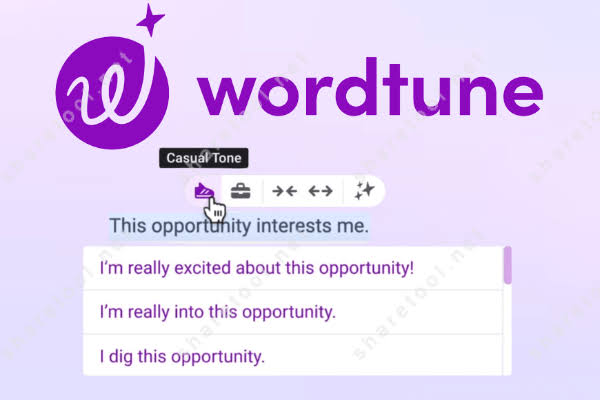
Wordtune's core strength is sentence rewriting. Highlight a sentence and Wordtune shows you multiple alternative versions. Each version preserves your meaning but adjusts clarity, brevity, or tone. The tone selector lets you switch between casual and formal instantly. You can choose to shorten sentences, expand them with more detail, make them more natural, or add variety. The Spices feature adds examples, analogies, counterarguments, or contextual information to enrich your writing. The Summarizer condenses long text into key points. In practice, the rewrite quality is consistently good. The suggestions usually make sentences clearer. Tone adjustment works well. The multiple options per sentence let you pick the best fit for your context.
Alternatives to Wordtune
Several tools compete with Wordtune in different ways. Grammarly is broader with comprehensive grammar checking but less focused on creative rewriting. QuillBot specializes in paraphrasing with academic writing modes. Jasper and Copy.ai generate original content from scratch, a different use case entirely. Rytr offers content generation at lower prices. NeuronWriter targets SEO-driven content. For pure sentence-level rewriting, Wordtune remains the most specialized and focused tool. If you need grammar correction, Grammarly is stronger. If you need original content generation, Jasper is better. If you need paraphrasing for academic work, QuillBot has modes Wordtune lacks. Choose based on your primary need.
User Experience and Dashboard
The Wordtune dashboard is clean and intuitive. The main editor shows your text on the left and rewriting suggestions on the right. Controls for tone adjustment, rewrite options, and summaries are organized logically. The interface is inviting and not intimidating for new users. Mobile responsiveness is adequate though the tool is optimized for desktop. The experience is consistent whether you use the web app, Chrome extension, or Google Docs integration. Wordtune feels more like a helpful writing assistant than complex software. That simplicity is intentional and valuable. There is no learning curve. You log in and immediately understand how to use it.
Pros and Cons
What Works Excellently
Sentence rewriting is genuinely excellent, multiple quality options per sentence
Tone adjustment between casual and formal works smoothly and intuitively
Chrome extension integrates everywhere you write online seamlessly
Pricing starting at six dollars ninety-nine is accessible for students and professionals
Free tier is genuinely useful for trying the tool, not crippled
Works in Google Docs, Microsoft Word, Gmail, Slack without friction
Ease of use is exceptional, no learning curve
Real-time suggestions as you type make it a natural part of your workflow
Summarizer condenses long text into key points effectively
Preserves your original voice and meaning while improving clarity
What Needs Improvement
Strictly a rewriting tool, cannot generate original content from scratch
Free tier daily limit of ten rewrites exhausted quickly by serious users
Some rewrite suggestions occasionally miss your original intent
No feature for full paragraph restructuring or major reorganization
No plagiarism detection or originality checking
Limited content generation compared to full AI writing platforms
No mobile app, web experience on phones is suboptimal
Monthly pricing at nineteen ninety-nine is expensive compared to annual
Frequently Asked Questions About Wordtune (2026)

1. Is Wordtune free to use forever?
Wordtune free tier is always available at no cost. You get ten rewrites per day and three summaries per month forever. However, the daily limit means you cannot sustain heavy editing on free. Most regular users upgrade to paid plans.
2. Can I use Wordtune in Google Docs?
Yes, Wordtune integrates directly with Google Docs. You can access rewriting tools from within your Google Docs without switching tabs. The integration is seamless and works reliably.
3. How does Wordtune differ from Grammarly?
Wordtune specializes in sentence-level rewriting and tone adjustment. Grammarly focuses on grammar correction and comprehensive error detection. Wordtune is better for style and clarity. Grammarly is better for catching mistakes. They serve different purposes.
4. Can Wordtune generate blog posts or articles?
No. Wordtune is strictly for improving existing text. It cannot write from scratch. If you need to generate full blog posts, tools like Jasper or Copy.ai are designed for that. Wordtune refines what you have already written.
5. What if I hit my daily rewrite limit on the free tier?
You have to wait until the next day for your limit to reset. This is frustrating if you are editing a long document. Most users hit this limit and decide whether to upgrade or wait until the next day.
6. Is Wordtune good for non-native English speakers?
Yes, Wordtune is excellent for non-native English speakers. The tool helps improve clarity and fluency. The natural language variations help you write more idiomatically. Many non-native speakers find Wordtune invaluable.
7. Does Wordtune work with Microsoft Word?
Yes, Wordtune has a Word add-in for both Windows and Mac. You can use Wordtune directly within Microsoft Word without switching to a web browser. The integration works as smoothly as the Chrome extension.
8. Can Wordtune detect plagiarism or check originality?
No, Wordtune does not include plagiarism detection. For that functionality you need tools like Copyscape, Turnitin, or Grammarly Premium which include plagiarism checking as a separate feature.
9. Is Wordtune worth the monthly subscription cost?
For students, professionals, and non-native speakers writing regularly, yes. At six dollars ninety-nine annually, the cost is low relative to the time saved and quality improvement. For casual writers using the tool once a month, the free tier is sufficient.
10. What makes Wordtune different from other rewriting tools?
Wordtune specializes exclusively in rewriting while maintaining your original voice. The multiple suggestions per sentence and seamless browser integration make it stand out. Unlike tools trying to do everything, Wordtune focuses on doing sentence editing exceptionally well.
Icon polls Verdict
Wordtune earns a 3.8 out of 5. That rating reflects a tool that does one thing exceptionally well with clear limitations for other use cases. Wordtune is the best tool available if your goal is improving existing writing. The sentence rewriting is consistently good. The tone adjustment is intuitive. The browser extension is seamless. The pricing is accessible. For students polishing essays, professionals refining emails, non-native speakers improving fluency, and content creators adjusting tone, Wordtune delivers real value.
The 3.8 is not a perfect score because Wordtune cannot generate original content. It cannot restructure long passages. It sometimes misses original intent. The free tier limits are frustrating. The tool is specialized and that specialization means it is not the right choice for everyone. But for its intended purpose, Wordtune is genuinely excellent.
The practical recommendation is to try Wordtune free. Highlight a sentence you have written and see what Wordtune suggests. If the suggestions improve clarity without losing your voice, upgrade to Advanced at six dollars ninety-nine. Use it as a tactical aid during the editing phase of writing. Let it help you refine existing drafts. For this use case, Wordtune is worth the modest investment.











