Quick Verdict
Albato is a no-code automation platform built for people who want their business apps to work together without hiring a developer. It connects forms, CRMs, spreadsheets, email tools, project management platforms, advertising systems, messengers, and hundreds of other services. The basic idea is familiar: one event starts a workflow, Albato moves the information, and another app completes the next action.
Our 4.0 out of 5 rating reflects a platform that has become easier to use and more ambitious in 2026. Albato now combines a traditional automation builder with Copilot, built-in AI tools, and AI Agents that can make decisions inside a workflow. It also supports custom app connections through the App Integrator. The strongest points are the broad app library, flexible automation steps, useful support, and pricing that can work well for individuals and small teams. The main drawbacks are the learning curve around transactions, the limits of the free plan, and the fact that advanced workflows still require careful testing.
At a Glance: Icon Polls Ratings
Here is how Albato scored across the areas we evaluated in 2026:
|
Category |
Stars |
Score |
|
Automation Builder |
★★★★☆ |
4.2/5 |
|
App Integrations |
★★★★☆ |
4.3/5 |
|
AI and Copilot Tools |
★★★★☆ |
4.0/5 |
|
Ease of Sign Up and Login |
★★★★☆ |
4.1/5 |
|
Pricing Value |
★★★★☆ |
3.9/5 |
|
Free Plan |
★★★☆☆ |
3.3/5 |
|
Support and Learning Resources |
★★★★☆ |
4.2/5 |
|
Overall |
★★★★☆ |
4.0/5 |
What Is Albato?
Albato is a cloud-based integration and workflow automation platform. It allows users to connect two or more apps and build automatic processes using triggers, actions, filters, webhooks, data tools, and multiple steps. A simple example is sending a new website lead to a CRM and then notifying a sales representative in a messaging app. A more advanced workflow can clean the data, check conditions, create records in several systems, and send different messages depending on the result.
The platform supports more than 1,000 apps and a large collection of ready-made integration combinations. Users can also build private or public connectors for services with an accessible API through the App Integrator. This makes Albato useful for freelancers, agencies, marketers, sales teams, online stores, SaaS companies, and businesses that rely on several tools but want to reduce repetitive manual work.
Albato App
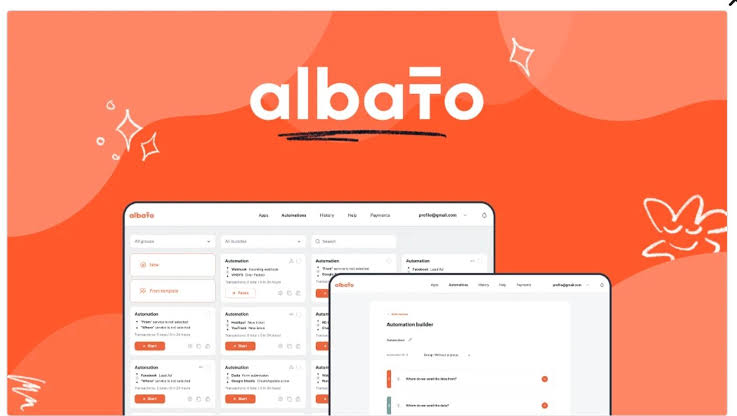
Albato is mainly a web-based platform rather than a traditional mobile-first app. Most serious setup work is done in a browser because building an automation involves choosing apps, connecting accounts, mapping fields, adding conditions, and testing the workflow. The interface groups automations, connected apps, billing, logs, analytics, and support tools into separate sections.
The browser experience is clean enough for daily management, although a large automation is easier to build on a laptop or desktop screen. Users looking for a downloadable desktop program may be disappointed because Albato works primarily as an online service. The benefit is that workflows continue running in the cloud after the user closes the browser.
Albato Login
Albato login is straightforward. Existing users open the platform, select the login option, and enter the email address and password connected to the account. Once signed in, the dashboard shows active automations, connected apps, recent activity, transaction usage, and access to the automation builder.
Common login problems usually involve an incorrect password, a different email address, browser cookies, or an account created through another sign-in method. Password reset is the first step when the details are unclear. People managing client workflows should also confirm that they are entering the correct workspace or account before making changes.
Albato Sign Up
Albato sign up takes only a few minutes. A new user provides basic account information, verifies access, and enters the platform. The trial gives users time to explore the main features and test a limited number of transactions before choosing a paid plan.
The best way to begin is with one simple workflow. Choose an app where an event starts, select the trigger, connect the account, choose the second app, add the action, map the fields, run a test, and then activate the automation. Starting with a complicated multi-app workflow can make the platform feel harder than it really is.
Albato AI
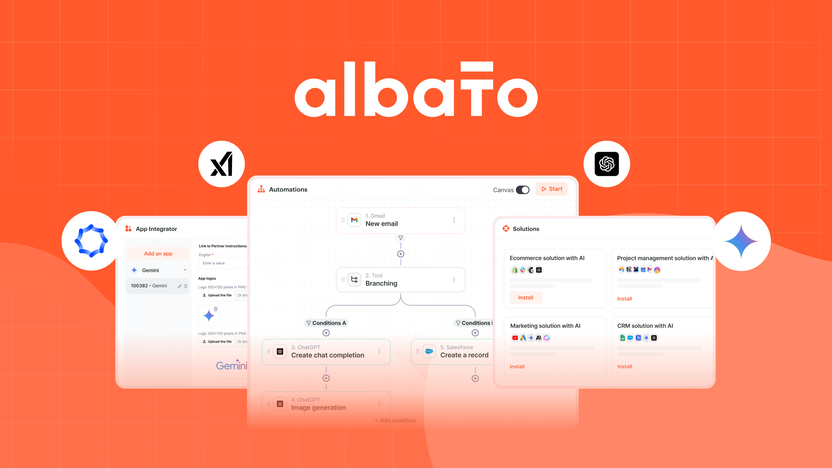
Albato has expanded its AI features in 2026. Albato AI can be added as a step inside an automation to generate text, translate content, create product descriptions, parse emails, process information, and complete other language-based tasks. The built-in option removes the need to open a separate AI account for simple use cases.
Albato Copilot is designed to help users create and launch automations through a chat-style experience. A user describes the job in normal language, answers follow-up questions, and allows Copilot to build much of the workflow. This is helpful for beginners who understand the business task but do not know which triggers, actions, or fields to select.
AI Agents take the idea further. An agent can examine incoming data and decide which action should happen next instead of following only a fixed branch. Users can connect supported models, write instructions, add guardrails, and give the agent tools from connected apps. This creates more flexible workflows, but it also increases the need for careful limits, testing, and monitoring.
Albato Automation
Every Albato automation begins with a trigger and contains at least one action. The trigger is the event that starts the process, such as a submitted form, a paid invoice, a new contact, or an updated task. The action is what Albato does next, such as adding a row, creating a deal, sending a message, or updating a record.
Paid plans allow unlimited active automations and unlimited steps. Users can add filters, routers, webhooks, data transformation tools, delays, and custom API requests. The automation history shows what ran, what data entered each step, and where an error happened. This is one of the most important areas of the product because a workflow is only useful when a user can understand why it failed.
Albato counts successful action steps as transactions. The starting trigger does not normally consume a transaction, but each completed action after it does. A workflow that sends one lead to a spreadsheet and then sends a notification can use two transactions for that lead. This pricing logic is reasonable once understood, but new users should calculate it before choosing a package.
Albato Pricing in 2026
Albato changed its pricing model in 2026. The plan now defines how the account is used, while a separate transaction package defines monthly volume. This gives users more freedom to increase usage without automatically changing the type of account.
|
Plan |
Listed Price |
Main Limits and Positioning |
|
Free |
$0 |
5 active automations, 2 steps per automation and 100 transactions |
|
Pro |
$22 monthly or $15 monthly with annual billing |
Unlimited automations and steps, AI tools, 1 user and transaction packages |
|
Teams |
$93 monthly or $65 monthly with annual billing |
5 seats, team controls, shared workspaces and priority support |
|
Custom |
Contact Albato |
Flexible limits, dedicated support, SLA options and custom solutions |
The Pro price shown above is based on a package of 1,000 monthly transactions. Larger transaction packages cost more, while annual billing can reduce the monthly equivalent. The Teams plan was still marked as coming soon on the public pricing page at the time of this review, so availability may depend on when and where the account is created.
Users should watch transaction usage closely. When a paid package runs out, Albato can continue workflows by purchasing additional transactions automatically when a valid payment method or account balance is available. Those extra transactions cost more than the normal package rate. This prevents sudden interruption, but it can also create a larger bill when usage grows unexpectedly.
Albato User Experience
Albato feels easier after the first successful automation. The platform uses familiar steps and labels, and the test process helps users see the information moving between apps. The large app catalogue is a major advantage because many popular business tools are already available. Multiple accounts can be connected to the same service, which is useful for agencies and people managing several brands.
The experience is not completely effortless. Field mapping can become confusing when an app returns many technical values, and error messages sometimes require a visit to the help centre or live chat. Complex automations also need to be tested with different types of real data. A workflow that succeeds with one example may fail when a field is empty, a date uses another format, or an app changes its permissions.
Support is one of Albato's stronger areas. The help centre contains setup guides, and paid users have access to live chat. Copilot also reduces some of the early friction. Overall, the platform offers a good balance between simplicity and control, especially for users who want more flexibility than a basic one-step connector.
Pros and Cons
What Works Well
More than 1,000 supported apps and a large library of integration combinations
No-code automation builder with triggers, actions, filters, routers, and webhooks
Unlimited automations and steps on paid plans
Albato Copilot helps users build workflows from plain-language instructions
Built-in Albato AI and AI Agents support smarter automation decisions
App Integrator allows custom connectors for services with an accessible API
Useful logs and automation history for troubleshooting
Responsive learning resources and live support for paid users
What Needs Improvement
Free plan allows only five active automations and two steps per automation
Transaction pricing takes time to understand
Extra transactions can increase costs when usage is not monitored
Advanced field mapping can feel technical for complete beginners
Complex workflows still require careful testing and error handling
The platform is primarily web-based rather than a full mobile or desktop app
AI features are not available on the Free plan
Some requested app integrations may still need a custom connector
Frequently Asked Questions About Albato (2026)
Albato is used to connect apps and automate repetitive tasks such as moving leads, updating records, sending notifications, creating contacts, processing data, and synchronising business tools.
2. Is Albato free?Yes. Albato has a free plan with 100 transactions, up to five active automations, and two steps in each automation. It is suitable for testing simple workflows.
3. How do I log in to Albato?Open the Albato website, select Log in, and enter the email address and password linked to the account. Use the password reset option when the login details are forgotten.
4. How do I sign up for Albato?Select Get started free, create an account, verify the required information, and enter the dashboard. New accounts can test the platform during the trial period before choosing a paid plan.
5. Does Albato have an app?Albato is mainly a browser-based cloud platform. The automation builder and account management tools work best on a desktop or laptop browser.
6. What is an Albato transaction?A transaction is a successful action completed inside an automation. The trigger generally does not count, while each completed action after the trigger uses one transaction.
7. How many apps does Albato support?Albato supports more than 1,000 apps across sales, marketing, communication, e-commerce, project management, databases, analytics, and other business categories.
8. Does Albato support AI automation?Yes. Albato offers built-in AI processing, Copilot for creating workflows, and AI Agents that can analyse data and choose actions inside an automation.
9. Can I connect an app that is not listed in Albato?Yes, when the app provides an accessible API. Users can create a private or public connector with the App Integrator or request help with adding a new app.
10. How much does Albato cost?The Free plan costs nothing. The Pro plan starts at $22 per month or a lower monthly equivalent with annual billing for 1,000 transactions. Teams and Custom plans cost more and include collaboration or enterprise features.
11. Is Albato easy for beginners?The first simple automation is easy to build, especially with Copilot and tutorials. More advanced workflows require an understanding of triggers, actions, fields, filters, and transactions.
12. What happens when Albato transactions run out?Paid automations may continue through automatically purchased extra transactions when a valid payment method or balance is available. Extra transactions cost more, so usage should be monitored.
Icon polls Verdict
Albato earns 4.0 out of 5 in the ICON POLLS 2026 review. It is a capable automation platform for people who want to connect their business tools without writing code. The wide app library, unlimited steps on paid plans, custom connector builder, AI features, and useful support make it a serious option for individuals, agencies, and growing teams.
The score also recognises that automation is never completely automatic at the setup stage. Users must understand transaction usage, map fields correctly, test unusual data, and review errors. The free plan is useful for learning but too limited for many real business workflows. Costs can also rise when transaction volume is underestimated.
Our practical recommendation is to begin with one repetitive task that already wastes time, build it during the free trial, and monitor how many transactions it uses over a normal week. Albato is worth paying for when the saved time and reduced manual work are greater than the monthly plan and transaction cost.











