
When Atlassian bought Arc in 2025 and its team turned its attention to a new browser called Dia, a lot of Arc fans were left holding a browser with an uncertain future. Most of them weren't attached to Arc's rendering engine or its tab tricks. They were attached to the sidebar: that tidy, colour-coded column of folders and pinned links running down the left edge of the window.
Arcmark is one developer's answer to that loss. Instead of asking you to switch browsers, it brings the sidebar to the browser you already use. It's a clever premise, and the privacy choices behind it deserve real credit. It's also a very young app, and that shows almost everywhere you look.
The essentials
| Detail | Arcmark |
|---|---|
| Developer | Ahmed Sulaiman |
| First release | Version 0.1.0, February 2026 |
| Platform | macOS 14 or later |
| Built with | Swift and AppKit |
| Licence | Open source (MIT) |
| Price | Free core app; Pro at $2.49 a month or $39.99 for lifetime access |
| Where your data lives | A single local JSON file on your Mac, no cloud |
| Browsers | Chrome, Safari, Brave, Arc, Firefox |
| Source code | github.com/Geek-1001/arcmark |
| Website | arcmark.app |
| Icon Polls rating | 2.1 out of 10 |
A sidebar that follows your browser around
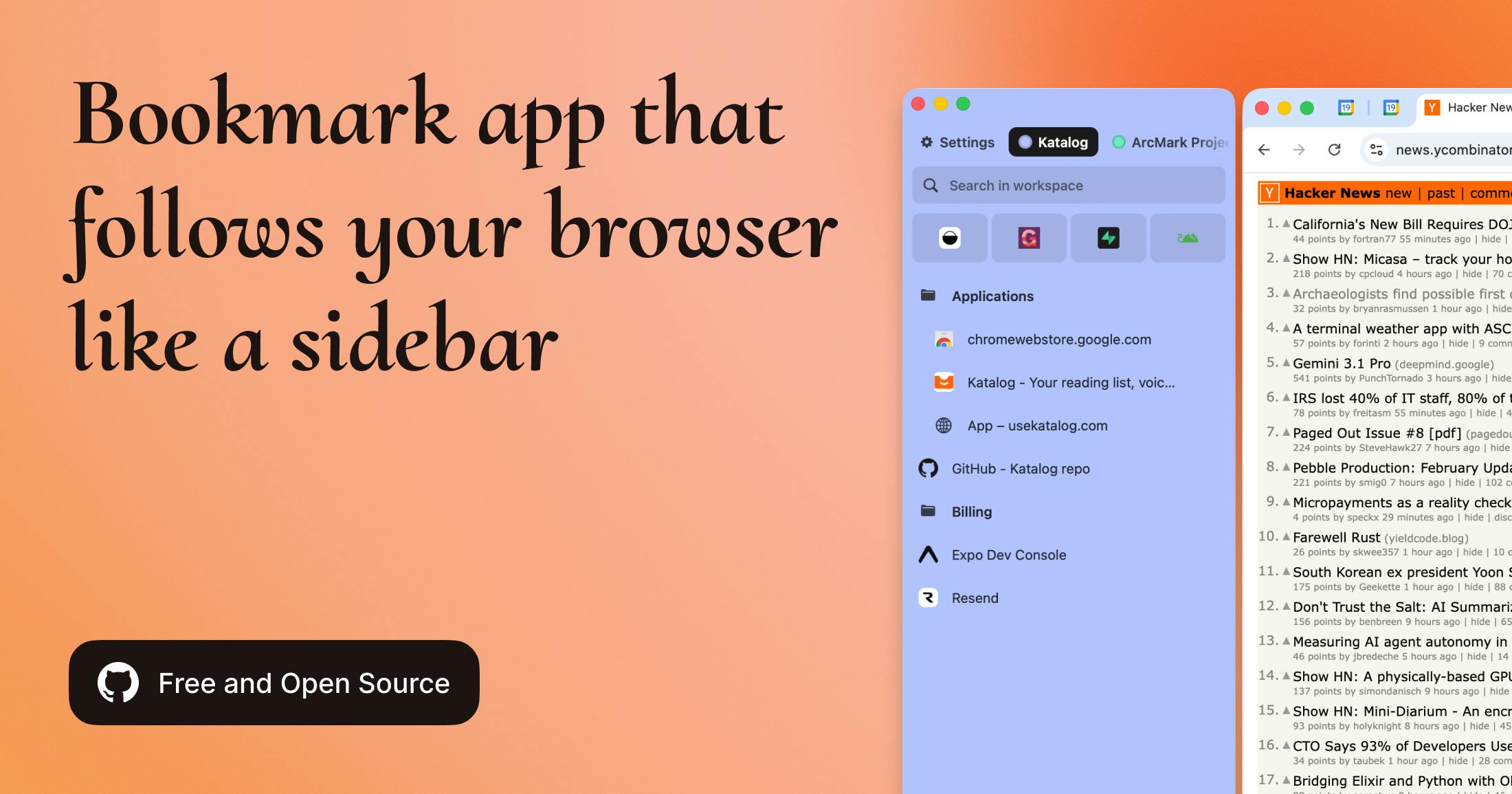
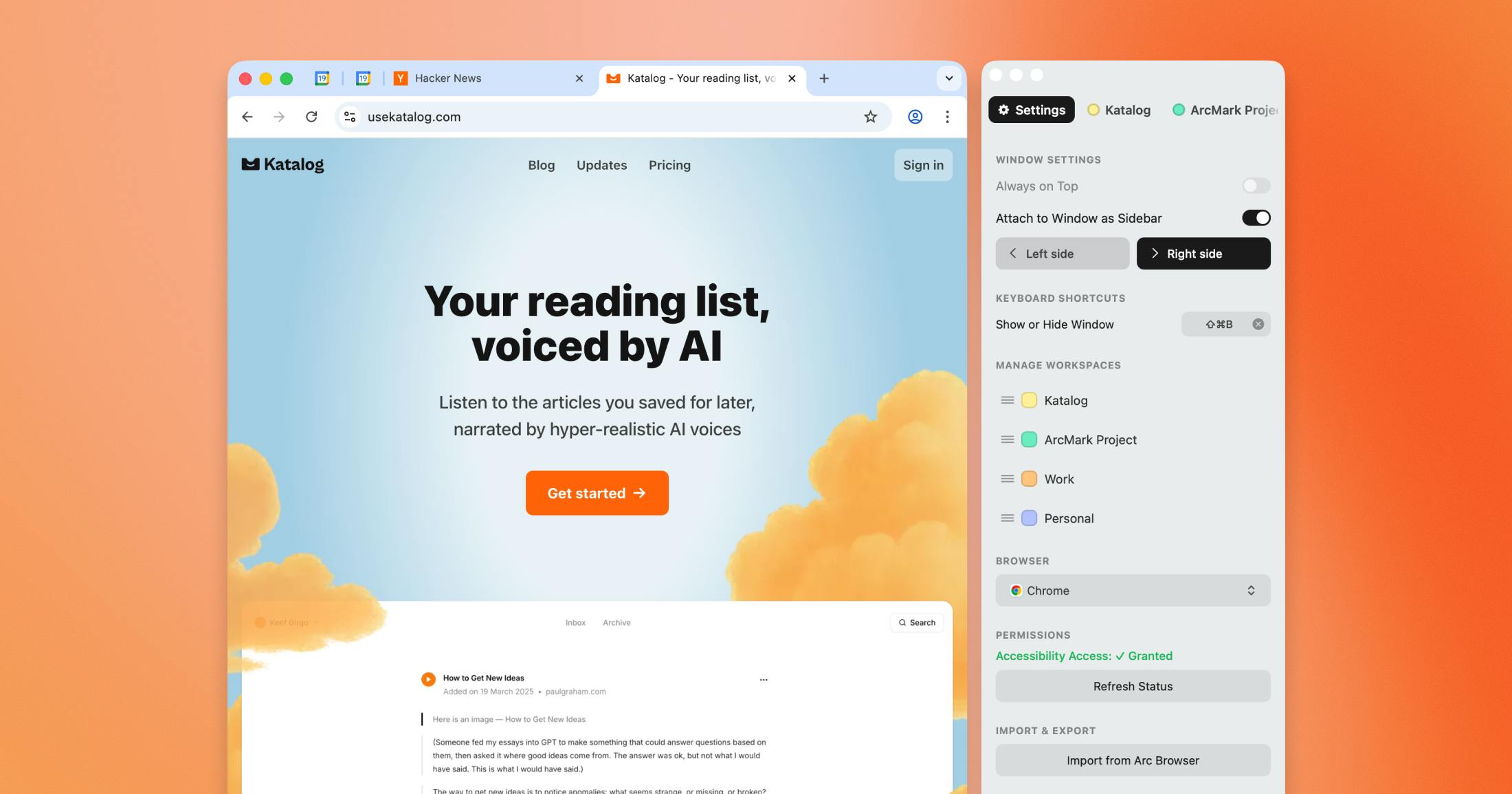
Arcmark lives in the Mac menu bar. Give it Accessibility permission in System Settings and it can latch onto your active browser window as a sidebar, moving and resizing along with it. If you'd rather not have it attached, it also works as a floating window.
Inside, it will look familiar to anyone who used Arc. You get colour-coded workspaces, nested folders, drag and drop, and a fast search box. You can import bookmarks from Safari and Chrome, and even pull in Arc's pinned tabs, which is a thoughtful touch for the exact audience this app is chasing.
Sulaiman isn't a first-timer, either. He previously built Flawless, an app that was acquired. That track record doesn't guarantee anything, but it does explain why Arcmark looks considered rather than thrown together.
No accounts, no servers, no sign-up
This is the part we like most. Arcmark stores everything in one JSON file on your machine. There's no login, no email capture and no company server holding your browsing habits. Because the code is MIT-licensed and public on GitHub, anyone uneasy about granting Accessibility access can read exactly what the app does with it.
That same choice is also Arcmark's biggest practical limitation, which brings us to the problems.
Where the friction creeps in
A bookmark tool has one job: make things quicker. Arcmark's rough edges tend to do the opposite.
- The sidebar doesn't always stay put. Switching between macOS Spaces or full-screen apps can leave it detached, and getting it back means a trip to the menu bar icon.
- Drag and drop is mostly reliable, but items can land in the wrong folder.
- Search is quick but basic, and long or unusual URLs can trip it up.
- Imports are one-off. Add a bookmark in Chrome tomorrow and Arcmark won't know unless you import again.
- No sync. Use two Macs and you're copying a JSON file between them by hand.
- Thin feature set. No tags, no smart folders, no integrations, and only a handful of keyboard shortcuts.
Early Reddit discussion, mostly in macOS, productivity and Arc communities, landed in a similar place. People liked the open-source, local-first approach. Some were still uncomfortable handing over Accessibility permissions, and multi-Mac users found the lack of sync a dealbreaker. After the launch buzz, conversation went quiet, and there's no dedicated subreddit.
Getting it onto your Mac
There's no Mac App Store listing. You download a DMG from the project's GitHub releases page, drag the app into Applications, then grant permissions manually. Because the app isn't notarised by Apple, macOS shows a security warning on first launch.
Developers won't blink at any of that. Everyone else might. The app itself is small and light on resources, but the route to installing it feels built for people who already know their way around GitHub.
Updates are slow, and manual
Since 0.1.0 shipped in February, a few updates have arrived with bug fixes and stability work. The core experience hasn't changed much. That's not a scandal: this is a one-person open-source side project, not a funded startup. But the free version has no automatic updater, so it's easy to sit on an old build without realising. If you install it, check GitHub now and then.
No, there isn't an Android version
People search for an Arcmark APK a lot, so plainly: it doesn't exist. Arcmark is Mac-only. There's no Android, iOS or Linux version. A community-built Windows port written in WPF and .NET 8 is on GitHub, but it's unofficial and not maintained by Sulaiman. Any site offering an Arcmark APK is offering something you shouldn't install.
How we got to 2.1
Our score is an editorial assessment that weighs Arcmark against mature rivals such as Raindrop.io and the bookmark tools already built into browsers. Here's the breakdown:
- Design and interface: about 4 out of 10. Attractive, not yet polished.
- Functionality: about 3 out of 10. The basics work, with noticeable bugs.
- Reliability: 2 out of 10, mainly because of sidebar detachment.
- Cross-platform support: 0 out of 10. Mac only, no mobile or web.
- Onboarding: 1 out of 10. GitHub download, security warning, manual permissions.
- Value: 2 out of 10. A generous free tier, but not yet worth building a workflow around.
It's a harsh number for an app with good intentions. It isn't a scam, and it isn't a bad idea. It just isn't ready for most people.
The narrow group it suits
If you're a Mac power user who misses Arc's sidebar, you're happy running early open-source software, you work on a single machine and you don't need your links on your phone, Arcmark could scratch the itch. Everyone else is better served by Raindrop.io, their browser's own bookmarks or even a notes app.
Arcmark only runs on one platform, which makes your choice of computer matter more than usual. Got opinions on that? Have your say in our poll on the best computer operating systems.
Before you download
Is Arcmark free?
The core app is free, including the sidebar, workspaces, folders, drag and drop, browser import and basic HTML export. Pro costs $2.49 a month or $39.99 for lifetime access and adds advanced filtering, duplicate detection and extra export formats.
Is it safe?
The code is public under the MIT licence, so it can be inspected. It does need Accessibility permissions, and macOS will warn you on first launch because it isn't notarised.
Will my bookmarks sync to my other devices?
No. Everything stays in one local JSON file. Moving it to another Mac means copying that file yourself.











