|
Profile Item |
Details |
|
Product name |
CreateOS |
|
Parent company / ecosystem |
NodeOps |
|
Category |
AI execution layer, app deployment, cloud infrastructure, AI builder workspace |
|
Main use case |
Building, deploying, scaling, and managing AI-assisted apps from one workspace |
|
Official website |
createos.sh and createos.nodeops.network |
|
GitHub organisation |
NodeOps-app |
|
Public CLI repository |
NodeOps-app/createos-cli |
|
Pricing checked |
Free, Plus, Pro, and Enterprise plans listed on the official CreateOS pricing page |
|
Best for |
Developers, AI builders, indie hackers, small teams, and startups testing AI-assisted deployment workflows |
|
ICON POLLS rating |
2.9 out of 5 |
CreateOS Review in 2026
CreateOS presents itself as a unified workspace for building, deploying, and scaling applications. The product is strongly positioned around the current AI-builder market: people are using tools like Cursor, Claude, ChatGPT, GitHub, and other coding assistants to create products faster, but they still get stuck when it is time to deploy, manage infrastructure, connect databases, handle logs, and turn the project into a working product. CreateOS is trying to reduce that messy middle.
The main promise is simple: bring project creation, deployment, managed services, templates, infrastructure, and AI-assisted workflows into one place. That is a useful pitch because many small teams do not want to maintain a full DevOps setup just to ship an MVP. On the official CreateOS website, the product is also positioned more broadly as an AI execution layer for enterprise use cases, with messaging around governance, audits, integrations, zero data retention, and controlled production rollout.
ICON POLLS sees CreateOS as an ambitious platform with good timing. AI-assisted development is growing fast, and many builders are actively looking for tools that help them move from idea to live app without switching between too many services. However, ambition is not the same as maturity. In our view, CreateOS still feels like a product that is proving itself in public. Its ecosystem looks active, but the public record is still thin compared with established hosting and developer platforms.
What is CreateOS?
CreateOS is a platform from the NodeOps ecosystem that helps users build, deploy, and manage applications from a single workspace. It can be described as a mix of AI development workspace, deployment platform, managed infrastructure tool, and app execution layer.
Based on its public positioning, CreateOS is not just trying to be another code generator. It is trying to help builders finish the full journey from idea to live product. That includes deployment from GitHub, Docker, or upload, access to managed databases and queues, custom domains, real-time logs, health checks, SSL, CDN, and infrastructure management.
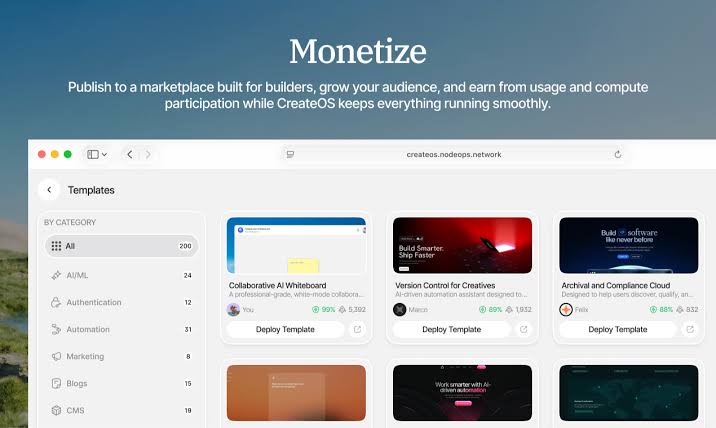
This makes it more comparable to platforms like Vercel, Railway, Render, Replit, and some AI coding deployment tools than to a simple chatbot or prompt tool. The difference is that CreateOS leans heavily into AI-assisted execution and the idea of a single workflow for building, deploying, and eventually monetising applications.
CreateOS Pricing in 2026
CreateOS pricing is one of the biggest search topics around the brand because users want to know whether it is affordable for experiments or only useful for funded teams. As checked from the official CreateOS pricing page in July 2026, the listed structure includes Free, Plus, Pro, and Enterprise plans.
The Free plan is listed at $0 per month and is aimed at hobby projects and side projects. It includes 1 project, 30 build minutes, 1 custom domain, and 10 GB database storage on a 15-day trial basis. The Plus plan is listed at $49 per month, with 5 projects, 500 build minutes, 5 custom domains, 20 GB database storage, Kafka message queue, and Valkey cache. The Pro plan is listed at $149 per month, with 20 projects, 2,000 build minutes, 20 custom domains, 100 GB database storage, template marketplace access, and unlimited security scans. Enterprise is listed as custom pricing for larger teams needing dedicated infrastructure, custom SLAs, priority support, and advanced security features.
On paper, the pricing is not the cheapest for small builders once they move beyond the free plan. The jump from free to Plus may feel high for students or solo creators who are still testing ideas. For a startup that already needs managed infrastructure, logs, domains, and database support in one place, the pricing may be easier to justify. ICON POLLS would like to see clearer public examples of what different apps cost in real usage, because builders often care less about the monthly label and more about total monthly cost after deployments, compute, storage, and usage.
CreateOS Github
CreateOS has a public GitHub presence through the NodeOps-app organisation. The most relevant public repository for searchers is NodeOps-app/createos-cli, described as the official command-line interface for CreateOS. The repository explains installation through a shell script, Homebrew, nightly builds, and source build options. It also shows commands for authentication, project creation, deployment, deployments, environments, environment variables, domains, cron jobs, templates, VMs, sandboxes, webhooks, skills, OAuth clients, and quick actions.
This is a positive sign because a public CLI gives technical users a way to inspect the workflow before fully committing. It also suggests that CreateOS is not only a visual app. It can fit into terminal and CI-style workflows, which matters for developers who prefer command-line control.
At the same time, the GitHub signals are still early. The CLI repository had a small public star count at the time of review. That is not a full measure of quality, but it shows that CreateOS is not yet a widely adopted open-source developer tool. Public issues, examples, roadmap clarity, and community discussions will matter if CreateOS wants more trust from developers who like to evaluate tools before connecting production projects.
CreateOS User Experience
CreateOS appears to be built for users who want fewer moving parts. The user experience pitch is attractive: connect a project, deploy it, manage infrastructure, view logs, add domains, and scale without setting up everything manually. For a builder who has been stuck between AI-generated code and real deployment, that workflow can feel useful.
The Product Hunt launch page also gives useful public context. CreateOS was presented as a way to build and deploy apps from any AI coding tool, and it was listed across categories such as web hosting, cloud computing, no-code website building, AI, development, and vibe coding. Public launch comments were mostly interested in the all-in-one promise, but one beta-style comment also mentioned repeated server errors and the need for more beginner-friendly tutorials.
This matches our review impression. The product has a strong promise, but the experience may still depend on how technical the user is. Developers may appreciate the CLI and infrastructure coverage. Beginners may need clearer guides, sample apps, pricing examples, and troubleshooting content. If the platform can reduce confusion for non-DevOps builders, its rating can improve. If users still need to understand too many infrastructure terms to succeed, the all-in-one promise becomes less convincing.
CreateOS Pros and Cons
Pros: CreateOS has a modern product idea, good timing, an official pricing page, an active parent ecosystem, a public CLI, and a clear focus on helping AI builders ship real applications. The combination of deployment, managed infrastructure, templates, logs, domains, and AI-assisted workflows is useful for teams that want to move faster.
Cons: CreateOS is still early in public adoption. Pricing may feel expensive after the free tier. Documentation and beginner education need to be very strong because the product covers many technical areas. Public proof, third-party reviews, and real case studies are still limited compared with older cloud platforms. The difference between CreateOS as a builder tool and CreateOS as an enterprise AI execution layer can also feel slightly confusing to first-time visitors.
CreateOS FAQs
1. What is CreateOS used for?
CreateOS is used to build, deploy, manage, scale, and operate applications from one workspace, especially apps created with AI coding tools.
2. Is CreateOS free?
Yes, CreateOS has a Free plan listed at $0 per month. The free plan is best for small tests, hobby projects, and early experiments.
3. How much does CreateOS cost in 2026?
As checked by ICON POLLS, the official pricing page lists Free at $0/month, Plus at $49/month, Pro at $149/month, and Enterprise as custom pricing.
4. Does CreateOS have GitHub integration?
Yes. CreateOS supports deployment from GitHub, and the CreateOS CLI includes commands for VCS and GitHub-based projects.
5. What is the CreateOS GitHub repo?
The main public repository people search for is NodeOps-app/createos-cli, which is the official command-line interface for CreateOS.
6. Is CreateOS good for beginners?
CreateOS can help beginners avoid some DevOps setup, but complete beginners may still need tutorials because deployment, databases, domains, and environments can be confusing.
7. Is CreateOS better than Vercel or Railway?
CreateOS is not automatically better. It has a different angle, combining AI-assisted building, deployment, managed infrastructure, templates, and marketplace-style workflows. Vercel and Railway are more established.
8. Can I deploy an AI app on CreateOS?
Yes. CreateOS is marketed toward AI apps and AI-assisted builders. It supports application deployment and managed services that can help AI projects go live.
9. Does CreateOS support Docker?
Yes. The official pricing page and CLI documentation mention deployment from Docker or Docker images.
10. Does CreateOS support custom domains?
Yes. The pricing page lists custom domain limits by plan, and the CLI includes domain commands for creating, verifying, listing, and deleting domains.
11. Does CreateOS provide databases?
Yes. CreateOS lists managed infrastructure services such as PostgreSQL, MySQL, Kafka, and Valkey depending on the plan.
12. Is CreateOS open source?
CreateOS itself should not be described as fully open source from the available public information. However, NodeOps provides public GitHub repositories, including the CreateOS CLI.
13. Is CreateOS safe for production?
CreateOS presents itself as production-focused, but ICON POLLS recommends testing with a small project first and requesting clear reliability, billing, and support details before mission-critical use.
14. Who owns CreateOS?
CreateOS is part of the NodeOps ecosystem.
15. Why is ICON POLLS rating CreateOS 2.9/5?
The score reflects a strong product idea but also early public adoption, limited independent review depth, pricing concerns for solo builders, and the need for clearer onboarding.











