Quick Verdict
Laxis AI is no longer just a meeting transcription tool. In 2026, it works more like a sales and conversation workspace that can record meetings, create transcripts, pull out action points, research prospects, prepare follow-up content, and move useful information into other business tools. The product is clearly aimed at sales teams, recruiters, consultants, managers, and professionals who spend a large part of the week in calls.
ICON POLLS gives Laxis AI a rating of 3.8 out of 5. The free plan is useful, the note taker covers the main meeting platforms, and the prospect research tools add real value for sales work. The Chrome extension is also convenient for Google Meet users who do not want a visible bot entering every call. The score stays below four because the platform has several products and recording methods, which can feel confusing at first. Some of its strongest sales and automation features also sit behind higher-priced plans.
At a Glance: Icon Polls Ratings
Here is how Laxis AI scored across the areas we reviewed in 2026:
|
Category |
Stars |
Score |
|
Meeting Transcription |
★★★★☆ |
4.1/5 |
|
AI Note Taking and Summaries |
★★★★☆ |
4.0/5 |
|
Prospect Research |
★★★★☆ |
3.9/5 |
|
Login and Account Setup |
★★★★☆ |
4.1/5 |
|
Chrome Extension |
★★★★☆ |
3.8/5 |
|
Free Plan Value |
★★★★☆ |
3.7/5 |
|
Ease of Use |
★★★☆☆ |
3.5/5 |
|
Overall |
★★★★☆ |
3.8/5 |
What Is Laxis AI?
Laxis AI is an artificial intelligence platform built around meetings, sales conversations, prospect research, and follow-up work. Its meeting assistant can capture online or in-person conversations, turn the audio into a searchable transcript, and produce a structured summary with topics, decisions, action items, and key moments.
The wider platform includes a prospect research agent and AI sales tools. These features help users build prospect lists, study companies and contacts, prepare personalised outreach, and use meeting information after a call. Laxis can be accessed through a web app, desktop software, mobile apps, a Chrome extension, and an optional meeting bot. This gives users several ways to record depending on the meeting platform and how visible they want the note taker to be.
Laxis AI Free Plan
Laxis AI has a Basic plan that costs nothing and does not require a credit card to begin. It includes 300 minutes of transcription each month, recording for online and in-person meetings, basic summaries, search across conversations, folders, exports, and sharing. Conversation history on the free plan is kept for 30 days, so users who need a permanent meeting archive will need a paid plan or regular exports.
The free level also includes Laxis Voice Keyboard features such as voice-to-text, removing filler words, reducing repetition, and translation. It is a fair starting point for a freelancer, student, recruiter, or small business owner who only records a few meetings each month. Heavy meeting users can use the allowance quickly, especially when several long calls are recorded in one week.
Laxis AI Login
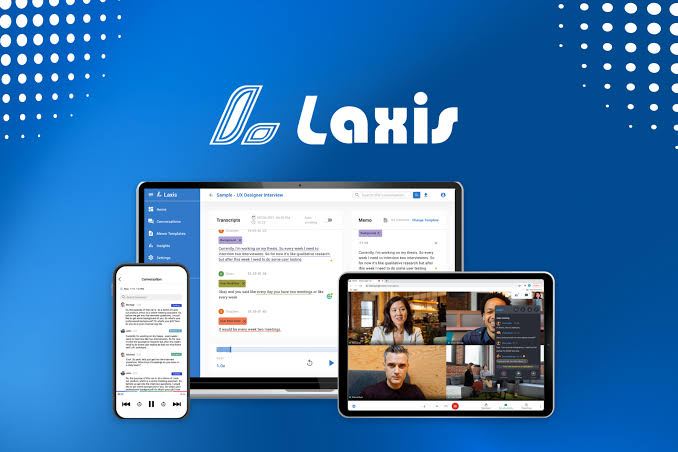
Laxis AI login is available through the web app and supported desktop or mobile applications. Users can sign in with Google, Microsoft, or a work email account. Google or Microsoft login is often the easiest option for people who want to connect their calendar and reduce the number of passwords they manage.
After login, users can view upcoming meetings, past conversations, transcripts, summaries, prospect lists, and account settings. A common login problem happens when someone creates the account with Google and later tries to enter a separate email password. In that situation, using the original sign-in method usually solves the issue. Users should also confirm that they are in the correct workspace when they belong to a business team.
Laxis AI Prospect Research
Prospect Research is one of the features that separates Laxis from a basic AI note taker. It can help a sales user search for potential customers, gather company information, find contact details, and organise research before outreach. The AI Research feature can search online information and return structured answers based on the fields the user requests.
This can be useful before a discovery call. A salesperson can prepare notes about a company, recent activity, likely problems, market position, and possible reasons the prospect may need the product. The quality of the result depends heavily on the instructions. A vague prompt can return broad information, while a clear prompt with defined output fields produces a more useful research table.
Prospect research uses separate search credits on applicable plans. These credits normally reset with each billing month and do not roll over. Users should therefore estimate how many companies and contacts they plan to research before selecting a package.
Laxis AI Note Taker
The Laxis AI note taker records meetings, creates a live or processed transcript, and produces summaries after the conversation. It can identify key topics, action items, decisions, and follow-up points. Users can also ask questions about past conversations through LaxisChat or use the AI Writer to turn meeting content into emails, reports, updates, and other documents.
Laxis supports common meeting environments such as Zoom, Google Meet, Microsoft Teams, and Webex. It can record through the desktop app without placing a visible participant in the meeting. Users who prefer calendar automation can also invite the Laxis assistant bot. For in-person discussions and voice notes, the mobile app can record through the phone microphone.
The note taker performs best when people speak clearly and use a good microphone. Background noise, several speakers talking at once, poor internet, and specialised names can reduce accuracy. Important figures, names, deadlines, and legal or medical statements should always be checked against the original recording.
Laxis Chrome Extension
The Laxis Chrome extension is mainly designed for Google Meet. Once installed and connected to a Laxis account, it can capture the meeting from the browser and show transcription features inside the meeting workflow. This option is useful for users who want quick recording without inviting a visible note-taking bot.
The extension can provide live captions and help users follow the discussion as it happens. After the meeting, the transcript, summary, and action points are saved to the Laxis account. The extension is optional. Google Meet users can also record through the desktop app or invite the Laxis assistant through the web platform.
Chrome extensions require access to browser and meeting information, so users should install the official version and review the requested permissions. Business users should also check their company policy before recording client or internal calls.
Laxis AI Pricing in 2026
Laxis has Basic, Premium, Business, and Enterprise plans. Annual billing is advertised with a discount, while mobile app prices may appear differently because app stores use local currencies, taxes, and regional pricing.
|
Plan |
Listed Monthly Price |
Main Use |
|
Basic |
$0 |
300 transcription minutes, basic summaries and 30-day history |
|
Premium |
$15.99 |
2,000 minutes, unlimited storage, AI Writer, templates and AI Chat |
|
Business |
$29.99 |
Unlimited transcription, CRM automation, team controls and priority support |
|
Enterprise |
Custom pricing |
Custom volume, API, SSO, deployment and dedicated support |
The Premium plan is the most practical choice for an individual who records meetings regularly and wants unlimited conversation storage. Business is aimed at teams that need unlimited transcription, CRM automation, administration tools, and broader integrations. Enterprise pricing is designed for larger organisations with security, deployment, training, and data requirements.
Laxis AI User Experience
The Laxis experience is strongest when the user chooses one clear workflow. For example, a Google Meet user can install the extension, sign in, record a call, and open the finished summary. A salesperson can research a prospect, conduct the meeting, and use the transcript to prepare a follow-up email. These connected steps make the platform feel more useful than a standalone transcription service.
The interface can feel busy because Laxis now includes a meeting assistant, research tools, AI sales functions, a voice keyboard, apps, extensions, and several recording options. A new user may need time to understand which product is responsible for each task. The help centre is useful, but a simpler first-time setup would make the experience more comfortable.
Transcripts are easy to search and summaries save time after long calls. The ability to record without a visible bot is also valuable when a business wants a more natural meeting. However, users still need to review AI-generated notes before sending them to a client or moving them into a CRM. Automation is helpful, but incorrect details can spread quickly when nobody checks the output.
Pros and Cons
What Works Well
Free plan includes 300 minutes of monthly transcription
Records online meetings, in-person conversations, and voice notes
Creates summaries, action items, key topics, and searchable transcripts
Prospect Research adds useful preparation for sales calls
Chrome extension provides a simple Google Meet workflow
Desktop recording can work without a visible meeting bot
Apps are available for web, desktop, iOS, and Android
Paid plans include AI writing, chat, templates, CRM automation, and integrations
What Needs Improvement
The number of products and recording options can confuse new users
Free conversation history lasts only 30 days
Advanced prospecting and sales tools require paid plans or credits
Transcription accuracy still depends on audio quality and clear speech
Users must review AI summaries before sharing important information
Pricing can differ between the website and mobile app stores
Team automation and CRM features are concentrated in the Business plan
Frequently Asked Questions About Laxis AI (2026)

Yes. Laxis has a Basic plan with 300 transcription minutes per month, basic summaries, 30 days of conversation history, search, folders, export, and sharing.
2. How do I log in to Laxis AI?Open the Laxis web app or installed application and sign in with Google, Microsoft, or the work email used when the account was created.
3. What does Laxis AI do?Laxis records and transcribes meetings, creates summaries and action items, researches prospects, prepares written follow-ups, and can connect meeting information to sales tools.
4. Is Laxis a meeting note taker?Yes. Its meeting assistant captures conversations and turns them into transcripts, summaries, topics, decisions, and action items.
5. Does Laxis work with Google Meet?Yes. Google Meet can be recorded through the Chrome extension, desktop app, or an invited Laxis assistant bot.
6. Does Laxis have a Chrome extension?Yes. The official Chrome extension is designed mainly for Google Meet and can provide an in-meeting transcription workflow.
7. Can Laxis record without a visible bot?Yes. The desktop app and Google Meet extension can capture audio without adding a visible bot participant. An optional bot is available for users who prefer automatic joining.
8. What is Laxis Prospect Research?It is a sales research feature that helps users find prospects, collect company and contact information, and generate structured research before outreach or meetings.
9. Can Laxis transcribe in-person meetings?Yes. Users can record in-person conversations through the mobile or desktop application and receive a transcript and summary.
10. How much does Laxis AI cost?The Basic plan is free. Premium is listed at $15.99 per month, Business at $29.99 per month, and Enterprise uses custom pricing.
11. Does Laxis support multiple languages?Yes. Laxis supports transcription in a large number of languages. Accuracy can vary based on accent, noise, microphone quality, and the language used.
12. Can Laxis export meeting notes?Yes. Users can export and share transcripts and meeting information. Paid plans also provide stronger integrations and CRM automation.
13. Is Laxis safe for confidential meetings?Laxis provides security and privacy controls, but organisations should review internal policies, recording consent rules, and plan-level security features before using it for sensitive meetings.
14. Can I cancel a Laxis subscription?Yes. A paid subscription can be cancelled from account settings. Access normally continues until the end of the current billing period.
Icon polls Verdict
Laxis AI earns 3.8 out of 5 in the ICON POLLS 2026 review. It is a useful meeting and sales assistant for people who want more than a basic transcript. The combination of note taking, summaries, prospect research, AI writing, and CRM-related workflows gives it a clear position among business-focused meeting tools.
The platform is best for salespeople, recruiters, consultants, managers, and teams that need to turn conversations into action. Its free plan is good enough for testing, while Premium offers a sensible step up for individual users. Business makes more sense when unlimited transcription, team administration, and CRM automation are important.
Our practical recommendation is to begin with the free plan and record two or three real meetings. Check transcription accuracy, summary quality, the extension workflow, and how quickly the 300-minute allowance is used. Upgrade only when the platform is already saving enough time to justify the monthly price.











