
|
Product name |
Shepherd: Focus & Productivity Time Tracker |
|
Category |
Browser productivity and time tracking |
|
Platform |
Google Chrome extension |
|
Pricing |
Free |
|
Core function |
Automatically tracks browser time and labels activity |
|
Key features |
Focus score, website categories, idle detection, session records, virtual sheep |
|
Account requirement |
No account is required for the basic extension experience |
|
Best for |
Individuals who want a simple view of their browser habits |
|
Icon Polls rating |
2.5/5 |
Shepherd is a free Chrome extension built for people who want a clearer picture of how they spend time online. Rather than asking users to start and stop a timer, it works in the background, scores browsing activity and turns the result into a simple visual prompt. Icon Polls reviewed its public product information, setup approach and core workflow to see where it helps and where it still feels limited.
Shepherd Review in 2026
Shepherd has a good idea at its centre. It watches browser activity automatically, labels websites as productive or distracting and gives the user a daily focus score. The hook is a virtual sheep that gets healthier when browsing stays on track and less healthy when distraction takes over. It is playful, memorable and less severe than a spreadsheet of time logs.
The best part is the lack of friction. Many people stop using time trackers because they forget to press start. Shepherd avoids that problem. Install it, browse normally and let the extension build a picture of where the day goes. For students, solo workers and anyone trying to reduce social media drift, that can be genuinely useful.
The limitation is scope. Shepherd is a browser tool, not a full work-management platform. It does not appear designed for payroll, client billing, deep project reporting or organisation-wide oversight. The focus score is also only as meaningful as the website categories behind it. Reading an article, watching a tutorial or using a social platform can be productive in one context and distracting in another.
Icon Polls gives Shepherd 2.5 out of 5. It earns credit for being free, simple and refreshingly automatic. The score is held back by its narrow browser-only focus, the blunt nature of website-based productivity labels and the fact that users who need serious reporting or cross-device tracking will quickly outgrow it.
Shepherd Download
Shepherd is downloaded as a Google Chrome extension rather than as a typical Android, iPhone or desktop application. The safest route is to find the official Shepherd listing in the Chrome Web Store, select “Add to Chrome” and review the permissions before confirming installation. Once installed, pinning the extension to the browser toolbar makes it easier to check your score and settings.
Because it tracks browsing activity, the permissions deserve attention. A productivity tracker needs access to relevant browsing information to recognise time spent on websites. Before installing, users should read the store listing and privacy information, then decide whether that level of tracking feels comfortable for their personal browser.
Shepherd Login
One of Shepherd’s selling points is that the basic experience does not require creating an account. That keeps setup fast and avoids another password to manage. You can install the extension and begin using it without a traditional login flow.
That convenience has a trade-off. Account-free tools can be less useful when you want to move data between devices, keep a long-term backup or share reports with someone else. If those features matter to you, check the current settings and product updates before relying on Shepherd as your only time record.
Shepherd App
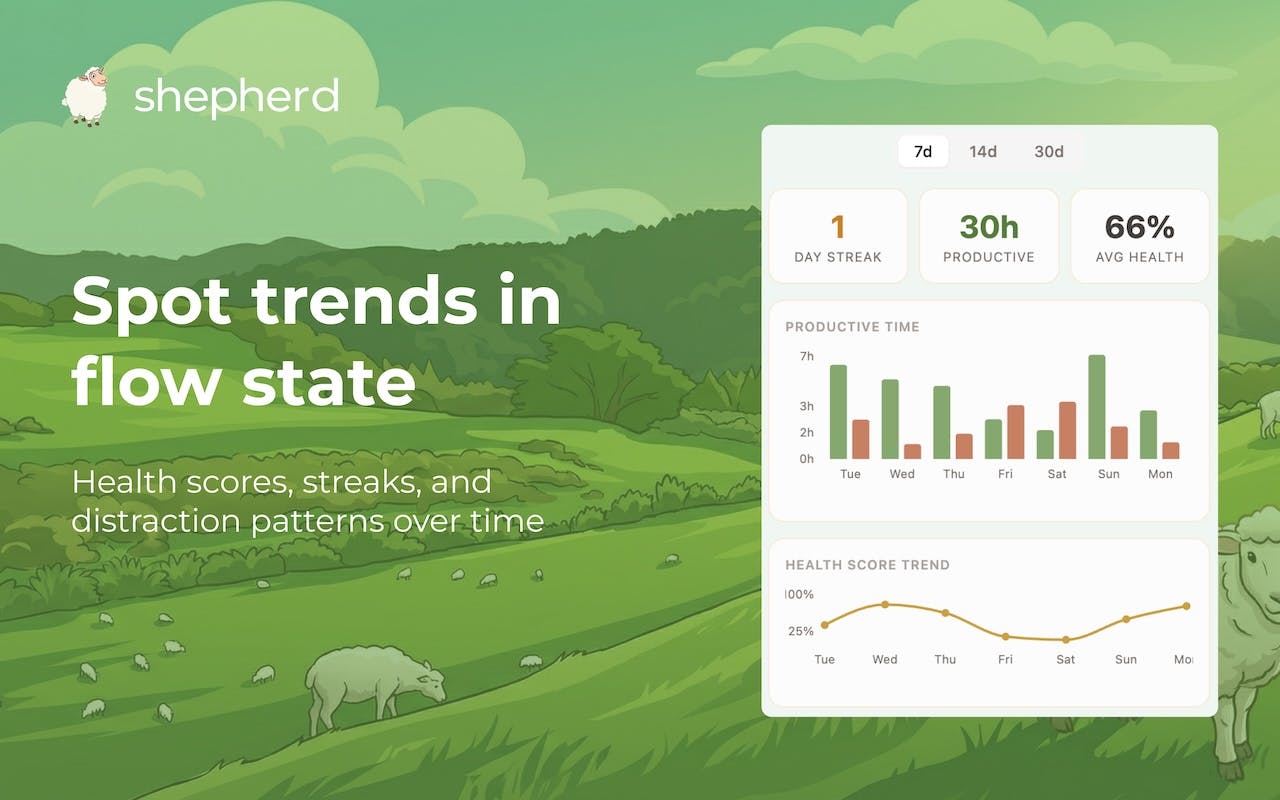
Calling Shepherd an “app” is understandable, but it is more accurate to call it a Chrome browser extension. It works inside the browser and focuses on the time spent across websites. It is not presented as a full mobile app or a broad desktop productivity suite.
Its main features include automatic browser-time tracking, productivity categorisation, a daily focus score, idle detection and a sheep-based visual system that turns habits into something you can see. Shepherd also allows website classification to be adjusted, which is important because default labels will not suit every person or job.
Shepherd Careers
At the time of this review, Shepherd is a small product and does not appear to maintain a large public careers section with regularly advertised roles. If you are interested in working with the project, use its official contact route or follow its product updates for any future opportunities.
For job seekers, it is worth being careful with third-party listings that use a product name without clearly showing who is hiring. Always confirm the company, role and application process through an official channel before sharing documents or personal information.
Shepherd User Experience
Shepherd’s user experience is strongest when the goal is awareness, not strict control. The extension reduces the effort of logging time and gives feedback in a way that is quick to understand. The sheep concept may sound small, but light gamification can make a dry habit feel more immediate.
The experience will not suit everyone. Some users may find a “brain rot” style score funny and motivating, while others may see it as judgemental. More importantly, automatic classification can miss context. A video platform might be a distraction during one hour and a research tool during the next. The option to override website classifications is therefore not a minor extra. It is essential for a fairer picture of your day.
Overall, Shepherd works best as a personal reflection tool. It can help you notice patterns, but it should not be treated as a perfect measure of effort, intelligence or value. Use the score as a prompt to ask better questions about your habits, not as a verdict on yourself.
Shepherd FAQs
1. What is Shepherd?
Shepherd is a free Chrome extension that automatically tracks browser activity and gives users a focus or productivity score.
2. Is Shepherd free to download?
Yes. Shepherd is presented as a free Chrome extension. Check its current store page for any future changes to pricing or features.
3. How do I download Shepherd?
Search for Shepherd: Focus & Productivity Time Tracker in the Chrome Web Store, then select Add to Chrome and complete the installation steps.
4. Does Shepherd need a login?
No account is required for the basic extension experience, so users can begin without a standard sign-up or login process.
5. Is Shepherd a mobile app?
No. Shepherd is primarily a Google Chrome browser extension, not a traditional iPhone or Android productivity app.
6. What does Shepherd track?
It tracks time spent browsing websites in Chrome and uses those patterns to label activity and calculate a daily focus score.
7. Can I change a website category in Shepherd?
Yes. Website classification can be adjusted, which helps users tailor the productivity labels to their own work or study routine.
8. Does Shepherd work when I am away from my computer?
Shepherd includes idle detection, which is intended to avoid treating inactive time as active browsing time.
9. Is Shepherd good for work time sheets or client billing?
Not really. It is better suited to personal focus awareness than detailed projects, invoicing, team reporting or payroll records.
10. Does Shepherd have careers or jobs?
There does not appear to be a large public careers portal for Shepherd. Use official contact channels for verified opportunities.
11. Is Shepherd safe to use?
Users should review the Chrome Web Store permissions and the product’s privacy information before installing. Any browser tracker should be chosen with care.
12. What is the Icon Polls rating for Shepherd?
Icon Polls rates Shepherd 2.5 out of 5 in 2026, based on its easy setup and useful concept, balanced against its narrow scope and limited professional features.











