
Quick Verdict
Suno AI in 2026 is the best general-purpose AI music generator available and earns a 3.8 rating reflecting genuinely excellent output with manageable limitations and legal considerations. Suno has 100 million users generating seven million songs daily. Version 5.5 released in March 2026 produces studio-quality audio with vocals that sound remarkably human. The free tier is genuinely generous at ten songs per day. The Pro plan at eight dollars monthly is excellent value at roughly two cents per commercially licensed song. The Premier plan at twenty-four dollars includes Suno Studio, a browser-based multitrack editor with stem export and MIDI support. Persona voices let you train custom voice models from your own recordings. The platform handles most genres well, excels at pop and rock, and generates complete songs with lyrics and production in under sixty seconds. For content creators, filmmakers, musicians seeking inspiration, and anyone needing royalty-free music, Suno delivers remarkable value. The 3.8 reflects legitimate limitations. Legal uncertainty from ongoing RIAA lawsuit cases affects commercial use considerations. Some genres like jazz and classical are weaker. Prompt engineering has a learning curve. The interface provides limited real-time control during generation. These limitations do not diminish the core offering but should be understood before committing.
At a Glance: Icon Polls Ratings
Here's how Suno AI scored across what we evaluated in 2026:
|
Category |
Stars |
Score |
|
Audio Quality and Vocal Realism |
★★★★★ |
4.5/5 |
|
Song Generation Speed and Reliability |
★★★★★ |
4.5/5 |
|
Customization and Control |
★★★★☆ |
3.5/5 |
|
Ease of Use and Onboarding |
★★★★☆ |
4/5 |
|
Pricing and Value |
★★★★☆ |
4/5 |
|
Features and Studio Capabilities |
★★★★☆ |
4/5 |
|
Legal Clarity and Commercial Rights |
★★★☆☆ |
3/5 |
|
Overall |
★★★★☆ |
3.8/5 |
What Is Suno AI?
Suno AI is an artificial intelligence music generation platform that creates complete songs from text descriptions. Instead of generating only instrumental backing tracks or only lyrics, Suno generates everything at once: vocals, lyrics, instrumentation, and mixing. You describe what you want like upbeat indie rock song about morning coffee and Suno generates a complete two-minute track with AI-sung vocals and full production. Founded in 2023, Suno has become the dominant consumer AI music tool with over 100 million users. The platform generates over seven million songs daily. Suno raised four hundred million dollars in June 2026 at a five point four billion dollar valuation. The company operates globally with a focus on democratizing music creation.
Download and Installation
Suno is a web-based platform accessible through your browser at suno.ai. No software installation is required. You can also download the iOS and Android mobile apps from the Apple App Store or Google Play Store respectively. The apps provide mobile access to the same features as the web version. Download is immediate after visiting the website or searching the app store. The web interface is responsive on desktop browsers. The mobile apps work smoothly on phones and tablets. Everything syncs across devices if you use the same account. This approach means you do not need to manage software updates or storage space for Suno itself. Your songs are stored in your account cloud-accessible from anywhere.
Login and Account Setup
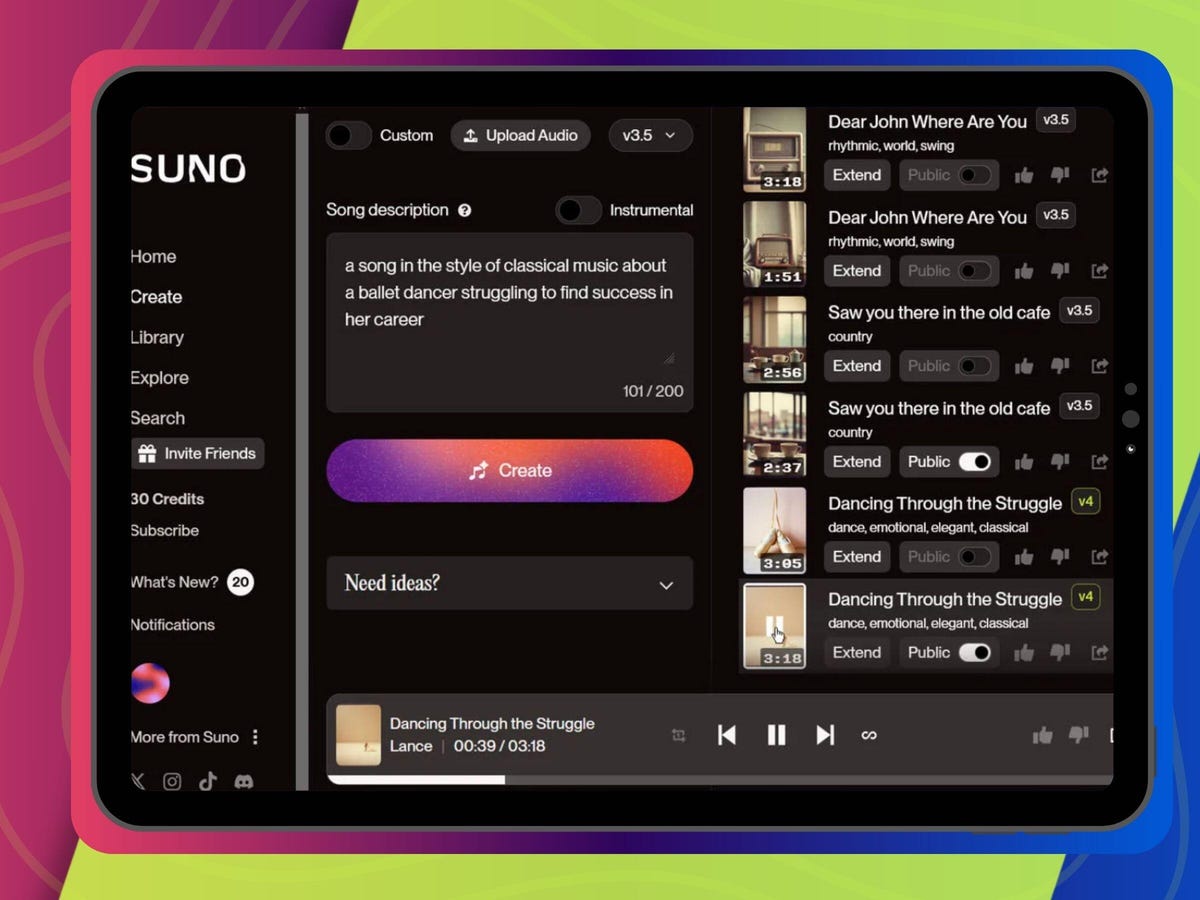
Creating a Suno account takes ninety seconds. You visit the website and click sign up. You can authenticate using Google or Discord accounts, or create a new email. Email verification is required if using email signup. Two-factor authentication is available for security. After verification, you are in the dashboard immediately with full access to the free tier. Logging in on future visits is straightforward. Session persistence works reliably across browser closures. Switching between devices works smoothly. The login interface is clean and quick. Within minutes of signing up you can generate your first song on the free tier. No payment information is required to try the platform.
Suno AI Free and Paid Plans
Suno offers a freemium model with a genuinely generous free tier and affordable paid options. The free tier includes ten songs per day with fifty credits daily. Songs generated on free do not have commercial licensing rights and require attribution if used. The Pro plan costs eight dollars per month when billed annually and includes five hundred songs monthly, commercial licensing, v5.5 model access, and stem export for editing. The Premier plan costs twenty-four dollars per month and includes two thousand songs monthly, all Pro features, plus Suno Studio with multitrack editing, MIDI export, and Persona voice training. Monthly billing costs about twenty percent more than annual. Credits do not roll over between months. For casual experimentation, free is sufficient. For content creators, Pro is the sweet spot. For professional musicians and heavy users, Premier with Studio access justifies the cost.
|
Plan |
Price |
What You Get |
|
Free |
$0/month |
10 songs/day, attribution required, v4.5 model, no commercial license. |
|
Pro |
$8/month (annual) |
500 songs/month, commercial license, v5.5 model, stem export, personal use. |
|
Premier |
$24/month (annual) |
2000 songs/month, Suno Studio, MIDI export, Persona voices, custom models. |
Is The Pricing Fair?
Yes, Suno pricing is excellent value. At eight dollars for five hundred commercially licensed songs you pay roughly two cents per track. Compare that to licensing stock music at fifteen to fifty dollars per song. For content creators, the value is exceptional. The free tier is generous enough to evaluate whether the tool works for you. The annual billing saves twenty percent compared to monthly so commit yearly if possible. No hidden fees or usage overages exist within your monthly credit allowance.
Music Generator Quality and Performance
Suno v5.5, released in March 2026, produces remarkably high-quality music. The vocal synthesis is the standout feature, generating singing that sounds genuinely human for most listeners. In blind tests, about thirty-five to fifty percent of Suno tracks are mistaken for human-produced music. The AI handles song structure intelligently, generating coherent verses, choruses, bridges, and outros automatically. Lyrics generation is strong, creating meaningful words that match your description and fit the melody. Production quality is professional with proper mixing and mastering included. Most genres work well, with exceptional quality for pop, rock, EDM, and hip-hop. Jazz and classical are weaker, producing less complex arrangements and limited improvisation. Generation typically takes thirty to sixty seconds. The Extend feature adds another verse or section up to eight minutes total length. Generation speed is fast enough for real-time creative workflow.
Suno Studio and Advanced Features
Suno Studio is exclusive to Premier subscribers and represents the platform's most ambitious feature. Launched in late 2025, Studio provides a browser-based digital audio workstation with a multitrack timeline. You can edit individual stems including vocals, drums, bass, and other instruments separately. The stem separation feature extracts up to twelve time-aligned WAV tracks from a generated song. MIDI export lets you pull the musical data into professional DAWs like Ableton or Logic Pro for further editing. The mixing controls include EQ, faders, panning, and solo or mute individual tracks. Persona voices train custom voice models from six or more of your own recordings. Custom Models let you train a personalized music generation model biased toward your style. The Take Lanes feature generates multiple variations of a section for comparison. Power users describe the current Studio build as pre-beta, noting it is improved but still developing. For creators wanting to refine AI-generated music rather than start from scratch, Studio provides valuable workflow improvements.
User Experience and Dashboard
The Suno dashboard is clean and intuitive. The main interface shows your credit balance, generation history, and quick access to create new songs. Generating a song is simple: write your description or select a style, optionally upload reference audio, and click generate. Your songs appear in a gallery with playback controls. You can download, extend, regenerate sections, or regenerate with different parameters. Collections let you organize your songs into projects. Sharing is easy with direct links or embed codes. The creation workflow is streamlined requiring minimal clicks. The interface provides good visual feedback. Generation progress is visible. Search and filtering options help you find past songs. The experience feels polished and user-friendly. The main friction emerges around prompt engineering as quality depends heavily on how well you describe what you want.
Pros and Cons
What Works Excellently
Vocal synthesis is remarkably human-sounding especially compared to prior models
Free tier at ten songs per day is genuinely generous for trying the platform
Pro plan at eight dollars per month is exceptional value for commercial licensing
Complete song generation in thirty to sixty seconds from text description
Handles most genres well with strong performance on pop rock EDM hip-hop
Stem export on Pro enables editing in professional DAWs
Persona voices let you train custom voice models from your own recordings
Extend feature builds songs up to eight minutes with maintained continuity
Mobile apps provide convenient access to full features
Generated music available for commercial use on paid plans
What Needs Improvement
Legal uncertainty from ongoing RIAA lawsuits affects commercial use confidence
Jazz classical and orchestral genres produce weaker results
Prompt engineering requires learning curve to achieve desired results
No real-time control during generation, limited mid-creation guidance
Studio is still developing with acknowledged pre-beta limitations
Cannot train models on copyrighted music, only music you own
Artist-specific style references like sounds like Taylor Swift no longer work
Quality varies with some generations weaker than others even with good prompts
Frequently Asked Questions About Suno AI (2026)
1. Is Suno AI free or does it cost money?
Suno is freemium. The free tier includes ten songs per day with no credit card required. Paid plans start at eight dollars per month for Pro. The free tier is genuinely useful for experimentation and learning.
2. Can I use Suno music commercially?
Free tier songs cannot be used commercially. Pro and Premier paid plans grant commercial licensing rights for songs you generate. The Warner Music deal announced in 2025 provides additional legal protection. However, RIAA lawsuits are still ongoing, so some teams consult legal counsel before commercial use.
3. How do I get my own voice in Suno?
The Persona feature trains custom voice models from your recordings. Upload six or more samples of your voice and Suno learns your tone and style. Future songs can use your voice instead of the default AI singers. This feature is Premier-only.
4. Can I edit songs after Suno generates them?
Basic editing includes regenerating specific sections. Pro and Premier subscribers can export stems and edit individual tracks in external DAWs. Premier with Studio provides browser-based multitrack editing without leaving Suno.
5. How long can Suno songs be?
Initial generation produces two-minute songs. The Extend feature adds another verse or section. You can extend up to eight minutes total. Complex longer compositions require multiple generations and combining sections.
6. Does Suno generate lyrics automatically?
Yes, Suno generates both lyrics and music. You can provide lyrics in your prompt and Suno will generate vocals that sing your words. Or let Suno create lyrics that match your description.
7. What genres does Suno handle best?
Suno excels at pop rock EDM hip-hop and country. These genres have strong training data and produce high-quality results. Jazz classical and experimental genres produce weaker results with less complex arrangements.
8. Can I copyright songs I make with Suno?
The US Copyright Office states purely AI-generated works cannot be copyrighted. If you write lyrics and significantly modify the generated music, you may claim copyright on the human-created elements. Legal guidance is recommended for serious commercial projects.
9. How is Suno different from Udio?
Both generate complete songs from text. Suno has better vocal quality and more generous free tiers. Udio initially had stronger instrumental quality but has restricted downloads due to legal settlements. Suno maintains full downloads on paid plans.
10. Is Suno worth the money?
For content creators needing original music regularly, absolutely. At eight dollars for five hundred commercially licensed songs, the value is exceptional. For hobbyists and experimentation, the free tier is sufficient. For casual users needing only occasional songs, free or pay-per-use alternatives may be cheaper.
Icon polls Verdict
Suno AI earns a 3.8 out of 5. That rating reflects genuinely excellent music generation capabilities with real but manageable limitations. Suno is the best consumer AI music generator available for most use cases. The v5.5 model generates studio-quality audio with vocals that sound human. The pricing is exceptional value. The free tier is genuinely generous. For content creators, filmmakers, and anyone needing original music, Suno delivers remarkable capability at accessible price points.
The 3.8 is not higher because legal uncertainty from RIAA lawsuits creates risk for commercial use. Some genres remain weaker than others. Studio features are still developing. The interface provides limited real-time generation control. These limitations matter for specific use cases but do not diminish the core offering for most users.
The practical recommendation is to try the free tier first. Generate a few songs in styles you care about and see if quality meets your needs. If it does, upgrade to Pro at eight dollars monthly. If you need advanced editing, commit to Premier with Studio. Most active creators find the investment worthwhile. Just understand the legal landscape before releasing music commercially.











