Quick Verdict
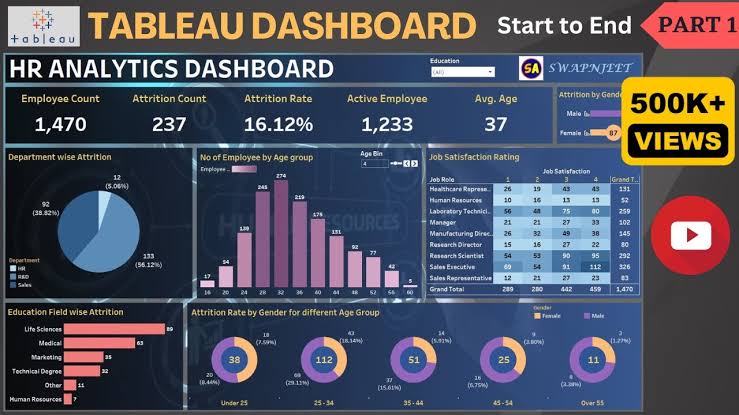
Tableau remains one of the best-known business intelligence platforms in 2026, and there is a reason it has stayed relevant for so long. It gives analysts, business teams and data professionals a strong visual environment for turning spreadsheets, databases and cloud data into dashboards people can actually explore. Tableau is especially good when the goal is interactive analysis rather than a static report.
ICON POLLS rates Tableau 3.8 out of 5. The platform is powerful, polished and mature, but it is not the easiest analytics tool to learn or budget for. Tableau Public gives beginners a genuinely free way to practise and publish visualizations, while paid Tableau products add private data, collaboration, governance, AI-assisted analytics and enterprise administration. The main drawbacks are licensing complexity, a fairly steep learning curve, and performance that can drop when workbooks, calculations or data models are poorly designed.
At a Glance: Icon Polls Ratings
Here is how Tableau scored across the main areas we evaluated in 2026:
|
Category |
Stars |
Score |
|
Data Visualization |
★★★★★ |
4.7/5 |
|
Dashboard Building |
★★★★★ |
4.6/5 |
|
Data Connections and Analysis |
★★★★★ |
4.5/5 |
|
Free Tools |
★★★★☆ |
4.0/5 |
|
Mobile App |
★★★★☆ |
4.0/5 |
|
Ease of Learning |
★★★☆☆ |
3.2/5 |
|
Pricing and Licensing |
★★★☆☆ |
3.1/5 |
|
Overall |
★★★★☆ |
3.8/5 |
What Is Tableau?
Tableau is a business intelligence and data visualization platform from Salesforce. It is used to connect to data, explore patterns, build dashboards, share analytics and support business decisions. Tableau can work with spreadsheets, databases, cloud warehouses and many other data sources.
The Tableau product family includes Tableau Desktop for authoring, Tableau Cloud for managed online analytics, Tableau Server for self-hosted deployments, Tableau Prep for data preparation, Tableau Public for free public visualizations, Tableau Mobile for viewing and interacting on phones, and newer AI-assisted capabilities such as Tableau Agent and Tableau Pulse in selected editions.
The product is used by analysts, finance teams, marketers, sales teams, operations teams, executives and developers. It can handle simple charts, but its real strength appears when several views, filters, calculations and data sources need to come together inside one interactive dashboard.
Tableau App
Tableau has an official mobile app for iOS and Android. The app is designed mainly for consuming dashboards, metrics and alerts rather than replacing the full desktop authoring experience. Users can open published content, interact with filters, inspect views and stay connected to key business metrics while away from a computer.
For organizations using Tableau Cloud or Tableau Server, the app is useful for executives and field teams that need a quick view of live dashboards. The best dashboards are designed with smaller screens in mind, because a desktop layout with many panels can feel cramped on a phone.
Tableau Public also has a web experience for exploring and publishing public visualizations. Serious dashboard creation is still better on Tableau Desktop or the browser authoring experience, depending on the edition and license.
![]()
Tableau Login
Tableau login depends on the product. Tableau Cloud users sign in to their organization's cloud site. Tableau Server users sign in to the server address managed by their organization. Tableau Public users create a free public profile and sign in through the Tableau Public platform.
Organizations can also use single sign-on and identity-provider integrations, so some users never type a separate Tableau password. The exact login flow therefore depends on how the company has configured access.
If a user can reach Tableau but cannot see a workbook or dashboard, the issue is often permissions rather than the password. Tableau content can be restricted by site role, project permissions, workbook permissions and data-source access.
Is Tableau Free in 2026?
Yes, but the free version is Tableau Public rather than the full private business platform. Tableau Public lets anyone create and publicly share visualizations online. Users can work with free web authoring or download Tableau Desktop Public Edition at no cost.
The trade-off is privacy. Content published to Tableau Public is meant to be public, so it should not be used for confidential company, customer or personal data. Data refresh and certain enterprise features are also more limited than in paid Tableau products.
Tableau Reader is another free desktop option for opening and interacting with packaged Tableau workbooks locally, although it is not a replacement for the full collaboration and publishing features available through Tableau Cloud or Server.
Tableau Download
Tableau can be downloaded in several forms. Paid Tableau Desktop installers are available to licensed users through the Tableau customer portal. Tableau Desktop Public Edition can be downloaded free for people who want to build public visualizations. Tableau Reader can also be downloaded free for opening supported packaged workbooks.
The correct installer depends on the operating system and product. Most users should download only from the official Tableau download or customer pages because analytics workbooks often connect to sensitive data and credentials.
Tableau Desktop is mainly a Windows and macOS authoring tool. Teams using Tableau Cloud can also do browser-based authoring for many tasks, which reduces the need for every user to install the desktop software.
Tableau Software and Products
Tableau is not one single application. The platform is made up of products that cover authoring, sharing, preparation, mobile access and enterprise administration. Understanding those roles makes the pricing easier to follow.
|
Product |
Main Purpose |
|
Tableau Desktop |
Build advanced visualizations and dashboards on a computer |
|
Tableau Cloud |
Managed online analytics, collaboration and sharing |
|
Tableau Server |
Self-hosted analytics for organizations needing deployment control |
|
Tableau Prep Builder |
Clean, combine and prepare data |
|
Tableau Public |
Create and publicly share visualizations for free |
|
Tableau Mobile |
View and interact with published analytics on phones and tablets |
|
Tableau Pulse |
Deliver personalized metric insights and summaries |
|
Tableau Agent |
AI-assisted help for analysis, authoring and preparation in supported editions |
Tableau Pricing in 2026
Tableau pricing in 2026 uses role-based licenses for Creator, Explorer and Viewer users, with Standard and Enterprise editions plus higher-end Cloud+ and Tableau+ options. Every deployment requires at least one Creator license.
|
License |
Standard |
Enterprise |
|
Creator |
$75 per user/month |
$115 per user/month |
|
Explorer |
$42 per user/month |
$70 per user/month |
|
Viewer |
$15 per user/month |
$35 per user/month |
The figures above are billed annually and reflect current listed role pricing. Creator is for people who build and publish analytics, Explorer is for users who explore and edit existing content in the browser, and Viewer is for people who mainly consume dashboards and metrics.
Tableau Cloud+ and the Tableau+ Bundle use higher-end packaging with additional AI, administration and support features, while Tableau Server also has separate deployment options. Large organizations may also use capacity-based Viewer licensing rather than buying a named Viewer license for every person.
Tableau Performance
Tableau can be very fast, but performance depends heavily on workbook design and the data environment underneath it. A simple dashboard connected to a well-designed extract can feel instant. A workbook with dozens of sheets, complex calculations, high-cardinality filters and slow live queries can feel heavy even on strong infrastructure.
Extracts are often used when speed matters because Tableau can query optimized local data rather than asking the original database for every interaction. Live connections make sense when the dashboard needs the freshest possible data, but the database and network then become part of the performance equation.
Good Tableau performance usually comes from reducing unnecessary marks, simplifying calculations, limiting expensive filters, hiding unused fields, optimizing data sources and avoiding dashboards that try to show everything at once. Performance recording and workbook analysis tools can help teams find slow queries and rendering steps.
In our view, Tableau is not slow by default. Poorly structured workbooks are usually the bigger problem. The platform gives experienced developers enough control to build fast dashboards, but beginners can create something visually impressive that becomes difficult to maintain.
Tableau User Experience
Tableau is easy to start and difficult to master. Dragging a field onto Rows or Columns and creating a basic chart takes only minutes. Building a polished executive dashboard with calculated fields, parameters, level-of-detail expressions, data relationships and good interaction design takes much longer.
The interface is visual, which helps non-programmers, but it still has its own language. New users need to understand dimensions, measures, discrete and continuous fields, filters, marks, relationships, extracts and calculations. Once those ideas click, Tableau becomes much faster to use.
Sharing is one of the better parts of the experience. Published dashboards can be viewed in a browser, filtered, subscribed to and shared with colleagues according to permissions. Tableau Pulse also gives users a more focused way to receive important metric updates without opening a full dashboard.
The main usability complaint is that the product family can feel fragmented. Desktop, Cloud, Server, Prep, Public, Pulse and several license roles all solve different parts of the workflow. A new buyer may understand dashboard building before understanding which package they actually need.
Pros and Cons
What Works Well
Excellent interactive dashboard and visualization tools
Large range of connectors for spreadsheets, databases and cloud platforms
Tableau Public provides a genuinely useful free learning and portfolio option
Creator, Explorer and Viewer roles let organizations separate authoring from consumption
Tableau Cloud and Server support controlled sharing and collaboration
Strong calculation, filtering, parameter and data-modeling capabilities
Mobile app makes published dashboards easier to access away from a computer
Tableau Pulse and Tableau Agent add newer AI-assisted analytics experiences
What Needs Improvement
Paid licensing is expensive for small teams
Role and edition choices can be confusing for new buyers
Learning advanced calculations and data modeling takes time
Poorly designed dashboards can become slow and difficult to maintain
Tableau Public is not suitable for confidential data
Desktop authoring remains more comfortable than mobile for serious work
Some enterprise and AI features require higher-priced editions
Frequently Asked Questions About Tableau (2026)
![]()
Tableau is used for business intelligence, data analysis and interactive visualization. People use it to connect data, build dashboards, explore trends and share insights.
2. Is Tableau free in 2026?Yes. Tableau Public is free for creating and publicly sharing visualizations. Tableau Desktop Public Edition can also be downloaded free. Private business use generally requires a paid Tableau product.
3. Does Tableau have a mobile app?Yes. Tableau has an official mobile app for iOS and Android that lets users view and interact with published analytics from Tableau Cloud or Tableau Server.
4. How do I log in to Tableau?The login depends on the product. Tableau Cloud users sign in to their cloud site, Server users sign in to their organization's server, and Tableau Public users sign in to their public profile.
5. Where can I download Tableau?Licensed users can download Tableau Desktop through Tableau's official customer download area. Tableau Desktop Public Edition and Tableau Reader also have free official download options.
6. What is Tableau Public?Tableau Public is a free platform for creating, exploring and publicly sharing data visualizations. Anything published there should be treated as public information.
7. How much does Tableau cost in 2026?Current Standard role pricing starts at $75 per user per month for Creator, $42 for Explorer and $15 for Viewer, billed annually. Enterprise role prices are higher.
8. What is Tableau software?Tableau is a family of analytics products that includes Desktop, Cloud, Server, Prep Builder, Public, Mobile, Pulse and AI-assisted tools in supported editions.
9. Is Tableau good for large datasets?Yes, but performance depends on data modeling, database speed, extracts, filters and workbook design. Large datasets can work well when the environment is optimized.

10. Why is my Tableau dashboard slow?Common causes include slow live queries, too many marks, expensive calculations, complex filters, large data sources and dashboards with too many worksheets. Performance recording can help identify the bottleneck.
11. Is Tableau difficult to learn?Basic charts are easy to create, but advanced dashboard design, calculations and data modeling take practice. The learning curve is moderate to steep for professional-level work.
12. Can I use Tableau without coding?Yes. Most Tableau analysis is done through a visual drag-and-drop interface. Coding is not required for normal dashboard building, although calculated fields and advanced integrations still require technical thinking.
13. What is the difference between Tableau Desktop and Tableau Cloud?Tableau Desktop is mainly an authoring application installed on a computer. Tableau Cloud is a managed online platform for publishing, collaboration, governance and browser-based analytics.
14. Is Tableau worth using in 2026?Yes for teams that need powerful interactive analytics and can justify the licensing and learning curve. Smaller teams with simple reporting needs may find a lighter or cheaper tool sufficient.
Icon polls Verdict
Tableau earns 3.8 out of 5 in the ICON POLLS 2026 review. It remains one of the strongest visualization platforms for teams that need interactive dashboards, flexible analysis and broad data connectivity.
Its biggest strengths are depth and maturity. Tableau Public gives beginners a strong free entry point, while paid editions scale from individual dashboard authors to large governed analytics deployments. New AI-assisted features also show that the platform is still evolving rather than standing still.
The score stays below four because Tableau is not simple in every area. Licensing can be difficult to understand, advanced work requires real training, and poorly built dashboards can become slow. The product is most valuable when an organization has enough analytics work to justify both the software cost and the time needed to learn it well.
Our recommendation is to start with Tableau Public if you are learning. For a business, test Tableau Cloud or Desktop with a real dataset and one real dashboard before buying a larger license package. If the team can build useful insights quickly and the dashboard performance holds up, Tableau remains a strong long-term choice in 2026.