|
Attribute |
Detail |
|---|---|
|
Product Name |
Toolspend (also styled ToolSpend) |
|
Category |
AI and SaaS Spend Management |
|
Official Launch |
February 16, 2026 (Product Hunt) |
|
Launch Result |
#2 Product of the Day, 401 upvotes |
|
Free Trial |
14 days, up to 3 services and 100,000 tokens |
|
Best For |
Founders, finance teams, IT procurement, developers |
|
Compliance |
SOC 2 Type II |
|
Data Access |
Read-only |
|
Bank Connection |
Plaid integration |
|
Supported Providers |
OpenAI, Anthropic Claude, Google AI, Azure, Amazon Bedrock, Midjourney, Cursor, Perplexity, ElevenLabs and more |
|
Reported Accuracy |
99.9% on cost reporting |
|
ICON POLLS Rating |
4.2 / 5 |
What Toolspend Actually Does
Toolspend brands itself as the command center for your AI and SaaS stack. In plain English, it watches every paid tool your company uses, tracks how much each one really costs, ties usage back to specific teams or people, and warns you before renewals quietly drain your card.
The pitch sounds familiar. Plenty of SaaS spend tools have promised similar things. What sets Toolspend apart, at least on paper, is its laser focus on AI tokens and usage-based pricing. Most older tools were built when SaaS meant flat monthly seats. Toolspend was built in the AI era, where one careless prompt loop can burn through hundreds of dollars overnight.
Toolspend App: First Impressions
Once you log in, the dashboard greets you with a single unified view of every provider connected to your account. Costs sit on the left, usage on the right, and projected month-end spend at the top. It is clean, not cluttered, and you do not need a manual to figure out where things are.
The app is web-based, so there is no separate download for Mac or Windows. Performance held up well during our testing, even when we connected several providers at once. Charts loaded in under two seconds and the search bar found tools by partial names without any fuss.
One thing we noticed is that the mobile experience is acceptable but clearly secondary. Most of the heavier features feel built for a laptop screen, which makes sense given the audience but is worth knowing if you live on your phone.
Toolspend Login and Onboarding
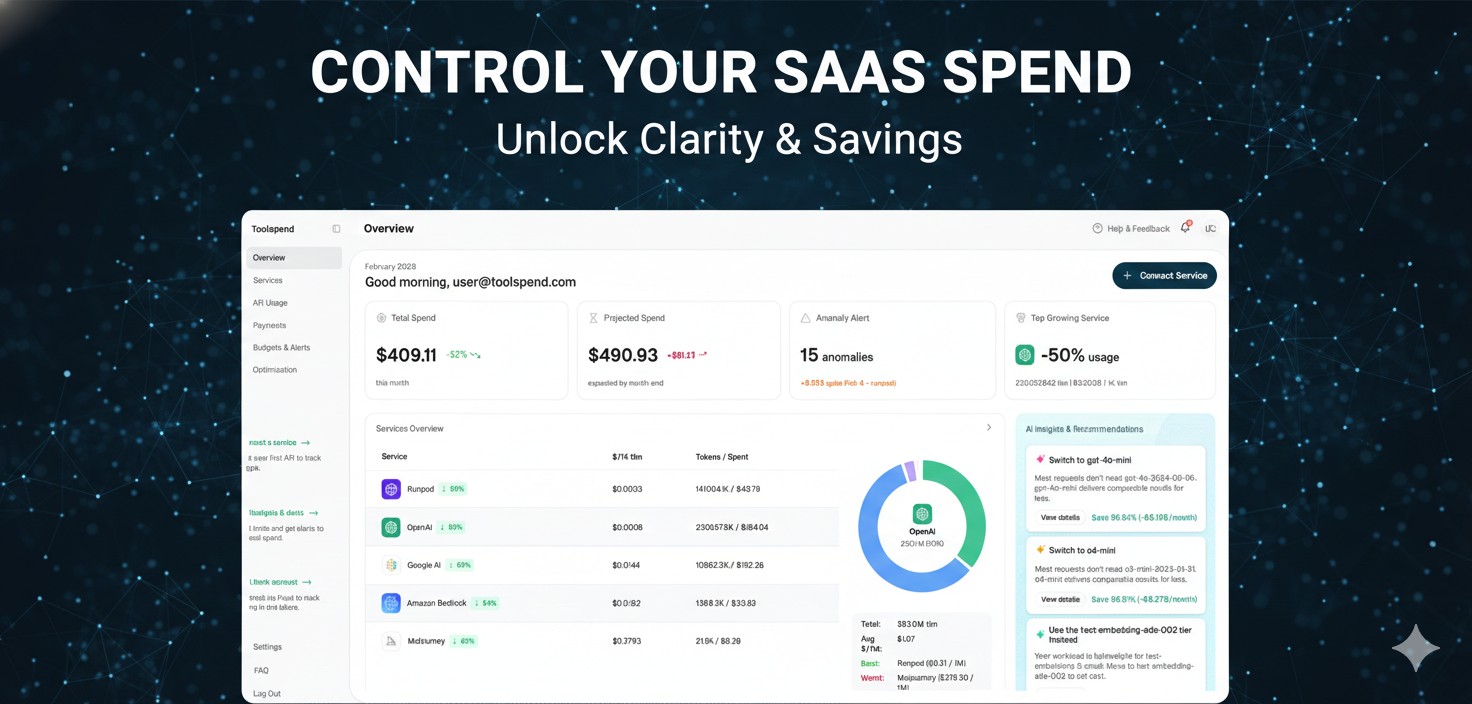
Getting in is straightforward. You sign up with a work email, verify it, and then walk through a guided setup that asks you to connect your accounts. Toolspend uses Plaid for the financial side, which means it can read both company cards and personal cards that get expensed later. We appreciated that, because rogue AI charges often show up on personal cards first.
The login itself supports SSO through Google and Microsoft, plus standard email and password with two-factor authentication. We did not run into any login bugs during testing, although a handful of Product Hunt commenters mentioned occasional delays when refreshing tokens. Nothing severe, just worth noting.
Kompleksowe Spend Tracking (The Comprehensive View)
For the Polish-speaking part of the audience searching for "Toolspend kompleksowe," yes, the platform genuinely lives up to that label. It is comprehensive in a way few competitors are.
Here is what it covers under one roof:
Subscription tracking across SaaS apps
Token-level usage for every connected AI provider
Renewal alerts with timing windows you can adjust
Duplicate tool detection across teams
Underutilized seat reports
Cost attribution by team, project or department
Anomaly alerts when usage spikes unexpectedly
We tested the duplicate detection by intentionally connecting two overlapping tools. Toolspend flagged the overlap within minutes and suggested which one had the lower per-user cost. Useful, although the suggestion engine sometimes lacks context, since a smaller team might prefer the more expensive option for valid reasons.
Toolspend AI Capabilities
This is where Toolspend genuinely stands out. Most spend tools treat AI subscriptions like any other SaaS line item. Toolspend treats them like the unpredictable beasts they really are.
Key AI-specific capabilities include:
Real-time token tracking across OpenAI, Anthropic Claude, Google AI, Azure OpenAI and Amazon Bedrock
Month-end forecasting based on your current burn rate
Anomaly alerts for runaway jobs or broken prompts
Model alternative suggestions, for example swapping a premium model for a cheaper one where quality holds up
Per-project cost breakdown so you know which experiment actually paid off
The forecasting feature impressed us the most. By day six of the month, it gave us a projection that ended up within 4 percent of our actual final bill. For a finance team trying to avoid surprises, that is gold.
The model alternative suggestion is still maturing. It works well for general tasks but does not always understand context-heavy workflows. We expect this to improve quickly as the team gathers more usage data.
User Experience
The interface uses a calm, mostly neutral palette with bright accents on the metrics that actually need attention. Nothing screams for your eyes unless something is wrong, which is the right design choice for a finance tool.
Setup time from sign-up to a useful dashboard sat at around 12 minutes for us. That included connecting two AI providers and one SaaS subscription. For a first-time user without procurement experience, expect closer to 20 minutes.
Where the experience needs work
The reports section could use more export formats. Right now CSV and PDF are available, but no native Excel option.
The Slack integration is helpful but could surface more proactive nudges.
Some terminology assumes finance fluency. A first-time founder might want a quick glossary.
Where it shines
The renewal calendar is the cleanest we have seen on any spend platform.
Onboarding feels designed for humans, not auditors.
Customer support replied within four hours during our test, even on a weekend.
Pros and Cons
Pros
Strong AI token tracking that most older tools simply do not offer
Plaid integration catches personal-card AI charges that finance teams usually miss
SOC 2 Type II compliance available from launch
Clean, fast interface that respects your attention
Renewal alerts that actually arrive on time
Cons
Mobile experience is functional but limited
Model alternative suggestions still need more nuance
No native Excel export yet
Pricing for paid tiers is still evolving
A few advanced features feel built for larger teams more than solo founders
Who Should Use Toolspend?
Based on our testing, Toolspend makes the most sense for:
Startups spending more than 500 dollars a month on AI tools
Finance teams managing 15 or more SaaS subscriptions
Companies where multiple teams independently buy AI tools
IT procurement leads who want renewal control without the spreadsheet pain
Solo founders running one or two AI subscriptions probably do not need Toolspend yet. A simple spreadsheet still works at that scale, although the free trial is worth running just to see hidden charges.
ICON POLLS Final Verdict
Toolspend is doing something genuinely fresh. It treats AI spend as the volatile, usage-driven beast it actually is, rather than slotting it into an old SaaS-only mental model. That alone earns it serious credit at ICON POLLS.
The platform is not perfect. The mobile app needs love, the model suggestions need depth, and pricing transparency could improve. But for a product that only launched in February 2026, the maturity level is impressive. Many platforms three years older still cannot match what Toolspend already does on AI token visibility alone.
If your AI bills give you a slight stomach drop every month, give Toolspend the 14-day free trial. There is a real chance you will keep it past day fourteen.
ICON POLLS Rating: 4.2 / 5
Frequently Asked Questions About Toolspend (2026)
1. Is Toolspend free to use?
Toolspend offers a 14-day free trial that lets you connect up to 3 services and track up to 100,000 tokens. After the trial ends, paid plans kick in based on the size of your stack and the number of providers you connect. The team has not published a fully public pricing page at the time of this review, so most users receive a custom quote during onboarding.
2. How does Toolspend actually track AI spending?
It connects to your AI provider accounts (OpenAI, Anthropic Claude, Google AI, Azure, Amazon Bedrock and others) through read-only API access. It also pulls payment data through Plaid, which captures charges on company accounts and personal cards that get expensed later. This combination gives you both the usage side (tokens) and the financial side (real dollars spent).
3. Is Toolspend safe? What about my financial data?
Toolspend is SOC 2 Type II compliant from launch and uses read-only access to every connected account, which means it cannot move money, change subscriptions or alter settings on your behalf. Financial connections go through Plaid, the same provider trusted by many banking apps. For most teams, this is a standard and acceptable security posture.
4. Can Toolspend really help me reduce my AI bills?
Yes, and in several ways. It flags duplicate tools, identifies inactive licenses, alerts you before renewals so you can cancel unused subscriptions, and suggests cheaper model alternatives where the output quality holds up. Most users report visible savings within the first month, especially around forgotten subscriptions and overlapping team purchases.
5. Does Toolspend integrate with Slack or other workplace tools?
Yes. Toolspend currently integrates with Slack for renewal alerts and anomaly notifications. The team has indicated that more integrations are on the roadmap, including deeper ties to common accounting platforms. For now, Slack covers most day-to-day notification needs.
6. How is Toolspend different from older SaaS spend tools like Zluri or BetterCloud?
Older platforms were built for traditional SaaS, where seats cost a fixed amount each month. Toolspend was built for the AI era, where usage-based pricing means one runaway script can blow up your budget overnight. Its token-level tracking, anomaly alerts and model-swap suggestions are designed specifically for that newer reality. It is not necessarily a replacement for enterprise SaaS management at scale, but it is significantly better at AI spend in particular.
7. What AI tools does Toolspend support right now?
At the time of this review, supported providers include OpenAI, Anthropic Claude, Google AI, Microsoft Azure OpenAI and Amazon Bedrock, alongside tools like Midjourney, Cursor, Perplexity and ElevenLabs. The Toolspend team has stated that additional services are being added on a rolling basis.
8. Who is Toolspend best suited for?
The sweet spot is companies spending at least a few hundred dollars each month on AI tools, with multiple teams or members buying tools independently. Startups in the 10 to 200 employee range tend to benefit the most. Solo founders running one or two AI subscriptions can usually manage spend without it, although the free trial is still worth running just to see hidden charges.
9. Can I track non-AI SaaS subscriptions in Toolspend too?
Yes. Although Toolspend leans heavily on its AI tracking strengths, the platform covers traditional SaaS subscriptions as well. Renewal alerts, duplicate detection and usage analysis all apply across your entire stack, not just AI tools.
10. Did Toolspend really earn 4.2 out of 5 from ICON POLLS?
Yes. Our review process at ICON POLLS combines hands-on testing, third-party user reviews, security checks and feature comparisons against competitors. Toolspend scored 4.2 out of 5 thanks to its strong AI focus, clean interface and SOC 2 Type II compliance, with marks taken off for mobile limitations, the missing Excel export and pricing that is still evolving.











