|
Profile Item |
Details |
|
Product Name |
Xcode 26.3 |
|
Developer |
Apple |
|
Category |
Integrated Development Environment, IDE |
|
Main Use |
Building apps for iPhone, iPad, Mac, Apple Watch, Apple TV and Vision Pro |
|
Release Status in 2026 |
Public release version listed in February 2026 |
|
Release Date |
26 February 2026 for the final release, after release candidate builds earlier in February |
|
Build Number |
17C529 |
|
Swift Version |
Swift 6.2.4 |
|
Minimum macOS Requirement |
macOS 15.6 or later |
|
Download Options |
Mac App Store and Apple developer download channels |
|
Best For |
Apple platform developers, Swift teams, iOS agencies, Mac app builders and students |
|
ICON POLLS Rating |
3.2 out of 5 |
Xcode 26.3 Review in 2026
Xcode 26.3 is one of the most important Apple developer tool updates of the 2026 cycle because it sits between the stable Xcode 26 line and the stronger AI assisted workflow Apple has been pushing into its development tools. For developers, Xcode is not just another app on the Mac. It is the main workspace for building, testing, debugging and submitting software for Apple devices.
In this ICON POLLS review, our rating for Xcode 26.3 is 3.2 out of 5. That rating is not because the software is weak. Xcode remains the default professional tool for Apple platform development. The score reflects a mixed experience: strong platform coverage, better coding help, tighter Apple ecosystem support and useful release improvements, but also a heavy install size, strict Mac requirements, occasional performance complaints and a learning curve that can frustrate beginners.
For experienced iOS and macOS developers, Xcode 26.3 feels like a practical update. It is not a casual app that every Mac user needs, but for anyone building apps for the Apple ecosystem, it is close to unavoidable.
Xcode 26.3 Download
The safest way to download Xcode 26.3 in 2026 is through Apple controlled channels. Most users will look for it in the Mac App Store, while registered developers may also prefer the Apple developer download area when they need a specific build, archived version or release candidate.
The download is large, so users should prepare enough storage before starting. It is also wise to use a stable WiFi connection and keep the Mac plugged in during installation. Xcode updates can take time because the app includes SDKs, simulators, compilers, documentation tools and debugging utilities in one package.
ICON POLLS recommends avoiding third party download sites for Xcode. Developers work with signing certificates, source code and app publishing credentials, so a clean and trusted installation path matters.
Xcode 26.3 Release Date
Xcode 26.3 moved through release candidate builds in February 2026 before the final 17C529 release became available on 26 February 2026. This timing made it a mid cycle update rather than a full annual Xcode reset.
That release pattern matters because many development teams do not upgrade their main project tool on day one. A mid cycle release usually attracts teams that need new SDK compatibility, specific fixes or new workflow features. Teams with older projects often test a new Xcode version on a secondary machine or branch before using it for production uploads.
Xcode 26.3 Requirements
Xcode 26.3 requires macOS 15.6 or later. This requirement is a key point for developers using older Intel Macs or machines that cannot move to newer versions of macOS. Even where installation is possible, performance will depend on available storage, RAM and the size of the project being built.
For comfortable use, ICON POLLS suggests using a modern Mac with Apple Silicon, enough free disk space and at least 16 GB of memory for serious iOS, macOS or multi platform work. Small student projects may run on lighter machines, but professional projects with several targets, simulators and dependencies need more breathing room.
Developers should also remember that App Store submission requirements change over time. In 2026, Apple pushed app submissions toward the Xcode 26 toolchain and current platform SDKs. That makes Xcode 26.3 relevant for teams that needed Xcode 26 compatibility, even if later Xcode 26 versions became available afterward.
Xcode 26.3 Release Notes
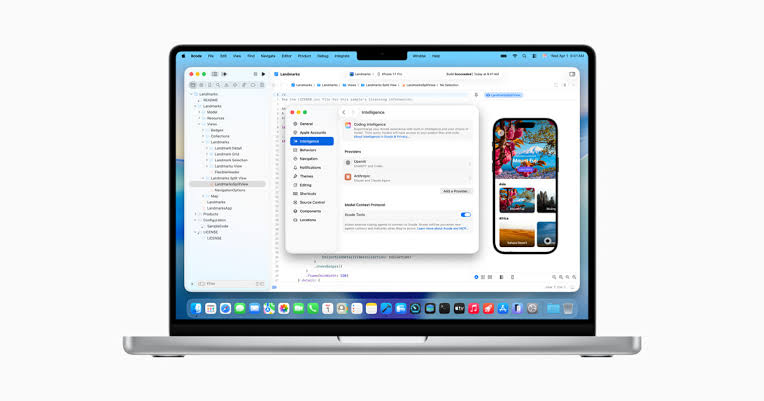
The release notes for Xcode 26.3 focused heavily on the developer workflow, Swift toolchain improvements, platform SDK support and a stronger AI assisted coding direction. The headline talking point was support for agentic coding inside Xcode, including deeper work with coding agents and model based assistance.
In plain language, this means Xcode was moving from basic code suggestions toward a more active assistant style workflow. Developers could expect help with writing code, finding issues, navigating documentation and handling project tasks. This does not remove the need for a skilled developer. It simply makes Xcode more competitive in a software world where coding assistants have become a regular part of the job.
The best part of the release is that it keeps the main Apple development workflow in one place. The weaker side is that not every developer wants AI features inside the core IDE, and some teams will have privacy, security or cost concerns around how these tools are used.
Xcode 26.3 User Experience
The user experience of Xcode 26.3 is powerful but not always light. When it works smoothly, it gives developers a complete studio for building apps, running simulators, editing Swift code, managing assets, testing, debugging and preparing releases. For someone already used to Xcode, version 26.3 feels familiar enough while still adding modern assistance features.
New users may feel overwhelmed. Xcode has many panels, settings, project files and build messages. A simple app can become confusing when signing, provisioning, simulators and dependencies enter the picture. This is one reason ICON POLLS gives Xcode 26.3 a balanced 3.2 rating instead of a higher score.
Performance is another mixed area. Developers with newer Apple Silicon Macs will usually get the best experience. Users on older or lower memory machines may notice slow indexing, simulator delays or long build times. The app is serious professional software, and it behaves like one. It rewards good hardware and punishes weak storage space.
Still, the overall experience is reliable for its purpose. If you are building for Apple platforms, Xcode 26.3 gives you the tools you need without forcing you to combine too many outside apps.
What ICON POLLS Likes About Xcode 26.3
ICON POLLS likes that Xcode 26.3 keeps Apple development centralized. The editor, compiler, debugger, simulator and app distribution path are all connected. This saves time for professional teams that need consistency.
We also like the stronger coding assistance. The market has clearly moved toward smarter development tools, and Xcode 26.3 shows Apple responding to that shift. Swift support is also strong, and developers building for iOS, iPadOS, macOS, watchOS, tvOS and visionOS get a single official environment.
What ICON POLLS Does Not Like
The biggest issue is still weight. Xcode is large, updates can be slow, and storage demands are not friendly to users with smaller Mac drives. The learning curve is also real. Beginners may not understand why a simple build fails because of signing, simulator setup or package issues.
Another concern is that AI assisted features will not be equally useful for every developer. Some people will love them. Others will disable them or ignore them because their company has strict code privacy rules. This makes Xcode 26.3 feel modern, but not perfect for every team.
Xcode 26.3 Pros and Cons
Pros: official Apple development environment, strong Swift support, good simulator coverage, useful debugging tools, improved coding assistance, direct app submission workflow and solid platform SDK support.
Cons: very large download, strict Mac requirements, can feel slow on older machines, confusing for beginners, setup can be frustrating and some AI features may not fit every professional workflow.
ICON POLLS Final Verdict
Xcode 26.3 is a serious development tool, not a casual productivity app. It deserves respect because it remains the main route for building professional Apple apps in 2026. At the same time, it is not the easiest or lightest software to use.
Our final ICON POLLS rating is 3.2 out of 5. The score reflects a product that is necessary, capable and increasingly modern, but still heavy and sometimes stressful for the average developer. If you build for Apple platforms, Xcode 26.3 is worth using. If you are new to app development, expect to spend time learning the environment before it feels natural.
Xcode 26.3 FAQs
1. What is Xcode 26.3 used for?
Xcode 26.3 is used to build apps for Apple platforms, including iPhone, iPad, Mac, Apple Watch, Apple TV and Vision Pro. It includes a code editor, compiler, simulator, debugger and app distribution tools.
2. Is Xcode 26.3 free to download?
Yes. Xcode is generally free to download, but some developer services, App Store publishing features and testing workflows may require an Apple Developer Program membership.
3. What is the Xcode 26.3 release date?
The final Xcode 26.3 release was listed in February 2026, with the 17C529 build available on 26 February 2026.
4. What macOS version does Xcode 26.3 require?
Xcode 26.3 requires macOS 15.6 or later. Users should check their Mac compatibility before downloading because the app is large and system requirements are strict.
5. Can I download Xcode 26.3 from the Mac App Store?
Yes, the Mac App Store is the easiest option for most users. Developers who need specific versions may use Apple developer download channels.
6. Is Xcode 26.3 good for beginners?
It is good for beginners who are serious about Apple app development, but it can feel complex at first. New users should learn Swift basics, project structure, simulators and signing step by step.
7. Does Xcode 26.3 support Swift?
Yes. Xcode 26.3 includes Swift 6.2.4, making it suitable for modern Swift development across Apple platforms.
8. Does Xcode 26.3 include AI coding features?
Yes. Xcode 26.3 places more attention on agentic coding and smarter coding assistance. Developers still need to review output carefully before shipping any code.
9. Why is Xcode 26.3 so large?
Xcode is large because it includes multiple SDKs, device simulators, compilers, documentation, debugging tools and platform support files in one application.
10. Is Xcode 26.3 better than Xcode 26.2?
For many users, yes. Xcode 26.3 brought updated tooling and stronger workflow improvements. However, teams with stable projects may prefer to test carefully before upgrading.
11. Can Xcode 26.3 run on Intel Macs?
It may run on supported Intel Macs that meet the macOS requirement, but performance will usually be better on modern Apple Silicon Macs.
12. What rating does ICON POLLS give Xcode 26.3?
ICON POLLS gives Xcode 26.3 a 3.2 out of 5 rating. The score reflects strong official Apple development tools but also heavy storage needs, a steep learning curve and mixed performance on older Macs.











