
Most property management software is built for portfolios bigger than yours. The demos are slick, the minimum contracts are steep and the feature list runs longer than your tenant roster. RentPost goes the other way. You pay a small base fee, then a dollar for every unit you manage, and that's it. For a landlord with a dozen doors or a manager running a few hundred, that pricing model alone makes it worth a serious look.
It isn't perfect. The interface is plain, the automation is modest and tenants carry the payment fees. But RentPost has stuck around since 2009 by doing the boring jobs reliably, and in rental management, boring is often exactly what you want.
The verdict before the details
Icon Polls rates RentPost 4.0 out of 5 for 2026. It pulls accounting, rent collection, leasing, screening, maintenance and owner reporting into one account, offers a 30-day free trial and backs it all with phone and live chat support. Its biggest strength is simplicity. Its biggest weakness is that larger operators will find it thinner than the enterprise suites.
How we scored it
| Category | Score |
|---|---|
| Property management tools | 4.2/5 |
| Online rent payments | 4.3/5 |
| Accounting and reporting | 4.1/5 |
| Tenant and owner portals | 4.2/5 |
| Customer service | 4.5/5 |
| Pricing value | 4.2/5 |
| Ease of use | 4.0/5 |
| Overall | 4.0/5 |
What sits inside one account
RentPost is cloud-based software that tries to replace the pile of spreadsheets, email threads and separate payment apps many landlords juggle. The core toolkit covers:
- Rental accounting, with income and expenses tied to property and owner records
- Tenant and lease management
- Online applications and tenant screening
- Maintenance work orders for staff and outside vendors
- Owner access to their own property and financial details
- Document storage and reporting
The clever part is the permissions. Tenants, owners, maintenance staff and vendors each get their own area, so a plumber can see a work order, its photos and comments, update the job status and never go near your books. Owners can review their numbers without wandering through the rest of your portfolio.
Browser first, and that's mostly fine
RentPost runs as a web application. There's no heavy desktop install, and it works in mobile browsers as well as on a laptop. Managers will still want the desktop view for accounting, reports and lease records, because that's detailed work and a phone screen isn't kind to it.

Tenants get a much simpler view: rental details, payment history, online rent payments, maintenance requests and messages. That split keeps the tenant side uncluttered. The trade-off is that managers hoping for a polished, mobile-first app built around their own workflow won't find one here.
Signing in without making a mess
Everyone logs in through the same online portal and lands in the area tied to their role. Managers invite tenants and owners directly from the platform, and once an invite is accepted, that person sees only what belongs to them.
One practical tip: if a login fails, check the email address and use password recovery. Don't create a fresh account when you already have an invitation, because your property or lease records may stay attached to the original profile.
Where the rent money goes
Online rent runs through RentPost's Payshift system. Tenants can pay by ACH from a US bank account or with a supported credit card, and managers can switch on AutoPay for recurring rent. Setting up Payshift itself is free.
Managers can connect more than one bank account and route payments to the right one, which matters if you keep owners' funds separate. Failed payments and notifications show up inside the platform. Expect a three-banking-day hold on ACH payments while funds clear. Standard card payments are listed with next-day funding.
The catch is who pays the processing cost. The tenant does, and some tenants will notice.
The pricing, door by door
There's one main plan, Pro, at $29 per month plus $1 per managed unit. All core features are included, so you aren't chasing upgrades to unlock basics. Fifty units comes to $79 a month and 100 units to $129, before any annual discount. Portfolios above 1,000 units can ask RentPost about volume pricing.
| Item | 2026 price |
|---|---|
| Pro subscription | $29 per month plus $1 per unit |
| Annual billing | 10% discount |
| Free trial | 30 days, no credit card required |
| ACH payment (paid by tenant) | $1.50 per transaction |
| Credit card payment | 2.99% |
| American Express payment | 3.59% |
| Basic tenant screening | $29 |
| Premium tenant screening | $39 |
Basic screening covers credit and several background checks. Premium adds identity verification and eviction history. The monthly plan has no long-term contract, you can cancel from the billing area, and RentPost says you keep access to your data afterwards.
People answer the phone
This is where RentPost earns its highest score. Every Pro subscription includes unlimited support through live chat, phone, email, an in-account support area and a help center. Online support runs seven days a week.
New customers also get free onboarding and training, plus import templates for property, unit, tenant and lease data. That last point is bigger than it sounds. Moving off spreadsheets is where most landlords give up, and a human who can help with a botched import is worth more than any chatbot when tenant money is involved.
Where it runs out of road
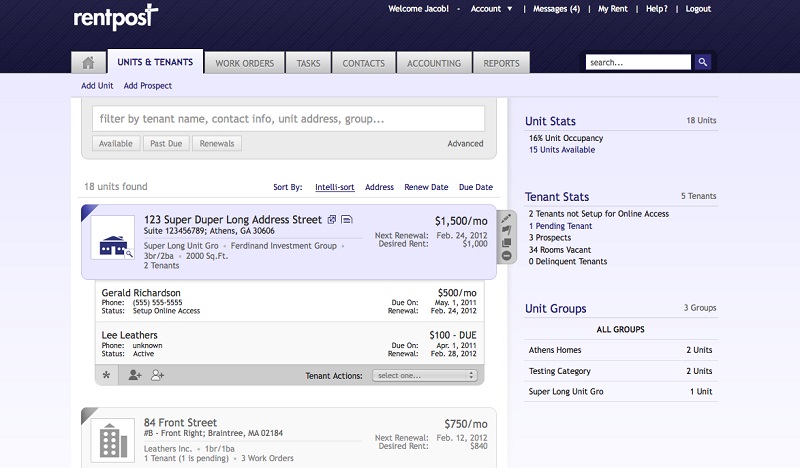
RentPost is practical rather than pretty, and some users will want a more modern look. Large property companies may miss deeper automation, more advanced AI features or specialized integrations, although RentPost does connect to many outside apps. Then there are the costs that sit outside the subscription: tenant payment fees, the ACH hold and paid screening reports.
None of these are dealbreakers for its target audience. They're simply reminders that this is a tool built for daily essentials, not for a corporate operations team.
Who should sign up
Small and mid-sized landlords and managers who want everything in one place without a hefty minimum. Use the trial properly: load real property data, invite at least one tenant, run a test payment, raise a maintenance request and pull the reports you actually rely on. If those jobs feel easier, the price is fair. And if you have opinions on the software you can't live without, add them to our vote on the world's most useful websites.
Quick answers
How much does RentPost cost in 2026?
The Pro plan costs $29 per month plus $1 per managed unit, with a 10% discount for annual billing.
Who pays the rent payment fees?
The tenant. ACH costs $1.50 per transaction, standard cards 2.99% and American Express 3.59%.
Can I try it before paying?
Yes. There's a 30-day free trial with Pro features, and no credit card is needed to start.











