Stagecaptions.io Review in 2026: App, Download, GitHub, User Experience and FAQs

By ICON Team · Aug 28, 2026 · 22 min read
Stagecaptions.io Review in 2026: App, Download, GitHub, User Experience and FAQs

Profile Field

Details

Brand Name

Stage Captions (stagecaptions.io)

Official Website

https://stagecaptions.io

Category

Real time captioning and live transcription software

Product Type

Browser based SaaS platform, no installation required

Primary Users

Conference organisers, AV and production teams, churches, schools, corporate comms, broadcasters

Base of Operations

Lithuania (the site carries a Made in Lithuania mark)

Public Launch

Listed on Product Hunt in early 2026, also featured on Uneed and Startup Fame

Core Technology

Automatic speech recognition, not human stenography

Headline Features

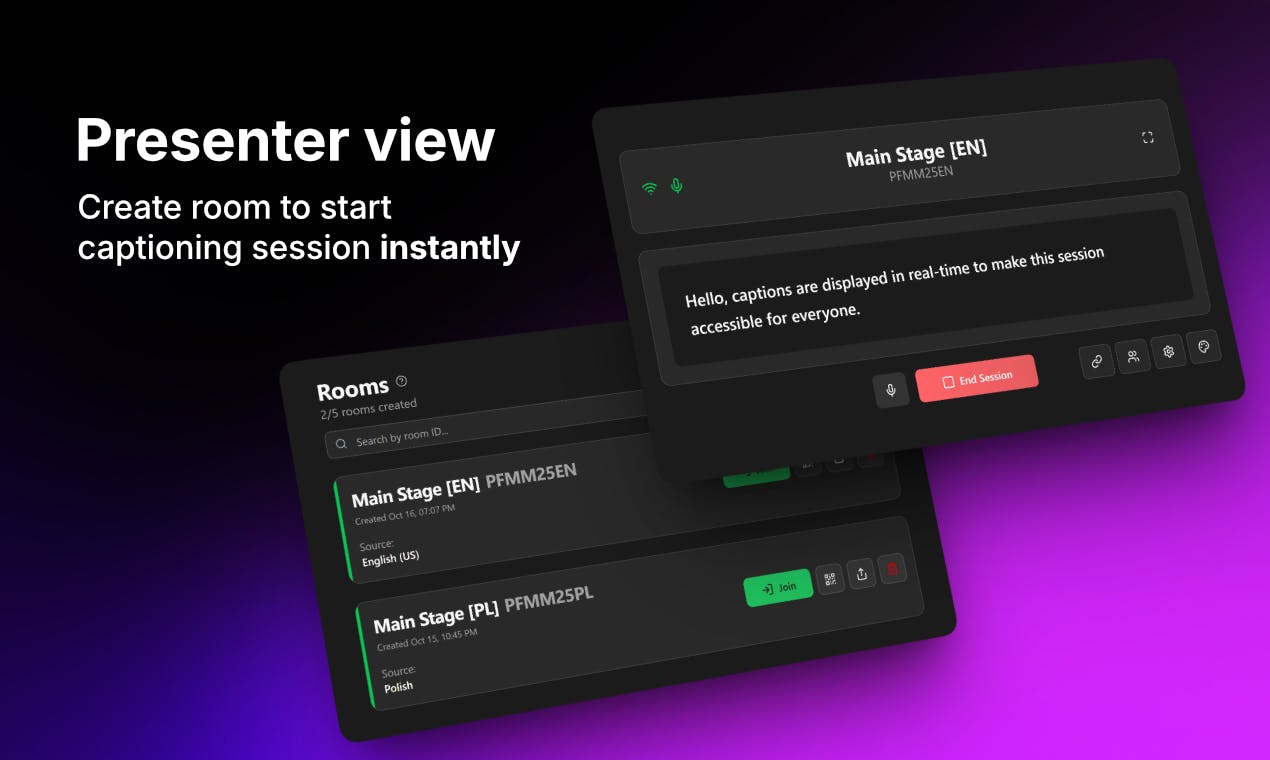
Live caption engine, custom dictionaries, presenter dashboard, QR code viewer access, browser output for OBS and Resolume

Language Support

More than 60 live transcription languages and regional variants

Live Translation

Yes, offered as a separate product page

Mobile App

None. Everything runs in the browser

Desktop Download

None. No installer, no plugin

GitHub Repository

No public repository. The product is closed source

Free Trial

15 minutes free, no credit card required

Pricing Model

Custom quote based on schedule, room count and support needs

Public Price List

Not published

Transcript Export

Not available yet, listed on the roadmap

Support Channel

Email support, with rehearsal and live standby support arranged on request

Integrations

OBS Studio, Resolume Arena, venue displays, confidence monitors, event apps

Named Competitors

Interprefy, Wordly, SyncWords, AI-Media

Social Presence

LinkedIn and YouTube

ICON POLLS Verdict

3.0 out of 5. Promising and easy to run, held back by pricing opacity and a thin public track record


What Is Stagecaptions.io?


Stage Captions is a live captioning tool that runs entirely in a web browser. An organiser opens a caption room, picks the audio input and the language, and the platform starts converting speech into text on screen while the person is still talking. That text can then go three places at once: onto the venue screens, into a livestream overlay, and onto the phones of people sitting in the room.

The audience side is the part most people notice first. Attendees do not install anything. They scan a QR code or open a shared link and the captions appear in their own browser. For anyone who has watched an AV crew try to talk two hundred people through downloading a conference app, that alone is a selling point.

The team behind it has been open about where the idea came from. They needed captions for their own conference, found the existing options either too heavy or too fiddly, built something simpler, and used it live on stage before selling it to anyone else. That origin story shows in the product. It is narrow on purpose.


Who It Is Built For


Conference and summit organisers running multiple rooms and multiple speakers.

AV and production crews who need a caption feed they can drop into OBS Studio or Resolume as a browser source.

Churches and community venues that want captions without hiring a stenographer every Sunday.

Universities, schools and training providers covering lectures and workshops.

Corporate communications teams running town halls, product launches and hybrid all hands.

Sports and broadcast teams captioning live commentary.


What It Is Not


This is worth being blunt about, because it affects who should shortlist it. Stage Captions is automatic speech recognition software. There is no human captioner sitting on the other end correcting the output in real time. If your event has a legal requirement for verbatim CART provided by a certified human captioner, this is not the product for that. The brand does not pretend otherwise, which we appreciated, but plenty of buyers only discover that distinction after they have signed something.


Stagecaptions.io App: Is There One in 2026?

No, and that is deliberate rather than an oversight.

There is no Stage Captions app on the App Store or Google Play, and there is no desktop application. The entire product is delivered through the browser. Presenters run the dashboard in a supported browser on a laptop, and attendees open the caption view in whatever browser is already on their phone.

For a live event tool this is the right call more often than not. App store review cycles, corporate device restrictions and the general reluctance of an audience to install anything at all are genuine obstacles at a real venue. Skipping them removes a whole category of show day problems.

The trade off is that you are dependent on the room. If the venue Wi-Fi is oversubscribed or the network drops, a browser based tool has nowhere to fall back to. There is no offline mode and no native app buffering to save you. Experienced production teams will already plan around this with a dedicated hardwired connection or a bonded mobile backup, but it is a real consideration and it costs the platform points on resilience in our scoring.


Stagecaptions.io Download: What You Actually Need to Install


Nothing. That is the honest answer, and it is one of the platform's strongest selling points.

A lot of people searching for a stagecaptions.io download are looking for an installer, a plugin for their streaming software, or an APK. None of those exist. If you find a file being offered as a Stage Captions download on a third party site, treat it as suspicious and stay away from it. The official product is only ever accessed at stagecaptions.io in a browser.

The integration with production software works the same way. You do not install an OBS plugin. You take the caption output URL and add it to OBS Studio as a browser source, then style and layer it inside your scene like any other web overlay. Resolume Arena and other tools that accept web content work on the same principle. The same URL can be opened on a display computer feeding a stage screen or a confidence monitor.

ICON POLLS note: browser source setups are easy to build but easy to break. Test your caption overlay during rehearsal with the actual scene collection you will use live, not a blank test scene. Font scaling and safe area cropping catch people out far more often than the captioning itself does.


Stagecaptions.io GitHub: Is It Open Source?


It is not. Our checks did not turn up a public GitHub repository for stagecaptions.io, and nothing on the company's own site points to one. Stage Captions is a closed source commercial product.

The GitHub searches are easy to explain. Live captioning is a space with a strong open source tradition, from browser speech recognition demos to self hosted Whisper based caption rigs that technical AV people build for their own venues. Anyone comparing options will naturally check whether a commercial tool has a repo, an SDK, or at least a documented API they can build against.

Right now the answer to all three is no public documentation. There is an integrations page, but it describes browser based routing rather than a developer API. For a venue with an in house dev team that wants captions piped into a custom display system or an event app backend, that is a limitation, and it is one of the clearer gaps between Stage Captions and the more established enterprise platforms it compares itself to.


Stagecaptions.io Login and Sign Up

Account access is straightforward. Organisers sign up at the stagecaptions.io signup page and log in from the same site to reach the presenter dashboard. From there you create rooms, choose the audio input, set the caption language, pick a display preset and share viewer access.

The important detail for event teams is that the login requirement only applies to the person running the session. Attendees never create an account. They open the shared link or scan the QR code and the captions load. That keeps the audience experience frictionless, which matters more than it sounds when you are dealing with a room of people who are not technical and do not want to be.


Common Login Issues and What Usually Fixes Them


Microphone or audio input not detected: the browser needs permission granted for the site. Check the browser's site settings rather than the operating system settings first.

Wrong audio device selected: laptops default to the internal mic. If you are taking a feed from the mixer through a USB interface, select it manually in the dashboard before the session starts.

Session not appearing for viewers: confirm you shared the viewer link and not the dashboard URL. They are different.

Access problems on venue networks: corporate and conference centre firewalls sometimes block the connections these tools rely on. Test on the actual event network during setup, not on your hotel Wi-Fi the night before.


Stagecaptions.io Pricing in 2026


This is the weakest part of the offer, and it is the single biggest reason our score sits at 3.0 rather than higher.

Stage Captions does not publish a price list. There are no tiers on the website, no per minute rate, and no per room figure. Pricing is quoted individually based on your event schedule, how many caption rooms you need and what level of support you want. The company also offers a guided pilot during the discovery conversation.

There is a free trial, and it is a small one: 15 minutes of captioning with no credit card required. That is enough to confirm the tool works and to see what the output looks like. It is not enough to run a proper rehearsal or to test how the system behaves across a full session with multiple speakers, which is what a buyer actually wants to know.

Here is how the pricing position stacks up in practice.

Pricing Element

Position as of 2026

Free trial

15 minutes, no card required

Published tiers

None

Per minute rate

Not disclosed publicly

Per room rate

Not disclosed publicly

How you get a price

Request a demo and go through a sales conversation

What the quote depends on

Event schedule, number of caption rooms, viewer capacity, support level

Pilot option

A guided pilot can be included during discovery

Contract terms

Not published


Our Honest Take on the Pricing Model


Quote based pricing is normal at the enterprise end of event technology. Wordly, Interprefy, SyncWords and AI-Media all sit in similar territory, and viewer capacity genuinely does change the cost structure, so there is a defensible reason for it.

But Stage Captions positions itself as the simple, fast, self serve option. The whole pitch is that you open a browser and go. Making a buyer book a call before they can find out whether the thing costs 90 euros or 900 euros works against that positioning. A small organiser running a one day meetup for eighty people is exactly the customer this product should win, and that person will often close the tab rather than fill in a demo form.

If the team published even a starting price or an entry tier, we would revisit this score.


Stagecaptions.io User Experience


Setup is the strongest part of the product. The flow is three steps and it is genuinely three steps: create a room and pick your audio input and language, share the viewer link or QR code, then display the captions wherever they need to appear. There is no onboarding maze and no configuration file.


The Presenter Dashboard


The dashboard is where the operator lives during a session. It handles room creation, audio input selection, caption display settings, viewer access sharing and session monitoring. The monitoring view shows the audio input, the caption output and the current display delay together, which is the information an operator actually needs mid show. That is a sign the product was designed by people who have stood at the back of a room during a live event rather than only in a product meeting.


Accuracy and Latency


The company states that latency stays under a second in typical event setups and that accuracy depends heavily on clean audio. Both claims are consistent with how modern ASR behaves. The team's own guidance is to take a direct feed from the speaker microphone or the mixer rather than picking up room audio, which removes most background noise. This is correct advice and it is also the difference between captions that read well and captions that embarrass you on a big screen.

The custom dictionary feature matters more than it might appear. You can add speaker names, brand terms, product names, acronyms and technical jargon ahead of the event. On a technical conference agenda, that is often the deciding factor between usable captions and a screen full of confident nonsense. Teams that skip this step and then complain about accuracy usually have themselves to blame.

We were not able to verify the accuracy claims through independent third party benchmarking, because none exists publicly for this product yet. That is not the same as saying the claims are wrong. It does mean a buyer should insist on a rehearsal session with their own audio chain and their own speakers before committing to a large event.


Audience Experience


This is where the product shines. Scan, open, read. No account, no download, no instructions needed from the stage. For deaf and hard of hearing attendees, for non native speakers, and for anyone sitting too far back to hear properly, that immediacy is the whole point. It also quietly solves a problem organisers rarely plan for, which is people arriving late and needing to catch up on context.


Documentation and Accessibility Resources


Stage Captions has invested real effort in accessibility content. There are guides covering WCAG requirements for live captions, ADA obligations for events, the European Accessibility Act, California SB 707 for public meetings, Bill 96 language access in Quebec, and an event accessibility checklist. For a compliance officer or an organiser trying to work out what they are legally required to provide, this is useful material and it is better than what several larger competitors offer.

It is also, obviously, marketing. The guides exist to capture people searching for compliance answers. That does not make the information less useful, but read it as a starting point and confirm your obligations with someone qualified in your jurisdiction.


What Is Missing


No transcript export. You cannot download the record of what was said after the event. The company confirms this is on the roadmap but not available yet. For education, corporate governance and any event where minutes matter, that is a significant gap.

No public API or developer documentation for custom integrations.

No published viewer capacity figures. Capacity is set per room and depends on your plan, which again means a sales conversation.

Email support only as standard. Live standby support is available but has to be arranged.

No offline or fallback mode if the network fails.


Track Record and Independent Reviews


This is the other half of why the score sits where it does. Stage Captions launched publicly in early 2026. It has picked up launch platform recognition, including a Product Hunt listing and a Product of the Day badge on Uneed, and it appears across the usual directory sites.

What it does not have yet is a body of independent user reviews. Its G2 seller page carried no reviews at the time of writing. There are no published case studies from named events with attendance figures, no verified customer testimonials with attribution, and no third party accuracy testing. Most of the descriptive content circulating online about the product is either the company's own copy or directory pages that have paraphrased it.

None of that indicates anything is wrong. Every good product starts here. But for an organiser about to put captions on a screen in front of a paying audience, the absence of a public track record is a legitimate risk factor, and a review that ignored it would not be doing its job.


What We Liked


Setup is genuinely fast. Three steps, no installation, no plugin.

The audience never has to download anything or create an account.

Browser output slots cleanly into OBS Studio and Resolume without custom software.

Custom dictionaries are included rather than being an upsell, and they make a real difference on technical content.

More than 60 supported languages and regional variants, plus a live translation offering.

The accessibility compliance library is substantial and genuinely useful.

The team is transparent that this is ASR software rather than human captioning.

Rehearsal sessions are encouraged rather than treated as an inconvenience.


What Held the Score Back


No published pricing at all, which conflicts with the self serve positioning.

A 15 minute trial is too short to properly evaluate a live event tool.

No transcript export, which rules the product out for several common use cases.

Almost no independent user reviews or verified case studies as of 2026.

No public API or developer documentation.

Accuracy and latency claims are unverified by any third party.

Complete dependence on venue connectivity with no fallback.

Support is email first, which is a nervous position to be in during a live show unless you have arranged standby cover.


ICON POLLS Rating Breakdown


Our reviewers scored the platform across six categories. The overall figure is the average of those scores.

Category

Score

Reviewer Comment

Ease of setup and deployment

4.0

Three step setup, nothing to install, works in any browser

Feature depth

3.5

Strong core feature set, but no transcript export and no API

Pricing transparency and value

2.0

No published pricing, very short trial, quote only

Accessibility and compliance resources

3.5

Better documentation than several larger rivals

Track record and independent proof

2.0

New product, no verified reviews or public case studies yet

Support and reliability

3.0

Email first support, rehearsal encouraged, no offline fallback

OVERALL ICON POLLS RATING

3.0

Capable and easy to run, but too early and too opaque to score higher


Is Stagecaptions.io Legit?


Yes. Based on our checks it is a legitimate software product from a real company operating out of Lithuania, with a working platform, a public launch history, published terms, a privacy policy, a security page, an accessibility statement and a reachable support address. It is not a scam and there are no fraud complaints associated with it that we could find.

Legitimate and proven are two different things, though. Our 3.0 rating reflects a product that is real and functional but still early, with unanswered questions around pricing and no independent evidence of performance at scale. Treat it as a strong candidate to trial, not as a safe default for a flagship event you cannot afford to get wrong.


Alternatives Worth Comparing


Stage Captions itself publishes comparison pages against four competitors, which tells you who it considers its market. If you are shortlisting, look at all of them.

Alternative

Where It Fits

Wordly

Established AI captioning and translation platform for events, widely used at large conferences

Interprefy

Remote interpretation and captioning platform aimed at multilingual enterprise events

SyncWords

Captioning and subtitling with a strong media and broadcast focus

AI-Media

Long standing captioning provider offering both automated and human captioning services

Human CART providers

Certified live captioners. Slower to book and more expensive, but the right answer where verbatim accuracy is a legal requirement


ICON POLLS Final Verdict


Rating: 3.0 out of 5.0


Stage Captions has done the hard part well. The setup is fast, the audience experience is close to effortless, and the browser output slots into a production workflow without drama. The custom dictionary feature and the accessibility compliance library both suggest a team that understands the actual working conditions of event professionals.

What stops us going higher is a combination of youth and opacity. There is no published price, the trial is too short to be a real evaluation, transcripts cannot be exported, and there is no independent evidence yet of how the platform performs at scale in front of a large audience. Those are fixable problems, and if the company addresses the pricing transparency and ships transcript export, this score would move.

Our recommendation: request the demo, insist on a full rehearsal with your own audio chain and your own speaker list loaded into the custom dictionary, and get the viewer capacity written into the quote. If it performs on your own content, it is a capable tool at a fair place in the market. Just do not put it on a main stage in front of a thousand people without testing it first.


Frequently Asked Questions About Stagecaptions.io


1. Is stagecaptions.io legit or a scam?

It is legitimate. Stage Captions is a real commercial software product operated by a company based in Lithuania, with a working platform, published terms and conditions, a privacy policy, a security page and a support email address. It launched publicly in early 2026 and has been listed on Product Hunt, Uneed and Startup Fame. We found no fraud reports or complaints of that kind. The caveat is that being legitimate is not the same as being battle tested, and independent user reviews are still scarce.

2. Does stagecaptions.io have a mobile app?

No. There is no iOS app and no Android app, and none is planned as far as the public information goes. Everything runs in a browser. Presenters use the dashboard on a laptop and attendees open the caption view in whatever browser is already on their phone or tablet. The company treats the absence of an app as a feature, because it means nobody in your audience has to install anything.

3. Do I need to download anything to use stagecaptions.io?

No. There is no installer, no desktop application and no plugin. Even the integration with OBS Studio works by adding the caption output URL as a browser source rather than by installing software. If you come across a file somewhere online being offered as a Stage Captions download, do not run it. The official product exists only at stagecaptions.io in a browser.

4. Is stagecaptions.io on GitHub or open source?

No. Our checks found no public GitHub repository, and the company does not link to one. Stage Captions is closed source commercial software. There is also no publicly documented API or SDK at present, so if you need to build a custom integration into your own display system or event app, that is a limitation you should raise with their team before committing.

5. How much does stagecaptions.io cost in 2026?

There is no published price. The company quotes each customer individually based on the event schedule, the number of caption rooms required, expected viewer capacity and the level of support needed. You have to request a demo to get a figure. This is common at the enterprise end of event technology, but it is the main criticism in our review because it works against the simple self serve experience the product otherwise offers.

6. Is there a free trial for stagecaptions.io?

Yes, but it is short. You get 15 minutes of free captioning and no credit card is required to start. That is enough to see the interface, check the output style and confirm the tool works with your microphone. It is not enough to run a full rehearsal or to evaluate how the system handles a long session with several different speakers. The company can include a guided pilot as part of a sales discovery conversation, which is the better route for a serious evaluation.

7. How do I log in to stagecaptions.io?

Go to stagecaptions.io and use the login or sign up option to reach the presenter dashboard. Only the person running the session needs an account. Attendees do not log in at all. They open the viewer link or scan the QR code you share and the captions appear straight away in their browser.

8. How many languages does stagecaptions.io support?

More than 60 live transcription languages and regional variants, including English, Spanish, French, German, Italian, Portuguese, Japanese, Korean, Polish and Lithuanian. The company maintains a supported languages page with the current list. There is also a separate live translation capability, which is worth asking about specifically if you are running a genuinely multilingual audience rather than just a multilingual speaker list.

9. Can I download or export the transcript after my event?

Not currently. Transcript export is on the roadmap but is not available yet, and the company confirms this openly. If you need a written record of the session for minutes, compliance, accessibility documentation or content repurposing, this is a genuine gap. Ask their team about early access if it is a requirement for you, and do not assume it will be ready in time for your event.

10. How accurate is stagecaptions.io, and is it good enough for a paid conference?

The company states latency stays under a second in typical setups and that accuracy depends on clean audio. That is consistent with how automatic speech recognition works generally. Two things make the biggest difference in practice: take the audio feed directly from the speaker microphone or the mixer rather than from a room mic, and load speaker names, brand terms and technical vocabulary into the custom dictionary before the event. There is no independent third party accuracy benchmark for this product yet, so for a paid conference we would insist on a full rehearsal with your own audio setup before relying on it.

11. Is stagecaptions.io human captioning or automated?

It is automated. Stage Captions uses automatic speech recognition and there is no human captioner correcting the output in real time. The company is clear about this. If your event has a legal or contractual requirement for verbatim CART delivered by a certified human captioner, you will need a human provider instead, or a hybrid arrangement. For general accessibility, hybrid audiences and multilingual attendees, automated captions are usually acceptable and considerably cheaper.

12. What are the best stagecaptions.io alternatives?

The company compares itself directly against Wordly, Interprefy, SyncWords and AI-Media, and those are the obvious names to shortlist alongside it. Wordly and Interprefy are strong on multilingual enterprise events, SyncWords leans towards media and broadcast, and AI-Media offers both automated and human captioning. If verbatim accuracy is non negotiable, a certified human CART provider remains the safest option regardless of price.