Watch a polished YouTuber or a confident LinkedIn presenter and it's easy to assume they have a great memory. Usually they don't. They have a script scrolling a few millimetres from the lens. That used to mean studio hardware. Now it means an Android phone, the front camera and the right app.
The category has grown up fast. Basic scroll and read tools now share shelf space with apps that follow your voice, float over any camera app, record and caption your footage, or try to correct your eye contact. Prices range from free to the cost of a streaming subscription. The catch is that the right choice depends on what you film. Someone shooting 60 second TikToks needs something very different from someone recording a 20 minute tutorial or a training video.
This ranking weighs what matters most to Android creators: reliability, ease of use, scroll quality, recording features and value. Prices below are the starting prices we found. App pricing changes often, so check the Play Store before you subscribe.
The ten at a glance
| # | App | Best for | Voice scroll | Starting price | Free option | Platforms |
|---|---|---|---|---|---|---|
| 1 | PromptSmart | Voice tracking | Yes (VoiceTrack) | $9.99/mo | Limited | Android, iOS |
| 2 | BIGVU | All in one production | No | $7.49/mo | Yes, watermarked | Android, iOS, Web |
| 3 | Teleprompter.com | Syncing across devices | Yes (VoiceGlide) | $7.50/mo | Yes | Android, iOS, Web |
| 4 | Nano Teleprompter | Floating overlay | No | Free, in app purchases | Yes | Android |
| 5 | Elegant Teleprompter | Simplicity | No | Free, ad supported | Yes | Android |
| 6 | Teleprompter for Video | Recording and editing | No | $8.99/mo | Yes, limited | Android, iOS |
| 7 | CapCut (prompter mode) | Creators who already edit in CapCut | No | Free, Pro from $19.99 | Yes | Android, iOS, Web |
| 8 | SpeechWay | Deep customisation | No | $4.99/mo | Yes | Android |
| 9 | Selvi Teleprompter | Zero budget | No | Free, in app purchases | Yes | Android |
| 10 | TeleprompterPAD | Hardware rigs | No | Free | Yes | Android, iOS |
The two that actually listen
Fixed speed scrolling has one flaw it can never fix: it makes you match the machine. You rush to keep up, or you stall while the text runs away. Voice scrolling flips that relationship, and it's why our top pick sits where it does.
PromptSmart uses VoiceTrack, which does real speech recognition rather than reacting to volume. Pause and the script pauses. Wander off script for a sentence and it waits for you to come back. It works offline, handles clear English well, and can stumble with heavier accents or very fast talkers. Add a built in recorder, Bluetooth remote support and SRT caption export, and it's the most complete tool here for anyone recording long, scripted pieces. Paid plans start at $9.99 a month. The free version is limited enough that you should treat it as a trial.
Teleprompter.com is the value play. VoiceGlide does the same job as VoiceTrack, and the app also offers speed based and timed scrolling, so you can switch modes depending on the shoot. It imports Word files, text files and PDFs from cloud storage, syncs scripts across phone, tablet and web, and supports mirror mode and cue markers. Pro costs $7.50 a month on annual billing, and there's a usable free tier. If you want voice scrolling without buying into a whole production suite, start here.
When the prompter is only step one
Some creators don't want a teleprompter. They want to go from script to posted video without opening three other apps.

BIGVU is built for them. You write or import a script, record with the prompter overlay, then edit, caption, add logos, swap backgrounds, trim and publish from the same app. AI eye contact correction helps hide the fact that you're reading. The free plan is restrictive, with watermarks and short recording limits, and paid tiers run from about $7.49 a month (Starter, billed annually) to $29 for Creator and $49 for Pro. That's expensive for a teleprompter. It's reasonable if it replaces separate prompting, editing and captioning subscriptions.
Teleprompter for Video, from Norton Five, sits in the middle. It records in portrait or landscape with either camera, supports external microphones, and adds captions, logos, text overlays and green screen backgrounds. Scrolling is speed based, so rehearse your pace or pair it with a Bluetooth remote. At $34.99 a year (or $8.99 monthly), the annual plan works out to under $3 a month, which is hard to argue with.
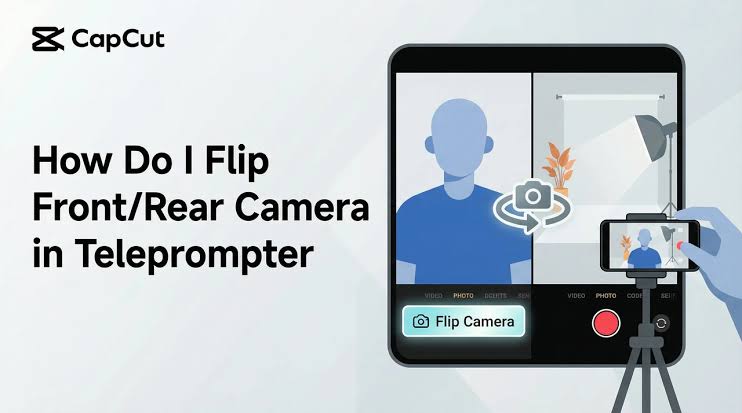
CapCut earns its spot by convenience, not by its prompter, which is basic: fixed speed, adjustable font and position, no overlay. The point is what happens after you stop recording. You're already inside one of the strongest mobile editors around, with auto captions, effects and direct export. The prompter is available on the free plan.
Keep your camera app, float the script
Nano Teleprompter runs as a movable, resizable, semi transparent window on top of any app. That means your preferred camera app, an Instagram or TikTok livestream, or a Zoom call. It's light on resources and free, with optional in app purchases and no subscription. You give up voice scrolling and recording, but that's not what it's for.
Elegant Teleprompter is the one to install if settings menus make you tired. Paste your script, set size and speed, press play. It also works as an overlay, which makes it a favourite with livestreamers and presenters. It's free with ads, and a premium option removes them.
For tinkerers and tight budgets
SpeechWay is the opposite of Elegant. Three modes (classic with mirroring, camera recording and floating widget) plus controls for timers, indicators, colour themes, margins in both orientations, pauses, do not disturb and remappable Bluetooth keys. If you enjoy dialling in a setup, nothing else here gives you more. Premium starts around $4.99 a month.
Selvi Teleprompter puts your script over the viewfinder, lets you switch cameras, choose resolution, use a floating widget and share straight to social apps. It isn't polished. It is free and dependable, which is exactly what a creator on a zero budget needs.
Glass and mirrors
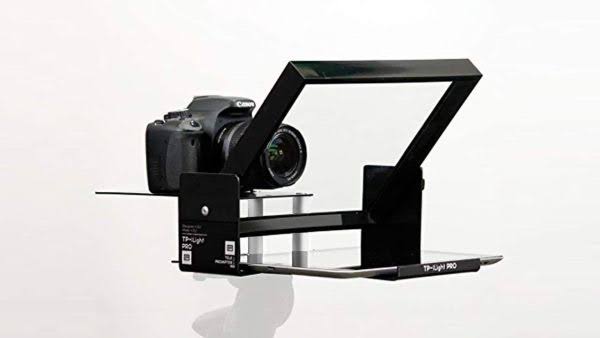
TeleprompterPAD does one job. If you own a beam splitter rig and need a tablet to feed it a mirrored script, it's a reliable, free way to do that on Android or iOS. No recording, no overlay, no voice tracking. For anyone without the hardware, skip it.
Matching the app to the way you film
- Long scripted videos: PromptSmart, or Teleprompter.com if price matters.
- Script to post in one place: BIGVU if budget allows, Teleprompter for Video if it doesn't.
- Livestreams and calls: Nano or Elegant.
- Already editing in CapCut: try its prompter before paying for anything.
Good delivery is half the battle on camera. If you want to see who the internet thinks has mastered it, vote for the greatest YouTubers of all time on Icon Polls.
Before you download
Is voice scrolling worth paying for?
For anything longer than a minute or two, usually yes. It removes the need to rehearse your pace around the app. For short clips, a free fixed speed app is fine.
Can I read a script while using my normal camera app?
Yes. Nano, Elegant, SpeechWay, Selvi and Teleprompter for Video all offer floating overlay modes that sit on top of other apps.